
Hi Folks,
When I download using FF, this appears then closes when all downloads are completed.
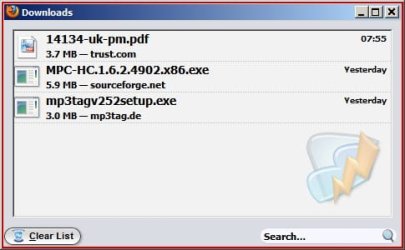
This is nearly how I want it to work. In recent versions, I was able to have the items downloaded cleared automatically, now it has to be done manually. Any ideas on how to do it ?
i prefer to keep my downloads list as when occasionally i cant find a download i can right click the file and select " open containing folder"
also i can install a software by double clicking the exe in the download manager.
i occasionally remove the list when i use ccleaner.
i find the download manager a really useful tool.
My Computer
At a glance
Microsoft Windows 7 Home Premium 64-bit 7600IIx4 amd athelon 635 processor2x2gbati radeon HD 5450
Computer Manufacturer/Model Number
Hewlett packard/p6512uk
OS
Microsoft Windows 7 Home Premium 64-bit 7600
CPU
IIx4 amd athelon 635 processor
Motherboard
FOXCONN 2AA9
Memory
2x2gb
Graphics Card(s)
ati radeon HD 5450
Sound Card
(1) Realtek High Definition Audio (2) AMD High Definition
Monitor(s) Displays
samsung lcd tv 32"
Screen Resolution
1360x 768
Hard Drives
(1) WDC WD10 01FAES-60Z2A0 SATA Disk Device (2) Maxtor OneTouch USB Device (3) ST310003 33AS USB Device (4) WD My Book 1111 USB Device
Normally, when programs get an update, I disable my Outpost FW Pro as it tends to block access to certain files, causing things to go wrong. I had lost the up/down scroll bar on my Desktop pc and thought I had failed to disable Outpost FW, so gave it a clean install, it didn't help but its now fixed.
-
Everything on my Laptop works as it should without having to make changes.
i prefer to keep my downloads list as when occasionally i cant find a download i can right click the file and select " open containing folder"
also i can install a software by double clicking the exe in the download manager.
i occasionally remove the list when i use ccleaner.
i find the download manager a really useful tool.
i usually save them directly to the folder location ,if its a pic it goes in the pics folder ,music ,mussic folder and so on,
occasionally they get misplaced so i can find them easily via the manager,
each to their own i guess.
My Computer
At a glance
Microsoft Windows 7 Home Premium 64-bit 7600IIx4 amd athelon 635 processor2x2gbati radeon HD 5450
Computer Manufacturer/Model Number
Hewlett packard/p6512uk
OS
Microsoft Windows 7 Home Premium 64-bit 7600
CPU
IIx4 amd athelon 635 processor
Motherboard
FOXCONN 2AA9
Memory
2x2gb
Graphics Card(s)
ati radeon HD 5450
Sound Card
(1) Realtek High Definition Audio (2) AMD High Definition
Monitor(s) Displays
samsung lcd tv 32"
Screen Resolution
1360x 768
Hard Drives
(1) WDC WD10 01FAES-60Z2A0 SATA Disk Device (2) Maxtor OneTouch USB Device (3) ST310003 33AS USB Device (4) WD My Book 1111 USB Device