
| Windows 7: Chrome and inability to open downloads without having to save? |
28 Jul 2012
|
#1 | | Home Premium 64 bit UK, Hampshire |
Chrome and inability to open downloads without having to save? I am getting a little peeved with Google Chrome, because I cannot find a way to download anything without saving it to the download folder. Often items such as pdfs are just intended for viewing only.
Is there somehow that I may avoid saving everything downloaded? | My System Specs |
| System Manufacturer/Model Number Dell Inspiron 560MT OS Home Premium 64 bit CPU .93 gigahertz Intel Core2 Duo 64 kilobyte primary memory cac Motherboard Board: Dell Inc. 0K83V0 A00 Serial Number: ..CN750939CP069B Memory 4096 Megabytes Usable Installed Memory Slot 'DIMM0' has 102 Graphics Card Invidia GeForce G310 512MB Sound Card High Definition Audio Device NVIDIA High Definition Audio ( Monitor(s) Displays DELL ST2210 [Monitor] (21.7"vis, s/n P479R01Q0VCU, January 2 Screen Resolution 1920x1080 Hard Drives 628.58 Gigabytes Usable Hard Drive Capacity
554.78 Gigabytes Hard Drive Free Space |
28 Jul 2012
|
#2 | | Windows 7 Home Premium x64 |

Quote: Originally Posted by rundwald I am getting a little peeved with Google Chrome, because I cannot find a way to download anything without saving it to the download folder. Often items such as pdfs are just intended for viewing only.
Is there somehow that I may avoid saving everything downloaded? Wouldn't this be a Google Chrome problem, not a Windows 7 problem? Try searching the Google Chrome forum: http://productforums.google.com/forum/#!categories/chrome/windows
You will have to join to post.
HTH | My System Specs | | System Manufacturer/Model Number Custom Built OS Windows 7 Home Premium x64 CPU Intel i5 quad processor Motherboard DP67BG Memory 16 GB Graphics Card Radeon HD 5770 Sound Card Realtek High Definition Audio Monitor(s) Displays Samsung SyncMaster Screen Resolution 1920X1080 Keyboard MS Wireless Mouse MS Optical Wired PSU Corsair GS800 Case Tower (Generic) Cooling 3 Internal Fans Hard Drives WD 2TB (SATA Internal)
WD 1TB (USB External) Internet Speed 19.4 Mbps |
28 Jul 2012
|
#3 | | Home Premium 64 bit UK, Hampshire |
 As I have already asked there and received no reply, which clearly you would not know, surely I am not wrong to ask elsewhere, in case a member has had similar problems. Please do not treat other members like idiots. | My System Specs | | System Manufacturer/Model Number Dell Inspiron 560MT OS Home Premium 64 bit CPU .93 gigahertz Intel Core2 Duo 64 kilobyte primary memory cac Motherboard Board: Dell Inc. 0K83V0 A00 Serial Number: ..CN750939CP069B Memory 4096 Megabytes Usable Installed Memory Slot 'DIMM0' has 102 Graphics Card Invidia GeForce G310 512MB Sound Card High Definition Audio Device NVIDIA High Definition Audio ( Monitor(s) Displays DELL ST2210 [Monitor] (21.7"vis, s/n P479R01Q0VCU, January 2 Screen Resolution 1920x1080 Hard Drives 628.58 Gigabytes Usable Hard Drive Capacity
554.78 Gigabytes Hard Drive Free Space |
28 Jul 2012
|
#4 | | Windows 7 Home Premium x64 SP1 SoCal USA |
I use Comodo Dragon and have always wondered the same thing. There must be some logical reason why Chromium does this, but I have never read why. Maybe a security thing? You can download the installer and check it thoroughly before launching. I don't use any desktop shortcuts so I changed Dragon's default download location to desktop so I can see what is there, and delete it after each session so stuff doesn't pile up. | My System Specs | | OS Windows 7 Home Premium x64 SP1 |
28 Jul 2012
|
#5 | | Windows 7 Home Premium x64 |
My reply was intended to provide you with a better source for obtaining a solution to your problem. As you state, I had no way of knowing where else you may have searched.
It may benefit you to provide the steps you have taken to find a solution, rather than infer, wrongly, I might add, that you are being treated like an idiot.
HTH | My System Specs | | System Manufacturer/Model Number Custom Built OS Windows 7 Home Premium x64 CPU Intel i5 quad processor Motherboard DP67BG Memory 16 GB Graphics Card Radeon HD 5770 Sound Card Realtek High Definition Audio Monitor(s) Displays Samsung SyncMaster Screen Resolution 1920X1080 Keyboard MS Wireless Mouse MS Optical Wired PSU Corsair GS800 Case Tower (Generic) Cooling 3 Internal Fans Hard Drives WD 2TB (SATA Internal)
WD 1TB (USB External) Internet Speed 19.4 Mbps |
28 Jul 2012
|
#6 | | Windows 7 Ultimate x64 SP1 |
If you have a PDF viewer extension for Chrome, PDF files are not downloaded when you click on them - they open inside of Chrome and are not saved to the download folder. The same goes for text files, photos, etc. The only things I see downloaded are application files, zips/rars, and things like that.
What specific file types are automatically downloaded for you? | My System Specs | | System Manufacturer/Model Number Dell XPS 15 L502x OS Windows 7 Ultimate x64 SP1 CPU Core i7-2670QM Memory 8GB DDR3 PC3-10600 Graphics Card Intel HD Graphics 3000 + GeForce GT 540M Screen Resolution 1920x1080 Hard Drives 1TB 5400RPM Seagate |
29 Jul 2012
|
#7 | | Home Premium 64 bit UK, Hampshire |
@ Sir George
I was out of order with my response and apologise.
@ kegobeer AFAICS all types. I'll have to try and find the extension you mentioned.
@all I wonder if Chrome may be losing its way, or Google becoming too almighty. The queries and problems on their forum that seem intractable seem legion. | My System Specs | | System Manufacturer/Model Number Dell Inspiron 560MT OS Home Premium 64 bit CPU .93 gigahertz Intel Core2 Duo 64 kilobyte primary memory cac Motherboard Board: Dell Inc. 0K83V0 A00 Serial Number: ..CN750939CP069B Memory 4096 Megabytes Usable Installed Memory Slot 'DIMM0' has 102 Graphics Card Invidia GeForce G310 512MB Sound Card High Definition Audio Device NVIDIA High Definition Audio ( Monitor(s) Displays DELL ST2210 [Monitor] (21.7"vis, s/n P479R01Q0VCU, January 2 Screen Resolution 1920x1080 Hard Drives 628.58 Gigabytes Usable Hard Drive Capacity
554.78 Gigabytes Hard Drive Free Space |
29 Jul 2012
|
#8 | | Windows 7 Ultimate x64 SP1 |
If anything you click is automatically downloaded, then there's something out of whack with your particular configuration, because that's definitely not the default action. You could create a new user on your computer, then download Chrome again using that new profile, install it, and see if the same problems continue. | My System Specs | | System Manufacturer/Model Number Dell XPS 15 L502x OS Windows 7 Ultimate x64 SP1 CPU Core i7-2670QM Memory 8GB DDR3 PC3-10600 Graphics Card Intel HD Graphics 3000 + GeForce GT 540M Screen Resolution 1920x1080 Hard Drives 1TB 5400RPM Seagate |
29 Jul 2012
|
#9 | | Microsoft Windows 7 Home Premium 64-bit 7601 Multiprocessor Free Service Pack 1 Hertfordshire |

Quote: Originally Posted by kegobeer If you have a PDF viewer extension for Chrome, PDF files are not downloaded when you click on them - they open inside of Chrome and are not saved to the download folder. The same goes for text files, photos, etc. The only things I see downloaded are application files, zips/rars, and things like that.
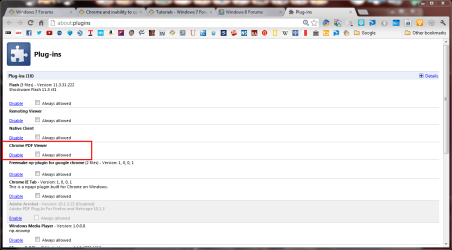
What specific file types are automatically downloaded for you? They are actually Plugins. Go to about  lugins to enable them. Chrome should have its own built in PDF viewer which you can enable. | My System Specs | | Computer type PC/Desktop System Manufacturer/Model Number Hewlett-Packard/G62-107SA Notebook OS Microsoft Windows 7 Home Premium 64-bit 7601 Multiprocessor Free Service Pack 1 CPU Intel(R) Core(TM) i3 CPU M 330 @ 2.13GHz Motherboard Hewlett-Packard 1425 Memory 8 GB DDR3 Graphics Card Intel(R) HD Graphics Sound Card Realtek High Definition Audio Monitor(s) Displays Builtin Screen Resolution 1366 x 768 x 32 bits (4294967296 colors) @ 60 Hz Mouse Microsoft Bluetooth Notebook Mouse 5000 Hard Drives 250 GB SATA Hard Disk Drive 7200 rpm
2TB Seagate GoFlex USB 2 Drive
1TB Iomega Prestige USB 2 Drive
1.5TB Iomega Prestige USB 2 Drive (Samsung)
1TB Iomega NAS. Internet Speed 60 Mbs download 3 Mbs upload Antivirus Norton 360 Browser Chrome |
29 Jul 2012
|
#10 | | Windows 7 Ultimate x64 SP1 |
Chrome calls them extensions, under settings -> extensions. | My System Specs | | System Manufacturer/Model Number Dell XPS 15 L502x OS Windows 7 Ultimate x64 SP1 CPU Core i7-2670QM Memory 8GB DDR3 PC3-10600 Graphics Card Intel HD Graphics 3000 + GeForce GT 540M Screen Resolution 1920x1080 Hard Drives 1TB 5400RPM Seagate Chrome and inability to open downloads without having to save? problems? All times are GMT -5. The time now is 04:20 PM. | |