J jukeman New member Jul 30, 2012 #1 I frequently type in Italian and frequently have to use a stand alone lower case i. Live Mail automatically capitalizes it. Is there an auto correct setting somewhere to disable that? Thanks My Computer OSWindows 7 Home Premium 64 bit
I frequently type in Italian and frequently have to use a stand alone lower case i. Live Mail automatically capitalizes it. Is there an auto correct setting somewhere to disable that? Thanks
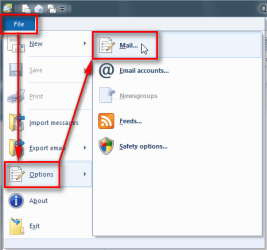
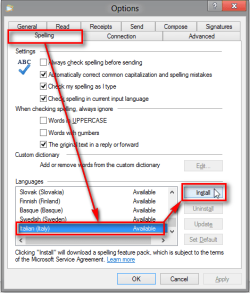
Kari An Angry Old Man Jul 31, 2012 #2 Hi Jukeman, welcome to the Seven Forums. You could try if installing Italian dictionary helps. Open Mail Options in WLM: Install Italian dictionary: Click OK to save settings. That should work. If not you can completely disable auto correction from the same Spelling tab in Options dialog. Kari My Computer Computer typeLaptopComputer Manufacturer/Model NumberHP ENVY 17-1150egOSWindows 10 Pro x64 EN-GBCPU1.6 GHz Intel Core i7-720QM ProcessorMemory6 GBGraphics Card(s)ATI Mobility Radeon HD 5850 GraphicsSound CardBeats sound system with integrated subwooferMonitor(s) Displays17" laptop display, 22" LED and 32" Full HD TV through HDMIScreen Resolution1600*900 (1), 1920*1080 (2&3)Hard DrivesInternal: 2 x 500 GB SATA Hard Disk Drive 7200 rpm External: 2TB for backups, 3TB USB3 network drive for mediaCoolingAs Envy runs a bit warm, I have it on a Cooler Master padKeyboardLogitech diNovo Media Desktop Laser (bluetooth)MouseLogitech Performance Mouse MXInternet Speed50/10 Mbps VDSLAntivirusWindows Defender 4.3.9431.0BrowserMaxthon 3.5.2., IE11
Hi Jukeman, welcome to the Seven Forums. You could try if installing Italian dictionary helps. Open Mail Options in WLM: Install Italian dictionary: Click OK to save settings. That should work. If not you can completely disable auto correction from the same Spelling tab in Options dialog. Kari