- Local time
- 11:09 PM
- Messages
- 715
I hope this is an easy question to answer.
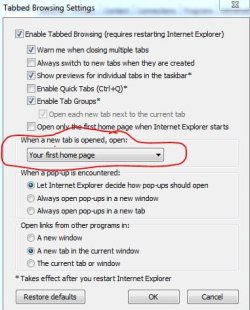
When I go File --> New Tab in IE9, instead of opening a new tab in my home page, it open to "about:Tabs".
IS there anyway to force it open at my home page???
When I go File --> New Tab in IE9, instead of opening a new tab in my home page, it open to "about:Tabs".
IS there anyway to force it open at my home page???
My Computer
At a glance
Windows 7 ProIntel(R) Pentium(R) Duel CPU E2200 2.20 Ghz4 gb 2.96 UsableOnboard
- OS
- Windows 7 Pro
- CPU
- Intel(R) Pentium(R) Duel CPU E2200 2.20 Ghz
- Motherboard
- GA-G41M-ES2L
- Memory
- 4 gb 2.96 Usable
- Graphics Card(s)
- Onboard
- Sound Card
- Onboard
- Hard Drives
- 2 - 1TB WD Sata Drives