Windows 7 Forums


Windows 7: Adobe Flash 9 + Firefox 3.5.3 issues...

17 Sep 2009   #1

Windows 7 Professional RTM 32-bit
IL, US
 
 
Adobe Flash 9 + Firefox 3.5.3 issues...

Hey everyone,

I recently installed a RTM Windows 7 Pro on my laptop (upgraded from XP), and now I'm starting to run into a little browser issues involving Adobe Flash.

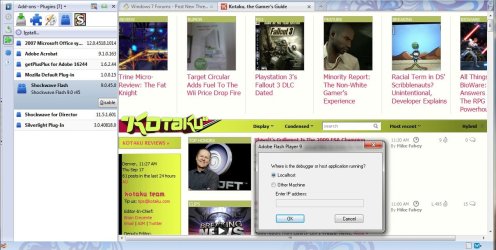
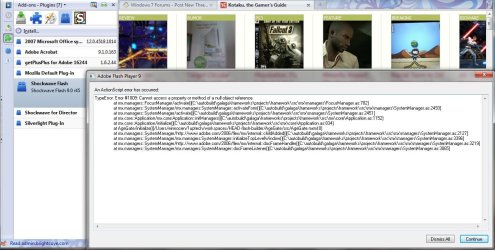
Youtube, and other video sites seem to work just fine, but for some odd reason, a couple sites, such as Kotaku.com, always initiates some random Adobe Flash 9 "where is the debugger or host application running?" popup error. The real annoyance is however, that this message pops up repeatedly for maybe 8-10 times before this second error log message is displayed. I have no idea what this message even means.

I noticed there is a new Adobe Flash 10 version out, as well as Shockwave 11, and have installed both, but in my Firefox's browser plugin menu, Shockwave Flash is still listed as version 9... Is there a way to completely remove this?


Thanks for any guidance you can provide!
Attached Thumbnails
Adobe Flash 9 + Firefox 3.5.3 issues...-screenshot1.jpg   Adobe Flash 9 + Firefox 3.5.3 issues...-screenshot2.jpg  
My System SpecsSystem Spec

17 Sep 2009   #2

Windows 7 Professional x64
Trinidad and Tobago


Download and install the Adobe Flash 10.. See how that works.. Let us know.
My System SpecsSystem Spec
17 Sep 2009   #3

Windows 7 Professional RTM 32-bit
IL, US


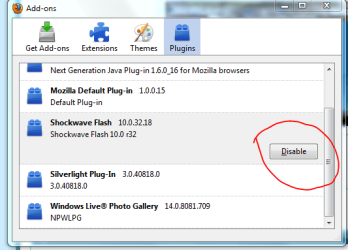
I installed it, and it added another plug-in called "Shockwave Flash 10.0.32.18"

Somehow, I still have my original Firefox default Shockwave Flash 9 though....I'd like the flash 10 to somehow replace this.

I attached a screenshot of my setup so far.

Also, I disabled Shockwave Flash 9, and yes, those previous sites I mentioned such as Kotaku now no longer have a debug issue, but now Youtube, google video, etc. don't work....I can't seem to fix both issues haha.

Is there a way to somehow get Firefox to get rid of Adobe Shockwave Flash 9?

Oh, and what is the difference between Shockwave player and Adobe Flash..?
Attached Thumbnails
Adobe Flash 9 + Firefox 3.5.3 issues...-screenshot3.jpg  
My System SpecsSystem Spec
.


17 Sep 2009   #4

Windows 7 professional 32 bit


Laguz1,

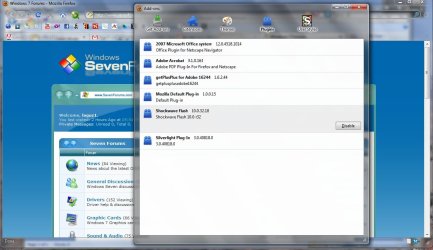
you can disable it until you find a way to completely take it off, i am searching online on how to take it off but for the mean time, you an disable the old one and leave the new one running.
Attached Thumbnails
Adobe Flash 9 + Firefox 3.5.3 issues...-capture.png  
My System SpecsSystem Spec
17 Sep 2009   #5

Windows® 8 Pro (64-bit)
Mumbai, India


1. Open Computer.
2. Navigate to C:\Windows\SysWOW64\.
3. Scroll down and open the Macromed directory.
4. Open the Flash directory.
5. Right-click FlashUtil9b or FlashUtil10a.
6. Select Run as Administrator.
7. When the UAC prompt appears, select Continue.
8. Follow the Flash Player installation wizard.
Once the wizard completes, Flash Player has been properly installed and will now function properly.
My System SpecsSystem Spec
17 Sep 2009   #6

Windows 7 Professional RTM 32-bit
IL, US


Quote   Quote: Originally Posted by Dinesh View Post
Navigate to C:\Windows\SysWOW64\.
I searched my C:\Windows directory, but I do not have a SysWOW64 folder, only "system" and "System32"

I checked both folders and there was no Macromedia related folder either.

I have disabled it for now, except this where it gets weird.

Once I have Flash 10 going and Flash 9 disabled, youtube, google video, and pretty much any other flash-related site does NOT work. But that solves my weird Kotaku.com flash debugger issue.

Once I re-enable Flash 9, youtube and all that work, but now debugger posts errors again on Kotaku. This is pretty annoying.

I checked with a fellow student friend, and his Firefox came pre-installed with the Flash 10 variant. I have tried reinstalling Firefox on my laptop several times, but still always Flash 9. My friend upgraded from Vista while I installed Windows 7 over XP. This shouldn't be affecting my Firefox flash-type though....

I also have tried to custom Firefox, but there is no selection of plugin types to install.

Could you guys tell me if your firefox default plugins list "Shockwave Flash 9.0.45.0 r45" or do you have the flash 10 r32?
My System SpecsSystem Spec
17 Sep 2009   #7

Windows® 8 Pro (64-bit)
Mumbai, India


i m sorry. thats for 64 bit OS.
My System SpecsSystem Spec
17 Sep 2009   #8

Windows 7 Professional RTM 32-bit
IL, US


OK guys, somehow now my issue seems fixed after I did nothing. I'm thinking it was just a bad flash object on Kotaku that trigger some error.

So anyhow, I guess I'll have Flash 9 and 10 working together in harmony for now until I can somehow get 10 to replace 9 without any issues.

Thanks for the help!
My System SpecsSystem Spec
17 Sep 2009   #9

Windows 7 Professional RTM 32-bit
IL, US


Okay, for clarification, I actually managed to replace the stubborn Flash 9 r45 finally.

After reading your post Dinesh, I manually typed in the C:\Windows\System32\Macromed, and it worked. It was just not visible by default for some reason...

Anyhow, I deleted all contents in the Flash folder, then installed Flash 10, and boom, Firefox only has Flash 10 detected now.

Everything works great. THANKS!
Attached Thumbnails
Adobe Flash 9 + Firefox 3.5.3 issues...-screenshot4.jpg  
My System SpecsSystem Spec
18 Sep 2009   #10

Windows® 8 Pro (64-bit)
Mumbai, India


Glad to heat that you got it sorted.
My System SpecsSystem Spec
Reply

 Adobe Flash 9 + Firefox 3.5.3 issues... problems?


Thread Tools


Similar help and support threads for: Adobe Flash 9 + Firefox 3.5.3 issues...
Thread Forum
latest firefox and/or adobe flash = garbage so how can I go back to Browsers & Mail
Adobe puts Firefox Flash plugin in the sandbox Security News
Firefox 4 64 bit with Adobe Flash Square Browsers & Mail
Firefox and Adobe Flash 10.1 Browsers & Mail
Adobe Flash Player for Firefox 32bit Browsers & Mail


All times are GMT -5. The time now is 06:56 AM.


Seven Forums Android App Seven Forums IOS App Follow us on Facebook

Windows 7 Forums is an independent web site and has not been authorized,
sponsored, or otherwise approved by Microsoft Corporation.
"Windows 7" and related materials are trademarks of Microsoft Corp.
© Designer Media Ltd
  

1 2 3 4 5 6 7 8 9 10 11 12 13 14 15 16 17 18 19 20 21 22 23 24 25 26 27 28 29 30 31 32