Windows 7 Forums


Windows 7: chromium "memory tree goes green" ??

08 Oct 2012   #1

Windows 7 32 bit
 
 
chromium "memory tree goes green" ??

Just wondering if anyone knows what "memory tree goes green" means in Chromium change logs? I see it every so often. But I don't have a clue what they are talking about!

My System SpecsSystem Spec

08 Oct 2012   #2

Windows 7 Ultimate x64 Service Pack 1
Doncaster, UK


Quote   Quote: Originally Posted by Release Process, The Chromium Projects
Pipelining releases


I briefly talked about our release process but I want to take a pause to explain it more in depth.
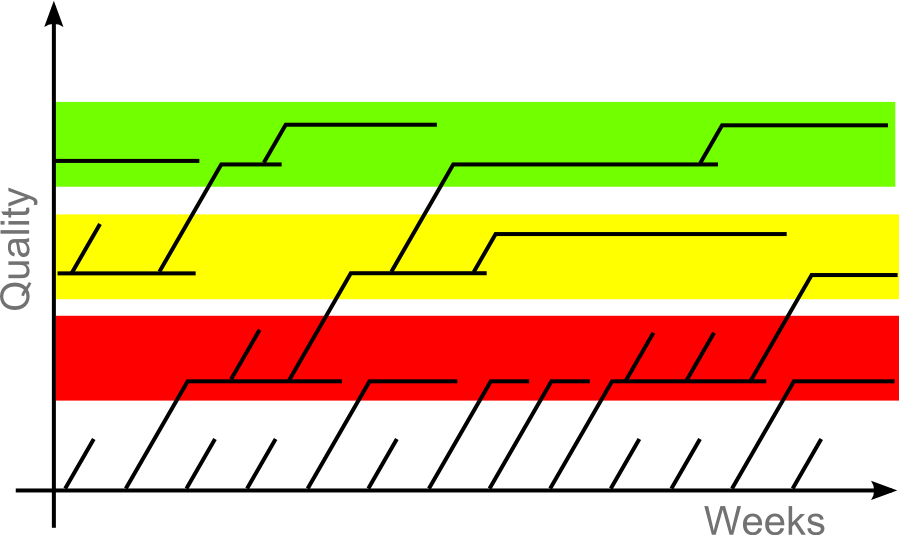
This busy graphic represents our release process. Each line is a branch in our source tree. Horizontal lines are what is released to our users. An aborted branch is one that didn't pass QA. The red section is the developer channel, the yellow section is the beta channel and the green section is the stable release.
More info: Release process - The Chromium Projects
My System SpecsSystem Spec
08 Oct 2012   #3

Windows 7 32 bit


Ah, thanks for that explanation. From google I was almost suspecting some weird correlation with memorial trees. Now I feel better. Apparently the memory handling shouldn't crash then.
My System SpecsSystem Spec
.


Reply

 chromium "memory tree goes green" ?? problems?


Thread Tools


Similar help and support threads for: chromium "memory tree goes green" ??
Thread Forum
W7 Network map tree with "?" between laptop and wireless router Network & Sharing
Need Help Choosing Hardware for a "Green" Mini Computer Hardware & Devices
Enabled "Hardware Acceleration" causes "green screen" Graphic Cards
chromium snap shot source "show through" on forums? Browsers & Mail
any way to keep "Save as" folder tree open? General Discussion


All times are GMT -5. The time now is 01:42 PM.


Seven Forums Android App Seven Forums IOS App Follow us on Facebook

Windows 7 Forums is an independent web site and has not been authorized,
sponsored, or otherwise approved by Microsoft Corporation.
"Windows 7" and related materials are trademarks of Microsoft Corp.
© Designer Media Ltd
  

1 2 3 4 5 6 7 8 9 10 11 12 13 14 15 16 17 18 19 20 21 22 23 24 25 26 27 28 29 30 31 32