TheKloowner
New member
My Computer
- Computer Manufacturer/Model Number
- Acer Aspire GX
- OS
- Windows 7 Ultimate x64
- Memory
- 6gb
- Graphics Card(s)
- Geforce 315
- Sound Card
- Realtek
- Monitor(s) Displays
- SyncMaster 710v
- Hard Drives
- 2


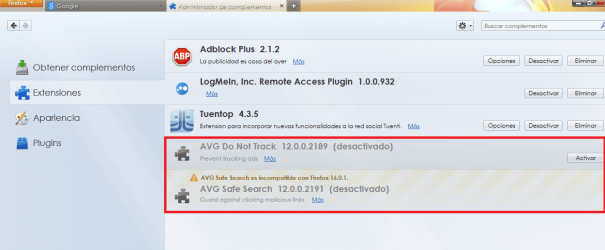
I want to delete or hide this unused extensions, Using latest Version Of Firefox.
Take a look at Sysinternals' Autoruns. IF AVG entries show up, they can be terminated.

not sure if this will do it but worth a try.
go to your users folder, click organise and select "folder and search options"
click the view tab and check the show hidden files,folders and drives.
you can re hide them after.
once you have the hidden folders on view, then you can see the appadata folder in your users folder,
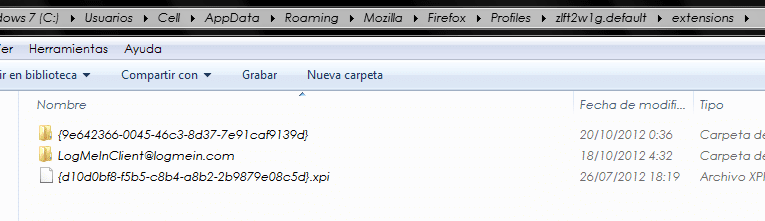
go to roaming/mozilla/firefox/profiles /extensions.
see if the avg extensions are showing and remove them by cut and paste, to another location of your choice, the reason i suggest cutting them is that they can be put back if it causes a problem removing them.
do this with firefox closed.
then check to see if they are gone from your extensions list in firefox.
if not then replace the files you cut and we can try another method
ok, have a look in appadata local /mozilla..
ok thats a tricky one.
i would be tempted to take a screenshot of my extensions page in firefox so i could reinstall them all, and then do a fresh install of firefox,
first back up your saved passwords
and i would back up my bookmarks
i use xmarks for doing this as i can sync bookmarks between computers, one saved on the laptop shows on the desktop when i open firefox again.
Xmarks | Bookmark Sync and Search
also before you do this could you check that the avg stuff is not in your control panel /programs and features,
also what anti virus do you use?