| Windows 7: can't access microsoft website |
03 Dec 2012
|
#1 | | Windows 7 Ultimate SP1 64bit |
can't access microsoft website hi folks
since yesterday....2/12/2012....i just can't access any of the microsoft homepages and the msg i've been getting is....http 500 internal server error....but the strange thing is, i've been getting "se definition updates" alright.
so i'm sitting here wondering if anybody else is experiencing this. | My System Specs |
| OS Windows 7 Ultimate SP1 64bit |
03 Dec 2012
|
#2 | | Windows 7 Ultimate SP1 64bit |
187 views and not a single response? wow!
would just like to know if it's a problem from my end and what to do.
nb: was trying to install a program just now and this is what showed up:
Runtime Error at (82:664)
WinHttp.WinHttp Request: The Operation timed out
Last edited by sandpd; 03 Dec 2012 at 08:53 PM..
Reason: add more info
| My System Specs | | OS Windows 7 Ultimate SP1 64bit |
04 Dec 2012
|
#3 | | Windows 7 Ultimate SP1 64bit |
well i decided to try another browser so just installed firefox, tried connecting to microsoft.com and....no suitable nodes are available to serve your request....is what i got.
i'm probably stupid for not being able to figure out what the hell is happening here....for all you know, it could very well be a very simple solution to fixing this....truth is, i don't know much 'bout these things. forgive me.
but look i'll bow out gracefully, i know how busy everybody is these days guys so no hard feelings.
nb: not sure if i should close the thread by marking it "solved" or just leave it like this. | My System Specs | | OS Windows 7 Ultimate SP1 64bit |
05 Dec 2012
|
#4 | | Windows 7 Home Premium AZ, USA |
downforeveryoneorjustme[dot]com, this website tell you the particular website is down only for you or for everyone. | My System Specs | | OS Windows 7 Home Premium CPU Intel Motherboard Intel Memory 4GB Monitor(s) Displays 15"6 Screen Resolution 1366x768 Mouse DELL Hard Drives 320GB |
05 Dec 2012
|
#5 | | Windows 7 Home Premium 64 bit. SP-1 Northern Ohio |
| My System Specs | | Computer type PC/Desktop System Manufacturer/Model Number Home made Desktop OS Windows 7 Home Premium 64 bit. SP-1 CPU Intel i7-960-3.2 @ 4.25 Motherboard ASUS P6X58D-E Memory KINGSTON KHX2000C9, Hyper X,12 GIGS Graphics Card MSI/Nvidia/460GTX-Cyclone 1GD5/OC Monitor(s) Displays DYNEX 40 IN. Screen Resolution 1920-1080 or 1280-720 HDMI Keyboard M/S 3000 v 2.0 wireless Mouse M/S 5000 wireless PSU Corsair AX-850 Plus Gold Case Corsair 600T (Black) + side panel with 2 140 mm Noctua fans Cooling Corsair H50/2 Noctua NF-P12 (120 mm) Push/Pull- Hard Drives INTEL SSD 120GB-SER 510
Seagate 1TB SATA 600 7200 rpm Hard Drive Internet Speed 3.0 mb Antivirus Microsoft Security Eesentials Browser I.E. 10 default/Firefox Other Info LG BluRay-Read/Write
Sound system
KLipsch-THX
Asus Router RTN-12
2 Noctua 140 added on top of 600t case
Malwarebytes Anti Malware Professional
Windows 7 Firewall |
05 Dec 2012
|
#6 | | Windows 7 Ultimate SP1 64bit |
@pctechie
thanks buddy. did check the site and it turns out microsoft.com is up and running. so this obviously is a problem from my end but the question is:
why now?
why me?
what have i done?
did i bad talk windows somewhere that i can't remember?
all of a sudden microsoft doesn't like me anymore?
well, somebody tell them to pick a number and join the queue, because i don't think i'm doing very well here either....haha
@layback b
man i tried both links without success
seriously though, i'm going to try to illustrate what i recall prior to this and what....with my limitations....have tried so far. so please bear with me if it becomes a little boring please.
a couple of days ago, i was online when a msg just popped up saying se had blocked a potential threat to my computer. i saw the word trojan and the level indicated was "critical".
at the bottom of the dialog box were two options....remove immediately and something else i cant remember....at that point without hesitation i just clicked on remove and just continued browsing.
it wasn't long after that i realised i couldn't access any of the microsoft pages. all i was getting was this "http 500" error page. i honestly don't know if there is a relationship between the two....msg popping up and not being able to access ms site.
1) i came offline and ran my "expired" malwarebytes full scan. end result was a "successful scan" nothing found.
2) i immediately followed up with an se full scan and the end result for that was " no virus found" but when i went into history>all detected items, i saw the same trojan msg that had popped up before, right there again. ofcourse i clicked on "remove all" and that was it.
3) went back online and the prob was still there
4) reset ie to default settings, the prob was still there
5) checked firewall settings, didn't notice anything strange....limited knowledge
6) tried 2 different restore points, the prob was still there
well at this point i thought the best thing to do was to do a complete system maintenance. so i did:
1) the sfc 3times thing
2) dskchek
3) memory diag
4) even used windows readiness tool
all panned out good, no problems.
btw, running a genuine windows plartform validated on the ms site a couple of times well already.
it's been hell login in and out of hotmail since.
nb:the one thing i remember doing before all this was making a change to flash players local storage settings. i changed:
"allow sites to save information on this computer"
to
"ask me before allowing new sites to save information on this computer"
just thought i'll throw that in.
Last edited by sandpd; 05 Dec 2012 at 09:28 PM..
| My System Specs | | OS Windows 7 Ultimate SP1 64bit |
05 Dec 2012
|
#7 | | Windows 7 Home Premium 64 bit. SP-1 Northern Ohio |
We need some more information.
Fill in your system specs. using this. System Info - See Your System Specs
Lets make sure Windows 7 still loves you. Please do this. Windows Genuine and Activation Issue Posting Instructions If that comes out okay.
What firewall are you using?
What anti virus programs are you using and can you update it?
Did you update Malwarebytes before scanning?
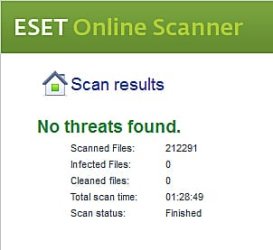
I'm thinking your infected. I recommend running these two programs in this order. Free Online Virus Scanner | ESET Windows Defender Offline
Post back results of scans.
------
I do not understand this. Please explain. btw, running a genuine windows plartform validated on the ms site a couple of times well already. | My System Specs | | Computer type PC/Desktop System Manufacturer/Model Number Home made Desktop OS Windows 7 Home Premium 64 bit. SP-1 CPU Intel i7-960-3.2 @ 4.25 Motherboard ASUS P6X58D-E Memory KINGSTON KHX2000C9, Hyper X,12 GIGS Graphics Card MSI/Nvidia/460GTX-Cyclone 1GD5/OC Monitor(s) Displays DYNEX 40 IN. Screen Resolution 1920-1080 or 1280-720 HDMI Keyboard M/S 3000 v 2.0 wireless Mouse M/S 5000 wireless PSU Corsair AX-850 Plus Gold Case Corsair 600T (Black) + side panel with 2 140 mm Noctua fans Cooling Corsair H50/2 Noctua NF-P12 (120 mm) Push/Pull- Hard Drives INTEL SSD 120GB-SER 510
Seagate 1TB SATA 600 7200 rpm Hard Drive Internet Speed 3.0 mb Antivirus Microsoft Security Eesentials Browser I.E. 10 default/Firefox Other Info LG BluRay-Read/Write
Sound system
KLipsch-THX
Asus Router RTN-12
2 Noctua 140 added on top of 600t case
Malwarebytes Anti Malware Professional
Windows 7 Firewall |
05 Dec 2012
|
#8 | | Windows 7 Ultimate X64 SP1 Mt. Crumpit/Whoville |
I don't know what "nb" and "se" mean. | My System Specs | | Computer type PC/Desktop System Manufacturer/Model Number Home Built Desktop By DataTech OS Windows 7 Ultimate X64 SP1 CPU Intel i5-2550K, Differing ~4.4-4.8GHz No built in GPU Motherboard ASUS P8Z68-V PRO/GEN3 Memory 16GB G.Skill Sniper 2133MHz 4x4GB Graphics Card ASUS ENGTX460 DirectCU/2DI/1GD5 GeForce GTX 460 Sound Card Onboard Realtek 5-1 Monitor(s) Displays Samsung P2570HD Screen Resolution 1920x1080 Keyboard Old, beat-up Dell USB From 10 yrs Ago Mouse Gigabyte m6900 wired PSU Corsair HX650W Case Inwin Dragon Rider Cooling Hyper 212 EVO w/two Noctua fans, push-pull, @1300 RPM Hard Drives Crucial M4 128GB for OS, 750GB Seagate MomentusXT for data, 500GB Seagate Constellation for storage Internet Speed 8-19 Mbs down, 3-4 Mbs up Comcast Cable Antivirus Norton Internet Security Browser IE 9, Opera when needed Other Info 4 case fans, LG BluRay-RE, ASUS DVD-RW, Mr. Fusion power generator with flux capacitor, 1.21 gigawatts. |
05 Dec 2012
|
#9 | | Windows 7 Home Premium 64 bit. SP-1 Northern Ohio |
| My System Specs | | Computer type PC/Desktop System Manufacturer/Model Number Home made Desktop OS Windows 7 Home Premium 64 bit. SP-1 CPU Intel i7-960-3.2 @ 4.25 Motherboard ASUS P6X58D-E Memory KINGSTON KHX2000C9, Hyper X,12 GIGS Graphics Card MSI/Nvidia/460GTX-Cyclone 1GD5/OC Monitor(s) Displays DYNEX 40 IN. Screen Resolution 1920-1080 or 1280-720 HDMI Keyboard M/S 3000 v 2.0 wireless Mouse M/S 5000 wireless PSU Corsair AX-850 Plus Gold Case Corsair 600T (Black) + side panel with 2 140 mm Noctua fans Cooling Corsair H50/2 Noctua NF-P12 (120 mm) Push/Pull- Hard Drives INTEL SSD 120GB-SER 510
Seagate 1TB SATA 600 7200 rpm Hard Drive Internet Speed 3.0 mb Antivirus Microsoft Security Eesentials Browser I.E. 10 default/Firefox Other Info LG BluRay-Read/Write
Sound system
KLipsch-THX
Asus Router RTN-12
2 Noctua 140 added on top of 600t case
Malwarebytes Anti Malware Professional
Windows 7 Firewall |
06 Dec 2012
|
#10 | | Windows 7 Ultimate SP1 64bit |
wow! thanks guys for sticking with me....layback b, britton30
i just got online and saw your posts so let me quickly fill in what i can now and i'll do the tests and post the results later.
@britton: i dont know what "nb" and "se" mean "nb" and "se" are just acronyms nb = note back or note normally used for additional information se = security essentials or microsoft security essentials which is my prefered anti virus program @layback b i do not understand this please explain..... btw, running a genuine windows plartform validated on the ms site a couple of times well already.
i was just basically throwing in anything that i could remember that i thought was going to help creat a clear picture of what was happening.
yes i do visit the microsoft site pretty often and something or the other i was downloading sometime ago and part of the pre-requisite for the download was for microsoft to validate the copy of windows on your system. so i went ahead and did the validation and after the download i was taking to the "genuine windows" homepage where a big "thank you for using genuine windows" was waiting me haha....i thought that was cute.
anyway so i bookmarked the page and would go back now and again to read up on the various things to look out for and about validation etc etc. done it once or twice more since then just for the heck of it. sorry if this created some confusion in your minds, wasn't meant to. what anti virus program are you using and can you update it? microsoft security essentials (se) and yes in my very first post i mentioned that strangely enough i've been getting definition updates for se. what firewall are you using? se pretty much handles that as well Did you update Malwarebytes before scanning? yes i believe so. the reason for saying "i believe so " is that i don't have malwarebytes installed permanently on the system anymore. i install it when i need to use it and normally during the installation, it will download and install the latest version and straight after installation, it will update its definitions. the reason i don't have malwarebytes permanently installed is that, i thought i had downloaded the free version (if there is one). but recently as soon as i turn on the system, the first thing to pop out of the notification area is a notice from malwarebytes that the computer is no longer protected because the trial period has expired. it got a bit annoying so i uninstalled and only install when need to use it. I'm thinking you're infected. possibly "layback b". that's my suspicion baffling because i'm always so careful as to where i go but.... | My System Specs | | OS Windows 7 Ultimate SP1 64bit can't access microsoft website problems? All times are GMT -5. The time now is 07:48 AM. | |