Computer type Laptop System Manufacturer/Model Number Asus OS W7 Ultimate CPU 2.2 bh Intel Core i3-2330M Motherboard Asustek Computer Inc. P53E 1.0 Memory 4MB Graphics Card On Board Sound Card On Board Monitor(s) Displays On Board Screen Resolution 1366 X 768
Hard Drives ST9500423AS
ST2000DM USB Backup Drive External
Computer type Laptop System Manufacturer/Model Number Asus OS W7 Ultimate CPU 2.2 bh Intel Core i3-2330M Motherboard Asustek Computer Inc. P53E 1.0 Memory 4MB Graphics Card On Board Sound Card On Board Monitor(s) Displays On Board Screen Resolution 1366 X 768
Hard Drives ST9500423AS
ST2000DM USB Backup Drive External
Computer type PC/Desktop System Manufacturer/Model Number Dell Inspiron 530 OS Windows 7 Professional SP1 64-bit CPU Intel Core 2 Duo Processor E8300 @ 2.83GHz Motherboard Dell Inc. 0RY007 (Socket 775) Memory 4.00 GB Dual-Channel DDR2 @ 332MHz (5-5-5-15) Graphics Card Intel(R) G33/G31 Express Chipset Family Sound Card Integrated 7.1 Channel Audio Monitor(s) Displays Acer G245HQL 23.6" LED(1920x1080@60Hz) Screen Resolution 1920 x 1080
Keyboard Dell USB Keyboard Mouse Dell Optical USB Mouse Hard Drives Disk 0 HITACHI 1TB OS Installed - Disk 1 HITACHI 1TB For Backups Internet Speed DSL 1.5 meg Antivirus Symantec(SEP) Browser Firefox
blockie the problem is with the web page source code--it was coded for IE
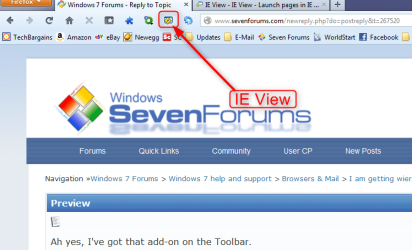
don't know what version of FF you're using--but there is an add-on called 'IEView' that will eliminate that problem by allowing you to switch to the internet explorer rendering engine with one mouse click
System Manufacturer/Model Number SALEON model 2.2b OS win7 ultimate 32bit CPU core2 Extreme QX6850-OCd to 3.15 GHz Motherboard ASUS P5G41-M LE Memory 4 GB Graphics Card NVidia 8600 GT Monitor(s) Displays 23" acer
PSU 500W Thermaltake Case mini tower Hard Drives one SATA 250GB partitioned equally in half
one SATA 160GB-internal storage
IE View is a simple Firefox add-on (for Microsoft Windows users), which allows the current page or a selected link to be opened in Internet Explorer. I use Firefox 99.99% of the time, but there are those moments – particularly when testing new pages, or when viewing that rare IE-only page that’s actually interesting – when I need to see what things look like in IE. IE View - IE View - Launch pages in IE from Firefox
Computer type PC/Desktop System Manufacturer/Model Number Dell Inspiron 530 OS Windows 7 Professional SP1 64-bit CPU Intel Core 2 Duo Processor E8300 @ 2.83GHz Motherboard Dell Inc. 0RY007 (Socket 775) Memory 4.00 GB Dual-Channel DDR2 @ 332MHz (5-5-5-15) Graphics Card Intel(R) G33/G31 Express Chipset Family Sound Card Integrated 7.1 Channel Audio Monitor(s) Displays Acer G245HQL 23.6" LED(1920x1080@60Hz) Screen Resolution 1920 x 1080
Keyboard Dell USB Keyboard Mouse Dell Optical USB Mouse Hard Drives Disk 0 HITACHI 1TB OS Installed - Disk 1 HITACHI 1TB For Backups Internet Speed DSL 1.5 meg Antivirus Symantec(SEP) Browser Firefox
i occasionally see a page like that that normally load fine, so i know its not a firefox issue or a site thats supposed to be viewed with Ie,
i think its a connection issue, refresh or restart your router and see if it looks ok after that.
System Manufacturer/Model Number Hewlett packard/p6512uk OS Microsoft Windows 7 Home Premium 64-bit 7600 CPU IIx4 amd athelon 635 processor Motherboard FOXCONN 2AA9 Memory 2x2gb Graphics Card ati radeon HD 5450 Sound Card (1) Realtek High Definition Audio (2) AMD High Definition Monitor(s) Displays samsung lcd tv 32" Screen Resolution 1360x 768
Keyboard wireless hp Mouse wireless Hp,optical PSU ? Cooling air! Hard Drives (1) WDC WD10 01FAES-60Z2A0 SATA Disk Device (2) Maxtor OneTouch USB Device (3) ST310003 33AS USB Device (4) WD My Book 1111 USB Device Internet Speed 1.10mb/s Antivirus MSE Browser Firefox