Windows 7 Forums


Windows 7: IE 10 on Windows 7 SP1 x64 Professional: WebcacheV01.dat size

06 Dec 2012   #1

Windows 7 SP1 x64 & x86 Professional
 
 
IE 10 on Windows 7 SP1 x64 Professional: WebcacheV01.dat size

I recently changed from IE9 to IE 10 Preview on my Windows 7 SP1 x86 and x64 Professional systems. IE 10 is functioning very well on my systems.

Variable WebcacheV01.dat is located in the C:\Users\"MyName"\Appdata\Local\Microsoft\Windows\Webcache folder. This variable keeps increasing in size at a rate of 5-10 mbytes per day depending on my browsing requirements.

I have not been able to define a setting or method for limiting the size of WebcacheV01.dat or for clearing it.

Does anyone know how to control the size of this variable?

My System SpecsSystem Spec

08 Dec 2012   #2

Windows 7 Home Premium x64 SP1
Bay Area Peninsula


Welcome to Seven Forums siliconman01. Only took you 3 years to have a problem to post? I can find very little reference to WebcacheV01.dat at all. Mostly just logs saying

Quote:
taskhostex (1768) An attempt to open the file "C:\Users\Damien\AppData\Local\Microsoft\Windows\W ebCache\WebCacheV01.dat" for read only access failed with system error 32 (0x00000020): "The process cannot access the file because it is being used by another process. ". The open file operation will fail with error -1032 (0xfffffbf8).
Or similar. Is the file getting abnormally large, or do you just want to keep control of everything? I can understand that. But hopefully someone who has IE10 installed will comment. I doubt they would know about limiting the size of a dat file though. I suspect you could delete it and it would be recreated, but I won't suggest that. Good luck. A Guy
My System SpecsSystem Spec
09 Dec 2012   #3

Windows 7 SP1 x64 & x86 Professional


My Google searches found nothing either. It's headed for 80-100+ mbytes in size from the 32 mbytes that it started at. I just do not like to see a file gobbling up disk space unless there are visible performance or security returns.
My System SpecsSystem Spec
.


09 Dec 2012   #4

Windows 7 Pro x64


It must be browsers cache - go to options -> general -> browsing history settings -> disk space to use
My System SpecsSystem Spec
09 Dec 2012   #5

Windows 7 SP1 x64 & x86 Professional


Quote   Quote: Originally Posted by startas View Post
It must be browsers cache - go to options -> general -> browsing history settings -> disk space to use
That was my thought too. However, those settings do not have any affect on limiting the size....or turning off web caching. I tried changes and nothing impacted webcacheV01.dat.
My System SpecsSystem Spec
09 Dec 2012   #6

Windows 7 Ultimate 64 bit
NC


It could be just a glitch in IE 10 given the fact it's still a beta for windows 7. I know when I was testing windows 8 and using ie 10 in metro some webpages had issues yet while using IE 10 in desktop mode the same webpage worked normally. Then when 8 was released those particular webpages worked as they should in both metro and desktop.
My System SpecsSystem Spec
09 Dec 2012   #7

win 7 X64 Ultimate SP1
Ohio (From WV)
 
 
IE 10 Web Cache

You people have me wondering. I did a search with very few results, none helpful.

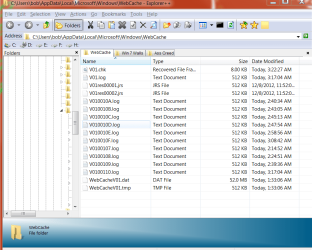
Here is a snip of my directory. IE 10 has only been installed for two days. I'll be watching this for size, etc.

IE 10 on Windows 7 SP1 x64 Professional:  WebcacheV01.dat size-web.png
My System SpecsSystem Spec
10 Dec 2012   #8

win 7 X64 Ultimate SP1
Ohio (From WV)
 
 
Flash

Is the same flash ver for IE9 good in IE10? I see on the Adobe site there are versions for Win 8 etc. I am using a 32 bit ver that is up to date for IE9.

I think I might be having flash problems.
My System SpecsSystem Spec
11 Dec 2012   #9

Windows 7 SP1 x64 & x86 Professional


Quote   Quote: Originally Posted by HammerHead View Post
Is the same flash ver for IE9 good in IE10? I see on the Adobe site there are versions for Win 8 etc. I am using a 32 bit ver that is up to date for IE9.

I think I might be having flash problems.
Flash Player V11.5.502.110 is working fine on my IE 10 on Win 7 SP1 x64 and x86 Professional.
My System SpecsSystem Spec
11 Dec 2012   #10

win 7 X64 Ultimate SP1
Ohio (From WV)
 
 
Flash Ver

OK Siliconman, that is the ver I am running. I must have a problem somewhere else.
My System SpecsSystem Spec
Reply

 IE 10 on Windows 7 SP1 x64 Professional: WebcacheV01.dat size problems?


Thread Tools


Similar help and support threads for: IE 10 on Windows 7 SP1 x64 Professional: WebcacheV01.dat size
Thread Forum
Downgrade from Windows 7 Professional to Windows XP Professional SP2 Installation & Setup
change taskbar icon size to specific size other than small or large? Customization
150% size zoom in makes Chrome and Adobe Reader overblown size General Discussion
Resizing Gadgets using the Larger Size/Smaller Size Button Gadgets
Folder Size, like Disk Size addon/app? Software


All times are GMT -5. The time now is 10:07 PM.


Seven Forums Android App Seven Forums IOS App Follow us on Facebook

Windows 7 Forums is an independent web site and has not been authorized,
sponsored, or otherwise approved by Microsoft Corporation.
"Windows 7" and related materials are trademarks of Microsoft Corp.
© Designer Media Ltd
  

1 2 3 4 5 6 7 8 9 10 11 12 13 14 15 16 17 18 19 20 21 22 23 24 25 26 27 28 29 30 31 32