| Windows 7: IE10 Scroll Bar Arrows not showing correctly. |
26 Feb 2013
|
#1 | | |
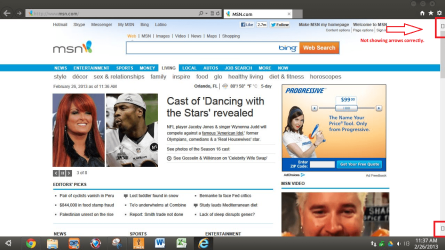
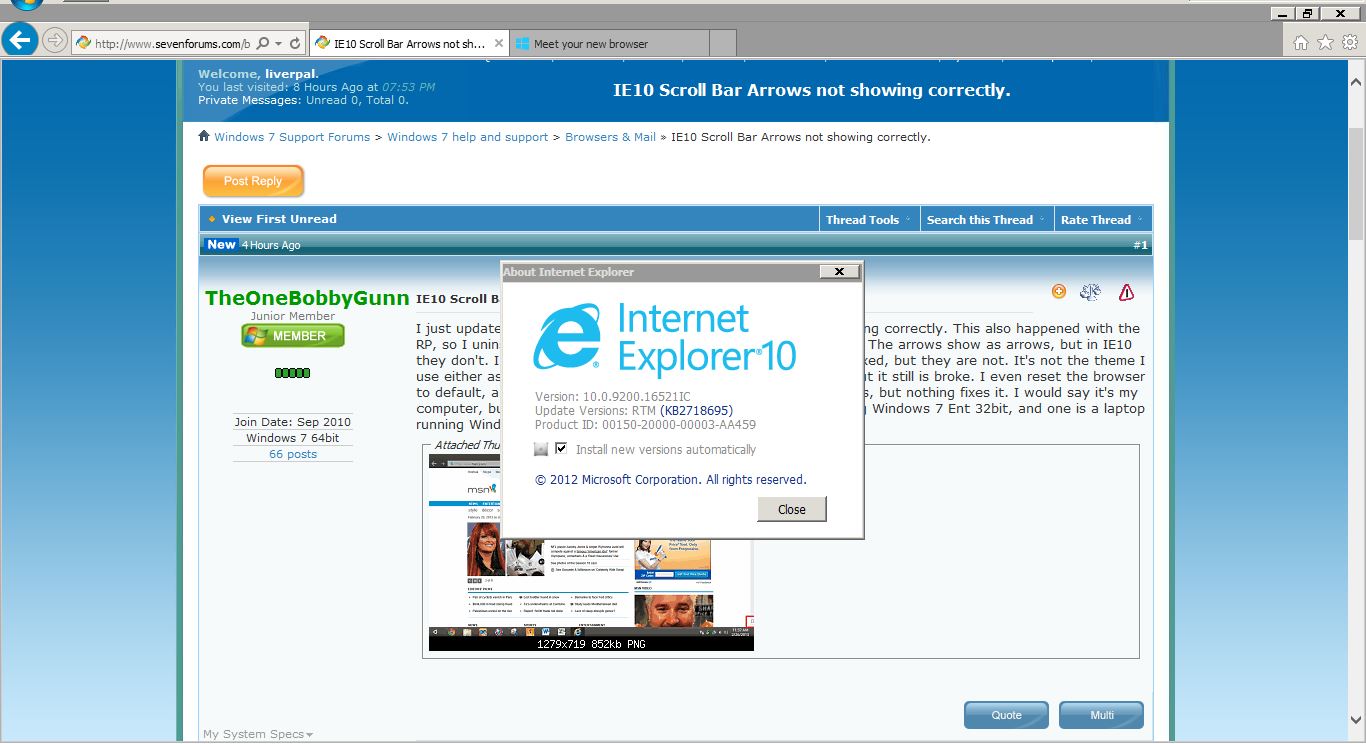
IE10 Scroll Bar Arrows not showing correctly. I just updated to IE10 RTM, and my scroll bar arrows are not showing correctly. This also happened with the RP, so I uninstalled that to go back to IE9. In IE9 I have no issues. The arrows show as arrows, but in IE10 they don't. I thought since IE10 is now final the arrows would be fixed, but they are not. It's not the theme I use either as I have gone back to the default Windows 7 theme, but it still is broke. I even reset the browser to default, and rebooted, disabled allowing themes to change things, but nothing fixes it. I would say it's my computer, but it is happening on two machines. One is a PC running Windows 7 Ent 32bit, and one is a laptop running Windows 7 Ult 64bit. Anyone have any ideas? | My System Specs |
| |
26 Feb 2013
|
#2 | | Win 7 Ultimate 64 bit At home. |

Quote: Originally Posted by TheOneBobbyGunn I just updated to IE10 RTM, and my scroll bar arrows are not showing correctly. This also happened with the RP, so I uninstalled that to go back to IE9. In IE9 I have no issues. The arrows show as arrows, but in IE10 they don't. I thought since IE10 is now final the arrows would be fixed, but they are not. It's not the theme I use either as I have gone back to the default Windows 7 theme, but it still is broke. I even reset the browser to default, and rebooted, disabled allowing themes to change things, but nothing fixes it. I would say it's my computer, but it is happening on two machines. One is a PC running Windows 7 Ent 32bit, and one is a laptop running Windows 7 Ult 64bit. Anyone have any ideas? Do the little boxes function as arrows? | My System Specs | | Computer type PC/Desktop System Manufacturer/Model Number Custom Build OS Win 7 Ultimate 64 bit CPU Intel i7-3930K Motherboard ASUS P9X79 WS Memory Kingston HyperX Genesis 32GB Kit (8x4GB Modules) 1600MHz DDR Graphics Card MSI R7850 Twin Frozr 2GD5/OC Radeon HD 7850 2GB 256-bit GDDR Sound Card On board Realtek HD Monitor(s) Displays HP w2207h Screen Resolution 1680 x 1050 Keyboard Logitech G110 Mouse Logitech M525 (two in use) PSU Corsair HX750w Case Antec Two Hundred v2 Cooling Cooler Master GeminII S524 120mm (fan replaced with a 140mm) Hard Drives Samsun 128GB 840 Pro
Western Digital WD Black WD2002FAEX 2TB
Western Digital WD Black WD2002FAEX 2TB Internet Speed fair to middlin' Antivirus AVAST!, MBAM, SAS, Spybot S&D (all but MBAM free) Browser IE9 Other Info LSI 9211-8i SATA III controller card (eight more SATA III ports), 2.5" & 3.5" Hot Swap Bays, HooToo HT-CR001 PCI-E to USB 3.0 Internal Combo - 3 Ports USB 3.0 Hub + 6 Slot Card Reader, and LG Model CH12LS28 BD-ROM Combo Optical Drive. Also, ScanSnap S1500 ADF duplexing scanner, Canon 9000F flat bed scanner, Logitech 5.1 speaker system, Samsung CLP 415nw laser color printer, |
26 Feb 2013
|
#3 | | |

Quote: Originally Posted by Lady Fitzgerald 
Quote: Originally Posted by TheOneBobbyGunn I just updated to IE10 RTM, and my scroll bar arrows are not showing correctly. This also happened with the RP, so I uninstalled that to go back to IE9. In IE9 I have no issues. The arrows show as arrows, but in IE10 they don't. I thought since IE10 is now final the arrows would be fixed, but they are not. It's not the theme I use either as I have gone back to the default Windows 7 theme, but it still is broke. I even reset the browser to default, and rebooted, disabled allowing themes to change things, but nothing fixes it. I would say it's my computer, but it is happening on two machines. One is a PC running Windows 7 Ent 32bit, and one is a laptop running Windows 7 Ult 64bit. Anyone have any ideas? Do the little boxes function as arrows? Yep. And it's actually not just scroll bar arrows. Even drop down menu arrows are squares too. All arrows are like that. Ugh... | My System Specs | | |
26 Feb 2013
|
#4 | | Win 7 Ultimate 64 bit At home. |
Sounds like a font issue. Are using a different theme than the default? | My System Specs | | Computer type PC/Desktop System Manufacturer/Model Number Custom Build OS Win 7 Ultimate 64 bit CPU Intel i7-3930K Motherboard ASUS P9X79 WS Memory Kingston HyperX Genesis 32GB Kit (8x4GB Modules) 1600MHz DDR Graphics Card MSI R7850 Twin Frozr 2GD5/OC Radeon HD 7850 2GB 256-bit GDDR Sound Card On board Realtek HD Monitor(s) Displays HP w2207h Screen Resolution 1680 x 1050 Keyboard Logitech G110 Mouse Logitech M525 (two in use) PSU Corsair HX750w Case Antec Two Hundred v2 Cooling Cooler Master GeminII S524 120mm (fan replaced with a 140mm) Hard Drives Samsun 128GB 840 Pro
Western Digital WD Black WD2002FAEX 2TB
Western Digital WD Black WD2002FAEX 2TB Internet Speed fair to middlin' Antivirus AVAST!, MBAM, SAS, Spybot S&D (all but MBAM free) Browser IE9 Other Info LSI 9211-8i SATA III controller card (eight more SATA III ports), 2.5" & 3.5" Hot Swap Bays, HooToo HT-CR001 PCI-E to USB 3.0 Internal Combo - 3 Ports USB 3.0 Hub + 6 Slot Card Reader, and LG Model CH12LS28 BD-ROM Combo Optical Drive. Also, ScanSnap S1500 ADF duplexing scanner, Canon 9000F flat bed scanner, Logitech 5.1 speaker system, Samsung CLP 415nw laser color printer, |
26 Feb 2013
|
#5 | | |
Yes I am currently, but it did it even when I switched back to the system default. I even un-patched the theme files, and ran sfc /scannow to fix/replace/restore anything that may have been causing it, but it still does it. | My System Specs | | |
26 Feb 2013
|
#6 | | |
I just wanted to chime in that I am also having this problem. It does seem cosmetic so it's mostly just an annoyance. | My System Specs | | Computer type PC/Desktop System Manufacturer/Model Number Dell OS Win7 Pro 64 bit CPU 2.4 Ghz core 2 duo Memory 4 GB Graphics Card Nvido gforce 140m |
26 Feb 2013
|
#7 | | Windows 7 SP1 Ultimate x86 |
just fine here | My System Specs | | OS Windows 7 SP1 Ultimate x86 |
26 Feb 2013
|
#8 | | |

Quote: Originally Posted by itsbenaltogethe I just wanted to chime in that I am also having this problem. It does seem cosmetic so it's mostly just an annoyance. Thank you! I'm not glad you're having the same issue, but at least I know I'm not alone. Yeah it is cosmetic, but I would like to fix it for sure. I'm trying everything I can think of. It's the oddest thing since it's only IE10. I went back again to IE9, and they are normal, but updated again, and they are back to the squares. | My System Specs | | |
26 Feb 2013
|
#9 | | |

Quote: Originally Posted by liverpal just fine here  That's a theme right? Classic AE? I wonder why only select few have the issue. | My System Specs | | |
26 Feb 2013
|
#10 | | |
I also posted about this ie10 scroll arrows missing - Microsoft Community here. Letting you know in case someone on that forum comes up with something. | My System Specs | | Computer type PC/Desktop System Manufacturer/Model Number Dell OS Win7 Pro 64 bit CPU 2.4 Ghz core 2 duo Memory 4 GB Graphics Card Nvido gforce 140m IE10 Scroll Bar Arrows not showing correctly. problems? All times are GMT -5. The time now is 12:46 AM. | |