Windows 7 Forums Search
Welcome to Windows 7 Forums. Our forum is dedicated to helping you find solutions with any problems, errors or issues you are experiencing with Windows 7. The Windows 7 forum also covers news and updates and has an extensive Windows 7 tutorial section that covers a wide range of tips and tricks.


Windows 7 - I have all italics in IE8 & Outlook!!

 
02-20-2009   #1


XP Pro, Windows 7 Ultimate 64 & 32 Build 7022


I have all italics in IE8 & Outlook!!

Well this issue started about a week ago, I still have not figured out what caused it or how to fix it, I tried some fixes I found on a Vista message board but they don't seem to work, & yes I went to the font settings & tried to make the changes plus changed them in IE8 & Outlook. If anyone knows how I can fix this issue I'd be so greatful.

I also sent feedback to M$.

My System SpecsSystem Spec
02-20-2009   #2


Windows 7 Build 7048 x64


Can you please post screenshots of IE8 and Outlook so we can check what items are italicized?

Thanks
My System SpecsSystem Spec
02-20-2009   #3


XP Pro, Windows 7 Ultimate 64 & 32 Build 7022


Quote   Quote: Originally Posted by NosferatuX View Post
Can you please post screenshots of IE8 and Outlook so we can check what items are italicized?

Thanks


I hope this helps, I am tired of Italics.
My System SpecsSystem Spec
.


02-20-2009   #4


Windows 7 Build 7048 x64


Quote   Quote: Originally Posted by djhallucn8 View Post


I hope this helps, I am tired of Italics.
Thanks for the screenies.

On IE: You can just go ahead and reset it to defaults;
Go to Tools>Internet Options then Advanced tab
Under Reset Internet Explorer setting, click on Reset
After that's done verify two settings;
1. Tools>Internet Options>General>Fonts
Language script: Latin
Webpage font: Times New Roman
Plain text font: Courier New
2. Tools>Internet Options>General>Accessibility
Nothing should have any check marks

On Outlook: The one shot solution is to just run Office Diagnostics
Open Outlook>Help>Office Diagnostics
It will ask you to reset everything to default and all customizations, just say yes.

To verify if you have the correct font settings in Outlook
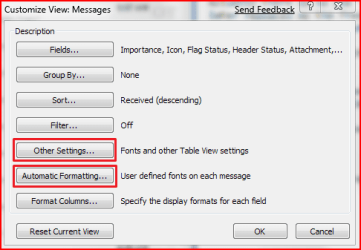
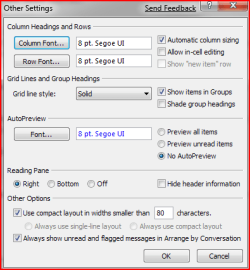
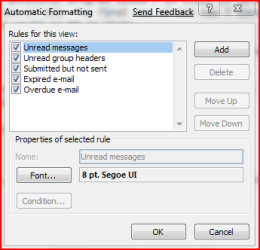
Open Outlook>View>Arrange By>Custom
Please refer to attachment on font settings

Cheers
Attached Thumbnails
I have all italics in IE8 & Outlook!!-capture.png   I have all italics in IE8 & Outlook!!-capture1.png   I have all italics in IE8 & Outlook!!-capture2.png  
My System SpecsSystem Spec
02-20-2009   #5


XP Pro, Windows 7 Ultimate 64 & 32 Build 7022


Well I tried it & still I have italics, any other suggestions?
My System SpecsSystem Spec
02-20-2009   #6


Windows 7 Build 7048 x64


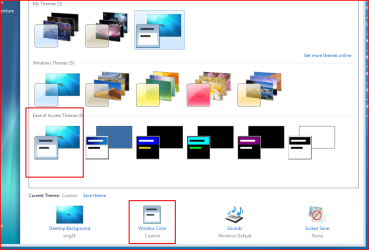
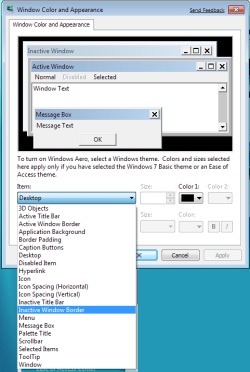
Right click the desktop>Personalize
Select the first scheme under Ease of Access Theme
After it has been applied
You can then click on Window Color
Here you can select the items you want and change fonts, font size, color, bold and
italic.

Cheers
Attached Thumbnails
I have all italics in IE8 & Outlook!!-capture.png   I have all italics in IE8 & Outlook!!-capture1.png  
My System SpecsSystem Spec
02-20-2009   #7


XP Pro, Windows 7 Ultimate 64 & 32 Build 7022


OK ,tried that & still italics.
My System SpecsSystem Spec
02-21-2009   #8


Windows 7 Build 7048 x64


Well the only other option I could think of short of a full reinstall is doing a Repair Install.

Please do let us know the progress of your case
My System SpecsSystem Spec
02-21-2009   #9


XP Pro, Windows 7 Ultimate 64 & 32 Build 7022


I'm just going to leave the italics till RC1 comes out then I'll do a fresh install.
My System SpecsSystem Spec
02-21-2009   #10


Windows 7 x64


Is there a chance some system fonts have been removed and it is reverting to another version?

If you do a SFC, make sure and reboot afterward.
My System SpecsSystem Spec
Reply

 I have all italics in IE8 & Outlook!! problems?


Thread Tools


Similar Threads for: I have all italics in IE8 & Outlook!!
Thread Forum
Solved updates in italics? Windows Updates & Activation
Italics General Discussion
Everything is in italics? Customization


All times are GMT -5. The time now is 12:02 AM.


Windows 7 Forums is an independent web site and has not been authorized,
sponsored, or otherwise approved by Microsoft Corporation.
"Windows 7" and related materials are trademarks of Microsoft Corp.
© Designer Media Ltd
  

1 2 3 4 5 6 7 8 9 10 11 12 13 14 15 16 17 18 19 20 21 22 23 24 25 26 27 28 29 30