
You are using an out of date browser. It may not display this or other websites correctly.
You should upgrade or use an alternative browser.
You should upgrade or use an alternative browser.
How do I get more than 12 typed addresses in drop-down?
- Thread starter cjhtwo
- Start date

I've already seen that I need to remove address bar sections, but how on earth do I do that?
Are you talking about Outlook? or what?
Can you be a little more specific.
Thank you
My Computer
At a glance
Windows 10 ProIntel i5I'm old and lost a few chipsYup
- Computer type
- PC/Desktop
- Computer Manufacturer/Model Number
- Self Built
- OS
- Windows 10 Pro
- CPU
- Intel i5
- Motherboard
- I have a fatherboard
- Memory
- I'm old and lost a few chips
- Graphics Card(s)
- Yup
- Sound Card
- Yup
- Monitor(s) Displays
- Samsung 32" UHD
- Screen Resolution
- 3840 x 2160
- Hard Drives
- Samsung 860 EVO drives
- PSU
- 450 Watt and some fans that blow
- Case
- Small tower
- Cooling
- Yes I am cool. lol
- Keyboard
- Who needs a keyboard?
- Mouse
- Logitech Laser G7 wireless
- Internet Speed
- Zippy fast UP and DOWN
- Antivirus
- I got a shot
- Browser
- The new Improved EDGE 2020

Hello Cjhtwo, and welcome to Seven Forums.
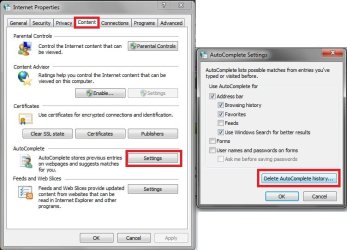
This would be the autocomplete feature. You can clear this in Internet Options by clicking "Delete AutoComplete history" button like in the screenshot below. Unchecking the "Address bar" box will turn off autocomplete for this.
Hope this helps,
Shawn
This would be the autocomplete feature. You can clear this in Internet Options by clicking "Delete AutoComplete history" button like in the screenshot below. Unchecking the "Address bar" box will turn off autocomplete for this.
Hope this helps,
Shawn
My Computer
At a glance
64-bit Windows 11 Pro for WorkstationsIntel i7-8700K OC'd to 5 GHz64 GB (4x16GB) G.SKILL TridentZ RGB DDR4 3600...ASUS ROG-STRIX-GTX1080TI-O11G-GAMING
- Computer type
- PC/Desktop
- Computer Manufacturer/Model Number
- Self built custom
- OS
- 64-bit Windows 11 Pro for Workstations
- CPU
- Intel i7-8700K OC'd to 5 GHz
- Motherboard
- ASUS ROG Maximus XI Formula Z390
- Memory
- 64 GB (4x16GB) G.SKILL TridentZ RGB DDR4 3600 MHz
- Graphics Card(s)
- ASUS ROG-STRIX-GTX1080TI-O11G-GAMING
- Sound Card
- Integrated
- Monitor(s) Displays
- 2 x Samsung Odyssey G7 27"
- Screen Resolution
- 2560x1440
- Hard Drives
- 1TB Samsung 990 PRO M.2,
4TB Samsung 990 PRO PRO M.2,
TerraMaster F8 SSD Plus NAS
- PSU
- Seasonic Prime Titanium 850W
- Case
- Thermaltake Core P3
- Cooling
- Corsair Hydro H115i
- Keyboard
- Logitech wireless K800
- Mouse
- Logitech MX Master 4
- Internet Speed
- 2 Gb/s Download and 100 Mb/s Upload
- Antivirus
- Malwarebyte Anti-Malware Premium
- Browser
- Google Chrome
- Other Info
- Logitech Z625 speaker system,
Logitech BRIO 4K Pro webcam,
HP Color LaserJet Pro MFP M477fdn,
APC SMART-UPS RT 1000 XL - SURT1000XLI,
Galaxy S23 Plus phone
I think I didn't make myself clear enough. Whenever I want to go to a new website, I click on the down arrow in the address bar to see the websites I've visited in the past. Right now it only shows the last 12 websites, so when I go to a new one, the bottom one is removed from the list. I want to have as many as I had in XP, I think it was 20. Right now there are the 12 typed addresses, followed by a History section that has 5 showing and can be expanded to 20, and then a Favorites section of 5 that can go to 20. I read somewhere that if I remove an "address bar section", that I can have more typed addresses. But how do I remove an "address bar section?"
My Computer
At a glance
Windows 7 Home Premium
- OS
- Windows 7 Home Premium
Cjhtwo,
I'm not sure if it will have more than 12 or not, but you can also click on the Favorties toolbar button, History tab, then click on a day that you want to see all the websites that you went to that day. It will show everything instead of the last 12.
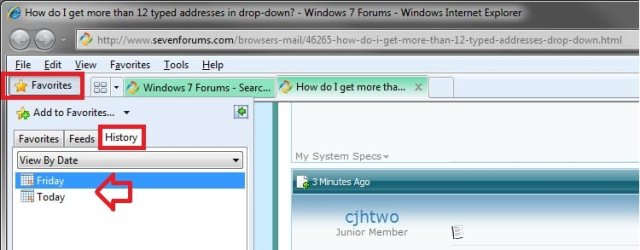
I'm not sure if it will have more than 12 or not, but you can also click on the Favorties toolbar button, History tab, then click on a day that you want to see all the websites that you went to that day. It will show everything instead of the last 12.
My Computer
At a glance
64-bit Windows 11 Pro for WorkstationsIntel i7-8700K OC'd to 5 GHz64 GB (4x16GB) G.SKILL TridentZ RGB DDR4 3600...ASUS ROG-STRIX-GTX1080TI-O11G-GAMING
- Computer type
- PC/Desktop
- Computer Manufacturer/Model Number
- Self built custom
- OS
- 64-bit Windows 11 Pro for Workstations
- CPU
- Intel i7-8700K OC'd to 5 GHz
- Motherboard
- ASUS ROG Maximus XI Formula Z390
- Memory
- 64 GB (4x16GB) G.SKILL TridentZ RGB DDR4 3600 MHz
- Graphics Card(s)
- ASUS ROG-STRIX-GTX1080TI-O11G-GAMING
- Sound Card
- Integrated
- Monitor(s) Displays
- 2 x Samsung Odyssey G7 27"
- Screen Resolution
- 2560x1440
- Hard Drives
- 1TB Samsung 990 PRO M.2,
4TB Samsung 990 PRO PRO M.2,
TerraMaster F8 SSD Plus NAS
- PSU
- Seasonic Prime Titanium 850W
- Case
- Thermaltake Core P3
- Cooling
- Corsair Hydro H115i
- Keyboard
- Logitech wireless K800
- Mouse
- Logitech MX Master 4
- Internet Speed
- 2 Gb/s Download and 100 Mb/s Upload
- Antivirus
- Malwarebyte Anti-Malware Premium
- Browser
- Google Chrome
- Other Info
- Logitech Z625 speaker system,
Logitech BRIO 4K Pro webcam,
HP Color LaserJet Pro MFP M477fdn,
APC SMART-UPS RT 1000 XL - SURT1000XLI,
Galaxy S23 Plus phone
"More typed addresses
As part of the request for more control, many of you desired to see more typed addresses. The other sections (History, Favorites, and Feeds) are expandable to show 5-20 items, but in Beta 2 we limited typed addresses to 5. I’m excited to announce that we now offer the option to see more typed addresses.
Turning off one address bar section (ex: feeds) will increase the number of typed addresses from 5 to 12. If you decide you really just want typed addresses and turn off all the other sections, you will now see up to 25 typed addresses. Coupled with the change to turn feeds off by default, you will now see up to 12 typed addresses in the default case"
I got this from somplace here called IE8 Smart Address Bar. This is what I was looking for, not all of the steps involved in using the Favorites & History tabs. But I have no idea how to "Turn off one address bar section." And I'd really want to turn both of them off so I can get 25 typed addresses. I would have hoped that if directions are given to do something, that instructions on how to do it could be found somewhere.
As part of the request for more control, many of you desired to see more typed addresses. The other sections (History, Favorites, and Feeds) are expandable to show 5-20 items, but in Beta 2 we limited typed addresses to 5. I’m excited to announce that we now offer the option to see more typed addresses.
Turning off one address bar section (ex: feeds) will increase the number of typed addresses from 5 to 12. If you decide you really just want typed addresses and turn off all the other sections, you will now see up to 25 typed addresses. Coupled with the change to turn feeds off by default, you will now see up to 12 typed addresses in the default case"
I got this from somplace here called IE8 Smart Address Bar. This is what I was looking for, not all of the steps involved in using the Favorites & History tabs. But I have no idea how to "Turn off one address bar section." And I'd really want to turn both of them off so I can get 25 typed addresses. I would have hoped that if directions are given to do something, that instructions on how to do it could be found somewhere.
My Computer
At a glance
Windows 7 Home Premium
- OS
- Windows 7 Home Premium


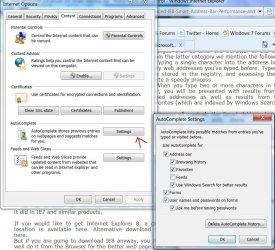
Maybe this is what you are looking for . good luck to you with this problem. And welcome to Seven Forums!
My Computer
At a glance
Windows 7 Ulti. x64AMD Phenom 8450 triple-core 2.10 ghz4GBATI Radion HD 3200
- Computer Manufacturer/Model Number
- Gateway GT5692
- OS
- Windows 7 Ulti. x64
- CPU
- AMD Phenom 8450 triple-core 2.10 ghz
- Memory
- 4GB
- Graphics Card(s)
- ATI Radion HD 3200
- Monitor(s) Displays
- Gateway FPD1775W
- Screen Resolution
- 1280x720
- Hard Drives
- 465.6613 Gibibytes

using a better browser might be an easier option ?
My Computer
At a glance
win7 ultimate / virtual boxIntel Core i7 3770K,1155, Ivy BridgeGSkill Ripjaws Z Series 1600 CL 9.0 16GBKFA2 GeForce GTX 670 EX OC 2048MB GDDR5 PCI-E...
- Computer Manufacturer/Model Number
- built my own
- OS
- win7 ultimate / virtual box
- CPU
- Intel Core i7 3770K,1155, Ivy Bridge
- Motherboard
- MSI Z77A-G43
- Memory
- GSkill Ripjaws Z Series 1600 CL 9.0 16GB
- Graphics Card(s)
- KFA2 GeForce GTX 670 EX OC 2048MB GDDR5 PCI-E gfx card
- Sound Card
- onboard Nvidia HDMI audio
- Monitor(s) Displays
- ASUS VK222H 22" widescreen LCD monitor
- Screen Resolution
- 1680x1050
- Hard Drives
- Kingston 128gb SSD
OCZ Vertex 90gb SSD
500GB WDCaviar 16mb 5000KS
320GB WDCaviar 16mb 3200AAKS sata 2
1TB Samsung 16mb HD103SJ sata 2
- PSU
- Corsair HX 750W ATX2.2 Modular
- Cooling
- Antec 25 Kuhler H2O 620
- Keyboard
- logitech
- Mouse
- logitech MX518
- Internet Speed
- 7mb adsl
Well I tried unclicking the history and favs in the settings and it works good. Thanks for the idea cjhtwo. Now when the kids want me to find the web game they was playing two days ago I can show them a quick place to look for it. My only problem with that is they are not all old enough to read very good yet. Sorry if that is not what you wanted cjhtwo.
My Computer
At a glance
Windows 7 Ulti. x64AMD Phenom 8450 triple-core 2.10 ghz4GBATI Radion HD 3200
- Computer Manufacturer/Model Number
- Gateway GT5692
- OS
- Windows 7 Ulti. x64
- CPU
- AMD Phenom 8450 triple-core 2.10 ghz
- Memory
- 4GB
- Graphics Card(s)
- ATI Radion HD 3200
- Monitor(s) Displays
- Gateway FPD1775W
- Screen Resolution
- 1280x720
- Hard Drives
- 465.6613 Gibibytes
Thanks! I hadn't thought that this was it because I thought Autocomplete ws the same as Autofill. But it was. The directions seemed to say I could get more if I removed only one section than if I still had both sections. But it stayed at 12 when I kept the History section. I had to remove the History section to get more than 12. Now I have to figure out which I prefer. The nice thing about the History section is that it said where in the website I went, not just the website mane. For instance, there was a de-cluttering article that I had been sent to in Redbook and the History secdtion in the drop-down brought me right to it. The History that is in the Favorites section in the far left just has the Redbook website, not the article. Now that I've gotten used to the Most Viewed that show up in a new tab, I think that maybe I'll go back to having the History section in the drop-down since that means I effectively have 21 websites at my fingertips, the 9 in the New Tab and the 12 in the drop-down. Unfortunately I lost all the History in the drop-down so I'll probably never find those particular places again. Oh Well. Now I have the information to make a good decision.
The same instructions were posted earlier, but I thought it was about Autofill so I didn't think they were the right ones. Sorry to Brink, I think that's who it was.
The same instructions were posted earlier, but I thought it was about Autofill so I didn't think they were the right ones. Sorry to Brink, I think that's who it was.
My Computer
At a glance
Windows 7 Home Premium
- OS
- Windows 7 Home Premium
Similar threads
- Replies
- 8
- Views
- 2K

- Replies
- 11
- Views
- 4K
- Replies
- 11
- Views
- 10K
- Replies
- 1
- Views
- 6K
