Windows 7 Forums Search
Welcome to Windows 7 Forums. Our forum is dedicated to helping you find solutions with any problems, errors or issues you are experiencing with Windows 7. The Windows 7 forum also covers news and updates and has an extensive Windows 7 tutorial section that covers a wide range of tips and tricks.


Windows 7 - IE8 doesn't stop all popups --help please

 
03-24-2009   #1


W7 X-64 RTM,SUSE 11.1, XP PRO SP3 as a VM, VMware ESXi


IE8 doesn't stop all popups --help please

Hi guys

These type of advertisments I find really irritating in the extreme - posted another "general" comment in another topic

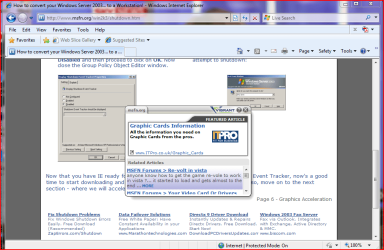
However how do I STOP these -- the popup blocker does a passable job but these little boxes that popup randomly just over the bit you are reading ARE REALLY IRRITATING.

The people who write this type of code must really have bird size brains if they think ANY PRODUCT will be sold via this type of commercial - in fact it would PUT ME OFF BUYING that product for all time.

A lot more sites are beginning to use this insidious method of advertising as a way to get round traditional "pop-up" blockers.


Cheers
jimbo

Attached Thumbnails
IE8 doesn't stop all popups --help please-popup.png  
My System SpecsSystem Spec
03-24-2009   #2


Windows 7 Professional 64-bit


You could try IE7Pro - The Ultimate Add-On for Internet Explorer It works with IE8 as well. It includes an AdBlock like feature.
My System SpecsSystem Spec
03-24-2009   #3


Windows 7 Ultimate Vista Ultimate x64


Just went to that page and I don't get any popups using Firefox, I hate popups and this is the reason I use Firefox and it's also a reason I would not use Chrome.
My System SpecsSystem Spec
.


03-24-2009   #4


win7 ultimate / virtual box


Quote   Quote: Originally Posted by jimbo45 View Post
Hi guys

These type of advertisments I find really irritating in the extreme - posted another "general" comment in another topic

However how do I STOP these -- the popup blocker does a passable job but these little boxes that popup randomly just over the bit you are reading ARE REALLY IRRITATING.

The people who write this type of code must really have bird size brains if they think ANY PRODUCT will be sold via this type of commercial - in fact it would PUT ME OFF BUYING that product for all time.

A lot more sites are beginning to use this insidious method of advertising as a way to get round traditional "pop-up" blockers.


Cheers
jimbo
you have just discovered Vibrant InText Advertising bla bla bla

not a popup I think but placed by cookies and it's embedded in the website but not dowloaded to the pc

I hate Em too

I found some methods to block in different browsers on good ole Neowin

aha discovered you can actually turn them off follow these instructions

Last edited by ickymay; 03-24-2009 at 06:04 AM.. Reason: found new solution
My System SpecsSystem Spec
03-24-2009   #5


Vista Ult 64 bit Seven Ult RTM x64


Hi ickymay,

Unfortunately, in order to turn them off, you have to allow the rats to put a cookie in your comp. Not to fond of that either.

Gary
My System SpecsSystem Spec
03-24-2009   #6


Windows 7 RC 7100 32bit/64bit


These are dymanic "<div>" which are called through javascript and are not considered browser popups.

The html code in tha page has them visible on-load and hidden on-demand.

They are not new browser windows, it's just some code executed within the page, something like this forum does when you click to enlarge an image.

The only way to disable it is to disable javascript I guess , but many sites use javascript to execute usefull functions and I don't think it would be a good idea. You can disable it though, if you're browsing these sites extensively, and re-enable it when you close them.

Cheers
My System SpecsSystem Spec
03-24-2009   #7


Windows 7 Ultimate 32bit SP1


Quote   Quote: Originally Posted by garysgold View Post
Hi ickymay,

Unfortunately, in order to turn them off, you have to allow the rats to put a cookie in your comp. Not to fond of that either.

Gary
Surprisingly "CookieWall" works with Windows 7 ... I've used it sin Win 98
AnalogX CookieWall Freeware download and review - a firewall for cookies from SnapFiles
My System SpecsSystem Spec
03-24-2009   #8


Vista Ult 64 bit Seven Ult RTM x64


Hi Jacee,

This is to prevent cookies. I've done that in the browser options and then allow what I need for things like logging in here automatically. The problem is you have to allow the cookie in order to stop the pop-ups from Vibrant.

Gary
My System SpecsSystem Spec
03-24-2009   #9


Windows 7 Ultimate 32bit SP1


I can't even get the page to load ... "Internet Explorer cannot display the webpage"

It must be my Hosts file is blocking it
My System SpecsSystem Spec
03-24-2009   #10


Windows 7 Professional 64-bit


Well theres two options

1) use the program I mentioned earlier (easy option)
2) harder option is to set up an add blocking proxy.
My System SpecsSystem Spec
Reply

 IE8 doesn't stop all popups --help please problems?


Thread Tools


Similar Threads for: IE8 doesn't stop all popups --help please
Thread Forum
Word process doesn't stop Microsoft Office
IE9 and Popups Browsers & Mail
popups General Discussion
How to stop popups on tasks running on taskbar Customization


All times are GMT -5. The time now is 12:12 AM.


Windows 7 Forums is an independent web site and has not been authorized,
sponsored, or otherwise approved by Microsoft Corporation.
"Windows 7" and related materials are trademarks of Microsoft Corp.
© Designer Media Ltd
  

1 2 3 4 5 6 7 8 9 10 11 12 13 14 15 16 17 18 19 20 21 22 23 24 25 26 27 28 29 30