Windows 7 Forums


Windows 7: Explorer Tabs Refreshes

25 Jan 2010  
stomper

Windows 7 Ultimate 64 bit
118 posts
Cape Town, South Africa
 
 
Explorer Tabs Refreshes

Hey guys plz help
My internet explorer tabs keep on refreshing...I use IE that came with Windows 7, so I installed firefox....funny enough a few days later the same happend to firefox...What the hell......really not cool...
Appreciate any help related to this problem...tnx a mil

My System SpecsSystem Spec

25 Jan 2010  
valtonray

Windows 7 Ultimate Signature Edition
1,604 posts
FL


is your keyboard damaged, particularly the "F5" key try a different keyboard if possible.
My System SpecsSystem Spec
25 Jan 2010  
stomper

Windows 7 Ultimate 64 bit
118 posts
Cape Town, South Africa


Know Its not that...Two days after my IE started doing it I bought a new mouse and keyboard...a few days later firefox started doing it....
have now idea whats going on.....
My System SpecsSystem Spec
.


25 Jan 2010  
V3xar

Operating System Microsoft Windows 7 Ultimate Build 7600
307 posts
Liverpool, UK


Hi stomper! Welcome to SevenForums

I can't help you with IE, but to stop Firefox reloading/refreshing pages automatically, do the following:

  1. Open Firefox browser
  2. Head to Tools >> Options >> Advanced >> General >> Accessibility
  3. Tick the option next to Warn me when web sites try to redirect or reload the page
Explorer Tabs Refreshes-ff3.jpg

Save your changes.

Checking the above option means you have manually selected not to allow Firefox to automatically reload web pages by adding accessibility.blockautorefresh code to the about:config parameters. Now all your auto page refresh or auto page reload requests by web sites will be ignored by Firefox and you will enjoy an uninterrupted browsing.

Hope this helps.


.
My System SpecsSystem Spec
26 Jan 2010  
stomper

Windows 7 Ultimate 64 bit
118 posts
Cape Town, South Africa


hey tnx man.....
THIS ACTUALLY WORKS....so what if my IE doesn't work....
Tnx a mil.... =)
My System SpecsSystem Spec
26 Jan 2010  
V3xar

Operating System Microsoft Windows 7 Ultimate Build 7600
307 posts
Liverpool, UK


Hi Stomper,

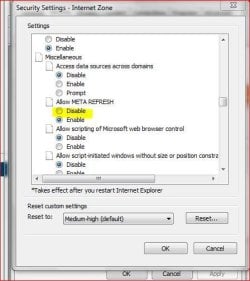
To do the same for Internet Explorer, do the following :

Step 1: In Internet Explorer go to Tools –> Internet Options and click on the security tab.


Step 2: In the security tab click on the Custom level button towards the bottom.

Explorer Tabs Refreshes-ie.jpg

Step 3: In the security settings window, scroll down till you come across the Miscellaneous group and select disable in Allow META REFRESH option and click on Ok.


That’s it the auto-refreshing of the page won’t happen once you make this change.

Sorry for the delay in posting this.

Hope this helps.


.
My System SpecsSystem Spec
Reply

 Explorer Tabs Refreshes problems?


Thread Tools


Similar help and support threads for: Explorer Tabs Refreshes
Thread Forum
Internet Explorer Tabs - Drag and Drop Tutorials
Solved Explorer 9 tabs below favourites Browsers & Mail
Explorer 8 Problems with TABs Browsers & Mail
Internet Explorer 9 (IE9) Navigation on Steroids, from the UI to Tabs News
Add Tabs to Explorer.exe - Little similar to QtTabBar Customization


All times are GMT -5. The time now is 10:34 PM.


Windows 7 Forums is an independent web site and has not been authorized,
sponsored, or otherwise approved by Microsoft Corporation.
"Windows 7" and related materials are trademarks of Microsoft Corp.
© Designer Media Ltd