| Windows 7: help! my emails have all disappeared! |
03 Feb 2010
|
#1 | | |
help! my emails have all disappeared! Hey,
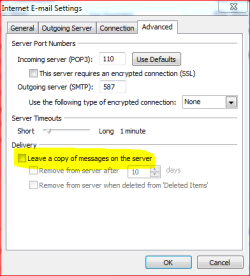
I just opened Outlook 2010 beta and all of my emails that were there have disappeared! Earlier on I had an email from my webhost saying that my disk space was exceeded. So I tried to find the option in account settings that outlook used to have called 'leave a copy on the server' in order to uncheck it so that all the messages wouldn't keep getting left on the server and taking up so much space. However It doesn't seem to be there in outlook 2010beta anymore, and I don't think I changed any other settings so I don't see why all my emails have gone. once I realised that the option to stop mail from being left on the server was gone I went onto my mail server and deleted all the mail from the server to create space. But surely that shouldn't have deleted them from my computer as well,, surely emails that outlook has downloaded should be saved in outlook!! Can you help tell me what might have gone wrong and if i can get my emails back??
Thanks, Duncan. | My System Specs |
| System Manufacturer/Model Number Home Built December 09 OS Windows 7 x64 Ultimate CPU Core i7 860 Motherboard Asus p7p55d Memory Corsair Dominator 1600MHz Graphics Card GeForce 8600GT Monitor(s) Displays Xerox Screen Resolution 1280*1024 Keyboard Trust Mouse Logitech Mx1000 PSU Corsair 550W Case Coolermaster CM 690 Hard Drives wextern digital caviar green 500GB 32Mb Cashe |
03 Feb 2010
|
#2 | | Windows 7 Home Premium SP1, clean install, upgrade disc CT |
Duncan, can you try backup and restore? That may return your email.
Hopefully you were making backup on a regular basis. | My System Specs | | System Manufacturer/Model Number Dell XPS 420 OS Windows 7 Home Premium SP1, clean install, upgrade disc CPU Intel Core2 processsor Q8200(2.33Ghz 1333FSB) Quad Core Tech Motherboard Dell Memory 6 gb Graphics Card ATI Radeon 256MB HD3650 Sound Card Intergrated 7.1 Channel Audio Monitor(s) Displays Dell SP2009W 20" Keyboard Dell USB Keyboard Mouse Dell Premium Optical USB Cooling Fan Hard Drives 640 GB Serial ATA Hard drive Internet Speed DSL 2.85 |
03 Feb 2010
|
#3 | | Vista Ult 64 bit Seven Ult RTM x64 Maine, USA |
That check box is here: Email accounts/change/More settings/Advanced Tab.
Hope that's what your looking for. | My System Specs | | System Manufacturer/Model Number Dell XPS420 OS Vista Ult 64 bit Seven Ult RTM x64 CPU Intel Core2 Quad Q6600 2.40 gigahertz Memory Crucial Ballistix 4x2GB PC2 6400 Graphics Card NVIDIA GeForce 8600 GTS 256 MB Sound Card Creative SB X-Fi audio Monitor(s) Displays HP w2207 + HPvs15 Screen Resolution 1680x1050 + 1024x768 Keyboard Microsoft Comfort Curve Mouse MX Revolution Hard Drives 2-WD5000AAKS-500 GB
WD5000AAV-500 GB external Other Info Wacom Intuos 2 Graphics Tablet
Experience Index=5.5 |
03 Feb 2010
|
#4 | | |

Quote: Originally Posted by richc46 Duncan, can you try backup and restore? That may return your email.
Hopefully you were making backup on a regular basis. Thanks richc46 I've only just built my pc a month ago and I haven't set up my backup yet because I am having a problem partitioning my hard drive I haven't resolved yet. Do you mean a system restore?
Also I tried opening my archieve to see if they had ended up there but that seems to be completely empty also eventhough it should have stuff I've archieved from my previous comp and I then copied the archieve to my new comp.
garysgold
I have looked at Email accounts/change/More settings/Advanced Tab and it just isn't there. It isn't there in 2010 beta, I've seen other people on the net with the same problem of it not being there. | My System Specs | | System Manufacturer/Model Number Home Built December 09 OS Windows 7 x64 Ultimate CPU Core i7 860 Motherboard Asus p7p55d Memory Corsair Dominator 1600MHz Graphics Card GeForce 8600GT Monitor(s) Displays Xerox Screen Resolution 1280*1024 Keyboard Trust Mouse Logitech Mx1000 PSU Corsair 550W Case Coolermaster CM 690 Hard Drives wextern digital caviar green 500GB 32Mb Cashe |
03 Feb 2010
|
#5 | | Windows 7 x64 Ultimate A Finnish immigrant in Leipzig, Germany |

Quote: Originally Posted by Duncan I have looked at Email accounts/change/More settings/Advanced Tab and it just isn't there. It isn't there in 2010 beta, I've seen other people on the net with the same problem of it not being there. It is there if the account is POP account. For IMAP accounts it does not exist.
Check your email provider's support if you can use POP / SMTP instead of IMAP.
This screenshot from my Office 2010 Beta:
Kari | My System Specs | | Computer type Laptop System Manufacturer/Model Number HP ENVY 17-1150eg OS Windows 7 x64 Ultimate CPU 1.6 GHz Intel Core i7-720QM Processor Memory 6 GB Graphics Card ATI Mobility Radeon HD 5850 Graphics Sound Card Beats sound system with integrated subwoofer Monitor(s) Displays 17" laptop display, 22" LCD and 32" Full HD TV through HDMI Screen Resolution 1600*900, 1680*1050 and 1920*1080 Keyboard Logitech diNovo Media Desktop Laser (bluetooth) Mouse Logitech MX1000 Laser (Bluetooth) Hard Drives Internal: 2 x 500 GB SATA Hard Disk Drive 7200 rpm
External: 2TB for backups, 3TB USB3 network drive for media Internet Speed 50/10 Mbps VDSL Antivirus MSE, Windows Defender Browser Maxthon 3.5.2. Other Info Windows 7 Ultimate Retail Full in English, additional Guest-user accounts in Finnish, German and Swedish (Working languages English & Swedish, Family language German, my own language, mother tongue, Finnish. I really need Ultimate to get to use Language Packs!) |
03 Feb 2010
|
#6 | | Windows 7 Home Premium SP1, clean install, upgrade disc CT |

Quote: Originally Posted by Duncan 
Quote: Originally Posted by richc46 Duncan, can you try backup and restore? That may return your email.
Hopefully you were making backup on a regular basis. Thanks richc46 I've only just built my pc a month ago and I haven't set up my backup yet because I am having a problem partitioning my hard drive I haven't resolved yet. Do you mean a system restore?
Also I tried opening my archieve to see if they had ended up there but that seems to be completely empty also eventhough it should have stuff I've archieved from my previous comp and I then copied the archieve to my new comp.
garysgold
I have looked at Email accounts/change/More settings/Advanced Tab and it just isn't there. It isn't there in 2010 beta, I've seen other people on the net with the same problem of it not being there. Sorry, system restore will not return mail. | My System Specs | | System Manufacturer/Model Number Dell XPS 420 OS Windows 7 Home Premium SP1, clean install, upgrade disc CPU Intel Core2 processsor Q8200(2.33Ghz 1333FSB) Quad Core Tech Motherboard Dell Memory 6 gb Graphics Card ATI Radeon 256MB HD3650 Sound Card Intergrated 7.1 Channel Audio Monitor(s) Displays Dell SP2009W 20" Keyboard Dell USB Keyboard Mouse Dell Premium Optical USB Cooling Fan Hard Drives 640 GB Serial ATA Hard drive Internet Speed DSL 2.85 |
03 Feb 2010
|
#7 | | Windows 7 x64 Ultimate A Finnish immigrant in Leipzig, Germany |
Please check the folder C:\Users\Your_Username\AppData\Local\Microsoft\Outlook. Are your PST-files (Outlook Data Files) still there? Outlook.pst is for your POP account(s) mail, calendar, tasks and contacts. Files named as Your@Email.com.pst (or .net.pst etc.) are for your IMAP accounts.
If these PST-files still exist, we can do something.
Kari | My System Specs | | Computer type Laptop System Manufacturer/Model Number HP ENVY 17-1150eg OS Windows 7 x64 Ultimate CPU 1.6 GHz Intel Core i7-720QM Processor Memory 6 GB Graphics Card ATI Mobility Radeon HD 5850 Graphics Sound Card Beats sound system with integrated subwoofer Monitor(s) Displays 17" laptop display, 22" LCD and 32" Full HD TV through HDMI Screen Resolution 1600*900, 1680*1050 and 1920*1080 Keyboard Logitech diNovo Media Desktop Laser (bluetooth) Mouse Logitech MX1000 Laser (Bluetooth) Hard Drives Internal: 2 x 500 GB SATA Hard Disk Drive 7200 rpm
External: 2TB for backups, 3TB USB3 network drive for media Internet Speed 50/10 Mbps VDSL Antivirus MSE, Windows Defender Browser Maxthon 3.5.2. Other Info Windows 7 Ultimate Retail Full in English, additional Guest-user accounts in Finnish, German and Swedish (Working languages English & Swedish, Family language German, my own language, mother tongue, Finnish. I really need Ultimate to get to use Language Packs!) |
03 Feb 2010
|
#8 | | |

Quote: Originally Posted by Kari 
Quote: Originally Posted by Duncan I have looked at Email accounts/change/More settings/Advanced Tab and it just isn't there. It isn't there in 2010 beta, I've seen other people on the net with the same problem of it not being there. It is there if the account is POP account. For IMAP accounts it does not exist.
Check your email provider's support if you can use POP / SMTP instead of IMAP.
This screenshot from my Office 2010 Beta: Attachment 51950
Kari
Thanks Kari, it looks like my account is an IMAP and it was definately POP3 in my old outlook on my old comp. But the 'account type' setting in account settings > advanced is set to IMAP and greyed out. I think this new outlook 2010 beta just found my email address and set it up automatically without asking me to choose any settings so how do I fix it?
thanks,
richc46 thanks for your help I only lost a few invoices, order confirmations and a returns notification. Don't think I should need any of it anymore it's just nice to have the record. | My System Specs | | System Manufacturer/Model Number Home Built December 09 OS Windows 7 x64 Ultimate CPU Core i7 860 Motherboard Asus p7p55d Memory Corsair Dominator 1600MHz Graphics Card GeForce 8600GT Monitor(s) Displays Xerox Screen Resolution 1280*1024 Keyboard Trust Mouse Logitech Mx1000 PSU Corsair 550W Case Coolermaster CM 690 Hard Drives wextern digital caviar green 500GB 32Mb Cashe |
03 Feb 2010
|
#9 | | |

Quote: Originally Posted by Kari Please check the folder C:\Users\Your_Username\AppData\Local\Microsoft\Outlook. Are your PST-files (Outlook Data Files) still there? Outlook.pst is for your POP account(s) mail, calendar, tasks and contacts. Files named as Your@Email.com.pst (or .net.pst etc.) are for your IMAP accounts.
If these PST-files still exist, we can do something.
Kari
Thanks Kari,
I don't seem to have this location or an AppData folder. I do have this location though: C:\Users\Duncan\MyDocuments\OutlookFiles\Outlook.pst and I tried to open the file but it seems to be empty and there are no My@Email.com.pstfiles in this directory. I guess we're probably at a dead end now? | My System Specs | | System Manufacturer/Model Number Home Built December 09 OS Windows 7 x64 Ultimate CPU Core i7 860 Motherboard Asus p7p55d Memory Corsair Dominator 1600MHz Graphics Card GeForce 8600GT Monitor(s) Displays Xerox Screen Resolution 1280*1024 Keyboard Trust Mouse Logitech Mx1000 PSU Corsair 550W Case Coolermaster CM 690 Hard Drives wextern digital caviar green 500GB 32Mb Cashe |
03 Feb 2010
|
#10 | | Windows 7 x64 Ultimate A Finnish immigrant in Leipzig, Germany |
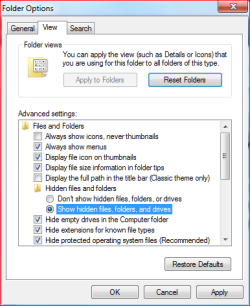
AppData is a hidden folder. To see it, go to Control Panel > Appearance and Personalization > Folder Options, click the View tab and choose Show hidden files, folders and drives.
Kari | My System Specs | | Computer type Laptop System Manufacturer/Model Number HP ENVY 17-1150eg OS Windows 7 x64 Ultimate CPU 1.6 GHz Intel Core i7-720QM Processor Memory 6 GB Graphics Card ATI Mobility Radeon HD 5850 Graphics Sound Card Beats sound system with integrated subwoofer Monitor(s) Displays 17" laptop display, 22" LCD and 32" Full HD TV through HDMI Screen Resolution 1600*900, 1680*1050 and 1920*1080 Keyboard Logitech diNovo Media Desktop Laser (bluetooth) Mouse Logitech MX1000 Laser (Bluetooth) Hard Drives Internal: 2 x 500 GB SATA Hard Disk Drive 7200 rpm
External: 2TB for backups, 3TB USB3 network drive for media Internet Speed 50/10 Mbps VDSL Antivirus MSE, Windows Defender Browser Maxthon 3.5.2. Other Info Windows 7 Ultimate Retail Full in English, additional Guest-user accounts in Finnish, German and Swedish (Working languages English & Swedish, Family language German, my own language, mother tongue, Finnish. I really need Ultimate to get to use Language Packs!) help! my emails have all disappeared! problems? All times are GMT -5. The time now is 02:56 AM. | |