| Windows 7: Anyway to disable mouse-over text boxes in Firefox? |
13 Mar 2010
|
#1 | | Windows 7 Professional x64 |
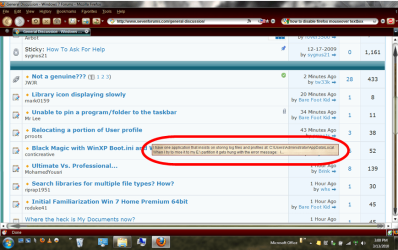
Anyway to disable mouse-over text boxes in Firefox? I'm not sure if this is a Windows or a Firefox thing, but I would like to disable these mouse-over text boxes that appear in Firefox. I have looked all over and can't figure out how to turn them off. Any help would be appreciated. | My System Specs |
| System Manufacturer/Model Number HP dv3510nr OS Windows 7 Professional x64 CPU Intel Core 2 Duo P7350 2GHz (1066MHz FSB, 3MB Cache) Memory 4GB DDR2 Graphics Card Nvidia GeForce 9300M GS with 512MB Sound Card IDT High Definition Audio Monitor(s) Displays 13.3" WXGA High-Definition HP LED BrightView Widescreen Screen Resolution 1280 x 800 Hard Drives 320GB 5400RPM SATA |
13 Mar 2010
|
#2 | | Windows 7 Ultimate The Southern Hinterlands |
the mouseover effect is hard coded in the HTML ... you can't disable it as far as i know.. | My System Specs | | System Manufacturer/Model Number ASUSTeK Computer INC. CM5675 OS Windows 7 Ultimate CPU Core(TM) i5 CPU 650 @ 3.20GHz Motherboard ASUSTeK Computer INC. CM5675 Memory 6.00 GB Graphics Card Intel(R) HD Graphics Sound Card Intel HD integtrated Monitor(s) Displays Samsung 24' Screen Resolution 1900/1020 Hard Drives (1) INTEL SSD SA2M120G2GC ATA Device (2) ST31000528AS ATA Device Internet Speed 30mb |
13 Mar 2010
|
#3 | | Windows 7 Ultimate x64 SP1 |
The best you can do is press shift or ctrl as you hover over them. That will kill the pop up box. | My System Specs | | System Manufacturer/Model Number Dell XPS 15 L502x OS Windows 7 Ultimate x64 SP1 CPU Core i7-2670QM Memory 8GB DDR3 PC3-10600 Graphics Card Intel HD Graphics 3000 + GeForce GT 540M Screen Resolution 1920x1080 Hard Drives 1TB 5400RPM Seagate |
13 Mar 2010
|
#4 | | Windows 7 Ultimate x64 ®™ West Yorkshire |

Quote: Originally Posted by Tews the mouseover effect is hard coded in the HTML ... you can't disable it as far as i know.. +1. It's quite handy imo. | My System Specs | | System Manufacturer/Model Number Sony Vaio FZ21Z OS Windows 7 Ultimate x64 ®™ CPU Intel Core 2 Duo (2.2 GHz) Motherboard Sony (Intel Chipset) Memory 2x 2GB Corsair (667 MHz) Graphics Card NVIDIA 8600M GS (256MB) Sound Card Sigmatel Monitor(s) Displays 15.4" TFT X-Black Screen Resolution 1280x800 Mouse Logitech Anywhere MX Hard Drives Western Digital 300GB Scorpio Black (7200rpm) Internet Speed Sky 5MB |
15 Mar 2010
|
#5 | | Windows 7 Professional x64 |

Quote: Originally Posted by kegobeer The best you can do is press shift or ctrl as you hover over them. That will kill the pop up box. Thanks Kegobeer, that's a cool little trick that seems to do the job. I still wish there was a way to just turn it off completely. | My System Specs | | System Manufacturer/Model Number HP dv3510nr OS Windows 7 Professional x64 CPU Intel Core 2 Duo P7350 2GHz (1066MHz FSB, 3MB Cache) Memory 4GB DDR2 Graphics Card Nvidia GeForce 9300M GS with 512MB Sound Card IDT High Definition Audio Monitor(s) Displays 13.3" WXGA High-Definition HP LED BrightView Widescreen Screen Resolution 1280 x 800 Hard Drives 320GB 5400RPM SATA |
15 Mar 2010
|
#6 | | Windows 7 Ultimate x64 SP1 |
You have to disable javascript, I'm afraid. I can't stand those stupid pop-ups, and I wish there was something else I could do. | My System Specs | | System Manufacturer/Model Number Dell XPS 15 L502x OS Windows 7 Ultimate x64 SP1 CPU Core i7-2670QM Memory 8GB DDR3 PC3-10600 Graphics Card Intel HD Graphics 3000 + GeForce GT 540M Screen Resolution 1920x1080 Hard Drives 1TB 5400RPM Seagate |
16 Mar 2010
|
#7 | | Windows 7 Professional x64 |
That's alright, both ctrl and shift work fine. Thanks for the tip. | My System Specs | | System Manufacturer/Model Number HP dv3510nr OS Windows 7 Professional x64 CPU Intel Core 2 Duo P7350 2GHz (1066MHz FSB, 3MB Cache) Memory 4GB DDR2 Graphics Card Nvidia GeForce 9300M GS with 512MB Sound Card IDT High Definition Audio Monitor(s) Displays 13.3" WXGA High-Definition HP LED BrightView Widescreen Screen Resolution 1280 x 800 Hard Drives 320GB 5400RPM SATA |
16 Mar 2010
|
#8 | | Windows XP - Now Windows 7 Home Premium (64-bit). |
Yes, does not bother me as such, in fact I quite like the 'preview' given but thanks for the useful tip keg. | My System Specs | | OS Windows XP - Now Windows 7 Home Premium (64-bit). |
16 Mar 2010
|
#9 | | Windows 7 Ultimate x86 build 7600 (XP, 98SE, 95, 3.11, DOS 7.10 on VM) + Ubuntu 10.04 LTS Lucid Lynx Chennai, India |

Quote: Originally Posted by kegobeer You have to disable javascript, I'm afraid. I can't stand those stupid pop-ups, and I wish there was something else I could do. that has nothing to do with javascript kegobeer. its the title attribute for a link and disabling javascript won't disable it | My System Specs | | Computer type Laptop System Manufacturer/Model Number HP EliteBook 8530w Mobile Workstation OS Windows 7 Ultimate x86 build 7600 (XP, 98SE, 95, 3.11, DOS 7.10 on VM) + Ubuntu 10.04 LTS Lucid Lynx CPU Intel Core 2 Duo Processor P8600 (2.40 GHz, 3 MB L2 cache) Motherboard Mobile Intel PM45 Express Chipset ICH9M-Enhanced Memory 2GB 800 MHz DDR2 SDRAM Graphics Card ATI Mobility FireGL V5700 with 256 MB Sound Card SoundMAX Integrated Digital HD Audio Monitor(s) Displays 15.4-inch WXGA anti-glare (1280 x 800 resolution) Screen Resolution 1280 x 800 Mouse Synaptics PS/2 Port Touchpad, USB Mouse Hard Drives 250GB Fujitsu MJA2250BH G2 ATA Device (IDE),
120GB in External Casing Internet Speed 2 Mbps Antivirus MSE Browser Firefox, Chrome, IE Other Info Authentec AES2810 Fingerprint Reader,
Optiarc DVD RW AD-7561S LightScribe |
24 Mar 2010
|
#10 | | |
Switch off hover. 
Quote: Originally Posted by Slimer I'm not sure if this is a Windows or a Firefox thing, but I would like to disable these mouse-over text boxes that appear in Firefox. I have looked all over and can't figure out how to turn them off. Any help would be appreciated. Browser.chrome.toolbar tips - MozillaZine Knowledge Base When you hover your mouse cursor over various UI elements, a tooltip will often be displayed with descriptive text. This preference determines whether or not Mozilla will display tooltips. Possible values and their effects True
Show tooltips for toolbar buttons, bookmarks, web content, and other items. (Default) False Hide all tooltips. Mozilla Suite and SeaMonkey The checkbox “Show Tooltips” under “Edit → Preferences → Appearance” toggles this preference between true and false.
Mozilla Suite (all versions since 0.6)
Mozilla Firefox (all versions)
SeaMonkey (all versions) | My System Specs | | Anyway to disable mouse-over text boxes in Firefox? problems? All times are GMT -5. The time now is 10:16 PM. | |