| Windows 7: Attach picture to email |
03 Jul 2010
|
#1 | | Windows 7 x64 RC1, Vista Ultimate, XP Pro AZ |
Attach picture to email It ask if I wanted to make this an email photo and I mark yes "Don't ask again" That was a mistake. How do I insert a photo into my email now because all I can do is attach a little picture.
Richard | My System Specs |
| OS Windows 7 x64 RC1, Vista Ultimate, XP Pro CPU AMD 955 Memory 4 gigs - 1333 Graphics Card 5750 Monitor(s) Displays i-inc 28" Screen Resolution 1920x1200 Hard Drives 2 SATA2 750 GB - 1 SATA2 1TB - 1 SATA3 1TB - 1 USB3 2TB - 1 USB3 500 GB, SSD 60 GB Internet Speed 7 Megs |
03 Jul 2010
|
#2 | | Win 8 Release candidate 8400 |

Quote: Originally Posted by lostsoul62 It ask if I wanted to make this an email photo and I mark yes "Don't ask again" That was a mistake. How do I insert a photo into my email now because all I can do is attach a little picture.
Richard
Info please. What mail client, what OS, etc | My System Specs | | System Manufacturer/Model Number HP Pavillion dv-7 1005 Tx OS Win 8 Release candidate 8400 CPU 2@2.4 Memory 4 gigs Graphics Card Nvidia 9600M Sound Card HD built-in Monitor(s) Displays 17" Wxga Screen Resolution 1440x900 Cooling none Internet Speed 45Mb down 5Mb up |
03 Jul 2010
|
#3 | | Win 8 Release candidate 8400 |

Quote: Originally Posted by lostsoul62 It ask if I wanted to make this an email photo and I mark yes "Don't ask again" That was a mistake. How do I insert a photo into my email now because all I can do is attach a little picture.
Richard
Info please. What mail client, what OS, etc | My System Specs | | System Manufacturer/Model Number HP Pavillion dv-7 1005 Tx OS Win 8 Release candidate 8400 CPU 2@2.4 Memory 4 gigs Graphics Card Nvidia 9600M Sound Card HD built-in Monitor(s) Displays 17" Wxga Screen Resolution 1440x900 Cooling none Internet Speed 45Mb down 5Mb up |
03 Jul 2010
|
#4 | | Windows 7 x64 RC1, Vista Ultimate, XP Pro AZ |
Info please. What mail client, what OS, etc[/QUOTE]
This is Windows 7 forum. Windows Live Mail | My System Specs | | OS Windows 7 x64 RC1, Vista Ultimate, XP Pro CPU AMD 955 Memory 4 gigs - 1333 Graphics Card 5750 Monitor(s) Displays i-inc 28" Screen Resolution 1920x1200 Hard Drives 2 SATA2 750 GB - 1 SATA2 1TB - 1 SATA3 1TB - 1 USB3 2TB - 1 USB3 500 GB, SSD 60 GB Internet Speed 7 Megs |
03 Jul 2010
|
#5 | | |
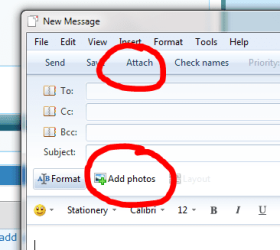
try attaching photos (using the attach button) rather than adding photos using the 'add photos' button.
by the way, the little pictures are thumbnails, that the recepient can click to see the full size picture (for 30 days, then they get deleted).
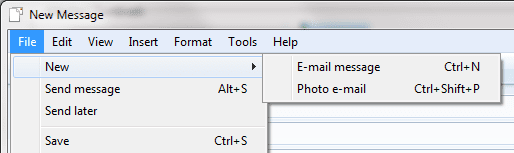
*edit* or use file>> new menu...and choose 'email message' rather than photo email.
hope this helps. | My System Specs | | System Manufacturer/Model Number mickey megabyte 1234 OS ultimate 64 sp1 CPU i5 2500K 3.3@4.2GHz Motherboard MSI P67A-GD53 Memory 8 gigs GSkill Ripjaws 1600 Graphics Card amd hd6950 Sound Card creative x-fi gamer Monitor(s) Displays samsung 24" Screen Resolution 1920x1080 Keyboard saitek eclipse ii Mouse logitech g3 PSU antec 550 Case antec three hundred Cooling i'm a cooling fan Hard Drives ocz vertex 2e 60 gig, samsung f3 1tb, buffalo 2tb ext Internet Speed about 4 Mbps Other Info i love win7 |
03 Jul 2010
|
#6 | | Windows 7 x64 RC1, Vista Ultimate, XP Pro AZ |
When I did "Attach" it ask if I wanted to make this an email photo and I said yes and then a message came and ask "Don't ask me again" and I said yes like a fool and now I can't send and high resolution picture. | My System Specs | | OS Windows 7 x64 RC1, Vista Ultimate, XP Pro CPU AMD 955 Memory 4 gigs - 1333 Graphics Card 5750 Monitor(s) Displays i-inc 28" Screen Resolution 1920x1200 Hard Drives 2 SATA2 750 GB - 1 SATA2 1TB - 1 SATA3 1TB - 1 USB3 2TB - 1 USB3 500 GB, SSD 60 GB Internet Speed 7 Megs |
03 Jul 2010
|
#7 | | |
ok, i've done some more research and found this thread here, there is a registry setting that controls this behaviour. 
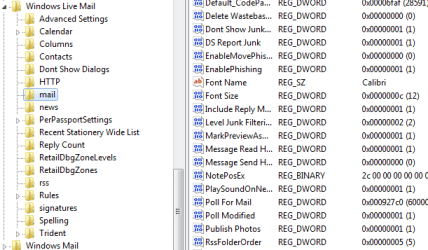
Quote: Originally Posted by niceget HKEY_CURRENT_USER\Software\Microsoft\Windows Live Mail\mail
On the right side look for Publish Photos. The DWORD value is 0 (zero) by default but you will find it to be the number "1". Simply change the number 1 to 0 and you're back in buiness. are you comfortable with editing the registry? | My System Specs | | System Manufacturer/Model Number mickey megabyte 1234 OS ultimate 64 sp1 CPU i5 2500K 3.3@4.2GHz Motherboard MSI P67A-GD53 Memory 8 gigs GSkill Ripjaws 1600 Graphics Card amd hd6950 Sound Card creative x-fi gamer Monitor(s) Displays samsung 24" Screen Resolution 1920x1080 Keyboard saitek eclipse ii Mouse logitech g3 PSU antec 550 Case antec three hundred Cooling i'm a cooling fan Hard Drives ocz vertex 2e 60 gig, samsung f3 1tb, buffalo 2tb ext Internet Speed about 4 Mbps Other Info i love win7 |
03 Jul 2010
|
#8 | | Windows 7 x64 RC1, Vista Ultimate, XP Pro AZ |
I went into the regedit and I didn't find "Publish Photos" but I did find "safe attachments and secure safe attachments" and I can change these from 1 to 0 and it won't harm anything but I thought I would get back to you because I'm a little light on my computers because I've been retired for 7 years and I need to get up to speed. Before I do anything I thought I would ask for your opinion. Richard | My System Specs | | OS Windows 7 x64 RC1, Vista Ultimate, XP Pro CPU AMD 955 Memory 4 gigs - 1333 Graphics Card 5750 Monitor(s) Displays i-inc 28" Screen Resolution 1920x1200 Hard Drives 2 SATA2 750 GB - 1 SATA2 1TB - 1 SATA3 1TB - 1 USB3 2TB - 1 USB3 500 GB, SSD 60 GB Internet Speed 7 Megs |
03 Jul 2010
|
#9 | | |
it's all present and correct here.
you could try rightclicking in the right-hand pane, and add a new DWORD (32 bit) value, rename it Publish Photos (with a space in the middle) and give it the value of 0.
you may have to reboot to see any changes. (?)
if that doesn't work, then change the value to 1 and see what happens.
if that doesn't work, then i'm all out of ideas, sorry, and maybe somebody else could help you.
best of luck! | My System Specs | | System Manufacturer/Model Number mickey megabyte 1234 OS ultimate 64 sp1 CPU i5 2500K 3.3@4.2GHz Motherboard MSI P67A-GD53 Memory 8 gigs GSkill Ripjaws 1600 Graphics Card amd hd6950 Sound Card creative x-fi gamer Monitor(s) Displays samsung 24" Screen Resolution 1920x1080 Keyboard saitek eclipse ii Mouse logitech g3 PSU antec 550 Case antec three hundred Cooling i'm a cooling fan Hard Drives ocz vertex 2e 60 gig, samsung f3 1tb, buffalo 2tb ext Internet Speed about 4 Mbps Other Info i love win7 |
03 Jul 2010
|
#10 | | Windows 7 x64 RC1, Vista Ultimate, XP Pro AZ |
It Worked
Thank You
Richard | My System Specs | | OS Windows 7 x64 RC1, Vista Ultimate, XP Pro CPU AMD 955 Memory 4 gigs - 1333 Graphics Card 5750 Monitor(s) Displays i-inc 28" Screen Resolution 1920x1200 Hard Drives 2 SATA2 750 GB - 1 SATA2 1TB - 1 SATA3 1TB - 1 USB3 2TB - 1 USB3 500 GB, SSD 60 GB Internet Speed 7 Megs Attach picture to email problems? All times are GMT -5. The time now is 01:49 PM. | |