Solved 2 BSODs 2 Days

All clear. Took forever

Had no problems since
 

My Computer

OS
Windows 7 Home prem 64
CPU
AMD Phenom II X4 955 Black Edition 3.2 GHz Socket AM3
Motherboard
Asus M4A79XTD Evo AM3
Memory
G.Skill RipJaw 4GB (2x2GB) DDR3 PC3-10666C8 1333MHz
Graphics Card(s)
Asus GeForce GTX 560Ti DirectCU II
Sound Card
Asus Xonard)
Monitor(s) Displays
2* Samsung P2350
Screen Resolution
1920*1080
Hard Drives
Western Digital WD1001FALS 1TB Hard Drive SATAII 7200rpm 32MB Cache
PSU
Coolermaster RealPower 700W Modular PSU
Case
Cooler Master Storm Scout
Keyboard
Logitech G11
Mouse
Razer Deathadder 3500DPI
Internet Speed
50down 5up
That's good news.

Run some stress tests or have a gaming session, see how it does.

CPU - Stress Test with Prime95

Run the torture test, it tests RAM and CPU.
Open Prime95 > Advanced > Select 'Round off Checking'
Then go to 'Options' > Torture Test > tic 'Blend', enter the max number of threads to run.
Monitor CPU temps closely until they level off (won't take very long), let it run for a full hour.
If it's going to fail it should by then.

Let us know how it's running, good or bad.
 

My Computer

Computer type
PC/Desktop
Computer Manufacturer/Model Number
76~2.0
OS
Windows 7 Ult x64 - SP1/ Windows 8 Pro x64
CPU
Intel Core i5-3570K 4.6GHz
Motherboard
Gigabyte GA-Z77X UD3H, f18
Memory
8GB (2X4GB) DDR3 1600 Corsair Vengeance CL8 1.5v
Graphics Card(s)
Sapphire HD 7770 Vapor-X OC 1GB DDR5
Sound Card
Onboard VIA VT2021
Monitor(s) Displays
22" LCD Dell
Screen Resolution
1680x1050
Hard Drives
Samsung 840Pro 128GB SSD,
Seagate Barracuda 500GB SATA2 7200rpm 32MB cache, Seagate Barracuda 1TB SATA2 7200rpm 32MB cache,
PSU
Corsair HX650W
Case
Cooler Master Storm Scout
Cooling
Corsair H80 2x12cm Noctua NF P12 , 2x14cm case fans
Keyboard
Logitech Wave
Mouse
CM Sentinel
Internet Speed
Dismal
Antivirus
Avast
Browser
Opera Next
Other Info
Haswell laptop: HP Envy 17t-j, i7-4700MQ, GeForce 740M 2GB DDR3, 17.3" Full HD 1920x1080, 16GB RAM, Samsung 840 Pro 128GB, 1TB Hitachi 7200 HDD,
Desktop: eSATA ports,
External eSATA Seagate 500GB SATA2 7200rpm,
External WD USB 500GB
Well I gamed plenty yesterday ;)

I'm sure they will return sometime though! Thanks :D

Ordered my first SSD as well so will put that and sound card in on Thursday
 

My Computer

OS
Windows 7 Home prem 64
CPU
AMD Phenom II X4 955 Black Edition 3.2 GHz Socket AM3
Motherboard
Asus M4A79XTD Evo AM3
Memory
G.Skill RipJaw 4GB (2x2GB) DDR3 PC3-10666C8 1333MHz
Graphics Card(s)
Asus GeForce GTX 560Ti DirectCU II
Sound Card
Asus Xonard)
Monitor(s) Displays
2* Samsung P2350
Screen Resolution
1920*1080
Hard Drives
Western Digital WD1001FALS 1TB Hard Drive SATAII 7200rpm 32MB Cache
PSU
Coolermaster RealPower 700W Modular PSU
Case
Cooler Master Storm Scout
Keyboard
Logitech G11
Mouse
Razer Deathadder 3500DPI
Internet Speed
50down 5up
Ok doing the stress test, max cpu temp been 45c. Started it at 3:42, its 4:03 now and on 42c.
 

My Computer

OS
Windows 7 Home prem 64
CPU
AMD Phenom II X4 955 Black Edition 3.2 GHz Socket AM3
Motherboard
Asus M4A79XTD Evo AM3
Memory
G.Skill RipJaw 4GB (2x2GB) DDR3 PC3-10666C8 1333MHz
Graphics Card(s)
Asus GeForce GTX 560Ti DirectCU II
Sound Card
Asus Xonard)
Monitor(s) Displays
2* Samsung P2350
Screen Resolution
1920*1080
Hard Drives
Western Digital WD1001FALS 1TB Hard Drive SATAII 7200rpm 32MB Cache
PSU
Coolermaster RealPower 700W Modular PSU
Case
Cooler Master Storm Scout
Keyboard
Logitech G11
Mouse
Razer Deathadder 3500DPI
Internet Speed
50down 5up
Well its been an hour PC had no problems, can't even notice that the cpu is going at 100% and ram at 74% from surfing web etc.

Might as well keep it going... 43c
 

My Computer

OS
Windows 7 Home prem 64
CPU
AMD Phenom II X4 955 Black Edition 3.2 GHz Socket AM3
Motherboard
Asus M4A79XTD Evo AM3
Memory
G.Skill RipJaw 4GB (2x2GB) DDR3 PC3-10666C8 1333MHz
Graphics Card(s)
Asus GeForce GTX 560Ti DirectCU II
Sound Card
Asus Xonard)
Monitor(s) Displays
2* Samsung P2350
Screen Resolution
1920*1080
Hard Drives
Western Digital WD1001FALS 1TB Hard Drive SATAII 7200rpm 32MB Cache
PSU
Coolermaster RealPower 700W Modular PSU
Case
Cooler Master Storm Scout
Keyboard
Logitech G11
Mouse
Razer Deathadder 3500DPI
Internet Speed
50down 5up
How did the test go?

You can see the CPU and RAM usage from Task Manager, performance tab, Resource Monitor.
 

My Computer

Computer type
PC/Desktop
Computer Manufacturer/Model Number
76~2.0
OS
Windows 7 Ult x64 - SP1/ Windows 8 Pro x64
CPU
Intel Core i5-3570K 4.6GHz
Motherboard
Gigabyte GA-Z77X UD3H, f18
Memory
8GB (2X4GB) DDR3 1600 Corsair Vengeance CL8 1.5v
Graphics Card(s)
Sapphire HD 7770 Vapor-X OC 1GB DDR5
Sound Card
Onboard VIA VT2021
Monitor(s) Displays
22" LCD Dell
Screen Resolution
1680x1050
Hard Drives
Samsung 840Pro 128GB SSD,
Seagate Barracuda 500GB SATA2 7200rpm 32MB cache, Seagate Barracuda 1TB SATA2 7200rpm 32MB cache,
PSU
Corsair HX650W
Case
Cooler Master Storm Scout
Cooling
Corsair H80 2x12cm Noctua NF P12 , 2x14cm case fans
Keyboard
Logitech Wave
Mouse
CM Sentinel
Internet Speed
Dismal
Antivirus
Avast
Browser
Opera Next
Other Info
Haswell laptop: HP Envy 17t-j, i7-4700MQ, GeForce 740M 2GB DDR3, 17.3" Full HD 1920x1080, 16GB RAM, Samsung 840 Pro 128GB, 1TB Hitachi 7200 HDD,
Desktop: eSATA ports,
External eSATA Seagate 500GB SATA2 7200rpm,
External WD USB 500GB
Well its been an hour PC had no problems, can't even notice that the cpu is going at 100% and ram at 74% from surfing web etc.

Might as well keep it going... 43c

Well this.

It was fine, had it going for nearly 2 hours. Temperatures averaging at 43c. No crashes or anything or lag spikes while surfing the web etc.

Ye the CPU was going at 100% load while RAM at 75%
 

My Computer

OS
Windows 7 Home prem 64
CPU
AMD Phenom II X4 955 Black Edition 3.2 GHz Socket AM3
Motherboard
Asus M4A79XTD Evo AM3
Memory
G.Skill RipJaw 4GB (2x2GB) DDR3 PC3-10666C8 1333MHz
Graphics Card(s)
Asus GeForce GTX 560Ti DirectCU II
Sound Card
Asus Xonard)
Monitor(s) Displays
2* Samsung P2350
Screen Resolution
1920*1080
Hard Drives
Western Digital WD1001FALS 1TB Hard Drive SATAII 7200rpm 32MB Cache
PSU
Coolermaster RealPower 700W Modular PSU
Case
Cooler Master Storm Scout
Keyboard
Logitech G11
Mouse
Razer Deathadder 3500DPI
Internet Speed
50down 5up
That is normal for the Prime95 test.

Use it normally, try to do anything that use to cause a crash, let us know how it's running.

Hope it's going to be stable now.
 

My Computer

Computer type
PC/Desktop
Computer Manufacturer/Model Number
76~2.0
OS
Windows 7 Ult x64 - SP1/ Windows 8 Pro x64
CPU
Intel Core i5-3570K 4.6GHz
Motherboard
Gigabyte GA-Z77X UD3H, f18
Memory
8GB (2X4GB) DDR3 1600 Corsair Vengeance CL8 1.5v
Graphics Card(s)
Sapphire HD 7770 Vapor-X OC 1GB DDR5
Sound Card
Onboard VIA VT2021
Monitor(s) Displays
22" LCD Dell
Screen Resolution
1680x1050
Hard Drives
Samsung 840Pro 128GB SSD,
Seagate Barracuda 500GB SATA2 7200rpm 32MB cache, Seagate Barracuda 1TB SATA2 7200rpm 32MB cache,
PSU
Corsair HX650W
Case
Cooler Master Storm Scout
Cooling
Corsair H80 2x12cm Noctua NF P12 , 2x14cm case fans
Keyboard
Logitech Wave
Mouse
CM Sentinel
Internet Speed
Dismal
Antivirus
Avast
Browser
Opera Next
Other Info
Haswell laptop: HP Envy 17t-j, i7-4700MQ, GeForce 740M 2GB DDR3, 17.3" Full HD 1920x1080, 16GB RAM, Samsung 840 Pro 128GB, 1TB Hitachi 7200 HDD,
Desktop: eSATA ports,
External eSATA Seagate 500GB SATA2 7200rpm,
External WD USB 500GB
Well I can't do a prime95 and do something 'normal' such as playing a game.


I did load 4 WoW login screens up yesterday actually by accident. Caused the PC to go slow for a few minutes while I managed to close them. Obviously it would go slow with 4 clients open!
Otherwise been gaming and been ok.

So will wait and see, SSD coming later today, will also put the sound card back in :)
 

My Computer

OS
Windows 7 Home prem 64
CPU
AMD Phenom II X4 955 Black Edition 3.2 GHz Socket AM3
Motherboard
Asus M4A79XTD Evo AM3
Memory
G.Skill RipJaw 4GB (2x2GB) DDR3 PC3-10666C8 1333MHz
Graphics Card(s)
Asus GeForce GTX 560Ti DirectCU II
Sound Card
Asus Xonard)
Monitor(s) Displays
2* Samsung P2350
Screen Resolution
1920*1080
Hard Drives
Western Digital WD1001FALS 1TB Hard Drive SATAII 7200rpm 32MB Cache
PSU
Coolermaster RealPower 700W Modular PSU
Case
Cooler Master Storm Scout
Keyboard
Logitech G11
Mouse
Razer Deathadder 3500DPI
Internet Speed
50down 5up
I didn't mean to run Prime95 and play games, you past running Prime95 for a couple of hours, that's good and you don't need to run it again unless you get another crash.

Just use it as you normally do, not running Prime95, and see if it's stable.

If you can wait, I would make sure it's stable before adding the sound card in.

Which SSD did you get?
 

My Computer

Computer type
PC/Desktop
Computer Manufacturer/Model Number
76~2.0
OS
Windows 7 Ult x64 - SP1/ Windows 8 Pro x64
CPU
Intel Core i5-3570K 4.6GHz
Motherboard
Gigabyte GA-Z77X UD3H, f18
Memory
8GB (2X4GB) DDR3 1600 Corsair Vengeance CL8 1.5v
Graphics Card(s)
Sapphire HD 7770 Vapor-X OC 1GB DDR5
Sound Card
Onboard VIA VT2021
Monitor(s) Displays
22" LCD Dell
Screen Resolution
1680x1050
Hard Drives
Samsung 840Pro 128GB SSD,
Seagate Barracuda 500GB SATA2 7200rpm 32MB cache, Seagate Barracuda 1TB SATA2 7200rpm 32MB cache,
PSU
Corsair HX650W
Case
Cooler Master Storm Scout
Cooling
Corsair H80 2x12cm Noctua NF P12 , 2x14cm case fans
Keyboard
Logitech Wave
Mouse
CM Sentinel
Internet Speed
Dismal
Antivirus
Avast
Browser
Opera Next
Other Info
Haswell laptop: HP Envy 17t-j, i7-4700MQ, GeForce 740M 2GB DDR3, 17.3" Full HD 1920x1080, 16GB RAM, Samsung 840 Pro 128GB, 1TB Hitachi 7200 HDD,
Desktop: eSATA ports,
External eSATA Seagate 500GB SATA2 7200rpm,
External WD USB 500GB
Well haven't stopped doing what I normally do since I got the first one.

Intel 80GB SSD. (can't remember model)

How do I know its stable though? I thought it was stable last month when I had BSODs... Been fine for a few days now
 

My Computer

OS
Windows 7 Home prem 64
CPU
AMD Phenom II X4 955 Black Edition 3.2 GHz Socket AM3
Motherboard
Asus M4A79XTD Evo AM3
Memory
G.Skill RipJaw 4GB (2x2GB) DDR3 PC3-10666C8 1333MHz
Graphics Card(s)
Asus GeForce GTX 560Ti DirectCU II
Sound Card
Asus Xonard)
Monitor(s) Displays
2* Samsung P2350
Screen Resolution
1920*1080
Hard Drives
Western Digital WD1001FALS 1TB Hard Drive SATAII 7200rpm 32MB Cache
PSU
Coolermaster RealPower 700W Modular PSU
Case
Cooler Master Storm Scout
Keyboard
Logitech G11
Mouse
Razer Deathadder 3500DPI
Internet Speed
50down 5up
If it passes the tests, memtest86+ and Prime95, it should be stable.

Even if it passes these tests you might get another crash, which means a little more tweaking.

Just keep using it and let us know if you have another crash, will go from there.
 

My Computer

Computer type
PC/Desktop
Computer Manufacturer/Model Number
76~2.0
OS
Windows 7 Ult x64 - SP1/ Windows 8 Pro x64
CPU
Intel Core i5-3570K 4.6GHz
Motherboard
Gigabyte GA-Z77X UD3H, f18
Memory
8GB (2X4GB) DDR3 1600 Corsair Vengeance CL8 1.5v
Graphics Card(s)
Sapphire HD 7770 Vapor-X OC 1GB DDR5
Sound Card
Onboard VIA VT2021
Monitor(s) Displays
22" LCD Dell
Screen Resolution
1680x1050
Hard Drives
Samsung 840Pro 128GB SSD,
Seagate Barracuda 500GB SATA2 7200rpm 32MB cache, Seagate Barracuda 1TB SATA2 7200rpm 32MB cache,
PSU
Corsair HX650W
Case
Cooler Master Storm Scout
Cooling
Corsair H80 2x12cm Noctua NF P12 , 2x14cm case fans
Keyboard
Logitech Wave
Mouse
CM Sentinel
Internet Speed
Dismal
Antivirus
Avast
Browser
Opera Next
Other Info
Haswell laptop: HP Envy 17t-j, i7-4700MQ, GeForce 740M 2GB DDR3, 17.3" Full HD 1920x1080, 16GB RAM, Samsung 840 Pro 128GB, 1TB Hitachi 7200 HDD,
Desktop: eSATA ports,
External eSATA Seagate 500GB SATA2 7200rpm,
External WD USB 500GB
Ok

Thanks again for the help
 

My Computer

OS
Windows 7 Home prem 64
CPU
AMD Phenom II X4 955 Black Edition 3.2 GHz Socket AM3
Motherboard
Asus M4A79XTD Evo AM3
Memory
G.Skill RipJaw 4GB (2x2GB) DDR3 PC3-10666C8 1333MHz
Graphics Card(s)
Asus GeForce GTX 560Ti DirectCU II
Sound Card
Asus Xonard)
Monitor(s) Displays
2* Samsung P2350
Screen Resolution
1920*1080
Hard Drives
Western Digital WD1001FALS 1TB Hard Drive SATAII 7200rpm 32MB Cache
PSU
Coolermaster RealPower 700W Modular PSU
Case
Cooler Master Storm Scout
Keyboard
Logitech G11
Mouse
Razer Deathadder 3500DPI
Internet Speed
50down 5up
Your welcome.

BTW, very nice SSD choice.

I'm still going with Intel SSDs even though some others boast faster speeds, IMHO the Intels are a excellent choice for several reasons.

The new Gen3 SSDs are rumored to be coming out in Febuary, suppose to be faster and cheaper ;) :cool:
 

My Computer

Computer type
PC/Desktop
Computer Manufacturer/Model Number
76~2.0
OS
Windows 7 Ult x64 - SP1/ Windows 8 Pro x64
CPU
Intel Core i5-3570K 4.6GHz
Motherboard
Gigabyte GA-Z77X UD3H, f18
Memory
8GB (2X4GB) DDR3 1600 Corsair Vengeance CL8 1.5v
Graphics Card(s)
Sapphire HD 7770 Vapor-X OC 1GB DDR5
Sound Card
Onboard VIA VT2021
Monitor(s) Displays
22" LCD Dell
Screen Resolution
1680x1050
Hard Drives
Samsung 840Pro 128GB SSD,
Seagate Barracuda 500GB SATA2 7200rpm 32MB cache, Seagate Barracuda 1TB SATA2 7200rpm 32MB cache,
PSU
Corsair HX650W
Case
Cooler Master Storm Scout
Cooling
Corsair H80 2x12cm Noctua NF P12 , 2x14cm case fans
Keyboard
Logitech Wave
Mouse
CM Sentinel
Internet Speed
Dismal
Antivirus
Avast
Browser
Opera Next
Other Info
Haswell laptop: HP Envy 17t-j, i7-4700MQ, GeForce 740M 2GB DDR3, 17.3" Full HD 1920x1080, 16GB RAM, Samsung 840 Pro 128GB, 1TB Hitachi 7200 HDD,
Desktop: eSATA ports,
External eSATA Seagate 500GB SATA2 7200rpm,
External WD USB 500GB
Those reasons are?

Yeh, I should've waited to be honest, Price drops and better speed no doubt.
 

My Computer

OS
Windows 7 Home prem 64
CPU
AMD Phenom II X4 955 Black Edition 3.2 GHz Socket AM3
Motherboard
Asus M4A79XTD Evo AM3
Memory
G.Skill RipJaw 4GB (2x2GB) DDR3 PC3-10666C8 1333MHz
Graphics Card(s)
Asus GeForce GTX 560Ti DirectCU II
Sound Card
Asus Xonard)
Monitor(s) Displays
2* Samsung P2350
Screen Resolution
1920*1080
Hard Drives
Western Digital WD1001FALS 1TB Hard Drive SATAII 7200rpm 32MB Cache
PSU
Coolermaster RealPower 700W Modular PSU
Case
Cooler Master Storm Scout
Keyboard
Logitech G11
Mouse
Razer Deathadder 3500DPI
Internet Speed
50down 5up
Most of the SSD brands are posting high sequential read/write numbers, in the various forums users aren't able to get those numbers, this is a marketing scheme.
Intel's posted numbers are conservative, most people are able to exceed the published numbers.

The advertising seems to focus on the sequential read/write numbers, these are not the important numbers, just the highest numbers.
Access time is what makes the SSDs fast, Intel has the best access times, which means they are designing their controllers to be fast and provide performance. The others are sacrificing overall performance for the sake of being able to advertise some big numbers, all for marketing.

The second most important thing is random read/write. This is what the OS does during normal usage.

In various forums I don't see as many issues with Intel SSDs, this may be subjective but, we all form our own opinions ;)

I'll do my research and in the end will buy what I feel is the best product based on tech specs, reliability, support, regardless of brand.
 

My Computer

Computer type
PC/Desktop
Computer Manufacturer/Model Number
76~2.0
OS
Windows 7 Ult x64 - SP1/ Windows 8 Pro x64
CPU
Intel Core i5-3570K 4.6GHz
Motherboard
Gigabyte GA-Z77X UD3H, f18
Memory
8GB (2X4GB) DDR3 1600 Corsair Vengeance CL8 1.5v
Graphics Card(s)
Sapphire HD 7770 Vapor-X OC 1GB DDR5
Sound Card
Onboard VIA VT2021
Monitor(s) Displays
22" LCD Dell
Screen Resolution
1680x1050
Hard Drives
Samsung 840Pro 128GB SSD,
Seagate Barracuda 500GB SATA2 7200rpm 32MB cache, Seagate Barracuda 1TB SATA2 7200rpm 32MB cache,
PSU
Corsair HX650W
Case
Cooler Master Storm Scout
Cooling
Corsair H80 2x12cm Noctua NF P12 , 2x14cm case fans
Keyboard
Logitech Wave
Mouse
CM Sentinel
Internet Speed
Dismal
Antivirus
Avast
Browser
Opera Next
Other Info
Haswell laptop: HP Envy 17t-j, i7-4700MQ, GeForce 740M 2GB DDR3, 17.3" Full HD 1920x1080, 16GB RAM, Samsung 840 Pro 128GB, 1TB Hitachi 7200 HDD,
Desktop: eSATA ports,
External eSATA Seagate 500GB SATA2 7200rpm,
External WD USB 500GB
Interesting

Anyway sound card is going back in today
 

My Computer

OS
Windows 7 Home prem 64
CPU
AMD Phenom II X4 955 Black Edition 3.2 GHz Socket AM3
Motherboard
Asus M4A79XTD Evo AM3
Memory
G.Skill RipJaw 4GB (2x2GB) DDR3 PC3-10666C8 1333MHz
Graphics Card(s)
Asus GeForce GTX 560Ti DirectCU II
Sound Card
Asus Xonard)
Monitor(s) Displays
2* Samsung P2350
Screen Resolution
1920*1080
Hard Drives
Western Digital WD1001FALS 1TB Hard Drive SATAII 7200rpm 32MB Cache
PSU
Coolermaster RealPower 700W Modular PSU
Case
Cooler Master Storm Scout
Keyboard
Logitech G11
Mouse
Razer Deathadder 3500DPI
Internet Speed
50down 5up
That must mean you've had no futher crashes, hope it stays that way.

Did you get your SSD?
 

My Computer

Computer type
PC/Desktop
Computer Manufacturer/Model Number
76~2.0
OS
Windows 7 Ult x64 - SP1/ Windows 8 Pro x64
CPU
Intel Core i5-3570K 4.6GHz
Motherboard
Gigabyte GA-Z77X UD3H, f18
Memory
8GB (2X4GB) DDR3 1600 Corsair Vengeance CL8 1.5v
Graphics Card(s)
Sapphire HD 7770 Vapor-X OC 1GB DDR5
Sound Card
Onboard VIA VT2021
Monitor(s) Displays
22" LCD Dell
Screen Resolution
1680x1050
Hard Drives
Samsung 840Pro 128GB SSD,
Seagate Barracuda 500GB SATA2 7200rpm 32MB cache, Seagate Barracuda 1TB SATA2 7200rpm 32MB cache,
PSU
Corsair HX650W
Case
Cooler Master Storm Scout
Cooling
Corsair H80 2x12cm Noctua NF P12 , 2x14cm case fans
Keyboard
Logitech Wave
Mouse
CM Sentinel
Internet Speed
Dismal
Antivirus
Avast
Browser
Opera Next
Other Info
Haswell laptop: HP Envy 17t-j, i7-4700MQ, GeForce 740M 2GB DDR3, 17.3" Full HD 1920x1080, 16GB RAM, Samsung 840 Pro 128GB, 1TB Hitachi 7200 HDD,
Desktop: eSATA ports,
External eSATA Seagate 500GB SATA2 7200rpm,
External WD USB 500GB
No problems actually until yesterday. Not BSODs but crashes when gaming.
http://www.sevenforums.com/crashes-debugging/136092-close-programs-prevent.html#post1169529

I think I found the solution though

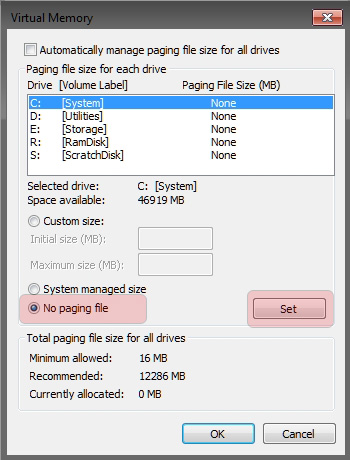
Free up extra drive space

Disable the Page File

Description: Eliminate writing memory to the SSD, free over 2GB of disk space.

WARNING: If you run out of memory the program you're using will crash.

Instructions: Start Menu -> Right-Click Computer -> Properties -> Advanced System Settings -> Settings (Performance) -> Advanced Tab -> Change -> Uncheck Automatically manage -> No paging file -> Set -> OK -> Restart your computer
Alternatively, if you want to play it safer, you can set a custom size of 200MB min and max.
Page%20File%20x.jpg
Set that back to default (auto) as I did have an error just before I went to bed which mentioned page file

SO yes SSD arrived. Very nice, still got 45.6GB left on it! So at this rate could've gone for the 40GB not the 80GB ;) Windows loading and programs loading are so quicker. Only game I have tried is WoW, no speed difference actually (at least on the first login) I know there's a way to get steam games on another drive than the default. Need to look into that when I have time and try like GTA loading times considering they time all year

thanks
 

My Computer

OS
Windows 7 Home prem 64
CPU
AMD Phenom II X4 955 Black Edition 3.2 GHz Socket AM3
Motherboard
Asus M4A79XTD Evo AM3
Memory
G.Skill RipJaw 4GB (2x2GB) DDR3 PC3-10666C8 1333MHz
Graphics Card(s)
Asus GeForce GTX 560Ti DirectCU II
Sound Card
Asus Xonard)
Monitor(s) Displays
2* Samsung P2350
Screen Resolution
1920*1080
Hard Drives
Western Digital WD1001FALS 1TB Hard Drive SATAII 7200rpm 32MB Cache
PSU
Coolermaster RealPower 700W Modular PSU
Case
Cooler Master Storm Scout
Keyboard
Logitech G11
Mouse
Razer Deathadder 3500DPI
Internet Speed
50down 5up
SSDs are great, excellent performance upgrade.


The Page File should fix your problem, you can dis-able it if you have a lot of RAM, like 8GB.

Mine is set to a very small amount and haven't had any problems.
 

My Computer

Computer type
PC/Desktop
Computer Manufacturer/Model Number
76~2.0
OS
Windows 7 Ult x64 - SP1/ Windows 8 Pro x64
CPU
Intel Core i5-3570K 4.6GHz
Motherboard
Gigabyte GA-Z77X UD3H, f18
Memory
8GB (2X4GB) DDR3 1600 Corsair Vengeance CL8 1.5v
Graphics Card(s)
Sapphire HD 7770 Vapor-X OC 1GB DDR5
Sound Card
Onboard VIA VT2021
Monitor(s) Displays
22" LCD Dell
Screen Resolution
1680x1050
Hard Drives
Samsung 840Pro 128GB SSD,
Seagate Barracuda 500GB SATA2 7200rpm 32MB cache, Seagate Barracuda 1TB SATA2 7200rpm 32MB cache,
PSU
Corsair HX650W
Case
Cooler Master Storm Scout
Cooling
Corsair H80 2x12cm Noctua NF P12 , 2x14cm case fans
Keyboard
Logitech Wave
Mouse
CM Sentinel
Internet Speed
Dismal
Antivirus
Avast
Browser
Opera Next
Other Info
Haswell laptop: HP Envy 17t-j, i7-4700MQ, GeForce 740M 2GB DDR3, 17.3" Full HD 1920x1080, 16GB RAM, Samsung 840 Pro 128GB, 1TB Hitachi 7200 HDD,
Desktop: eSATA ports,
External eSATA Seagate 500GB SATA2 7200rpm,
External WD USB 500GB
Back
Top