Missing Boot Manager, endless BSODs - I can't use my computer!
Hello,
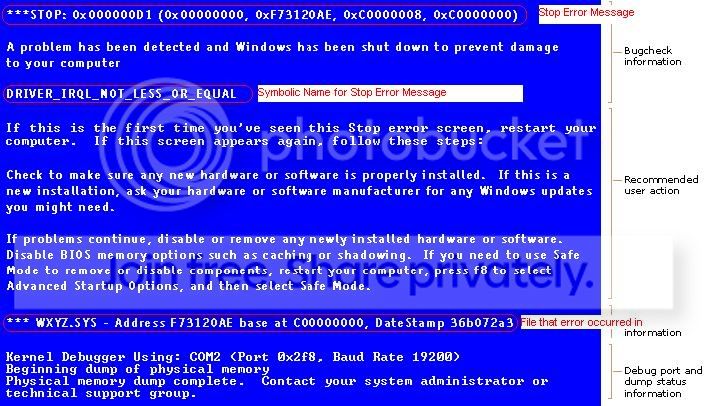
my computer has been dead for the last few days so to speak. For two days ago I turned on my computer - it started up just like any other day. I saw the Desktop and bang, blue screen of death. This has not happened since I installed Windows on my new SSD Harddisk (I'm running with two disks, one SSD for Windows and a HDD for everything else), so I simply started my computer again. (My computer worked just fine last weekend, no problems at all. I had a Windows Update and then this happened..).
During the set-up it stopped after the Motherboard-image - I had to chose between starting Windows Normal or repair it. Starting Windows normally does not help - it just give me BSOD right before or right after hitting the desktop. (Sometimes even before the Welcome-screen). So choosing to repair Windows during the setup is the only thing I can do.
By doing so, Windows searches for errors. I get the following error codes:
(Today and yesterday I only got 0x0, which apparently stands for 'unknown').
Hitting F8 during setup and loading Windows in safe-mode (/secure mode?) does not help either, I get BSOD here as well.
I have tried to change the boot location (different disks and from CD). As a standard, its booting from my harddisk - all though it's booting from the wrong disk (the HDD). When I'm choosing the SSD I can't get any further and I get the message: "Missing Bootmgr..".
The only way to boot the computer correctly (and maybe fix the missing boot manager) is by booting from a Windows 7 CD. I get the same two options (Normal / Repair) when booting from the CD though.. When I chose repair it seems to be fixing something - but in the end it says it couldn't find any errors. I have also tried to enter the following commands into the CMD:
The first two are completed with no errors or messages. The last one is unable to find any Windows installations (this happen when using both C and D).
I am able to use a safety backup copy which I took when I all out of sudden got access to the computer.. (Don't ask my why or how!), that is however not solving the problem, it's only allowing me to load the computer once. When it's loading it's checking the disk first and then loading normally -- I just tried that for a few minutes ago and my screen just turned black.
No hardware is damaged nor wrong installed. The only thing that doesn't seem to work is Windows.
Note; I have no interest in re installing Windows - who knows, maybe this problem will return tomorrow.
Thanks
Hello,
my computer has been dead for the last few days so to speak. For two days ago I turned on my computer - it started up just like any other day. I saw the Desktop and bang, blue screen of death. This has not happened since I installed Windows on my new SSD Harddisk (I'm running with two disks, one SSD for Windows and a HDD for everything else), so I simply started my computer again. (My computer worked just fine last weekend, no problems at all. I had a Windows Update and then this happened..).
During the set-up it stopped after the Motherboard-image - I had to chose between starting Windows Normal or repair it. Starting Windows normally does not help - it just give me BSOD right before or right after hitting the desktop. (Sometimes even before the Welcome-screen). So choosing to repair Windows during the setup is the only thing I can do.
By doing so, Windows searches for errors. I get the following error codes:
- 0x0
- 0x490
- ..and some with 6 f's.
(Today and yesterday I only got 0x0, which apparently stands for 'unknown').
Hitting F8 during setup and loading Windows in safe-mode (/secure mode?) does not help either, I get BSOD here as well.
I have tried to change the boot location (different disks and from CD). As a standard, its booting from my harddisk - all though it's booting from the wrong disk (the HDD). When I'm choosing the SSD I can't get any further and I get the message: "Missing Bootmgr..".
The only way to boot the computer correctly (and maybe fix the missing boot manager) is by booting from a Windows 7 CD. I get the same two options (Normal / Repair) when booting from the CD though.. When I chose repair it seems to be fixing something - but in the end it says it couldn't find any errors. I have also tried to enter the following commands into the CMD:
- Bootrec /fixmbr
- Bootrec /fixboot
- Bootrec /rebuildbcd
The first two are completed with no errors or messages. The last one is unable to find any Windows installations (this happen when using both C and D).
I am able to use a safety backup copy which I took when I all out of sudden got access to the computer.. (Don't ask my why or how!), that is however not solving the problem, it's only allowing me to load the computer once. When it's loading it's checking the disk first and then loading normally -- I just tried that for a few minutes ago and my screen just turned black.
No hardware is damaged nor wrong installed. The only thing that doesn't seem to work is Windows.
Note; I have no interest in re installing Windows - who knows, maybe this problem will return tomorrow.
Thanks
Last edited:
My Computer
At a glance
Windows 7 64bit
- OS
- Windows 7 64bit
 . Dangit.