(Diagnostic .zip Report is attached)
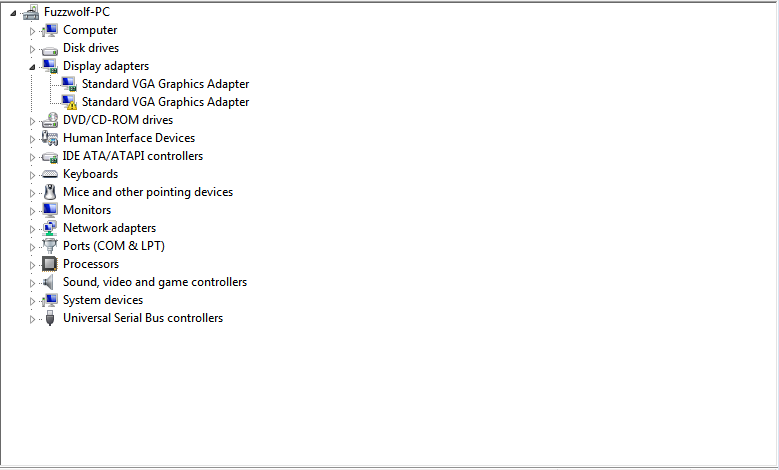
I type this from my Windows 64 bit system running the standard VGA driver. I generally am pretty good with troubleshooting in the computer field, but I have now spent over 10 hours on this problem with very little luck, and lots of frustration. I'll try to provide as much information as possible.
The problem started 4 nights ago when I was playing a somewhat-old computer game called Age of Empires 3. The graphics are not overly intense - I had not even maximized settings - but nonetheless my screen began to flicker and I was confronted with a blue screen, informing me that problem was caused by a failure to read nvlddmkm.sys, the nVidia driver file. I still have not figured out why my drivers suddenly crashed, I run a pretty cool system with no overclocking whatsoever. I have not been able to run the drivers since, so I was forced to go in to safe mode, disable the drivers, and boot up in normal with the standard VGA drivers.
So my question - how can I go about fixing this without completely reinstalling Windows. I realize that by now I could have backed up my files, reinstalled, and copied everything over. I've done that two times already in the last 3 months, and I'm really annoyed by the necessity of doing it. What can I do to get my system to properly run the drivers again without reinstalling the operating system?
Information:
- Spacious desktop rig with plenty of cooling, built by myself
- Graphics card remains at a temperature hovering around 65 degrees celsius
- EVGA GeForce GTX 560 TI 2GB 256-bit GDDR5
- Card is in perfect condition, no visible damage on the exterior (nor is it hot to the touch seconds after shutdown)
- I have never ran in to any errors with the card prior (I've only had it for two months)
- I do not overclock
- Motherboard (Supermicro X8SIA-F) does contain onboard VGA
- I am currently running this card rather than onboard VGA, but with VGA drivers
- I run RAID 1, I never have experienced any problems with its status until I started to receive all of these blue screens, now my second hard-drive is running in to issues giving the volume a "degraded" status (when I first experienced the blue screen my volume's condition was fine, as was it when I was first started troubleshooting. This is something new that seems to accommodate my frequent blue screens). This disables some extra functionality, but it is still entirely operable.
- I am unable to perform a system restore due to the lack of recent saves
- Yes, I have researched this problem and tested the methods of others on various help forums, including this very own
What I have tried and what happened:
- Reinstall proper drivers (to no avail)
- Completely wipe nVidia from my system, then try a reinstall (to no avail)
- Run a Windows Update to upgrade the drivers (cannot update)
- Search for drivers in the Device Manager (to no avail)
- Upgrade Windows (literally right after everything finished I was told that my system is illegible for an upgrade, though my system seemed ready according to their tool)
- Repair my drivers via System File Checker (no faults found)
- Expand (via cmd prompt) the nvlddmkm file from the driver installation in to the actual driver manually to ensure that the file is up to date (no change)
- Ensure that I am not running in Aero Mode (apparently this is incompatible without the proper drivers, did not work)
- Completely unplug my system (to no avail)
- Talk very sternly to my system (to no avail, though I do question my sanity more than I should now)
Any ideas? Any and all help is appreciated. My freetime has been swallowed by this dilemma. I will update my post with additional information when appropriate, it is more than likely I have left out or misaddressed some information due to the hastiness in which I wrote this.
Thank you for your time.
I type this from my Windows 64 bit system running the standard VGA driver. I generally am pretty good with troubleshooting in the computer field, but I have now spent over 10 hours on this problem with very little luck, and lots of frustration. I'll try to provide as much information as possible.
The problem started 4 nights ago when I was playing a somewhat-old computer game called Age of Empires 3. The graphics are not overly intense - I had not even maximized settings - but nonetheless my screen began to flicker and I was confronted with a blue screen, informing me that problem was caused by a failure to read nvlddmkm.sys, the nVidia driver file. I still have not figured out why my drivers suddenly crashed, I run a pretty cool system with no overclocking whatsoever. I have not been able to run the drivers since, so I was forced to go in to safe mode, disable the drivers, and boot up in normal with the standard VGA drivers.
So my question - how can I go about fixing this without completely reinstalling Windows. I realize that by now I could have backed up my files, reinstalled, and copied everything over. I've done that two times already in the last 3 months, and I'm really annoyed by the necessity of doing it. What can I do to get my system to properly run the drivers again without reinstalling the operating system?
Information:
- Spacious desktop rig with plenty of cooling, built by myself
- Graphics card remains at a temperature hovering around 65 degrees celsius
- EVGA GeForce GTX 560 TI 2GB 256-bit GDDR5
- Card is in perfect condition, no visible damage on the exterior (nor is it hot to the touch seconds after shutdown)
- I have never ran in to any errors with the card prior (I've only had it for two months)
- I do not overclock
- Motherboard (Supermicro X8SIA-F) does contain onboard VGA
- I am currently running this card rather than onboard VGA, but with VGA drivers
- I run RAID 1, I never have experienced any problems with its status until I started to receive all of these blue screens, now my second hard-drive is running in to issues giving the volume a "degraded" status (when I first experienced the blue screen my volume's condition was fine, as was it when I was first started troubleshooting. This is something new that seems to accommodate my frequent blue screens). This disables some extra functionality, but it is still entirely operable.
- I am unable to perform a system restore due to the lack of recent saves
- Yes, I have researched this problem and tested the methods of others on various help forums, including this very own
What I have tried and what happened:
- Reinstall proper drivers (to no avail)
- Completely wipe nVidia from my system, then try a reinstall (to no avail)
- Run a Windows Update to upgrade the drivers (cannot update)
- Search for drivers in the Device Manager (to no avail)
- Upgrade Windows (literally right after everything finished I was told that my system is illegible for an upgrade, though my system seemed ready according to their tool)
- Repair my drivers via System File Checker (no faults found)
- Expand (via cmd prompt) the nvlddmkm file from the driver installation in to the actual driver manually to ensure that the file is up to date (no change)
- Ensure that I am not running in Aero Mode (apparently this is incompatible without the proper drivers, did not work)
- Completely unplug my system (to no avail)
- Talk very sternly to my system (to no avail, though I do question my sanity more than I should now)
Any ideas? Any and all help is appreciated. My freetime has been swallowed by this dilemma. I will update my post with additional information when appropriate, it is more than likely I have left out or misaddressed some information due to the hastiness in which I wrote this.
Thank you for your time.
Last edited:
My Computer
At a glance
Windows 7 Ultimate x64Intel Xeon X3450 2.66ghz24GB Registered ECC RAMEVGA 02G-P3-1568-KR GeForce GTX 560 Ti (Fermi...
- OS
- Windows 7 Ultimate x64
- CPU
- Intel Xeon X3450 2.66ghz
- Motherboard
- Supermicro X8SIA-F
- Memory
- 24GB Registered ECC RAM
- Graphics Card(s)
- EVGA 02G-P3-1568-KR GeForce GTX 560 Ti (Fermi) 2GB 256-bit G
- Sound Card
- RF-71SDCD
- Monitor(s) Displays
- HP S2331a 23 inch Diagonal LCD Monitor
- Screen Resolution
- 1920x1080
- Keyboard
- Logitech® Wireless Wave Combo MK550
- Mouse
- Logitech® Wireless Wave Combo MK550
- Internet Speed
- 30mbs x 30mbs