| Windows 7: BSOD every hour, STOP: 0x000000F4 |
06 Oct 2012
|
#1 | | Windows 7 Pro (64-bit OS) san francisco |
BSOD randomly, after an hour or so, STOP: 0x000000F4 I built this machine about a year ago and its been a really stable work box up until really recently. Now it seems like every hour or so it gets 'stuck' freezes up and displays a BSOD.
The first couple times it happened it gave a 'KERNAL_DATD_INPAGE_ERROR" 0x0000007A
So I've scanned the disks looking for bad sectors, defragged, updated the intel drivers, rolled back with a system restore, and pulled the memory out, one by one, but I'm still getting these BSODs.; Now it seems to be consistently the F4 error.
I'm posting this quickly since I'm sure it'll freeze soon, please let me know if there is any additional info I could provide to make troubleshooting this any easier. I'd love to avoide completely reformatting and reinstalling, especially if that wouldn't even help.
I'm attempting to upload the zip of my mini dump now...
thanks,
-brad
Last edited by bradisdrab; 06 Oct 2012 at 04:49 PM..
Reason: improving topic
| My System Specs |
| OS Windows 7 Pro (64-bit OS) CPU Intel core i7 960 @ 3.20GHz 2.00GHz Motherboard AS Rock x58 Extreme Memory 12GB 16000 Graphics Card 2x Nvidia GeForce 8800 GT Sound Card onboard Monitor(s) Displays Apple Cinema display |
06 Oct 2012
|
#2 | | Windows 7 Pro (64-bit OS) san francisco |
added minidump
System specs;
OS  Windows 7 Pro (64-bit OS) CPU  Intel core i7 960 @ 3.20GHz 2.00GHz Motherboard  AS Rock x58 Extreme Memory  12GB 16000 Graphics Card(s)  2x Nvidia GeForce 8800 GT
Last edited by bradisdrab; 06 Oct 2012 at 04:40 PM..
Reason: adding sys specs
| My System Specs | | OS Windows 7 Pro (64-bit OS) CPU Intel core i7 960 @ 3.20GHz 2.00GHz Motherboard AS Rock x58 Extreme Memory 12GB 16000 Graphics Card 2x Nvidia GeForce 8800 GT Sound Card onboard Monitor(s) Displays Apple Cinema display |
06 Oct 2012
|
#3 | | Windows 7 Pro (64-bit OS) san francisco |
I was just typing a bit more info when it happened again, twice now since making this thread.
This seems to happen no matter what I'm doing, even if I leave it on without any programs running.
If I'm working when it happens, after approx an hour or so, the cursor starts spinning/loading, and the program hangs. I ctrl+alt+delete, and it goes to blank, black screen with cursor, then BSOD with the STOP error. Then if I've got it set to, it auto-restarts but hangs in BIOS just after memory test. Then I power it down, and startup, back to windows... etc.
Are there any other steps I could be trying? Would newer minidumps help, or perhaps a full or Kernal dump?
any help would be greatly appreciated!
thanks,
-brad | My System Specs | | OS Windows 7 Pro (64-bit OS) CPU Intel core i7 960 @ 3.20GHz 2.00GHz Motherboard AS Rock x58 Extreme Memory 12GB 16000 Graphics Card 2x Nvidia GeForce 8800 GT Sound Card onboard Monitor(s) Displays Apple Cinema display |
07 Oct 2012
|
#4 | | Windows 7 Pro (64-bit OS) san francisco |
I restarted into safe mode to test it, and left it alone; it BSOD'd and restarted itself again.
I zipped up a new copy of the minidump and everything from the forum tool, attached here;
anyone have any pointers?
thanks! | My System Specs | | OS Windows 7 Pro (64-bit OS) CPU Intel core i7 960 @ 3.20GHz 2.00GHz Motherboard AS Rock x58 Extreme Memory 12GB 16000 Graphics Card 2x Nvidia GeForce 8800 GT Sound Card onboard Monitor(s) Displays Apple Cinema display |
07 Oct 2012
|
#5 | | Windows 7 Home Premium 64 Bit SP 1 |
The dumps you uploaded, the latest one is of 19/08 Attachment 235423 | My System Specs | | Computer type PC/Desktop System Manufacturer/Model Number Self Assembled OS Windows 7 Home Premium 64 Bit SP 1 CPU Intel Core i3 2120 @ 3.30GHz Motherboard Gigabyte Technology Co., Ltd. H61M-DS2 DVI Memory Corsair 2GB x2 (Single-Channel DDR3 @ 665MHz) Graphics Card 2047MB GeForce GTS 450 (ZOTAC International) Sound Card Onboard (Realtek High Definition Audio) Monitor(s) Displays LG Flatron E2040T Screen Resolution 1600x900 Keyboard Logitech MK220 Mouse Logitech MK220 PSU uMAX 750 watt. Case iBall Cooling Air/ Fans Hard Drives Western Digital 1 TB
Seagate 500 GB Internet Speed BSNL Broadband Antivirus Microsoft Security Essentials Browser Waterfox Other Info Dell Studio 15" Laptop |
07 Oct 2012
|
#6 | | Windows 7 Pro (64-bit OS) san francisco |
Thank you for looking,
So it isn't making a new minidump? I've set it to do so more than once, (using the first two methods here Dump Files - Configure Windows to Create on BSOD ) but the last BSOD didn't hold on the blue screen and auto reset even though I had set it not to auto reset. Now I'm really confused. Is it possible its crashing before the dump can be written, or interferring with it?
Here is a photo of my typical BSOD, it never lists anything after initializing...
I'm resetting it for a kernal dump now, (confirmed from the command prompt as setting 2) and I'm restarting to be sure it takes the setting. Then I'm going to wait for it to happen again.
Or would trying for a new minidump be better? | My System Specs | | OS Windows 7 Pro (64-bit OS) CPU Intel core i7 960 @ 3.20GHz 2.00GHz Motherboard AS Rock x58 Extreme Memory 12GB 16000 Graphics Card 2x Nvidia GeForce 8800 GT Sound Card onboard Monitor(s) Displays Apple Cinema display |
07 Oct 2012
|
#7 | | Windows 7 Home Premium 64 Bit SP 1 |
According to Carrona.org, STOP 0x0000007A: KERNEL_DATA_INPAGE_ERROR
Usual causes: Memory, Paging file corruption, File system, Hard drive, Cabling, Virus infection, Improperly seated cards, BIOS, Bad motherboard, Missing Service Pack.
Start from virus scanning. Windows Defender Offline
Let us know the results. | My System Specs | | Computer type PC/Desktop System Manufacturer/Model Number Self Assembled OS Windows 7 Home Premium 64 Bit SP 1 CPU Intel Core i3 2120 @ 3.30GHz Motherboard Gigabyte Technology Co., Ltd. H61M-DS2 DVI Memory Corsair 2GB x2 (Single-Channel DDR3 @ 665MHz) Graphics Card 2047MB GeForce GTS 450 (ZOTAC International) Sound Card Onboard (Realtek High Definition Audio) Monitor(s) Displays LG Flatron E2040T Screen Resolution 1600x900 Keyboard Logitech MK220 Mouse Logitech MK220 PSU uMAX 750 watt. Case iBall Cooling Air/ Fans Hard Drives Western Digital 1 TB
Seagate 500 GB Internet Speed BSNL Broadband Antivirus Microsoft Security Essentials Browser Waterfox Other Info Dell Studio 15" Laptop |
07 Oct 2012
|
#8 | | Windows 7 Pro (64-bit OS) san francisco |
My mistake, that was the pre CHKDISK error BSOD. This is the current recurring one;
Windows defender sounds like it'll be worth a shot, trying it now. | My System Specs | | OS Windows 7 Pro (64-bit OS) CPU Intel core i7 960 @ 3.20GHz 2.00GHz Motherboard AS Rock x58 Extreme Memory 12GB 16000 Graphics Card 2x Nvidia GeForce 8800 GT Sound Card onboard Monitor(s) Displays Apple Cinema display |
07 Oct 2012
|
#9 | | Windows 7 Home Premium 64 Bit SP 1 |
- Reseat the sata and power.
- Run chkdsk /f/r, following the option two of the tutorial Disk Check
- Seatool for dos: SeaTools | Seagate download
Burn it in a blank cd. boot from the CD, click on "Accept", wait for it to finish detecting the drives, then in the upper left corner select "Basic Tests", then select "Long Test" and let it run. - Update your SSD'd firmware.
| My System Specs | | Computer type PC/Desktop System Manufacturer/Model Number Self Assembled OS Windows 7 Home Premium 64 Bit SP 1 CPU Intel Core i3 2120 @ 3.30GHz Motherboard Gigabyte Technology Co., Ltd. H61M-DS2 DVI Memory Corsair 2GB x2 (Single-Channel DDR3 @ 665MHz) Graphics Card 2047MB GeForce GTS 450 (ZOTAC International) Sound Card Onboard (Realtek High Definition Audio) Monitor(s) Displays LG Flatron E2040T Screen Resolution 1600x900 Keyboard Logitech MK220 Mouse Logitech MK220 PSU uMAX 750 watt. Case iBall Cooling Air/ Fans Hard Drives Western Digital 1 TB
Seagate 500 GB Internet Speed BSNL Broadband Antivirus Microsoft Security Essentials Browser Waterfox Other Info Dell Studio 15" Laptop |
07 Oct 2012
|
#10 | | Windows 7 Pro (64-bit OS) san francisco |
I downloaded the Windows defender and while I was waiting for it I found a driver for my video cards which was newer than what I had currently installed, so I installed the new driver for my Video cards. Then rebooted.
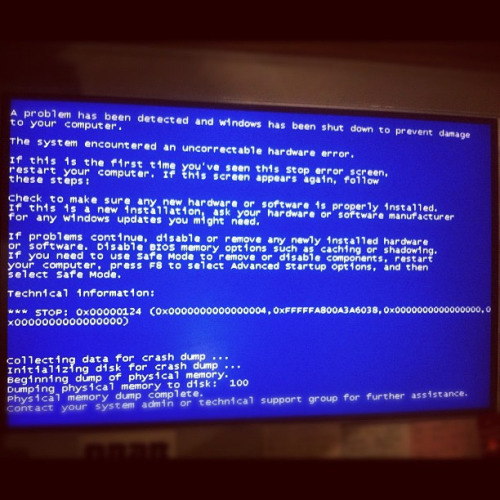
As I was setting up the USB drive for defender it BSOD'd with a new error x124, picture below;
But this time it looks like it made a new dump! (attaching it now)
I ran windows defender and it didn't turn up anything.
I'm going to confirm that it will dump again when it nexr freezes and I hope something is obivious in the new dump. Please let me know.
thank you!
-b
Last edited by bradisdrab; 07 Oct 2012 at 05:06 AM..
Reason: adding plan
| My System Specs | | OS Windows 7 Pro (64-bit OS) CPU Intel core i7 960 @ 3.20GHz 2.00GHz Motherboard AS Rock x58 Extreme Memory 12GB 16000 Graphics Card 2x Nvidia GeForce 8800 GT Sound Card onboard Monitor(s) Displays Apple Cinema display BSOD every hour, STOP: 0x000000F4 problems? All times are GMT -5. The time now is 11:03 AM. | |