BSOD During Gaming - BSOD's include dxgmms.sys, win32k.sys

EvilPengy

New member
Ranging from Far Cry 3 (which is a bit buggy already) to other games like Dead Island, I'm experiencing blue screens. Never happens outside of playing games. Also a lot of games tend to crash on me giving me the error message

'X.exe has stopped working' either leaving me to click close the program or kill it via task manager.

System:

Intel i5 2500k at Stock Settings
EVGA GTX 580 SC
8GB RipJawsX (2x4GB Sticks)
Asus P8P67 Pro Motherboard
Win7 Ultimate (64 Bit)
 

My Computer

OS
Windows 7 Ultimate 64 Bit
CPU
Intel i5 2500k @ 3.3 GHz (Stock)
Motherboard
ASUS P8P67 Pro
Memory
8GB RipJawsX
Graphics Card(s)
EVGA GTX 580 SC
Monitor(s) Displays
Acer GD2450
Screen Resolution
1920x1080
PSU
Corsair 1050W PSU
Keyboard
Logitech G15
Mouse
Logitech G500
Welcome aboard, EvilPengy.

Let us start from applying a known good stable driver version.

Then, stress test the Graphics Card using Furmark.
Video Card - Stress Test with Furmark

And, Stress test the video memory, too.
|MG| Video Memory Stress Test 1.7.116 Download

Let us know the results.
 

My Computer

Computer type
PC/Desktop
Computer Manufacturer/Model Number
Self Assembled
OS
Microsoft Windows 10 Pro Insider Preview 64-bit
CPU
Intel(R) Core(TM) i3-4130 CPU @ 3.40GHz
Motherboard
Gigabyte Technology Co., Ltd. B85M-D3H
Memory
Corsair Vengence 4GB x2 (8.00GB Dual-Channel DDR3 @ 798MHz)
Graphics Card(s)
2047MB GeForce GTS 450 (ZOTAC International)
Sound Card
Onboard (Realtek High Definition Audio)
Monitor(s) Displays
LG Flatron E2040T
Screen Resolution
1600x900
Hard Drives
Western Digital 1 TB
Seagate 500 GB
PSU
Corsair VS550
Case
Cooler Master K380
Cooling
Cooler Master Seidon 120V Plus
Keyboard
Logitech MK260r
Mouse
Logitech MK260r
Internet Speed
PMPL Broadband
Antivirus
Windows Defender + MBAM
Browser
Firefox
Other Info
Dell Studio 15" Laptop
How long do you want me to run FurMark for, shall I do the 15 min burn in benchmark and post results here?

I did do a quick Burn In with no time limit and I was getting temps of around 50-60c but the first pre-set with the blurred circle seemed locked at 9fps where as the water pre-set had varying FPS readings that I'd expect from my card.

EDIT: Also completed a short video memory stress test, 2 errors found, image attached. I'll do a longer one overnight tonight
 

My Computer

OS
Windows 7 Ultimate 64 Bit
CPU
Intel i5 2500k @ 3.3 GHz (Stock)
Motherboard
ASUS P8P67 Pro
Memory
8GB RipJawsX
Graphics Card(s)
EVGA GTX 580 SC
Monitor(s) Displays
Acer GD2450
Screen Resolution
1920x1080
PSU
Corsair 1050W PSU
Keyboard
Logitech G15
Mouse
Logitech G500
15 min burn in benchmark will ge a good test, but apparently it seems that the card is in fault. Is it under warranty?
 

My Computer

Computer type
PC/Desktop
Computer Manufacturer/Model Number
Self Assembled
OS
Microsoft Windows 10 Pro Insider Preview 64-bit
CPU
Intel(R) Core(TM) i3-4130 CPU @ 3.40GHz
Motherboard
Gigabyte Technology Co., Ltd. B85M-D3H
Memory
Corsair Vengence 4GB x2 (8.00GB Dual-Channel DDR3 @ 798MHz)
Graphics Card(s)
2047MB GeForce GTS 450 (ZOTAC International)
Sound Card
Onboard (Realtek High Definition Audio)
Monitor(s) Displays
LG Flatron E2040T
Screen Resolution
1600x900
Hard Drives
Western Digital 1 TB
Seagate 500 GB
PSU
Corsair VS550
Case
Cooler Master K380
Cooling
Cooler Master Seidon 120V Plus
Keyboard
Logitech MK260r
Mouse
Logitech MK260r
Internet Speed
PMPL Broadband
Antivirus
Windows Defender + MBAM
Browser
Firefox
Other Info
Dell Studio 15" Laptop
Why is the card faulty?

I don't think it is under warranty, I ordered it off dabs.com a year or two back and when I log into Dabs and check my order history none of my orders are showing up. I have no clue if it is in warranty or not. Unless I find a reciept, which I doubt I still have

I'll give the 15 min burn-in a shot

EDIT: Just done the FurMark test (15 Min) and it locked the FPS at 16 right the way thorugh, didn't even change. In-fact the only thing I noticed change was the temp gradually. I do have EVGA Precision X running in the background if that's causing any issues with low readings in FurMark?
 
Last edited:

My Computer

OS
Windows 7 Ultimate 64 Bit
CPU
Intel i5 2500k @ 3.3 GHz (Stock)
Motherboard
ASUS P8P67 Pro
Memory
8GB RipJawsX
Graphics Card(s)
EVGA GTX 580 SC
Monitor(s) Displays
Acer GD2450
Screen Resolution
1920x1080
PSU
Corsair 1050W PSU
Keyboard
Logitech G15
Mouse
Logitech G500
As it shows some errors in video memory test, there might be some faults I guess.

But the most important thing here is, how it is working after the driver rollback. So let us know?
 

My Computer

Computer type
PC/Desktop
Computer Manufacturer/Model Number
Self Assembled
OS
Microsoft Windows 10 Pro Insider Preview 64-bit
CPU
Intel(R) Core(TM) i3-4130 CPU @ 3.40GHz
Motherboard
Gigabyte Technology Co., Ltd. B85M-D3H
Memory
Corsair Vengence 4GB x2 (8.00GB Dual-Channel DDR3 @ 798MHz)
Graphics Card(s)
2047MB GeForce GTS 450 (ZOTAC International)
Sound Card
Onboard (Realtek High Definition Audio)
Monitor(s) Displays
LG Flatron E2040T
Screen Resolution
1600x900
Hard Drives
Western Digital 1 TB
Seagate 500 GB
PSU
Corsair VS550
Case
Cooler Master K380
Cooling
Cooler Master Seidon 120V Plus
Keyboard
Logitech MK260r
Mouse
Logitech MK260r
Internet Speed
PMPL Broadband
Antivirus
Windows Defender + MBAM
Browser
Firefox
Other Info
Dell Studio 15" Laptop
As it shows some errors in video memory test, there might be some faults I guess.

But the most important thing here is, how it is working after the driver rollback. So let us know?

I'll let you know about the driver rollback shortly. I did play Dead Island last night, it isn't the greatest of PC ports but no BSOD's or crashes in 45 minutes of playing and it was running at the frame rate I expected. I was also experiencing what seemed to look like green/bluish lines when ever I quickly glanced at an object in the game, that's dissapeared now! Haven't really tried any other games so I'll update here if anything occurs in other games.

The previous drivers I had installed were BETA, perhaps thats what caused these problems on certain games. Also I was using Driver Sweeper before when re-installing drivers, Driver Fusion is a bit more updated so that helped.

Also the video memory stress test seems to have variable results. Just done 2 full tests using it and now I'm getting no errors:
 

My Computer

OS
Windows 7 Ultimate 64 Bit
CPU
Intel i5 2500k @ 3.3 GHz (Stock)
Motherboard
ASUS P8P67 Pro
Memory
8GB RipJawsX
Graphics Card(s)
EVGA GTX 580 SC
Monitor(s) Displays
Acer GD2450
Screen Resolution
1920x1080
PSU
Corsair 1050W PSU
Keyboard
Logitech G15
Mouse
Logitech G500
So it is all good, I hope. :)

Observe more, let us know the results time to time :)
 

My Computer

Computer type
PC/Desktop
Computer Manufacturer/Model Number
Self Assembled
OS
Microsoft Windows 10 Pro Insider Preview 64-bit
CPU
Intel(R) Core(TM) i3-4130 CPU @ 3.40GHz
Motherboard
Gigabyte Technology Co., Ltd. B85M-D3H
Memory
Corsair Vengence 4GB x2 (8.00GB Dual-Channel DDR3 @ 798MHz)
Graphics Card(s)
2047MB GeForce GTS 450 (ZOTAC International)
Sound Card
Onboard (Realtek High Definition Audio)
Monitor(s) Displays
LG Flatron E2040T
Screen Resolution
1600x900
Hard Drives
Western Digital 1 TB
Seagate 500 GB
PSU
Corsair VS550
Case
Cooler Master K380
Cooling
Cooler Master Seidon 120V Plus
Keyboard
Logitech MK260r
Mouse
Logitech MK260r
Internet Speed
PMPL Broadband
Antivirus
Windows Defender + MBAM
Browser
Firefox
Other Info
Dell Studio 15" Laptop
Just got another BSOD, this time playing Team Fortress 2.

It was BCCode 3b, SYSTEM_SERVICE_EXCEPTION. Can't tell if it's related to the the installation of the new graphics drivers or not, it could be something completely different.

Information attached
 

My Computer

OS
Windows 7 Ultimate 64 Bit
CPU
Intel i5 2500k @ 3.3 GHz (Stock)
Motherboard
ASUS P8P67 Pro
Memory
8GB RipJawsX
Graphics Card(s)
EVGA GTX 580 SC
Monitor(s) Displays
Acer GD2450
Screen Resolution
1920x1080
PSU
Corsair 1050W PSU
Keyboard
Logitech G15
Mouse
Logitech G500
It says, you are still using the old version of the display driver.
Code:
lmvm nvlddmkm
start             end                 module name
fffff880`0f8cf000 fffff880`105b7000   nvlddmkm T (no symbols)           
    Loaded symbol image file: nvlddmkm.sys
    Image path: \SystemRoot\system32\DRIVERS\nvlddmkm.sys
    Image name: nvlddmkm.sys
    Timestamp:        Thu Aug 30 21:20:16 2012 (503F8BB8)
    CheckSum:         00CCA304
    ImageSize:        00CE8000
    Translations:     0000.04b0 0000.04e4 0409.04b0 0409.04e4

Test your RAM modules for possible errors, too.
How to Test and Diagnose RAM Issues with Memtest86+
Run memtest for at least 8 passes, preferably overnight, per RAM module per slot.
 

My Computer

Computer type
PC/Desktop
Computer Manufacturer/Model Number
Self Assembled
OS
Microsoft Windows 10 Pro Insider Preview 64-bit
CPU
Intel(R) Core(TM) i3-4130 CPU @ 3.40GHz
Motherboard
Gigabyte Technology Co., Ltd. B85M-D3H
Memory
Corsair Vengence 4GB x2 (8.00GB Dual-Channel DDR3 @ 798MHz)
Graphics Card(s)
2047MB GeForce GTS 450 (ZOTAC International)
Sound Card
Onboard (Realtek High Definition Audio)
Monitor(s) Displays
LG Flatron E2040T
Screen Resolution
1600x900
Hard Drives
Western Digital 1 TB
Seagate 500 GB
PSU
Corsair VS550
Case
Cooler Master K380
Cooling
Cooler Master Seidon 120V Plus
Keyboard
Logitech MK260r
Mouse
Logitech MK260r
Internet Speed
PMPL Broadband
Antivirus
Windows Defender + MBAM
Browser
Firefox
Other Info
Dell Studio 15" Laptop
After all this I decided to re-install Windows. Got everything back up to scratch but then BSoD's have started to show again.

I've only had one atm, but there could be more. This time is was Bccode d1, something related to nvlddmkm.sys

Problem signature:
Problem Event Name: BlueScreen
OS Version: 6.1.7600.2.0.0.256.1
Locale ID: 2057

Additional information about the problem:
BCCode: d1
BCP1: FFFFFFFFFFFFFFB0
BCP2: 0000000000000002
BCP3: 0000000000000000
BCP4: FFFFF880057EA74E
OS Version: 6_1_7600
Service Pack: 0_0
Product: 256_1

Also using WhoCrashed program to analyse the mini dumps says that nvlddmkm.sys was responsible for the last two BSoD's. Any way to fix this? Could you rename it to nvlddmkm.old and then it would replace it with a new version of the file, if it's corrupted (I've done the same with win32k.sys in the past and it's worked)
 

My Computer

OS
Windows 7 Ultimate 64 Bit
CPU
Intel i5 2500k @ 3.3 GHz (Stock)
Motherboard
ASUS P8P67 Pro
Memory
8GB RipJawsX
Graphics Card(s)
EVGA GTX 580 SC
Monitor(s) Displays
Acer GD2450
Screen Resolution
1920x1080
PSU
Corsair 1050W PSU
Keyboard
Logitech G15
Mouse
Logitech G500
I also ran MemTest 86 too after re-installation of Windows, I ran it with both sticks in.

No errors, 9 Passes, left it going for 10 hours overnight

I will eventually get round to testing each stick on it's own but I don't think RAM is the cause of the current BSoD's. I'll update my BIOS and re-install the graphics driver in safe mode for the time being. I'm using the latest WHQL drivers from Nvidia btw (310.70) I had another BSoD earlier which relates to dxgmms1.sys too

All these BSoD's seem to happen only when I'm playing games too.
 
Last edited:

My Computer

OS
Windows 7 Ultimate 64 Bit
CPU
Intel i5 2500k @ 3.3 GHz (Stock)
Motherboard
ASUS P8P67 Pro
Memory
8GB RipJawsX
Graphics Card(s)
EVGA GTX 580 SC
Monitor(s) Displays
Acer GD2450
Screen Resolution
1920x1080
PSU
Corsair 1050W PSU
Keyboard
Logitech G15
Mouse
Logitech G500
  • Download and install Driver Fusion.
  • Reboot the computer in Advanced Boot Options, safe mode. Search Driver Fusion in your start menu, and remove all components of your nVidia display driver.
  • Boot normally now. Apply the latest version of nVidia display driver.
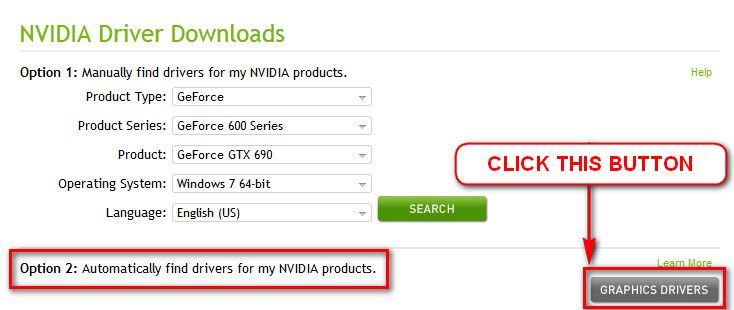
    You may download it directly, from our forum link http://www.sevenforums.com/graphic-cards/602-latest-nvidia-forceware-video-drivers-windows-7-a.html; or you may opt for the Option 2 of Drivers- Download NVIDIA Drivers for “Automatically find drivers for my NVIDIA products” (it requires java installed).

    nvidiadisplaydriver_zps0ba1be3b.jpg
May be it is caused by the beta driver you are using right now.
 

My Computer

Computer type
PC/Desktop
Computer Manufacturer/Model Number
Self Assembled
OS
Microsoft Windows 10 Pro Insider Preview 64-bit
CPU
Intel(R) Core(TM) i3-4130 CPU @ 3.40GHz
Motherboard
Gigabyte Technology Co., Ltd. B85M-D3H
Memory
Corsair Vengence 4GB x2 (8.00GB Dual-Channel DDR3 @ 798MHz)
Graphics Card(s)
2047MB GeForce GTS 450 (ZOTAC International)
Sound Card
Onboard (Realtek High Definition Audio)
Monitor(s) Displays
LG Flatron E2040T
Screen Resolution
1600x900
Hard Drives
Western Digital 1 TB
Seagate 500 GB
PSU
Corsair VS550
Case
Cooler Master K380
Cooling
Cooler Master Seidon 120V Plus
Keyboard
Logitech MK260r
Mouse
Logitech MK260r
Internet Speed
PMPL Broadband
Antivirus
Windows Defender + MBAM
Browser
Firefox
Other Info
Dell Studio 15" Laptop
I've done all that, thats my usual routine for installing new drivers. These aren't BETA drivers neither, 310.70 is a WHQL driver so it's non-BETA. It's supposed to be the most recent and stable one

Just got another BSoD in Team Fortress 2, related to dxgmms1.sys, maybe DirectX has been corrupted? Seems to be a common sight does 'dxgmms1.sys', same goes for the nvidia one, although the BSoD's I've had since re-installing the Nvidia Drivers have all been dxgmms1.sys

I'll get the dump files up in a min

Maybe I should go back to the most recent WHQL drivers other than 310.70, I think that's 306.XX series
 

My Computer

OS
Windows 7 Ultimate 64 Bit
CPU
Intel i5 2500k @ 3.3 GHz (Stock)
Motherboard
ASUS P8P67 Pro
Memory
8GB RipJawsX
Graphics Card(s)
EVGA GTX 580 SC
Monitor(s) Displays
Acer GD2450
Screen Resolution
1920x1080
PSU
Corsair 1050W PSU
Keyboard
Logitech G15
Mouse
Logitech G500
Good decision.

This one is the most stable one as I have experienced.
 

My Computer

Computer type
PC/Desktop
Computer Manufacturer/Model Number
Self Assembled
OS
Microsoft Windows 10 Pro Insider Preview 64-bit
CPU
Intel(R) Core(TM) i3-4130 CPU @ 3.40GHz
Motherboard
Gigabyte Technology Co., Ltd. B85M-D3H
Memory
Corsair Vengence 4GB x2 (8.00GB Dual-Channel DDR3 @ 798MHz)
Graphics Card(s)
2047MB GeForce GTS 450 (ZOTAC International)
Sound Card
Onboard (Realtek High Definition Audio)
Monitor(s) Displays
LG Flatron E2040T
Screen Resolution
1600x900
Hard Drives
Western Digital 1 TB
Seagate 500 GB
PSU
Corsair VS550
Case
Cooler Master K380
Cooling
Cooler Master Seidon 120V Plus
Keyboard
Logitech MK260r
Mouse
Logitech MK260r
Internet Speed
PMPL Broadband
Antivirus
Windows Defender + MBAM
Browser
Firefox
Other Info
Dell Studio 15" Laptop
Still getting BSoD's even after rolling back to 306.XX drivers

This time win32k.sys is the problem.

Getting really frustrated with this issue now!
 

My Computer

OS
Windows 7 Ultimate 64 Bit
CPU
Intel i5 2500k @ 3.3 GHz (Stock)
Motherboard
ASUS P8P67 Pro
Memory
8GB RipJawsX
Graphics Card(s)
EVGA GTX 580 SC
Monitor(s) Displays
Acer GD2450
Screen Resolution
1920x1080
PSU
Corsair 1050W PSU
Keyboard
Logitech G15
Mouse
Logitech G500
Code:
*******************************************************************************
*                                                                             *
*                        Bugcheck Analysis                                    *
*                                                                             *
*******************************************************************************

Use !analyze -v to get detailed debugging information.

BugCheck 50, {fffff1e00929b9ef, 1, fffff9600026f4e0, 7}


Could not read faulting driver name
[COLOR=Red]Probably caused by : dxgkrnl.sys [/COLOR]( dxgkrnl!DxgkGetPresentHistory+f6 )

Followup: MachineOwner
---------
Graphics related crash, but not the nvidia display driver. Stress test the Graphics Card using Furmark.
Video Card - Stress Test with Furmark

Report the temperatures .... post a screenshot of Speccy summery tab.
 

My Computer

Computer type
PC/Desktop
Computer Manufacturer/Model Number
Self Assembled
OS
Microsoft Windows 10 Pro Insider Preview 64-bit
CPU
Intel(R) Core(TM) i3-4130 CPU @ 3.40GHz
Motherboard
Gigabyte Technology Co., Ltd. B85M-D3H
Memory
Corsair Vengence 4GB x2 (8.00GB Dual-Channel DDR3 @ 798MHz)
Graphics Card(s)
2047MB GeForce GTS 450 (ZOTAC International)
Sound Card
Onboard (Realtek High Definition Audio)
Monitor(s) Displays
LG Flatron E2040T
Screen Resolution
1600x900
Hard Drives
Western Digital 1 TB
Seagate 500 GB
PSU
Corsair VS550
Case
Cooler Master K380
Cooling
Cooler Master Seidon 120V Plus
Keyboard
Logitech MK260r
Mouse
Logitech MK260r
Internet Speed
PMPL Broadband
Antivirus
Windows Defender + MBAM
Browser
Firefox
Other Info
Dell Studio 15" Laptop
Ok I'm talking on here from my laptop as I've decided to run MemTest on one stick at a time.

On this current stick I've got 2 errors, so immediately the RAM is an issue, don't know if it's causing the recent BSoD's tho. I'm on Pass 2 and now I've got 26 errors on this current stick.

How long should I leave each stick in for and when I put the second stick in shall I try the same slot or another 1?

(Also in response to your last post, my GPU temps aren't bad. I have EVGA Precison X running when playing games and it displays temp on my Logitech G15. I average between 50-70c in-game, typically lingers around the 60-65c mark, so it's not that bad)
 

My Computer

OS
Windows 7 Ultimate 64 Bit
CPU
Intel i5 2500k @ 3.3 GHz (Stock)
Motherboard
ASUS P8P67 Pro
Memory
8GB RipJawsX
Graphics Card(s)
EVGA GTX 580 SC
Monitor(s) Displays
Acer GD2450
Screen Resolution
1920x1080
PSU
Corsair 1050W PSU
Keyboard
Logitech G15
Mouse
Logitech G500
Ok I left MemTest at 5 passes, it'd ran for 2 and half hours with 42 errors, so that stick is faulty

I'll try the other stick shortly
 

My Computer

OS
Windows 7 Ultimate 64 Bit
CPU
Intel i5 2500k @ 3.3 GHz (Stock)
Motherboard
ASUS P8P67 Pro
Memory
8GB RipJawsX
Graphics Card(s)
EVGA GTX 580 SC
Monitor(s) Displays
Acer GD2450
Screen Resolution
1920x1080
PSU
Corsair 1050W PSU
Keyboard
Logitech G15
Mouse
Logitech G500
Run memtest for both the modules, in both the slots.

Module| S1| S2
M1| *| *
M2| *| *
In such a format. Where S1 an S2 are the DIMM slots and M1 and M2 are the memory modules.

In this way you will be able to discriminate between a RAM issue or a motherboard issue. If the test reports are wrong for either module in a particular slot, then it is the slot of the motherboard that is faulty.
In the reverse situation, if a stick givs errors i either slot, it is just that stick.
 

My Computer

Computer type
PC/Desktop
Computer Manufacturer/Model Number
Self Assembled
OS
Microsoft Windows 10 Pro Insider Preview 64-bit
CPU
Intel(R) Core(TM) i3-4130 CPU @ 3.40GHz
Motherboard
Gigabyte Technology Co., Ltd. B85M-D3H
Memory
Corsair Vengence 4GB x2 (8.00GB Dual-Channel DDR3 @ 798MHz)
Graphics Card(s)
2047MB GeForce GTS 450 (ZOTAC International)
Sound Card
Onboard (Realtek High Definition Audio)
Monitor(s) Displays
LG Flatron E2040T
Screen Resolution
1600x900
Hard Drives
Western Digital 1 TB
Seagate 500 GB
PSU
Corsair VS550
Case
Cooler Master K380
Cooling
Cooler Master Seidon 120V Plus
Keyboard
Logitech MK260r
Mouse
Logitech MK260r
Internet Speed
PMPL Broadband
Antivirus
Windows Defender + MBAM
Browser
Firefox
Other Info
Dell Studio 15" Laptop
Back
Top