BSOD of few random error, Memory Management.

leonnkeong

New member
Member
Local time
12:36 AM
Messages
68
I have the dump files and all the details attached. Please help.

Operating System: Windows 7 Home Premium 64-bit (6.1, Build 7601) Service Pack 1 (7601.win7sp1_gdr.120503-2030)
Language: English (Regional Setting: English)
System Manufacturer: Gigabyte Technology Co., Ltd.
System Model: To be filled by O.E.M.
BIOS: BIOS Date: 03/09/12 14:24:24 Ver: 04.06.05
Processor: Intel(R) Core(TM) i7-2600 CPU @ 3.40GHz (8 CPUs), ~3.8GHz
Memory: 8192MB RAM
Available OS Memory: 8154MB RAM
Page File: 3138MB used, 17013MB available
Windows Dir: C:\Windows
DirectX Version: DirectX 11
Card name: AMD Radeon HD 7800 Series (HD7850)
 

My Computer My Computer

At a glance

Windows Ultimate x64Intel i7 2600 @ 3.8GHzCorsair Vengeance 8GB Dual ChannelSapphire ATI HD7850 2GB
OS
Windows Ultimate x64
CPU
Intel i7 2600 @ 3.8GHz
Motherboard
Gigabyte Z77P-D3
Memory
Corsair Vengeance 8GB Dual Channel
Graphics Card(s)
Sapphire ATI HD7850 2GB
Case
CM RC 690 II
Cooling
Corsair H60
Keyboard
Razer Lycosa
Mouse
Razer Deathadder 3.5G
Internet Speed
VIP10 @ 10 mbps
welcome aboard.

It crashed on the display driver....
Code:
fffff880`044ae138  fffff880`05be2fefUnable to load image \SystemRoot\system32\DRIVERS\atikmdag.sys, Win32 error 0n2
[COLOR=Red]*** WARNING: Unable to verify timestamp for atikmdag.sys
*** ERROR: Module load completed but symbols could not be loaded for atikmdag.sys
 atikmdag+0x136fef[/COLOR]
Update your ATI/AMD display driver.
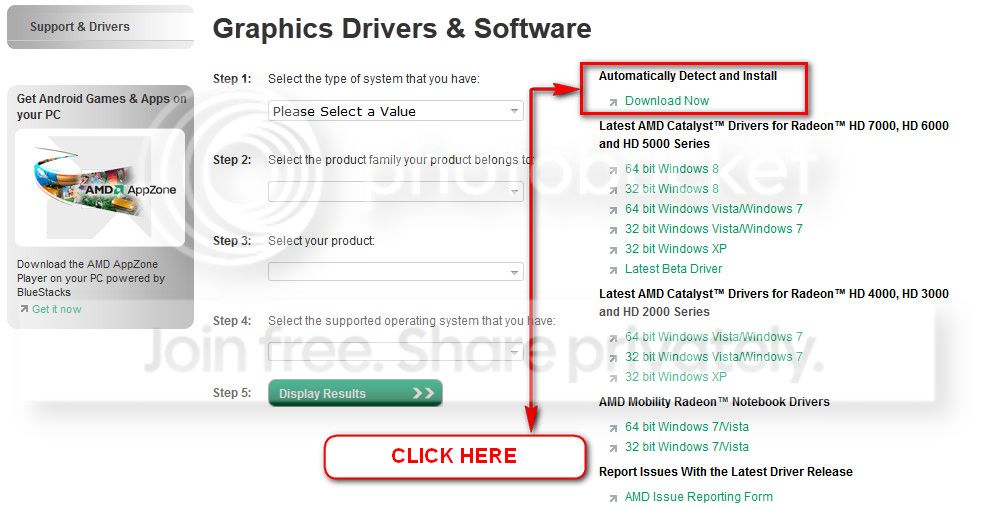
You can get it from the link in our forum, http://www.sevenforums.com/graphic-...alyst-video-driver-windows-7-a.html#post17671, or you may go to AMD Graphics Driver and Software and opt for Automatically Detect and Install the appropriate driver for your card.
ATI_zps0bc28aaa.jpg


During installation, you may opt for advanced installation, and install the display driver only, not the Catalyst Control Center.

Test your RAM modules for possible errors.
How to Test and Diagnose RAM Issues with Memtest86+
Run memtest for at least 8 passes, preferably overnight, per RAM module per slot.

► Stress test the Graphics Card using Furmark.
Video Card - Stress Test with Furmark

Daemon Tools, Alcohol 120% and Power Archiver Pro uses SCSI Pass Through Direct (SPTD), which is a well known BSOD causer. Uninstall Daemon Tools at first. Then download SPTD standalone installer from Disk-Tools.com, and execute the downloaded file as guided below :

  • Double click to open it.
  • Click this button only:
  • 2012-12-13_224441.jpg
  • If it is grayed out, as in the picture, there is no more SPTD in your system, and you just close the window.
Free up the startup.


  1. Click on the Start button
  2. Type “msconfig (without quotes), click the resulting link. It will open the System Configuration window.
  3. Select the “Startup” tab.
  4. Deselect all items other than the antivirus.
  5. Apply > OK
  6. Accept the restart.
Let us know the results.
 

My Computer My Computer

At a glance

Microsoft Windows 10 Pro Insider Preview 64-bitIntel(R) Core(TM) i3-4130 CPU @ 3.40GHzCorsair Vengence 4GB x2 (8.00GB Dual-Channel ...2047MB GeForce GTS 450 (ZOTAC International)
Computer type
PC/Desktop
Computer Manufacturer/Model Number
Self Assembled
OS
Microsoft Windows 10 Pro Insider Preview 64-bit
CPU
Intel(R) Core(TM) i3-4130 CPU @ 3.40GHz
Motherboard
Gigabyte Technology Co., Ltd. B85M-D3H
Memory
Corsair Vengence 4GB x2 (8.00GB Dual-Channel DDR3 @ 798MHz)
Graphics Card(s)
2047MB GeForce GTS 450 (ZOTAC International)
Sound Card
Onboard (Realtek High Definition Audio)
Monitor(s) Displays
LG Flatron E2040T
Screen Resolution
1600x900
Hard Drives
Western Digital 1 TB
Seagate 500 GB
PSU
Corsair VS550
Case
Cooler Master K380
Cooling
Cooler Master Seidon 120V Plus
Keyboard
Logitech MK260r
Mouse
Logitech MK260r
Internet Speed
PMPL Broadband
Antivirus
Windows Defender + MBAM
Browser
Firefox
Other Info
Dell Studio 15" Laptop
@Arc

I have updated my display driver to the latest one already ever since before I encounter few BSODs.

I'm suspecting my RAM is a bad RAM that caused all the problems. I have not run Memtest yet but all the BSOD I encountered seems had issue on memory management, for example like ntoskrnl.exe (the most), irql_not_less_or_equal, NTFS.SYS, and currently the atikmdag.sys too.

So I am wondering is these the signs of bad RAM? I'm using Corsair Vengeance 1600 4GB x 2.

Thanks for your reply.
 

My Computer My Computer

At a glance

Windows Ultimate x64Intel i7 2600 @ 3.8GHzCorsair Vengeance 8GB Dual ChannelSapphire ATI HD7850 2GB
OS
Windows Ultimate x64
CPU
Intel i7 2600 @ 3.8GHz
Motherboard
Gigabyte Z77P-D3
Memory
Corsair Vengeance 8GB Dual Channel
Graphics Card(s)
Sapphire ATI HD7850 2GB
Case
CM RC 690 II
Cooling
Corsair H60
Keyboard
Razer Lycosa
Mouse
Razer Deathadder 3.5G
Internet Speed
VIP10 @ 10 mbps
I have found nothing to suspect the RAM strongly, but if you need, you may test your RAM modules for possible errors.
How to Test and Diagnose RAM Issues with Memtest86+
Run memtest for at least 8 passes, preferably overnight, per RAM module per slot.

Have you uninstalled Daemon Tools and SPTD already? Let us know the results after that.
 

My Computer My Computer

At a glance

Microsoft Windows 10 Pro Insider Preview 64-bitIntel(R) Core(TM) i3-4130 CPU @ 3.40GHzCorsair Vengence 4GB x2 (8.00GB Dual-Channel ...2047MB GeForce GTS 450 (ZOTAC International)
Computer type
PC/Desktop
Computer Manufacturer/Model Number
Self Assembled
OS
Microsoft Windows 10 Pro Insider Preview 64-bit
CPU
Intel(R) Core(TM) i3-4130 CPU @ 3.40GHz
Motherboard
Gigabyte Technology Co., Ltd. B85M-D3H
Memory
Corsair Vengence 4GB x2 (8.00GB Dual-Channel DDR3 @ 798MHz)
Graphics Card(s)
2047MB GeForce GTS 450 (ZOTAC International)
Sound Card
Onboard (Realtek High Definition Audio)
Monitor(s) Displays
LG Flatron E2040T
Screen Resolution
1600x900
Hard Drives
Western Digital 1 TB
Seagate 500 GB
PSU
Corsair VS550
Case
Cooler Master K380
Cooling
Cooler Master Seidon 120V Plus
Keyboard
Logitech MK260r
Mouse
Logitech MK260r
Internet Speed
PMPL Broadband
Antivirus
Windows Defender + MBAM
Browser
Firefox
Other Info
Dell Studio 15" Laptop
Yes, I have removed DT and SPTD already. My BSOD it's not "that" frequent but sometimes it is. It's a weird BSOD. Most of the time is ntoskrnl.exe BSOD, any idea for that?

Owh, not RAM? I'm looking to RMA my RAM also. Any other way to prevent BSOD happen again? ;/

I can't run Memtest yet since I need to use this machine frequent.

Thanks
 

My Computer My Computer

At a glance

Windows Ultimate x64Intel i7 2600 @ 3.8GHzCorsair Vengeance 8GB Dual ChannelSapphire ATI HD7850 2GB
OS
Windows Ultimate x64
CPU
Intel i7 2600 @ 3.8GHz
Motherboard
Gigabyte Z77P-D3
Memory
Corsair Vengeance 8GB Dual Channel
Graphics Card(s)
Sapphire ATI HD7850 2GB
Case
CM RC 690 II
Cooling
Corsair H60
Keyboard
Razer Lycosa
Mouse
Razer Deathadder 3.5G
Internet Speed
VIP10 @ 10 mbps
Run memtest overnight, before going to bed :)

ntoskrnl.exe is the kernel on which the crash occurs and it cannot be the real cause of a BSOD. Either something is missing by the memory dump, ot it is to do a detailed analysis to find out the cause. There are ways to do it, dont worry :)

Now observe the situation. Let us know on the occurrence of the next BSOD ... of after a reasonable time that you think.
 

My Computer My Computer

At a glance

Microsoft Windows 10 Pro Insider Preview 64-bitIntel(R) Core(TM) i3-4130 CPU @ 3.40GHzCorsair Vengence 4GB x2 (8.00GB Dual-Channel ...2047MB GeForce GTS 450 (ZOTAC International)
Computer type
PC/Desktop
Computer Manufacturer/Model Number
Self Assembled
OS
Microsoft Windows 10 Pro Insider Preview 64-bit
CPU
Intel(R) Core(TM) i3-4130 CPU @ 3.40GHz
Motherboard
Gigabyte Technology Co., Ltd. B85M-D3H
Memory
Corsair Vengence 4GB x2 (8.00GB Dual-Channel DDR3 @ 798MHz)
Graphics Card(s)
2047MB GeForce GTS 450 (ZOTAC International)
Sound Card
Onboard (Realtek High Definition Audio)
Monitor(s) Displays
LG Flatron E2040T
Screen Resolution
1600x900
Hard Drives
Western Digital 1 TB
Seagate 500 GB
PSU
Corsair VS550
Case
Cooler Master K380
Cooling
Cooler Master Seidon 120V Plus
Keyboard
Logitech MK260r
Mouse
Logitech MK260r
Internet Speed
PMPL Broadband
Antivirus
Windows Defender + MBAM
Browser
Firefox
Other Info
Dell Studio 15" Laptop
So no point RMA my RAM? Then how about clean reinstall a fresh Windows 7 and drivers?

Thanks, I will post here if I encounter any BSOD again. Make sure you have a look here sometimes too, thanks again Arc.
 

My Computer My Computer

At a glance

Windows Ultimate x64Intel i7 2600 @ 3.8GHzCorsair Vengeance 8GB Dual ChannelSapphire ATI HD7850 2GB
OS
Windows Ultimate x64
CPU
Intel i7 2600 @ 3.8GHz
Motherboard
Gigabyte Z77P-D3
Memory
Corsair Vengeance 8GB Dual Channel
Graphics Card(s)
Sapphire ATI HD7850 2GB
Case
CM RC 690 II
Cooling
Corsair H60
Keyboard
Razer Lycosa
Mouse
Razer Deathadder 3.5G
Internet Speed
VIP10 @ 10 mbps
So no point RMA my RAM?
If the RAM shows errors in memtest, you must to RMA the RAM. Otherwise, there will not be a valid ground to do it.
 

My Computer My Computer

At a glance

Microsoft Windows 10 Pro Insider Preview 64-bitIntel(R) Core(TM) i3-4130 CPU @ 3.40GHzCorsair Vengence 4GB x2 (8.00GB Dual-Channel ...2047MB GeForce GTS 450 (ZOTAC International)
Computer type
PC/Desktop
Computer Manufacturer/Model Number
Self Assembled
OS
Microsoft Windows 10 Pro Insider Preview 64-bit
CPU
Intel(R) Core(TM) i3-4130 CPU @ 3.40GHz
Motherboard
Gigabyte Technology Co., Ltd. B85M-D3H
Memory
Corsair Vengence 4GB x2 (8.00GB Dual-Channel DDR3 @ 798MHz)
Graphics Card(s)
2047MB GeForce GTS 450 (ZOTAC International)
Sound Card
Onboard (Realtek High Definition Audio)
Monitor(s) Displays
LG Flatron E2040T
Screen Resolution
1600x900
Hard Drives
Western Digital 1 TB
Seagate 500 GB
PSU
Corsair VS550
Case
Cooler Master K380
Cooling
Cooler Master Seidon 120V Plus
Keyboard
Logitech MK260r
Mouse
Logitech MK260r
Internet Speed
PMPL Broadband
Antivirus
Windows Defender + MBAM
Browser
Firefox
Other Info
Dell Studio 15" Laptop
Do you recommend me to reinstall my Windows since ntoskrnl.exe link with missing or corrupt system files too?
 

My Computer My Computer

At a glance

Windows Ultimate x64Intel i7 2600 @ 3.8GHzCorsair Vengeance 8GB Dual ChannelSapphire ATI HD7850 2GB
OS
Windows Ultimate x64
CPU
Intel i7 2600 @ 3.8GHz
Motherboard
Gigabyte Z77P-D3
Memory
Corsair Vengeance 8GB Dual Channel
Graphics Card(s)
Sapphire ATI HD7850 2GB
Case
CM RC 690 II
Cooling
Corsair H60
Keyboard
Razer Lycosa
Mouse
Razer Deathadder 3.5G
Internet Speed
VIP10 @ 10 mbps
Do you recommend me to reinstall my Windows since ntoskrnl.exe link with missing or corrupt system files too?
NO ... ntoskrnl.exe is not missing or anything. For it, you need not to do a clean installation. ntoskrnl.exe is not a problem, and never was. It is just lack of memory data on the crash, and nothing more.

But if you want to do a clean install, you may do it anytime. :)
 

My Computer My Computer

At a glance

Microsoft Windows 10 Pro Insider Preview 64-bitIntel(R) Core(TM) i3-4130 CPU @ 3.40GHzCorsair Vengence 4GB x2 (8.00GB Dual-Channel ...2047MB GeForce GTS 450 (ZOTAC International)
Computer type
PC/Desktop
Computer Manufacturer/Model Number
Self Assembled
OS
Microsoft Windows 10 Pro Insider Preview 64-bit
CPU
Intel(R) Core(TM) i3-4130 CPU @ 3.40GHz
Motherboard
Gigabyte Technology Co., Ltd. B85M-D3H
Memory
Corsair Vengence 4GB x2 (8.00GB Dual-Channel DDR3 @ 798MHz)
Graphics Card(s)
2047MB GeForce GTS 450 (ZOTAC International)
Sound Card
Onboard (Realtek High Definition Audio)
Monitor(s) Displays
LG Flatron E2040T
Screen Resolution
1600x900
Hard Drives
Western Digital 1 TB
Seagate 500 GB
PSU
Corsair VS550
Case
Cooler Master K380
Cooling
Cooler Master Seidon 120V Plus
Keyboard
Logitech MK260r
Mouse
Logitech MK260r
Internet Speed
PMPL Broadband
Antivirus
Windows Defender + MBAM
Browser
Firefox
Other Info
Dell Studio 15" Laptop
Omai, my life was a lie haha.

Okay. But I think a clean installation will be safer too. Thanks a lot anyway. Since it is not bad RAM problem, that would save me few bucks. Still wondering what is root of the BSOD. Thanks, see few more days what's the result.
 

My Computer My Computer

At a glance

Windows Ultimate x64Intel i7 2600 @ 3.8GHzCorsair Vengeance 8GB Dual ChannelSapphire ATI HD7850 2GB
OS
Windows Ultimate x64
CPU
Intel i7 2600 @ 3.8GHz
Motherboard
Gigabyte Z77P-D3
Memory
Corsair Vengeance 8GB Dual Channel
Graphics Card(s)
Sapphire ATI HD7850 2GB
Case
CM RC 690 II
Cooling
Corsair H60
Keyboard
Razer Lycosa
Mouse
Razer Deathadder 3.5G
Internet Speed
VIP10 @ 10 mbps
I have reinstall Windows but after a day, I faced a BSOD again, KMODE_EXCEPTION_NOT_HANDLED. Any idea?
 

My Computer My Computer

At a glance

Windows Ultimate x64Intel i7 2600 @ 3.8GHzCorsair Vengeance 8GB Dual ChannelSapphire ATI HD7850 2GB
OS
Windows Ultimate x64
CPU
Intel i7 2600 @ 3.8GHz
Motherboard
Gigabyte Z77P-D3
Memory
Corsair Vengeance 8GB Dual Channel
Graphics Card(s)
Sapphire ATI HD7850 2GB
Case
CM RC 690 II
Cooling
Corsair H60
Keyboard
Razer Lycosa
Mouse
Razer Deathadder 3.5G
Internet Speed
VIP10 @ 10 mbps

My Computer My Computer

At a glance

Microsoft Windows 10 Pro Insider Preview 64-bitIntel(R) Core(TM) i3-4130 CPU @ 3.40GHzCorsair Vengence 4GB x2 (8.00GB Dual-Channel ...2047MB GeForce GTS 450 (ZOTAC International)
Computer type
PC/Desktop
Computer Manufacturer/Model Number
Self Assembled
OS
Microsoft Windows 10 Pro Insider Preview 64-bit
CPU
Intel(R) Core(TM) i3-4130 CPU @ 3.40GHz
Motherboard
Gigabyte Technology Co., Ltd. B85M-D3H
Memory
Corsair Vengence 4GB x2 (8.00GB Dual-Channel DDR3 @ 798MHz)
Graphics Card(s)
2047MB GeForce GTS 450 (ZOTAC International)
Sound Card
Onboard (Realtek High Definition Audio)
Monitor(s) Displays
LG Flatron E2040T
Screen Resolution
1600x900
Hard Drives
Western Digital 1 TB
Seagate 500 GB
PSU
Corsair VS550
Case
Cooler Master K380
Cooling
Cooler Master Seidon 120V Plus
Keyboard
Logitech MK260r
Mouse
Logitech MK260r
Internet Speed
PMPL Broadband
Antivirus
Windows Defender + MBAM
Browser
Firefox
Other Info
Dell Studio 15" Laptop

My Computer My Computer

At a glance

Windows Ultimate x64Intel i7 2600 @ 3.8GHzCorsair Vengeance 8GB Dual ChannelSapphire ATI HD7850 2GB
OS
Windows Ultimate x64
CPU
Intel i7 2600 @ 3.8GHz
Motherboard
Gigabyte Z77P-D3
Memory
Corsair Vengeance 8GB Dual Channel
Graphics Card(s)
Sapphire ATI HD7850 2GB
Case
CM RC 690 II
Cooling
Corsair H60
Keyboard
Razer Lycosa
Mouse
Razer Deathadder 3.5G
Internet Speed
VIP10 @ 10 mbps
Code:
*******************************************************************************
*                                                                             *
*                        Bugcheck Analysis                                    *
*                                                                             *
*******************************************************************************

Use !analyze -v to get detailed debugging information.

BugCheck 1E, {ffffffffc0000005, fffff800031b59bc, 0, ffffffffffffffff}

[COLOR=Red]Probably caused by : Pool_Corruption [/COLOR]( nt!ExDeferredFreePool+100 )

Followup: Pool_corruption
---------
Your crash dumps are not showing any finite probable cause. In such a situation, it is better to enable Driver Verifier to monitor the drivers.
Driver Verifier - Enable and Disable
Run Driver Verifier for 24 hours or the occurrence of the next crash, whichever is earlier.

   Information
Why Driver Verifier:
It puts a stress on the drivers, ans so it makes the unstable drivers crash. Hopefully the driver that crashes is recorded in the memory dump.

How Can we know that DV is enabled:
It will make the system bit of slow, laggy.

   Warning
Before enabling DV, make it sure that you have earlier System restore points made in your computer. You can check it easily by using CCleaner looking at Tools > System Restore.

If there is no points, make a System Restore Point manually before enabling DV.

   Tip


Let us know the results, with the subsequent crash dumps, if any.
 

My Computer My Computer

At a glance

Microsoft Windows 10 Pro Insider Preview 64-bitIntel(R) Core(TM) i3-4130 CPU @ 3.40GHzCorsair Vengence 4GB x2 (8.00GB Dual-Channel ...2047MB GeForce GTS 450 (ZOTAC International)
Computer type
PC/Desktop
Computer Manufacturer/Model Number
Self Assembled
OS
Microsoft Windows 10 Pro Insider Preview 64-bit
CPU
Intel(R) Core(TM) i3-4130 CPU @ 3.40GHz
Motherboard
Gigabyte Technology Co., Ltd. B85M-D3H
Memory
Corsair Vengence 4GB x2 (8.00GB Dual-Channel DDR3 @ 798MHz)
Graphics Card(s)
2047MB GeForce GTS 450 (ZOTAC International)
Sound Card
Onboard (Realtek High Definition Audio)
Monitor(s) Displays
LG Flatron E2040T
Screen Resolution
1600x900
Hard Drives
Western Digital 1 TB
Seagate 500 GB
PSU
Corsair VS550
Case
Cooler Master K380
Cooling
Cooler Master Seidon 120V Plus
Keyboard
Logitech MK260r
Mouse
Logitech MK260r
Internet Speed
PMPL Broadband
Antivirus
Windows Defender + MBAM
Browser
Firefox
Other Info
Dell Studio 15" Laptop
Any high chance on bad mem? Since it's a fresh Windows.
 

My Computer My Computer

At a glance

Windows Ultimate x64Intel i7 2600 @ 3.8GHzCorsair Vengeance 8GB Dual ChannelSapphire ATI HD7850 2GB
OS
Windows Ultimate x64
CPU
Intel i7 2600 @ 3.8GHz
Motherboard
Gigabyte Z77P-D3
Memory
Corsair Vengeance 8GB Dual Channel
Graphics Card(s)
Sapphire ATI HD7850 2GB
Case
CM RC 690 II
Cooling
Corsair H60
Keyboard
Razer Lycosa
Mouse
Razer Deathadder 3.5G
Internet Speed
VIP10 @ 10 mbps
Cannot nullify it, but the chance it not very high. PoolCorruption is caused due to a driver, and I am guessing something HDD monitoring driver is causing it. Even it may be your antivirus, MSE.

As a side test, uninstall MSE totally. Then get a fresh downloaded copy from Microsoft Security Essentials - Microsoft Windows and install it.

I guess Driver verifier may point out something.

Let us see what our troubleshooting results.
 

My Computer My Computer

At a glance

Microsoft Windows 10 Pro Insider Preview 64-bitIntel(R) Core(TM) i3-4130 CPU @ 3.40GHzCorsair Vengence 4GB x2 (8.00GB Dual-Channel ...2047MB GeForce GTS 450 (ZOTAC International)
Computer type
PC/Desktop
Computer Manufacturer/Model Number
Self Assembled
OS
Microsoft Windows 10 Pro Insider Preview 64-bit
CPU
Intel(R) Core(TM) i3-4130 CPU @ 3.40GHz
Motherboard
Gigabyte Technology Co., Ltd. B85M-D3H
Memory
Corsair Vengence 4GB x2 (8.00GB Dual-Channel DDR3 @ 798MHz)
Graphics Card(s)
2047MB GeForce GTS 450 (ZOTAC International)
Sound Card
Onboard (Realtek High Definition Audio)
Monitor(s) Displays
LG Flatron E2040T
Screen Resolution
1600x900
Hard Drives
Western Digital 1 TB
Seagate 500 GB
PSU
Corsair VS550
Case
Cooler Master K380
Cooling
Cooler Master Seidon 120V Plus
Keyboard
Logitech MK260r
Mouse
Logitech MK260r
Internet Speed
PMPL Broadband
Antivirus
Windows Defender + MBAM
Browser
Firefox
Other Info
Dell Studio 15" Laptop
Okay, will let you know. Just additional information, I have some problem on RAM issue during installation of my Office 2010. I remove one stick during first installation but failed. Put back the another stick and resolved.
 

My Computer My Computer

At a glance

Windows Ultimate x64Intel i7 2600 @ 3.8GHzCorsair Vengeance 8GB Dual ChannelSapphire ATI HD7850 2GB
OS
Windows Ultimate x64
CPU
Intel i7 2600 @ 3.8GHz
Motherboard
Gigabyte Z77P-D3
Memory
Corsair Vengeance 8GB Dual Channel
Graphics Card(s)
Sapphire ATI HD7850 2GB
Case
CM RC 690 II
Cooling
Corsair H60
Keyboard
Razer Lycosa
Mouse
Razer Deathadder 3.5G
Internet Speed
VIP10 @ 10 mbps
OK, if you want, you may go for a memtest following the instructions of this post :)
 

My Computer My Computer

At a glance

Microsoft Windows 10 Pro Insider Preview 64-bitIntel(R) Core(TM) i3-4130 CPU @ 3.40GHzCorsair Vengence 4GB x2 (8.00GB Dual-Channel ...2047MB GeForce GTS 450 (ZOTAC International)
Computer type
PC/Desktop
Computer Manufacturer/Model Number
Self Assembled
OS
Microsoft Windows 10 Pro Insider Preview 64-bit
CPU
Intel(R) Core(TM) i3-4130 CPU @ 3.40GHz
Motherboard
Gigabyte Technology Co., Ltd. B85M-D3H
Memory
Corsair Vengence 4GB x2 (8.00GB Dual-Channel DDR3 @ 798MHz)
Graphics Card(s)
2047MB GeForce GTS 450 (ZOTAC International)
Sound Card
Onboard (Realtek High Definition Audio)
Monitor(s) Displays
LG Flatron E2040T
Screen Resolution
1600x900
Hard Drives
Western Digital 1 TB
Seagate 500 GB
PSU
Corsair VS550
Case
Cooler Master K380
Cooling
Cooler Master Seidon 120V Plus
Keyboard
Logitech MK260r
Mouse
Logitech MK260r
Internet Speed
PMPL Broadband
Antivirus
Windows Defender + MBAM
Browser
Firefox
Other Info
Dell Studio 15" Laptop
Right before I wanted to run DV, a BSOD strike. Same cause ntfs.sys. Have a look.
 

My Computer My Computer

At a glance

Windows Ultimate x64Intel i7 2600 @ 3.8GHzCorsair Vengeance 8GB Dual ChannelSapphire ATI HD7850 2GB
OS
Windows Ultimate x64
CPU
Intel i7 2600 @ 3.8GHz
Motherboard
Gigabyte Z77P-D3
Memory
Corsair Vengeance 8GB Dual Channel
Graphics Card(s)
Sapphire ATI HD7850 2GB
Case
CM RC 690 II
Cooling
Corsair H60
Keyboard
Razer Lycosa
Mouse
Razer Deathadder 3.5G
Internet Speed
VIP10 @ 10 mbps
Back
Top