
Solved Several BSODs following power outage. Varying BCCodes and frequency.

RaptorBuddha

New member
I recently built a pc and hadn't had time to buy a battery backup when the power went out unexpectedly while I was on it. The computer seems to be acting the same way it did when I had to force a shut down a month or so ago. At that time it was the hard drive causing all my BSOD woes. I ran a dsk check and several sfc /scannow passes to resolve the past issues.

This time, however, sfc /scannow can't get past 14% without giving me an error saying that it found errors but could not fix them. The verifyonly version of sfc can get past 14%, but it still hits a point where I get a "Windows Resource Protection can't complete that action". In addition to my hard drive repair tools not working, I get several BSODs that I recognize from my previous trouble with my hdd. Error codes 19, 24, etc. I have also gotten a BCCode a, 1a, and I believe a 3e. I ran a full chkdsk on boot and tried to recover damaged sectors, which took several hours to complete. It seemed to help, but after a day or two the crashes returned, less frequently. I will attach the minidump files and CBS logs to see if anyone with more experience can help me.

As far as symptoms go, the computer is very unstable when it first boots. Usually trying to open Chrome or anything before letting it sit for about 3-4 minutes causes a BSOD. The only extensions I have in Chrome crash from time to time, with crashes always seeming to cluster around each other. Eventually I get the "Aw snap" message and Chrome crashes completely. I have scanned my system with Avast! antivirus several times with no threats popping up. I can go through periods of relative stability where I am able to game and use Skype and other programs normally, but every 1-2 days I hit instability and BSODs.

Here are two of the most recent minidump files:

https://skydrive.live.com/redir?resid=281524C6519550A2!112&authkey=!ABEdIUnGLcOpM28
https://skydrive.live.com/redir?resid=281524C6519550A2!113&authkey=!AMZJDbcuAmZYUTM

And here are the CBS logs from the SFC failures:

https://skydrive.live.com/redir?resid=281524C6519550A2!111

Here is the SF zip folder requested by the BSOD Posting Instructions page. Sorry I didn't have this up from the start.

View attachment 257559
 
Last edited:

My Computer

Computer type
PC/Desktop
Computer Manufacturer/Model Number
Self Assembled
OS
Windows 7 Ultimate SP1 64 bit
CPU
Intel i5 2500k 3.3GHz-3.7GHz
Motherboard
Gigabyte Z77-DS3H
Memory
G-Skill Ripjaw 8GB @1600MHz
Graphics Card(s)
EVGA GeForce GTX 660
Monitor(s) Displays
Asus 24" LED monitor/ Westinghouse 24" LED TV
Screen Resolution
1920x1080 x2
Hard Drives
2x Seagate Barracuda 7200 RPM 1TB
1x Samsung 840 SSD 120GB
PSU
Rosewill 550W PSU
Case
Rosewill Blackhawk Tower
Cooling
Stock CPU cooler/ 5 in-built tower fans
Keyboard
Razer Black Widow Ultimate 2013
Mouse
Razer Naga
Internet Speed
60 Mbps down/ 6 Mbps up
Antivirus
Microsoft Security Essentials/ MBAM
Browser
Google Chrome
Other Info
Backup Machine: 2013 Apple MacBook Pro 15" Retina 2.6 GHz quad i7, 500GB SSD, 16GB 1866 MHz RAM.

My Computer

Computer type
PC/Desktop
Computer Manufacturer/Model Number
Self Assembled
OS
Microsoft Windows 10 Pro Insider Preview 64-bit
CPU
Intel(R) Core(TM) i3-4130 CPU @ 3.40GHz
Motherboard
Gigabyte Technology Co., Ltd. B85M-D3H
Memory
Corsair Vengence 4GB x2 (8.00GB Dual-Channel DDR3 @ 798MHz)
Graphics Card(s)
2047MB GeForce GTS 450 (ZOTAC International)
Sound Card
Onboard (Realtek High Definition Audio)
Monitor(s) Displays
LG Flatron E2040T
Screen Resolution
1600x900
Hard Drives
Western Digital 1 TB
Seagate 500 GB
PSU
Corsair VS550
Case
Cooler Master K380
Cooling
Cooler Master Seidon 120V Plus
Keyboard
Logitech MK260r
Mouse
Logitech MK260r
Internet Speed
PMPL Broadband
Antivirus
Windows Defender + MBAM
Browser
Firefox
Other Info
Dell Studio 15" Laptop
Got the zip file on here.

Sorry it wasn't up from the start. Any help would be great!

Thanks in advance!
 

My Computer

Computer type
PC/Desktop
Computer Manufacturer/Model Number
Self Assembled
OS
Windows 7 Ultimate SP1 64 bit
CPU
Intel i5 2500k 3.3GHz-3.7GHz
Motherboard
Gigabyte Z77-DS3H
Memory
G-Skill Ripjaw 8GB @1600MHz
Graphics Card(s)
EVGA GeForce GTX 660
Monitor(s) Displays
Asus 24" LED monitor/ Westinghouse 24" LED TV
Screen Resolution
1920x1080 x2
Hard Drives
2x Seagate Barracuda 7200 RPM 1TB
1x Samsung 840 SSD 120GB
PSU
Rosewill 550W PSU
Case
Rosewill Blackhawk Tower
Cooling
Stock CPU cooler/ 5 in-built tower fans
Keyboard
Razer Black Widow Ultimate 2013
Mouse
Razer Naga
Internet Speed
60 Mbps down/ 6 Mbps up
Antivirus
Microsoft Security Essentials/ MBAM
Browser
Google Chrome
Other Info
Backup Machine: 2013 Apple MacBook Pro 15" Retina 2.6 GHz quad i7, 500GB SSD, 16GB 1866 MHz RAM.
Shameless bump.


If anyone happens to be taking a look at my logs and minidump files I would like to first say thank you, and second I would like to ask you if you wouldn't mind letting me know if you have any solutions/ suggestions in the works for me.

I have resorted to working from my laptop as my rig has blue screened 2-3 more times since the time of this original post. One was a PFN_LIST_CORRUPT which happened out of the blue (no pun intended), and the others were MEMORY MANAGEMENT which seemed to both happen when I was accessing my HDD intensively (scanning with Avast!, trying and retrying SFC, etc...). I will try to get an updated SFxx-xx-xxxx.zip file tacked on here as soon as my desktop is stable long enough for me to generate/ upload one.

Since the SFC and ChkDsk tools did't seem to be getting me anywhere in terms of HDD stability, I have created a bootable disc of Seagate's SeaTools for DOS hard drive test/ repair program. The drive passed 3 short tests, and is currently 30% through a long test. This utility seems to just be Seagate's version of the /chkdsk function built into Windows.

I'm trying anything at this point.

Thanks again,
Raptor
 

My Computer

Computer type
PC/Desktop
Computer Manufacturer/Model Number
Self Assembled
OS
Windows 7 Ultimate SP1 64 bit
CPU
Intel i5 2500k 3.3GHz-3.7GHz
Motherboard
Gigabyte Z77-DS3H
Memory
G-Skill Ripjaw 8GB @1600MHz
Graphics Card(s)
EVGA GeForce GTX 660
Monitor(s) Displays
Asus 24" LED monitor/ Westinghouse 24" LED TV
Screen Resolution
1920x1080 x2
Hard Drives
2x Seagate Barracuda 7200 RPM 1TB
1x Samsung 840 SSD 120GB
PSU
Rosewill 550W PSU
Case
Rosewill Blackhawk Tower
Cooling
Stock CPU cooler/ 5 in-built tower fans
Keyboard
Razer Black Widow Ultimate 2013
Mouse
Razer Naga
Internet Speed
60 Mbps down/ 6 Mbps up
Antivirus
Microsoft Security Essentials/ MBAM
Browser
Google Chrome
Other Info
Backup Machine: 2013 Apple MacBook Pro 15" Retina 2.6 GHz quad i7, 500GB SSD, 16GB 1866 MHz RAM.
I will also be running Memtest86+ well into the night to be sure the outage didn't damage my RAM. I have run memtest before, and both sticks came back clean after 3-4 passes in several configurations on the motherboard (tested with the sticks together, and separate, in multiple sockets). I am just going to let both sticks run the test as a pair throughout the night and see what happens when I wake up tomorrow.
 

My Computer

Computer type
PC/Desktop
Computer Manufacturer/Model Number
Self Assembled
OS
Windows 7 Ultimate SP1 64 bit
CPU
Intel i5 2500k 3.3GHz-3.7GHz
Motherboard
Gigabyte Z77-DS3H
Memory
G-Skill Ripjaw 8GB @1600MHz
Graphics Card(s)
EVGA GeForce GTX 660
Monitor(s) Displays
Asus 24" LED monitor/ Westinghouse 24" LED TV
Screen Resolution
1920x1080 x2
Hard Drives
2x Seagate Barracuda 7200 RPM 1TB
1x Samsung 840 SSD 120GB
PSU
Rosewill 550W PSU
Case
Rosewill Blackhawk Tower
Cooling
Stock CPU cooler/ 5 in-built tower fans
Keyboard
Razer Black Widow Ultimate 2013
Mouse
Razer Naga
Internet Speed
60 Mbps down/ 6 Mbps up
Antivirus
Microsoft Security Essentials/ MBAM
Browser
Google Chrome
Other Info
Backup Machine: 2013 Apple MacBook Pro 15" Retina 2.6 GHz quad i7, 500GB SSD, 16GB 1866 MHz RAM.

My Computer

Computer type
PC/Desktop
Computer Manufacturer/Model Number
Self Assembled
OS
Microsoft Windows 10 Pro Insider Preview 64-bit
CPU
Intel(R) Core(TM) i3-4130 CPU @ 3.40GHz
Motherboard
Gigabyte Technology Co., Ltd. B85M-D3H
Memory
Corsair Vengence 4GB x2 (8.00GB Dual-Channel DDR3 @ 798MHz)
Graphics Card(s)
2047MB GeForce GTS 450 (ZOTAC International)
Sound Card
Onboard (Realtek High Definition Audio)
Monitor(s) Displays
LG Flatron E2040T
Screen Resolution
1600x900
Hard Drives
Western Digital 1 TB
Seagate 500 GB
PSU
Corsair VS550
Case
Cooler Master K380
Cooling
Cooler Master Seidon 120V Plus
Keyboard
Logitech MK260r
Mouse
Logitech MK260r
Internet Speed
PMPL Broadband
Antivirus
Windows Defender + MBAM
Browser
Firefox
Other Info
Dell Studio 15" Laptop
I edited the original post to include the diagnostic zip file outlined in the posting guidelines. Attached to this post is an updated SFXXXXXXX.zip. I uninstalled SP1 last night, though. I am fairly sure the problem is just corrupt system files. I can't fix that with SFC (since it's broken, as mentioned in the OP), so I'm tempted to just do a repair install.

I ran two 'long' hard drive tests (via SeaTools) last night and the drive passed both of them. I also ran Memtest86+ for 12 hours (about 10 passes) with no errors. This has to be a corrupt driver interfering with my system files or malware preventing SFC from doing its job. I have scanned repeatedly with Avast! (before I uninstalled it), and MSE (after I replaced Avast! with it) and both turned up no infected files.

Any more information would be great. I'm pretty sure I've posted everything mentioned in the BSOD posting guidelines, so I'm not really sure what more information you need.

View attachment 257662

Thanks,
Raptor
 

My Computer

Computer type
PC/Desktop
Computer Manufacturer/Model Number
Self Assembled
OS
Windows 7 Ultimate SP1 64 bit
CPU
Intel i5 2500k 3.3GHz-3.7GHz
Motherboard
Gigabyte Z77-DS3H
Memory
G-Skill Ripjaw 8GB @1600MHz
Graphics Card(s)
EVGA GeForce GTX 660
Monitor(s) Displays
Asus 24" LED monitor/ Westinghouse 24" LED TV
Screen Resolution
1920x1080 x2
Hard Drives
2x Seagate Barracuda 7200 RPM 1TB
1x Samsung 840 SSD 120GB
PSU
Rosewill 550W PSU
Case
Rosewill Blackhawk Tower
Cooling
Stock CPU cooler/ 5 in-built tower fans
Keyboard
Razer Black Widow Ultimate 2013
Mouse
Razer Naga
Internet Speed
60 Mbps down/ 6 Mbps up
Antivirus
Microsoft Security Essentials/ MBAM
Browser
Google Chrome
Other Info
Backup Machine: 2013 Apple MacBook Pro 15" Retina 2.6 GHz quad i7, 500GB SSD, 16GB 1866 MHz RAM.
Code:
fffff880`031848a8  fffff880`08e66905Unable to load image \??\C:\Windows\system32\drivers\[URL="http://www.carrona.org/drivers/driver.php?id=aswMonFlt.sys"]aswMonFlt.sys[/URL], Win32 error 0n2
*** WARNING: Unable to verify timestamp for [URL="http://www.carrona.org/drivers/driver.php?id=aswMonFlt.sys"]aswMonFlt.sys[/URL]
*** ERROR: Module load completed but symbols could not be loaded for [URL="http://www.carrona.org/drivers/driver.php?id=aswMonFlt.sys"]aswMonFlt.sys[/URL]
 aswMonFlt+0x21905
Uninstall Avast using Avast Uninstall Utility. Apparently it seems that You have no avast in your system other than this particular driver. Is it right? In case, Go to C:Windows\System32\drivers and there delete that file aswMonFlt.sys. Use Microsoft Security Essentials as your antivirus with windows inbuilt firewall, and free MBAM as the on demand scanner.
Download, install and update those, and then run full system scans with both of them, one by one. Scan the system for possible virus infection with these two programs, too. It is needed.

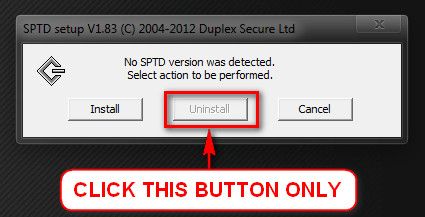
Daemon Tools, Alcohol 120% and Power Archiver Pro uses SCSI Pass Through Direct (SPTD), which is a well known BSOD causer. Uninstall Daemon Tools at first. Then download SPTD standalone installer from Disk-Tools.com, and execute the downloaded file as guided below :

  • Double click to open it.
  • Click this button only:
  • 2012-12-13_224441.jpg
  • If it is grayed out, as in the picture, there is no more SPTD in your system, and you just close the window.
Report us the situation after doing these. If there are further crashes, post them following the BSOD posting instructions. There might be some more things to troubleshoot for .... but after making it sure that there is no virus and no sptd present.
 

My Computer

Computer type
PC/Desktop
Computer Manufacturer/Model Number
Self Assembled
OS
Microsoft Windows 10 Pro Insider Preview 64-bit
CPU
Intel(R) Core(TM) i3-4130 CPU @ 3.40GHz
Motherboard
Gigabyte Technology Co., Ltd. B85M-D3H
Memory
Corsair Vengence 4GB x2 (8.00GB Dual-Channel DDR3 @ 798MHz)
Graphics Card(s)
2047MB GeForce GTS 450 (ZOTAC International)
Sound Card
Onboard (Realtek High Definition Audio)
Monitor(s) Displays
LG Flatron E2040T
Screen Resolution
1600x900
Hard Drives
Western Digital 1 TB
Seagate 500 GB
PSU
Corsair VS550
Case
Cooler Master K380
Cooling
Cooler Master Seidon 120V Plus
Keyboard
Logitech MK260r
Mouse
Logitech MK260r
Internet Speed
PMPL Broadband
Antivirus
Windows Defender + MBAM
Browser
Firefox
Other Info
Dell Studio 15" Laptop
I went ahead and did a repair install of Windows 7 to make things a bit cleaner during this troubleshooting process. After reinstalling, I downloaded MSE and attempted a full scan. It stopped about halfway through telling me the service responsible for running the program stopped working. It gave me the option to either restart it manually or reboot my computer to restart the service. I chose to restart it manually, but will wait until after further scans with MBAM to resume the MSE scan.

Also, Avast! is no longer present on the system. Same with the C:Windows\System32\drivers\aswMonFlt.sys file. Both were removed by the reinstall.

After installing my motherboard drivers and EVGA graphics drivers I ran into a BSOD while deleting the windows.old file. I have attached the SF diagnostic zip file with the logs of the two crashes that have occurred AFTER my repair install of Windows 7.

I am currently about 30 minutes into the full scan with MBAM. I used the SPTD installer to verify that SPTD is no longer installed on this system (the "uninstall" button was grayed out). I also uninstalled all 3 programs you mentioned that use SPTD. I will run Kaspersky's TDSSKiller as soon as this full scan is completed. After I get this scan done, and the TDSSKiller scan out of the way, I will retry the MSE scan to see if it was a fluke or if something about the way it's scanning the system is forcing a crash.

Thanks for all the help so far,
Raptor

View attachment 257732
 
Last edited:

My Computer

Computer type
PC/Desktop
Computer Manufacturer/Model Number
Self Assembled
OS
Windows 7 Ultimate SP1 64 bit
CPU
Intel i5 2500k 3.3GHz-3.7GHz
Motherboard
Gigabyte Z77-DS3H
Memory
G-Skill Ripjaw 8GB @1600MHz
Graphics Card(s)
EVGA GeForce GTX 660
Monitor(s) Displays
Asus 24" LED monitor/ Westinghouse 24" LED TV
Screen Resolution
1920x1080 x2
Hard Drives
2x Seagate Barracuda 7200 RPM 1TB
1x Samsung 840 SSD 120GB
PSU
Rosewill 550W PSU
Case
Rosewill Blackhawk Tower
Cooling
Stock CPU cooler/ 5 in-built tower fans
Keyboard
Razer Black Widow Ultimate 2013
Mouse
Razer Naga
Internet Speed
60 Mbps down/ 6 Mbps up
Antivirus
Microsoft Security Essentials/ MBAM
Browser
Google Chrome
Other Info
Backup Machine: 2013 Apple MacBook Pro 15" Retina 2.6 GHz quad i7, 500GB SSD, 16GB 1866 MHz RAM.
Just finished the rootkit scan with the TDSSKiller tool, and the MBAM full scan. Both came up totally clean. I am restarting the MSE scan now. Will post back if/when that is done.
 

My Computer

Computer type
PC/Desktop
Computer Manufacturer/Model Number
Self Assembled
OS
Windows 7 Ultimate SP1 64 bit
CPU
Intel i5 2500k 3.3GHz-3.7GHz
Motherboard
Gigabyte Z77-DS3H
Memory
G-Skill Ripjaw 8GB @1600MHz
Graphics Card(s)
EVGA GeForce GTX 660
Monitor(s) Displays
Asus 24" LED monitor/ Westinghouse 24" LED TV
Screen Resolution
1920x1080 x2
Hard Drives
2x Seagate Barracuda 7200 RPM 1TB
1x Samsung 840 SSD 120GB
PSU
Rosewill 550W PSU
Case
Rosewill Blackhawk Tower
Cooling
Stock CPU cooler/ 5 in-built tower fans
Keyboard
Razer Black Widow Ultimate 2013
Mouse
Razer Naga
Internet Speed
60 Mbps down/ 6 Mbps up
Antivirus
Microsoft Security Essentials/ MBAM
Browser
Google Chrome
Other Info
Backup Machine: 2013 Apple MacBook Pro 15" Retina 2.6 GHz quad i7, 500GB SSD, 16GB 1866 MHz RAM.
Install Service pack 1.
Code:
[COLOR=Red]Windows 7 Kernel Version 7600 MP[/COLOR] (4 procs) Free x64
Product: WinNt, suite: TerminalServer SingleUserTS
Built by: 7600.16617.amd64fre.win7_gdr.100618-1621
Learn how to install Windows 7 Service Pack 1 (SP1)
Service Pack Center - Microsoft Windows

Waiting for the virus scan's results.

Repair install was not a very good idea in this situation, an it does not make all the things clear other than fixing the windows indigenous failures. Which was not very necessary here. If you want to start afresh, go far it: http://www.sevenforums.com/tutorials/219487-clean-reinstall-factory-oem-windows-7-a.html. Everything you need is described and provided there.
 

My Computer

Computer type
PC/Desktop
Computer Manufacturer/Model Number
Self Assembled
OS
Microsoft Windows 10 Pro Insider Preview 64-bit
CPU
Intel(R) Core(TM) i3-4130 CPU @ 3.40GHz
Motherboard
Gigabyte Technology Co., Ltd. B85M-D3H
Memory
Corsair Vengence 4GB x2 (8.00GB Dual-Channel DDR3 @ 798MHz)
Graphics Card(s)
2047MB GeForce GTS 450 (ZOTAC International)
Sound Card
Onboard (Realtek High Definition Audio)
Monitor(s) Displays
LG Flatron E2040T
Screen Resolution
1600x900
Hard Drives
Western Digital 1 TB
Seagate 500 GB
PSU
Corsair VS550
Case
Cooler Master K380
Cooling
Cooler Master Seidon 120V Plus
Keyboard
Logitech MK260r
Mouse
Logitech MK260r
Internet Speed
PMPL Broadband
Antivirus
Windows Defender + MBAM
Browser
Firefox
Other Info
Dell Studio 15" Laptop
I've attempted to rescan using MSE 3-4 times with no luck. The first time about 10 seconds into the scan I got a blue screen. The last 2-3 attempted scans wound up the same way my earlier attempt to scan did. The service that runs MSE stopped working and the scan was cut short. Each attempt only ran for about 10-15 minutes.

I will attach another SF zip file which will include my most recent actions.

Thanks,
Raptor

View attachment 257740
 

My Computer

Computer type
PC/Desktop
Computer Manufacturer/Model Number
Self Assembled
OS
Windows 7 Ultimate SP1 64 bit
CPU
Intel i5 2500k 3.3GHz-3.7GHz
Motherboard
Gigabyte Z77-DS3H
Memory
G-Skill Ripjaw 8GB @1600MHz
Graphics Card(s)
EVGA GeForce GTX 660
Monitor(s) Displays
Asus 24" LED monitor/ Westinghouse 24" LED TV
Screen Resolution
1920x1080 x2
Hard Drives
2x Seagate Barracuda 7200 RPM 1TB
1x Samsung 840 SSD 120GB
PSU
Rosewill 550W PSU
Case
Rosewill Blackhawk Tower
Cooling
Stock CPU cooler/ 5 in-built tower fans
Keyboard
Razer Black Widow Ultimate 2013
Mouse
Razer Naga
Internet Speed
60 Mbps down/ 6 Mbps up
Antivirus
Microsoft Security Essentials/ MBAM
Browser
Google Chrome
Other Info
Backup Machine: 2013 Apple MacBook Pro 15" Retina 2.6 GHz quad i7, 500GB SSD, 16GB 1866 MHz RAM.
Ok. I guess I'll just wipe it. I'll probably wind up buying a new hard drive tomorrow because as far as I can tell that's the underlying issue here.

Thanks anyway.
 

My Computer

Computer type
PC/Desktop
Computer Manufacturer/Model Number
Self Assembled
OS
Windows 7 Ultimate SP1 64 bit
CPU
Intel i5 2500k 3.3GHz-3.7GHz
Motherboard
Gigabyte Z77-DS3H
Memory
G-Skill Ripjaw 8GB @1600MHz
Graphics Card(s)
EVGA GeForce GTX 660
Monitor(s) Displays
Asus 24" LED monitor/ Westinghouse 24" LED TV
Screen Resolution
1920x1080 x2
Hard Drives
2x Seagate Barracuda 7200 RPM 1TB
1x Samsung 840 SSD 120GB
PSU
Rosewill 550W PSU
Case
Rosewill Blackhawk Tower
Cooling
Stock CPU cooler/ 5 in-built tower fans
Keyboard
Razer Black Widow Ultimate 2013
Mouse
Razer Naga
Internet Speed
60 Mbps down/ 6 Mbps up
Antivirus
Microsoft Security Essentials/ MBAM
Browser
Google Chrome
Other Info
Backup Machine: 2013 Apple MacBook Pro 15" Retina 2.6 GHz quad i7, 500GB SSD, 16GB 1866 MHz RAM.
Good decision.

But, even if you are planning to do a fresh install, dont forget to give TDSSKiller a go before doing it.
 

My Computer

Computer type
PC/Desktop
Computer Manufacturer/Model Number
Self Assembled
OS
Microsoft Windows 10 Pro Insider Preview 64-bit
CPU
Intel(R) Core(TM) i3-4130 CPU @ 3.40GHz
Motherboard
Gigabyte Technology Co., Ltd. B85M-D3H
Memory
Corsair Vengence 4GB x2 (8.00GB Dual-Channel DDR3 @ 798MHz)
Graphics Card(s)
2047MB GeForce GTS 450 (ZOTAC International)
Sound Card
Onboard (Realtek High Definition Audio)
Monitor(s) Displays
LG Flatron E2040T
Screen Resolution
1600x900
Hard Drives
Western Digital 1 TB
Seagate 500 GB
PSU
Corsair VS550
Case
Cooler Master K380
Cooling
Cooler Master Seidon 120V Plus
Keyboard
Logitech MK260r
Mouse
Logitech MK260r
Internet Speed
PMPL Broadband
Antivirus
Windows Defender + MBAM
Browser
Firefox
Other Info
Dell Studio 15" Laptop
I ran TDSSKiller and it came up clean. I downloaded a fresh copy of Windows 7 with SP1 and made a bootable DVD. Got the hard drive wiped and got to the desktop for the first time under the fresh *clean* install. I had just put the motherboard driver dvd in the disc tray and loaded the run.exe when I was instantly hit with a blue screen.

Hard drive must have gotten severely damaged by the power outage. Will be ordering a new drive in the next few days. Hopefully all will go well with a new one.

Thanks for all the help Arc,
Raptor
 

My Computer

Computer type
PC/Desktop
Computer Manufacturer/Model Number
Self Assembled
OS
Windows 7 Ultimate SP1 64 bit
CPU
Intel i5 2500k 3.3GHz-3.7GHz
Motherboard
Gigabyte Z77-DS3H
Memory
G-Skill Ripjaw 8GB @1600MHz
Graphics Card(s)
EVGA GeForce GTX 660
Monitor(s) Displays
Asus 24" LED monitor/ Westinghouse 24" LED TV
Screen Resolution
1920x1080 x2
Hard Drives
2x Seagate Barracuda 7200 RPM 1TB
1x Samsung 840 SSD 120GB
PSU
Rosewill 550W PSU
Case
Rosewill Blackhawk Tower
Cooling
Stock CPU cooler/ 5 in-built tower fans
Keyboard
Razer Black Widow Ultimate 2013
Mouse
Razer Naga
Internet Speed
60 Mbps down/ 6 Mbps up
Antivirus
Microsoft Security Essentials/ MBAM
Browser
Google Chrome
Other Info
Backup Machine: 2013 Apple MacBook Pro 15" Retina 2.6 GHz quad i7, 500GB SSD, 16GB 1866 MHz RAM.
Hey Arc, I'm back again.

I recently bought a new hard drive, and ran into the same exact issues. I took my system to a local computer repair store and he did what he said would 'fix' it. It wound up being a load of crap as all he did was reload windows and fix my 'corrupt' brand new hard drive.

Same problems as before. Chrome randomly begins its Aw Snap loops, and I've gotten a few BSODs. Will attach the SF zip as before. I hate to dredge up old problems, but I'm sick of having a shiny blue piece of eye candy sitting under my desk.

Thanks in advance,
Raptor

View attachment 259630
 

My Computer

Computer type
PC/Desktop
Computer Manufacturer/Model Number
Self Assembled
OS
Windows 7 Ultimate SP1 64 bit
CPU
Intel i5 2500k 3.3GHz-3.7GHz
Motherboard
Gigabyte Z77-DS3H
Memory
G-Skill Ripjaw 8GB @1600MHz
Graphics Card(s)
EVGA GeForce GTX 660
Monitor(s) Displays
Asus 24" LED monitor/ Westinghouse 24" LED TV
Screen Resolution
1920x1080 x2
Hard Drives
2x Seagate Barracuda 7200 RPM 1TB
1x Samsung 840 SSD 120GB
PSU
Rosewill 550W PSU
Case
Rosewill Blackhawk Tower
Cooling
Stock CPU cooler/ 5 in-built tower fans
Keyboard
Razer Black Widow Ultimate 2013
Mouse
Razer Naga
Internet Speed
60 Mbps down/ 6 Mbps up
Antivirus
Microsoft Security Essentials/ MBAM
Browser
Google Chrome
Other Info
Backup Machine: 2013 Apple MacBook Pro 15" Retina 2.6 GHz quad i7, 500GB SSD, 16GB 1866 MHz RAM.
Intel(R) USB 3.0 Hub Driver
Code:
fffff880`090f1a58  fffff880`03fba80aUnable to load image \SystemRoot\system32\DRIVERS\iusb3hub.sys, Win32 error 0n2
*** WARNING: Unable to verify timestamp for iusb3hub.sys
*** ERROR: Module load completed but symbols could not be loaded for iusb3hub.sys
 iusb3hub+0x1f80a
If possible, try to update the driver from Intel Download Center

Test your RAM modules for possible errors.
How to Test and Diagnose RAM Issues with Memtest86+
Run memtest for at least 8 passes, preferably overnight.
 

My Computer

Computer type
PC/Desktop
Computer Manufacturer/Model Number
Self Assembled
OS
Microsoft Windows 10 Pro Insider Preview 64-bit
CPU
Intel(R) Core(TM) i3-4130 CPU @ 3.40GHz
Motherboard
Gigabyte Technology Co., Ltd. B85M-D3H
Memory
Corsair Vengence 4GB x2 (8.00GB Dual-Channel DDR3 @ 798MHz)
Graphics Card(s)
2047MB GeForce GTS 450 (ZOTAC International)
Sound Card
Onboard (Realtek High Definition Audio)
Monitor(s) Displays
LG Flatron E2040T
Screen Resolution
1600x900
Hard Drives
Western Digital 1 TB
Seagate 500 GB
PSU
Corsair VS550
Case
Cooler Master K380
Cooling
Cooler Master Seidon 120V Plus
Keyboard
Logitech MK260r
Mouse
Logitech MK260r
Internet Speed
PMPL Broadband
Antivirus
Windows Defender + MBAM
Browser
Firefox
Other Info
Dell Studio 15" Laptop
The Chrome crashes forced me to uninstall it. I downloaded Firefox as a backup, but began to use IE for my Googling and to update that driver. Before I could get the ball rolling on the driver update IE began to crash consistently similarly to Chrome. I tried swapping to Firefox, but something must have gone wrong with either its install or setup. Nothing will download via Firefox. Not another browser, not the java runtime that is required to run Intel's driver update tool, not even manual downloads after searching for the correct file on Intel's download server.

If you have any suggestions as to how I can get that driver updated while effectively not having an internet browser on my PC I'd love to hear them. I have my laptop, so if I have to I could download and move a browser to my PC and try to sneak in the Intel update tool before more crashes start. I am afraid though, that I won't be able to get the required plugins installed before the browsers crap out again.
 

My Computer

Computer type
PC/Desktop
Computer Manufacturer/Model Number
Self Assembled
OS
Windows 7 Ultimate SP1 64 bit
CPU
Intel i5 2500k 3.3GHz-3.7GHz
Motherboard
Gigabyte Z77-DS3H
Memory
G-Skill Ripjaw 8GB @1600MHz
Graphics Card(s)
EVGA GeForce GTX 660
Monitor(s) Displays
Asus 24" LED monitor/ Westinghouse 24" LED TV
Screen Resolution
1920x1080 x2
Hard Drives
2x Seagate Barracuda 7200 RPM 1TB
1x Samsung 840 SSD 120GB
PSU
Rosewill 550W PSU
Case
Rosewill Blackhawk Tower
Cooling
Stock CPU cooler/ 5 in-built tower fans
Keyboard
Razer Black Widow Ultimate 2013
Mouse
Razer Naga
Internet Speed
60 Mbps down/ 6 Mbps up
Antivirus
Microsoft Security Essentials/ MBAM
Browser
Google Chrome
Other Info
Backup Machine: 2013 Apple MacBook Pro 15" Retina 2.6 GHz quad i7, 500GB SSD, 16GB 1866 MHz RAM.
If you havent yet, give Windows Defender Offline a go. Use another computer in home or with friends to download the WDO iso.

Try to update Name Qualcomm Atheros AR8161/8165 PCI-E Gigabit Ethernet Controller (NDIS 6.20) driver from ATHEROS drivers for Microsoft Windows (Atheros?????).

Uninstall the Pando Networks products that you have installed right now.

Apparently I am not seeing anything else having a bearing on networks, but want to have a closer look.
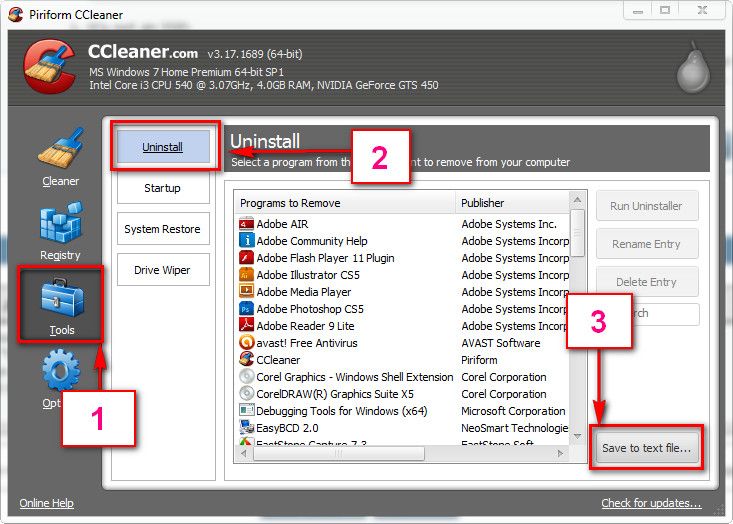
Download and install CCleaner. Then run it.
Go to "Tools" .... by default it will open the "uninstall" tab.
Click on save as text file. Save it on your desktop.
Upload the text file for us.
2012-11-02_224417.jpg
 

My Computer

Computer type
PC/Desktop
Computer Manufacturer/Model Number
Self Assembled
OS
Microsoft Windows 10 Pro Insider Preview 64-bit
CPU
Intel(R) Core(TM) i3-4130 CPU @ 3.40GHz
Motherboard
Gigabyte Technology Co., Ltd. B85M-D3H
Memory
Corsair Vengence 4GB x2 (8.00GB Dual-Channel DDR3 @ 798MHz)
Graphics Card(s)
2047MB GeForce GTS 450 (ZOTAC International)
Sound Card
Onboard (Realtek High Definition Audio)
Monitor(s) Displays
LG Flatron E2040T
Screen Resolution
1600x900
Hard Drives
Western Digital 1 TB
Seagate 500 GB
PSU
Corsair VS550
Case
Cooler Master K380
Cooling
Cooler Master Seidon 120V Plus
Keyboard
Logitech MK260r
Mouse
Logitech MK260r
Internet Speed
PMPL Broadband
Antivirus
Windows Defender + MBAM
Browser
Firefox
Other Info
Dell Studio 15" Laptop
I will give these suggestions a shot when I get back to my system. I will be out of town for work for the next few weeks. Thanks for all the help, Arc. I really appreciate it.
 

My Computer

Computer type
PC/Desktop
Computer Manufacturer/Model Number
Self Assembled
OS
Windows 7 Ultimate SP1 64 bit
CPU
Intel i5 2500k 3.3GHz-3.7GHz
Motherboard
Gigabyte Z77-DS3H
Memory
G-Skill Ripjaw 8GB @1600MHz
Graphics Card(s)
EVGA GeForce GTX 660
Monitor(s) Displays
Asus 24" LED monitor/ Westinghouse 24" LED TV
Screen Resolution
1920x1080 x2
Hard Drives
2x Seagate Barracuda 7200 RPM 1TB
1x Samsung 840 SSD 120GB
PSU
Rosewill 550W PSU
Case
Rosewill Blackhawk Tower
Cooling
Stock CPU cooler/ 5 in-built tower fans
Keyboard
Razer Black Widow Ultimate 2013
Mouse
Razer Naga
Internet Speed
60 Mbps down/ 6 Mbps up
Antivirus
Microsoft Security Essentials/ MBAM
Browser
Google Chrome
Other Info
Backup Machine: 2013 Apple MacBook Pro 15" Retina 2.6 GHz quad i7, 500GB SSD, 16GB 1866 MHz RAM.
Back
Top