| Windows 7: BSOD happening very frequently on laptop, stop error 0x00007A |
17 Mar 2013
|
#1 | | Windows 7 home premium 64-bit Maryland |
BSOD happening very frequently on laptop, stop error 0x00007A Hi,
I am at my wit's end with my BSOD's on my gaming laptop. I have tried multiple fixes, but none of the fixes seem to work. It seems I have a BSOD if I leave my computer on long enough, and I receive the following:
****************
kernel_data_inpage_error
Stop: 0x00007A (0xFFFFF6FC40009798, 0xFFFFFFFFC0000000E, 0x00000001BAB28860, 0xFFFFF880012F3B00).
ntfs.sys - Address FFFFF880012F3B00 base at FFFFF88001204000. Datest amp 5040d4c6
****************
I hope I provided all the information that is needed to help solve this BSOD, and if not, let me know so I can edit the post.
Thank you everyone for your help!
*edit*
I forgot to post system specs: Computer type
Laptop Computer Manufacturer/Model Number
custom Built through Sager OS
Windows 7 home premium 64-bit CPU
Intel core i5-2450M 2.50ghz Motherboard
w150ER (I am going by dxdiag, so I am not sure) Memory
8192MB Graphics Card(s)
Nvidia geforce GT 650m 1gb Sound Card
N/A Monitor(s) Displays
N/A Screen Resolution
1920 x 1080 Hard Drives
750gb Antivirus
Avast Browser
Chrome | My System Specs |
| Computer type Laptop System Manufacturer/Model Number custom Built through Sager OS Windows 7 home premium 64-bit CPU Intel core i5-2450M 2.50ghz Motherboard w150ER (I am going by dxdiag, so I am not sure) Memory 8192MB Graphics Card Nvidia geforce GT 650m 1gb Screen Resolution 1920 x 1080 Hard Drives 750gb Antivirus Avast Browser Chrome |
17 Mar 2013
|
#2 | | Windows® 7 Home Premium SP-1 |
Welcome to Seven Forums.
Configure the system to collect Small Memory Dumps (Minidumps) following this tutorial: Dump Files - Configure Windows to Create on BSOD
Avast! contributes in BSOD's often. As a test please remove it using its removal tool from here: Uninstallers (removal tools) for common antivirus software - ESET Knowledgebase
We recommended Microsoft Security Essentials from a strict BSOD perspective. Is most compatible & provides most stability compared to other antivirus app/Internet Security Software.  Warning Do not start the free trial of Malware Bytes; remember to deselect that option when prompted. 
Run a full scan with both (separately) once downloaded, installed and updated.
Make scans with the following:
-Kaspersky TDSSKiller -ESET online scanner Perform a System File Check to check the integrity of all protected Windows 7: - Click Start Menu
- Click All Programs
- Click Accessories
- Right click Command Prompt
- Click Run as administrator
- Type
- and press Enter
Full tutorial here: Check your hard drive(s) for errors by running chkdsk Upload a screenshot of your hard disk using CrystalDiskInfo: Make a hard drive test from the hard drive manufacturers website: Number down items at start-up. Keep only your anti-virus, this also improves the time for logging into windows. Take memtest. Run for 8 passes and test each stick in a know good slot for an additional 6 passes.  Note Pay close attention to part 3 of the tutorial in order to rule out the faulty stick.  Information Errors are sometimes found after 8 passes.  Tip Do this test overnight, before going to bed.
Let us know the results and further BSOD reports. | My System Specs | | Computer type PC/Desktop OS Windows® 7 Home Premium SP-1 CPU Intel Pentium(R) E5200 @ 2.50GHz Motherboard Intel Corporation DG41WV (PROCESSOR) Memory 4096 MBytes Dual-Channel DDR3 @ 398MHz Graphics Card ATI Radeon HD 5450 (ASUStek Computer Inc) Sound Card Realtek High Definition Audio Monitor(s) Displays DELL E170S on ATI Radeon HD 5450 Screen Resolution 1280x1024 pixels Keyboard Logitech PS/2 Keyboard Mouse A4 Tech Co Ltd/Logitech PSU 400W Case Nothing Fancy Cooling Fans Hard Drives 466GB Western Digital WDC Internet Speed 512 Kbps Antivirus Microsoft Security Essentials & Malwarebytes Browser Chrome & Internet Explorer 9 Other Info Imation 8 GB USB, 6 GB Seagate External Hard drive, ASUS DVD-E818A7T ATA Device |
18 Mar 2013
|
#3 | | Windows 7 home premium 64-bit Maryland |
Hi,
thank you for the reply! I switched from Avast! to microsoft security and malwarebytes, but when I tried to do full scan, my laptop froze up. I tried to go to all programs on the start menu, but I think it said no memory, or nothing to show... anyway, that shouldn't happen!
So I restarted my computer in safe mode with command prompt to do the Scf scan. When it was finished, there were no errors. So right now, I am currently running the memtest86+ on my laptop. I will be sure to post the results later when it is finished.
Thank you and my picture of my harddrive should be in attachments | My System Specs | | Computer type Laptop System Manufacturer/Model Number custom Built through Sager OS Windows 7 home premium 64-bit CPU Intel core i5-2450M 2.50ghz Motherboard w150ER (I am going by dxdiag, so I am not sure) Memory 8192MB Graphics Card Nvidia geforce GT 650m 1gb Screen Resolution 1920 x 1080 Hard Drives 750gb Antivirus Avast Browser Chrome |
18 Mar 2013
|
#4 | | Windows® 7 Home Premium SP-1 |
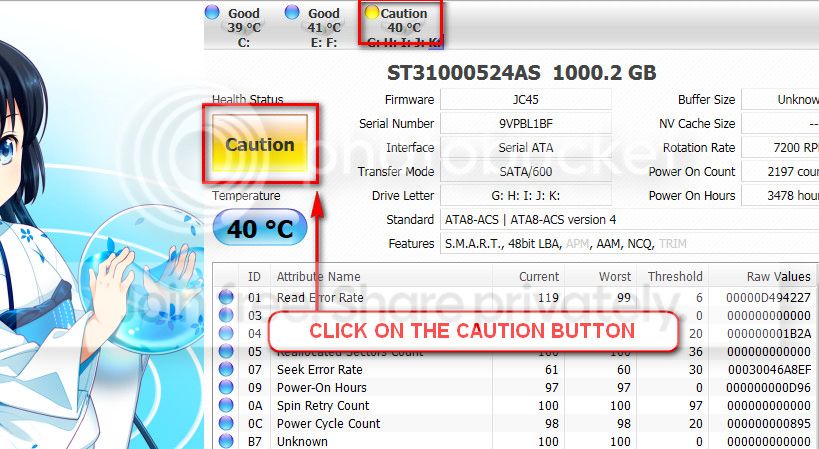
Keep us posted. Quote: The caution indication can be converted to good using CrystalDiscInfo. Click on the caution Button, you will get another window ....
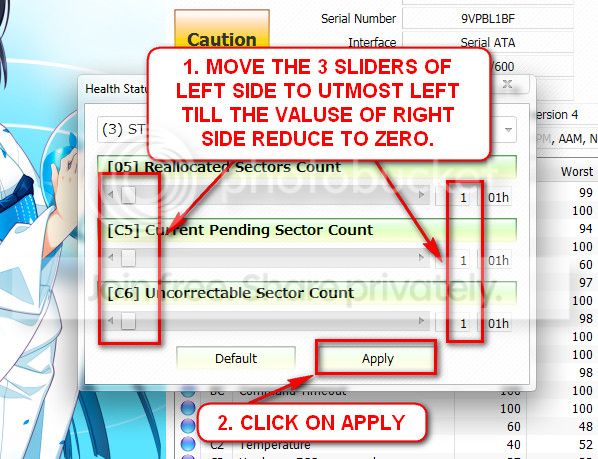
In the resulting window, there are three sliders in the left. Drag them to the ultimate left, and notice the values at the right side are converting to zeros.
Now click the apply button, and notice that the caution is gone. | My System Specs | | Computer type PC/Desktop OS Windows® 7 Home Premium SP-1 CPU Intel Pentium(R) E5200 @ 2.50GHz Motherboard Intel Corporation DG41WV (PROCESSOR) Memory 4096 MBytes Dual-Channel DDR3 @ 398MHz Graphics Card ATI Radeon HD 5450 (ASUStek Computer Inc) Sound Card Realtek High Definition Audio Monitor(s) Displays DELL E170S on ATI Radeon HD 5450 Screen Resolution 1280x1024 pixels Keyboard Logitech PS/2 Keyboard Mouse A4 Tech Co Ltd/Logitech PSU 400W Case Nothing Fancy Cooling Fans Hard Drives 466GB Western Digital WDC Internet Speed 512 Kbps Antivirus Microsoft Security Essentials & Malwarebytes Browser Chrome & Internet Explorer 9 Other Info Imation 8 GB USB, 6 GB Seagate External Hard drive, ASUS DVD-E818A7T ATA Device |
19 Mar 2013
|
#5 | | Windows 7 home premium 64-bit Maryland |
Thanks! I'll do that.
Also, I ran the memtest86 and I currently have 17 passes and 0 errors. I guess that's consider good and bad? Good that it's not the memory sticks, bad that I don't know what it is.
I'll exit out of it and reboot my laptop and change the caution to good.
thanks again! | My System Specs | | Computer type Laptop System Manufacturer/Model Number custom Built through Sager OS Windows 7 home premium 64-bit CPU Intel core i5-2450M 2.50ghz Motherboard w150ER (I am going by dxdiag, so I am not sure) Memory 8192MB Graphics Card Nvidia geforce GT 650m 1gb Screen Resolution 1920 x 1080 Hard Drives 750gb Antivirus Avast Browser Chrome |
19 Mar 2013
|
#6 | | Windows® 7 Home Premium SP-1 |
Good news. Any BSOD's so far?
Good luck. | My System Specs | | Computer type PC/Desktop OS Windows® 7 Home Premium SP-1 CPU Intel Pentium(R) E5200 @ 2.50GHz Motherboard Intel Corporation DG41WV (PROCESSOR) Memory 4096 MBytes Dual-Channel DDR3 @ 398MHz Graphics Card ATI Radeon HD 5450 (ASUStek Computer Inc) Sound Card Realtek High Definition Audio Monitor(s) Displays DELL E170S on ATI Radeon HD 5450 Screen Resolution 1280x1024 pixels Keyboard Logitech PS/2 Keyboard Mouse A4 Tech Co Ltd/Logitech PSU 400W Case Nothing Fancy Cooling Fans Hard Drives 466GB Western Digital WDC Internet Speed 512 Kbps Antivirus Microsoft Security Essentials & Malwarebytes Browser Chrome & Internet Explorer 9 Other Info Imation 8 GB USB, 6 GB Seagate External Hard drive, ASUS DVD-E818A7T ATA Device |
21 Mar 2013
|
#7 | | Windows 7 home premium 64-bit Maryland |
Actually I haven't had a blue screen yet! (thankfully!)
But I am still not sure about it, I'll keep an eye on it and leave it on for a little bit to see if any BSOD's occur.
thank you | My System Specs | | Computer type Laptop System Manufacturer/Model Number custom Built through Sager OS Windows 7 home premium 64-bit CPU Intel core i5-2450M 2.50ghz Motherboard w150ER (I am going by dxdiag, so I am not sure) Memory 8192MB Graphics Card Nvidia geforce GT 650m 1gb Screen Resolution 1920 x 1080 Hard Drives 750gb Antivirus Avast Browser Chrome |
21 Mar 2013
|
#8 | | Windows 7 home premium 64-bit Maryland |
Hi, an update! (and not a good one...)
I got another BSOD, but this time the stop code was different than the last.
Stop: 0x000000F4 (0x0000000000000003, 0xFFFFFA8009D7EB30, 0xFFFFFA8009D7EE10, 0xFFFFF800031D7470)
Well thank you for any help you can provide towards this new BSOD! | My System Specs | | Computer type Laptop System Manufacturer/Model Number custom Built through Sager OS Windows 7 home premium 64-bit CPU Intel core i5-2450M 2.50ghz Motherboard w150ER (I am going by dxdiag, so I am not sure) Memory 8192MB Graphics Card Nvidia geforce GT 650m 1gb Screen Resolution 1920 x 1080 Hard Drives 750gb Antivirus Avast Browser Chrome |
22 Mar 2013
|
#9 | | Windows® 7 Home Premium SP-1 |
Need the files like you posted on your first post | My System Specs | | Computer type PC/Desktop OS Windows® 7 Home Premium SP-1 CPU Intel Pentium(R) E5200 @ 2.50GHz Motherboard Intel Corporation DG41WV (PROCESSOR) Memory 4096 MBytes Dual-Channel DDR3 @ 398MHz Graphics Card ATI Radeon HD 5450 (ASUStek Computer Inc) Sound Card Realtek High Definition Audio Monitor(s) Displays DELL E170S on ATI Radeon HD 5450 Screen Resolution 1280x1024 pixels Keyboard Logitech PS/2 Keyboard Mouse A4 Tech Co Ltd/Logitech PSU 400W Case Nothing Fancy Cooling Fans Hard Drives 466GB Western Digital WDC Internet Speed 512 Kbps Antivirus Microsoft Security Essentials & Malwarebytes Browser Chrome & Internet Explorer 9 Other Info Imation 8 GB USB, 6 GB Seagate External Hard drive, ASUS DVD-E818A7T ATA Device |
22 Mar 2013
|
#10 | | Windows 7 Ultimate 32-Bit & Windows 7 Ultimate 64-Bit |
Hi MOAVG
Do you recall this file IASTOR.SYS being listed in the BSOD ? If so that is your Intel SATA drivers .
Click on the DOWNLOAD button below and save it onto your desktop . Double click it to run the software | My System Specs | | System Manufacturer/Model Number Custom Built OS Windows 7 Ultimate 32-Bit & Windows 7 Ultimate 64-Bit CPU Intel Core i7 CPU 950 @ 3.07GHz Motherboard ASUS P6T DELUXE V2 Memory OCZ 6GB (3 x 2GB) 240-Pin DDR3 SDRAM DDR3 1600 OCZ3X1600R2 Graphics Card ATI Radeon HD 5700 Series Sound Card OnBoard Keyboard Microsoft Wireless Laser Keyboard 7000 Mouse Microsoft Wireless Laser Mouse 7000 PSU CORSAIR 850w Case NZXT LEXA Cooling Intel Stock Heatsink Fan Hard Drives WD6400AACS-00M3B0 (640GB SATA ) BSOD happening very frequently on laptop, stop error 0x00007A problems? All times are GMT -5. The time now is 06:51 AM. | |