"Windows has recovered from an unexpected shutdown" - Please help.

Amputechture

New member
BSOD during "Sleep" and "Hibernation" modes

Hello everyone. I have been experiencing the following problem for quite a while now and surprisingly, even a factory restore did not solve it!

This problem normally occurs when I put my laptop to "Sleep" mode or "Hibernate" mode. It does not happen every single time, but at very random moments. It is bothering me so much and I just don't know how to get rid of it.

Here is the exact problem:

Windows has recovered from an unexpected shutdown:

Problem signature:
Problem Event Name: BlueScreen
OS Version: 6.1.7601.2.1.0.768.3
Locale ID: 1033

Additional information about the problem:
BCCode: 9f
BCP1: 0000000000000003
BCP2: FFFFFA80074BBA10
BCP3: FFFFF80000B9C3D8
BCP4: FFFFFA80094598A0
OS Version: 6_1_7601
Service Pack: 1_0
Product: 768_1

Files that help describe the problem:
C:\Windows\Minidump\032713-30014-01.dmp
C:\Users\Moody\AppData\Local\Temp\WER-61729-0.sysdata.xml


I have already zipped the minidump file and uploaded it onto SkyDrive. It is available for download to the public. So here is the link to my SkyDrive in case any of you want to have a look: https://skydrive.live.com/#cid=60B4135BC04292B6&id=60B4135BC04292B6!612

I will also upload my SF Diagnostics file to this post along with my minidump zip.


If there is anything else I need to upload or post, please let me know and I'll get to it as soon as possible. Any help you're able to offer is very much appreciated.

Thanks in advance.
 
Last edited:

My Computer

Computer type
Laptop
Computer Manufacturer/Model Number
Sony Vaio
OS
Windows 7 Home Premium 64bit
Memory
8.00 GB
Graphics Card(s)
Radeon
Antivirus
Kaspersky
Browser
Firefox
There is one little thing I forgot to mention. I noticed this problem occurring only after I started using an ethernet cable. Could that be related to the BSOD in any way or is it purely coincidental?
 

My Computer

Computer type
Laptop
Computer Manufacturer/Model Number
Sony Vaio
OS
Windows 7 Home Premium 64bit
Memory
8.00 GB
Graphics Card(s)
Radeon
Antivirus
Kaspersky
Browser
Firefox
Kaspersky has been contributing to your crashes. As a test I would recommend uninstalling it with its removal tool from here: Uninstallers (removal tools) for common antivirus software - ESET Knowledgebase

Recommended Microsoft Security Essentials from a strict BSOD perspective.
   Warning
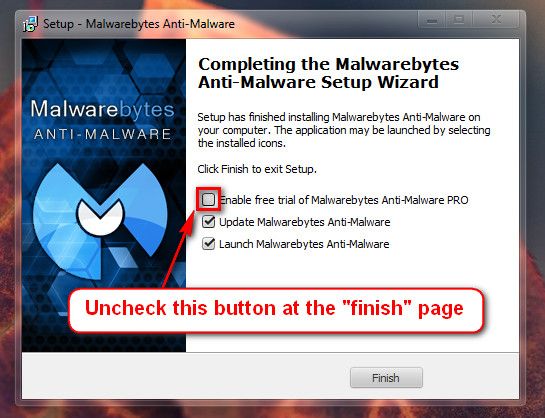
Do not start the free trial of Malware Bytes; remember to deselect that option when prompted.

2013-03-09_224312_zps62dc7c23.jpg

Run a full scan with both (separately) once downloaded, installed and updated.

The following is for information purposes only.
Any drivers in red should be updated/replaced/removed.

ArcSoftKsUFilter.sys Mon May 25 14:27:31 2009 (4A1A5673)
ArcSoft Magic-i Visual Effect
http://www.carrona.org/drivers/driver.php?id=ArcSoftKsUFilter.sys

SFEP.sys Fri Nov 27 11:39:13 2009 (4B0F6601)
Sony Firmware Extension Parser driver - 2007 version has BSOD issues in Win7
http://www.carrona.org/drivers/driver.php?id=SFEP.sys

SynTP.sys Fri Aug 13 09:19:24 2010 (4C64B9BC)
Synaptic Touch Pad Driver
http://www.carrona.org/drivers/driver.php?id=SynTP.sys

Please download the stable version of Intel Rapid Storage drivers from here:iaStor.sys Tue Sep 14 07:23:32 2010 (4C8ECE94)
Intel Storage drivers
http://www.carrona.org/drivers/driver.php?id=iaStor.sys

L1C62x64.sys Mon Sep 27 12:36:23 2010 (4CA03B67)
Atheros NIC driver
http://www.carrona.org/drivers/driver.php?id=L1C62x64.sys
If its wireless, match your device from here:
If its not a wireless, match your device from here:

nusb3hub.sys Thu Sep 30 10:00:03 2010 (4CA40B43)
NEC Electronics USB 3.0 Host Controller Driver (previous BSOD issues with 2010 version)
http://www.carrona.org/drivers/driver.php?id=nusb3hub.sys

nusb3xhc.sys Thu Sep 30 10:00:03 2010 (4CA40B43)
NEC Electronics USB 3.0 Host Controller Driver (previous BSOD issues with 2010 version)
http://www.carrona.org/drivers/driver.php?id=nusb3xhc.sys

Reinstall your ATI graphic card drivers.
atikmpag.sys Thu Jun 30 17:18:14 2011 (4E0C5B76)
ATI Video driver (remove the Catalyst Control Center and only install the Display Driver)
http://www.carrona.org/drivers/driver.php?id=atikmpag.sys

atikmdag.sys Thu Jun 30 17:48:35 2011 (4E0C6293)
ATI Video driver (remove the Catalyst Control Center and only install the Display Driver)
http://www.carrona.org/drivers/driver.php?id=atikmdag.sys

igdpmd64.sys Tue Aug 9 21:31:55 2011 (4E4152EB)
Intel Graphics Driver
http://www.carrona.org/drivers/driver.php?id=igdpmd64.sys

RTKVHD64.sys Tue Dec 13 16:24:54 2011 (4EE727F6)
Realtek High Definition Audio Function Driver
http://www.carrona.org/drivers/driver.php?id=RTKVHD64.sys

Please uninstall DAEMON Tools and any Alcohol % software. It uses a driver called sptd.sys which is known to cause BSODs in Windows 7. Uninstall the software using Add/Remove Programs. Reboot the system. Once the program is uninstalled, run sptd.sys uninstaller to remove the driver from your system.

As an alternative, many people recommend the use of Total Mounter or Magic ISO

dtsoftbus01.sys Fri Jan 13 19:45:46 2012 (4F10358A)
Daemon Tools driver [br] Possible BSOD issues in Win7
http://www.carrona.org/drivers/driver.php?id=dtsoftbus01.sys

kl1.sys Tue Jun 19 19:27:15 2012 (4FE07E33)
Kaspersky Unified Driver
http://www.carrona.org/drivers/driver.php?id=kl1.sys

klim6.sys Thu Aug 2 17:09:23 2012 (501A5FE3)
Kaspersky Lab Intermediate Network Driver
http://www.carrona.org/drivers/driver.php?id=klim6.sys

klflt.sys Fri Aug 3 22:10:13 2012 (501BF7E5)
Kaspersky driver - unable to locate a name for it.
http://www.carrona.org/drivers/driver.php?id=klflt.sys

kneps.sys Mon Aug 13 18:45:42 2012 (5028F6F6)
Kaspersky KNEPS Power driver
http://www.carrona.org/drivers/driver.php?id=kneps.sys

klkbdflt.sys Mon Sep 3 19:55:35 2012 (5044B6D7)
Kaspersky KLKBDFLT Keyboard Device Filter
http://www.carrona.org/drivers/driver.php?id=klkbdflt.sys

klmouflt.sys Mon Sep 3 20:21:58 2012 (5044BD06)
KLMOUFLT Mouse Device Filter [fre_wlh_x86] (Kaspersky)
http://www.carrona.org/drivers/driver.php?id=klmouflt.sys

kltdi.sys Thu Oct 18 16:50:34 2012 (507FDEFA)
Kaspersky Network filtering component
http://www.carrona.org/drivers/driver.php?id=kltdi.sys

klif.sys Fri Nov 2 17:41:30 2012 (5093B16A)
Klif Mini-Filter fre_wnet_x86 (Kaspersky)
http://www.carrona.org/drivers/driver.php?id=klif.sys

hssdrv6.sys Fri Feb 22 07:43:02 2013 (5126CD26)
Hotspot Shield Routing Driver [br] Possible BSOD cause seen in mid-2012
http://www.carrona.org/drivers/driver.php?id=hssdrv6.sys

The following is for information purposes only. The following information contains the relevant information from the blue screen analysis:
Code:
[FONT="Lucida Console"]Debug session time: Wed Mar 27 05:20:20.967 2013 (UTC + 6:00)
Loading Dump File [C:\Users\Yusra\SysnativeBSODApps\032713-30014-01.dmp]
Built by: 7601.18044.amd64fre.win7sp1_gdr.130104-1431
System Uptime: 0 days 11:06:40.231
Probably caused by : pci.sys
BugCheck 9F, {3, fffffa80074bba10, fffff80000b9c3d8, fffffa80094598a0}
BugCheck Info: [url=http://www.carrona.org/bsodindx.html#0x0000009F]DRIVER_POWER_STATE_FAILURE (9f)[/url]
Bugcheck code 0000009F
Arguments: 
Arg1: 0000000000000003, A device object has been blocking an Irp for too long a time
Arg2: fffffa80074bba10, Physical Device Object of the stack
Arg3: fffff80000b9c3d8, nt!TRIAGE_9F_POWER on Win7, otherwise the Functional Device Object of the stack
Arg4: fffffa80094598a0, The blocked IRP
BUGCHECK_STR:  0x9F
DEFAULT_BUCKET_ID:  WIN7_DRIVER_FAULT
PROCESS_NAME:  System
FAILURE_BUCKET_ID:  X64_0x9F_3_L1C62x64_IMAGE_pci.sys
¨¨¨¨¨¨¨¨¨¨¨¨¨¨¨¨¨¨¨¨¨¨¨¨¨¨¨¨¨¨¨¨¨¨¨¨¨¨¨¨¨¨¨¨¨¨¨¨¨¨¨¨¨¨¨¨¨¨¨¨¨¨¨¨¨¨¨¨¨¨¨¨¨¨¨¨¨¨¨¨¨¨¨¨¨¨``[/FONT]
Use the System File Checker tool (SFC.exe) to determine which file is causing the issue, and then replace the file.

To do this, follow these steps:
  1. Open an elevated command prompt. To do this, click Start, click All Programs, click Accessories, right-click Command Prompt, and then click Run as administrator. If you are prompted for an administrator password or for a confirmation, type the password, or click Allow.
  2. At the command prompt, type the following command, and then press ENTER: sfc /scannow
    The sfc /scannow command scans all protected system files and replaces incorrect versions with correct Microsoft versions.
http://www.sevenforums.com/tutorials/1538-sfc-scannow-command-system-file-checker.html

Check your hard drive(s) for errors by running chkdsk:
Number down items at start-up. Keep only your anti-virus, this also improves the time for logging into windows.
  • Click on the Start button
  • Type “msconfig” (without quotes), click the resulting link. It will open the System Configuration window.
  • Select the “Startup” tab.
  • Deselect all items other than the antivirus.
  • Apply > OK
  • Accept then restart.
Full tutorial:
This tutorial http://www.sevenforums.com/tutorials/147369-usb-selective-suspend-turn-off.html may help you:

To Disable Selective Suspend:
  • open the control panel
  • go to power options (you may have to set view to small icons)
  • click change plan settings
  • in the window that opens:
  • click change plan settings
  • click change advanced power settings, expand usb and ensure usb selective suspend is disabled.
Let us know the results and further BSOD reports.

 

My Computer

Computer type
PC/Desktop
Computer Manufacturer/Model Number
Self assembled
OS
Windows 10 Home 64Bit
CPU
Intel Core i5 10400 @ 2.90GHz
Motherboard
Intel Corporation DG41WV (PROCESSOR)
Memory
8.00GB Single-Channel Unknown @ 1329MHz (16-20-20-38)
Sound Card
Realtek High Definition Audio
Monitor(s) Displays
DELL E170S
Screen Resolution
1280x1024 pixels
Hard Drives
931GB TOSHIBA DT01ACA100 (SATA)
238GB TEAM TM8PS7256G (SATA SSD)
Case
Nothing Fancy
Cooling
Fans
Keyboard
A4 Tech Co LTD
Mouse
A4 Tech Co Ltd/Logitech
Internet Speed
25 Mbps
Thanks very much for your reply koolkat77.

I'm a bit of a newbie when it comes to computers, so it might be difficult for me to do everything you posted without causing further damage to my system. Do you think it would be a good idea just to uninstall Kaspersky for now without doing everything else you posted?

Oh, and just in case you need any more information: I bought my laptop about 2 and a half years ago. I've had Kaspersky installed ever since I bought my laptop but haven't experienced any BSODs until the past month or so. The only time I get a BSOD is when I put my computer to 'Sleep' or 'Hibernate' mode. Sometimes my computer successfully goes into hibernation/sleep mode and sometimes it does not, hence the unexpected shutdown due to the BSOD.

When the problem first occurred, I didn't make much of it and thought it was just a one time thing. But then it started to happen more frequently. I eventually decided it would be best to restore my computer to it's factory settings, so I did that just two days ago. And just this morning I got the same unexpected shutdown message from Windows.

Anyway, for now I will uninstall Kaspersky and install Malwarebytes along with Microsoft Security Essentials as according to your post. Is there anything else on your list that is vital for me to do? The reason I'm asking is because I'm afraid to mess my system up even more.

Thanks for your time.
 

My Computer

Computer type
Laptop
Computer Manufacturer/Model Number
Sony Vaio
OS
Windows 7 Home Premium 64bit
Memory
8.00 GB
Graphics Card(s)
Radeon
Antivirus
Kaspersky
Browser
Firefox
As priority, yes:
  • Uninstall Kaspersky (+replace with MSE & MBAM)
  • Uninstall Daemon tools
  • SFC scannow & Disk check & USB Selective suspense does not harm.
Check if that helps for the timebeing, rest you can keep for later.

I have come accross many BSOD threads where antivirus software act up with drivers and sleep mode, hence my recommendations. If that does not solve it we'll analyze further.

Do keep us posted of the results. Good luck.
 

My Computer

Computer type
PC/Desktop
Computer Manufacturer/Model Number
Self assembled
OS
Windows 10 Home 64Bit
CPU
Intel Core i5 10400 @ 2.90GHz
Motherboard
Intel Corporation DG41WV (PROCESSOR)
Memory
8.00GB Single-Channel Unknown @ 1329MHz (16-20-20-38)
Sound Card
Realtek High Definition Audio
Monitor(s) Displays
DELL E170S
Screen Resolution
1280x1024 pixels
Hard Drives
931GB TOSHIBA DT01ACA100 (SATA)
238GB TEAM TM8PS7256G (SATA SSD)
Case
Nothing Fancy
Cooling
Fans
Keyboard
A4 Tech Co LTD
Mouse
A4 Tech Co Ltd/Logitech
Internet Speed
25 Mbps
Thanks again, appreciate it.

My brother just told me that he has been experiencing the exact same issue as me for the past week or so. He uses a different laptop, an Acer. He also has Kaspersky installed on his laptop.

I've decided to run the SF Diagnostics tool on his laptop as well and to attach the results to this post. I'd greatly appreciate it if you could have a look at it and verify whether Kaspersky is also the culprit in this case or whether it's a different issue altogether.

Cheers.

Edit: There's no need to spend too much time analyzing these files and posting all the details as that would probably take too much of your time. I'd just like to know whether Kaspersky is once again the culprit.
 
Last edited:

My Computer

Computer type
Laptop
Computer Manufacturer/Model Number
Sony Vaio
OS
Windows 7 Home Premium 64bit
Memory
8.00 GB
Graphics Card(s)
Radeon
Antivirus
Kaspersky
Browser
Firefox
I will get back to the thread soon.
If not in 24 hours, bump the thread.
 

My Computer

Computer type
PC/Desktop
Computer Manufacturer/Model Number
Self assembled
OS
Windows 10 Home 64Bit
CPU
Intel Core i5 10400 @ 2.90GHz
Motherboard
Intel Corporation DG41WV (PROCESSOR)
Memory
8.00GB Single-Channel Unknown @ 1329MHz (16-20-20-38)
Sound Card
Realtek High Definition Audio
Monitor(s) Displays
DELL E170S
Screen Resolution
1280x1024 pixels
Hard Drives
931GB TOSHIBA DT01ACA100 (SATA)
238GB TEAM TM8PS7256G (SATA SSD)
Case
Nothing Fancy
Cooling
Fans
Keyboard
A4 Tech Co LTD
Mouse
A4 Tech Co Ltd/Logitech
Internet Speed
25 Mbps
Yes it does seem to be caused by Kaspersky and a bunch of network drivers.
Code:
fffff800`00b9be48  fffff880`07617765Unable to load image \SystemRoot\system32\DRIVERS\klim6.sys, Win32 error 0n2
*** WARNING: Unable to verify timestamp for klim6.sys
*** ERROR: Module load completed but symbols could not be loaded for klim6.sys
 klim6+0x1765
 

My Computer

Computer type
PC/Desktop
Computer Manufacturer/Model Number
Self assembled
OS
Windows 10 Home 64Bit
CPU
Intel Core i5 10400 @ 2.90GHz
Motherboard
Intel Corporation DG41WV (PROCESSOR)
Memory
8.00GB Single-Channel Unknown @ 1329MHz (16-20-20-38)
Sound Card
Realtek High Definition Audio
Monitor(s) Displays
DELL E170S
Screen Resolution
1280x1024 pixels
Hard Drives
931GB TOSHIBA DT01ACA100 (SATA)
238GB TEAM TM8PS7256G (SATA SSD)
Case
Nothing Fancy
Cooling
Fans
Keyboard
A4 Tech Co LTD
Mouse
A4 Tech Co Ltd/Logitech
Internet Speed
25 Mbps
Ps: Have you had any BSOD after your last post?
 

My Computer

Computer type
PC/Desktop
Computer Manufacturer/Model Number
Self assembled
OS
Windows 10 Home 64Bit
CPU
Intel Core i5 10400 @ 2.90GHz
Motherboard
Intel Corporation DG41WV (PROCESSOR)
Memory
8.00GB Single-Channel Unknown @ 1329MHz (16-20-20-38)
Sound Card
Realtek High Definition Audio
Monitor(s) Displays
DELL E170S
Screen Resolution
1280x1024 pixels
Hard Drives
931GB TOSHIBA DT01ACA100 (SATA)
238GB TEAM TM8PS7256G (SATA SSD)
Case
Nothing Fancy
Cooling
Fans
Keyboard
A4 Tech Co LTD
Mouse
A4 Tech Co Ltd/Logitech
Internet Speed
25 Mbps
Thanks for the reply.

I have uninstalled Daemon Tools and Kaspersky yesterday, and haven't experienced another BSOD since. Though I only put my laptop to sleep twice, so it's quite difficult to determine whether the problem has been solved or not. I will keep testing it within the next few days and will let you know what happens.

Cheers.

Edit: I'm talking about my Vaio laptop. I haven't tested my brother's.
 

My Computer

Computer type
Laptop
Computer Manufacturer/Model Number
Sony Vaio
OS
Windows 7 Home Premium 64bit
Memory
8.00 GB
Graphics Card(s)
Radeon
Antivirus
Kaspersky
Browser
Firefox
No problem. It always takes some time to get things fixed.

I'll wait for an update.
 

My Computer

Computer type
PC/Desktop
Computer Manufacturer/Model Number
Self assembled
OS
Windows 10 Home 64Bit
CPU
Intel Core i5 10400 @ 2.90GHz
Motherboard
Intel Corporation DG41WV (PROCESSOR)
Memory
8.00GB Single-Channel Unknown @ 1329MHz (16-20-20-38)
Sound Card
Realtek High Definition Audio
Monitor(s) Displays
DELL E170S
Screen Resolution
1280x1024 pixels
Hard Drives
931GB TOSHIBA DT01ACA100 (SATA)
238GB TEAM TM8PS7256G (SATA SSD)
Case
Nothing Fancy
Cooling
Fans
Keyboard
A4 Tech Co LTD
Mouse
A4 Tech Co Ltd/Logitech
Internet Speed
25 Mbps
Back
Top