BSOD Driver Power State Failure

minor

New member
Local time
11:42 PM
Messages
2
This is a HP pavilon dm4 Laptop, windows 7 64 bit.

The BSOD seems to always happen when the computer is plugged in, although it has happened a couple times when it wasn't. Its never when I am in the middle of doing something, only when I leave the computer alone for a while will it crash like this. For example, even if I am just listening to music or watch a movie, it doesn't crash. It's like it does this when it gets bored or something... As long as it is doing something it is fine.

I updated the drivers using HP's tool, but the problem hasn't gone away.
 
Last edited:

My Computer My Computer

At a glance

Windows 7 Home Premium 64 bit
Computer type
PC/Desktop
OS
Windows 7 Home Premium 64 bit
File correction

Sorry, I posted the incomplete file the first time... Here are the other files because the complete .zip file exceeded the maximum size.
 
Last edited:

My Computer My Computer

At a glance

Windows 7 Home Premium 64 bit
Computer type
PC/Desktop
OS
Windows 7 Home Premium 64 bit
Code:
Start Menu\Programs\Symantec Endpoint Protection	Public:Start Menu\Programs\Symantec Endpoint Protection	Public
Symantec/Norton is a frequent cause of BSOD's. Please remove it using its removal tool
:ar: Uninstallers (removal tools) for common antivirus software - ESET Knowledgebase

We recommended Microsoft Security Essentials from a strict BSOD perspective.
:ar:Microsoft Security Essentials, Free antivirus for windows
:ar:Malwarebytes Anti-Malware Free
:ar:Good and Free system security combination
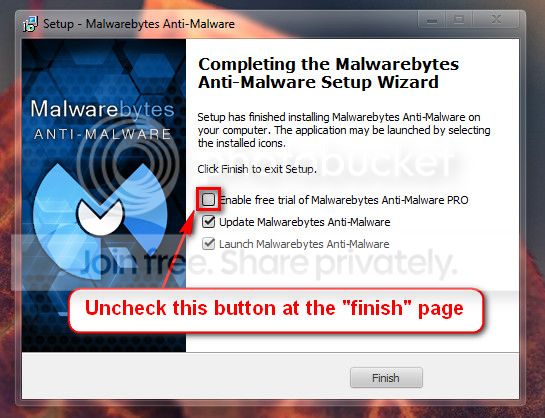
   Warning
Do not start the free trial of Malware Bytes; remember to deselect that option when prompted.

2013-03-09_224312_zps62dc7c23.jpg

Run a full scan with both (separately) once downloaded, installed and updated.

Use the System File Checker tool (SFC.exe) to determine which file is causing the issue, and then replace the file.

To do this, follow these steps:
1. Open an elevated command prompt. To do this, click Start, click All Programs, click Accessories, right-click Command Prompt, and then click Run as administrator. If you are prompted for an administrator password or for a confirmation, type the password, or click Allow.
2. At the command prompt, type the following command, and then press ENTER: sfc /scannow
The sfc /scannow command scans all protected system files and replaces incorrect versions with correct Microsoft versions.

:ar: http://www.sevenforums.com/tutorials/1538-sfc-scannow-command-system-file-checker.html

Number down items at start-up. Keep only your anti-virus, this also improves the time for logging into windows.
:ar: http://www.sevenforums.com/tutorials/1401-startup-programs-change.html
:ar: http://www.sevenforums.com/tutorial...ation-conflicts-performing-clean-startup.html

Then run Disk Check for errors on your drive:
:ar: Check a drive for errors

Let us know the results.
 

My Computer My Computer

At a glance

Windows 10 Home 64BitIntel Core i5 10400 @ 2.90GHz8.00GB Single-Channel Unknown @ 1329MHz (16-2...
Computer type
PC/Desktop
Computer Manufacturer/Model Number
Self assembled
OS
Windows 10 Home 64Bit
CPU
Intel Core i5 10400 @ 2.90GHz
Motherboard
Intel Corporation DG41WV (PROCESSOR)
Memory
8.00GB Single-Channel Unknown @ 1329MHz (16-20-20-38)
Sound Card
Realtek High Definition Audio
Monitor(s) Displays
DELL E170S
Screen Resolution
1280x1024 pixels
Hard Drives
931GB TOSHIBA DT01ACA100 (SATA)
238GB TEAM TM8PS7256G (SATA SSD)
Case
Nothing Fancy
Cooling
Fans
Keyboard
A4 Tech Co LTD
Mouse
A4 Tech Co Ltd/Logitech
Internet Speed
25 Mbps
Back
Top