JavaScript is disabled. For a better experience, please enable JavaScript in your browser before proceeding.
You are using an out of date browser. It may not display this or other websites correctly.
You should upgrade or use an
alternative browser .
How can I design or change my avatar/pic on my profile? I uploaded some of my pics but I don't know how to change my display pic. Thanks guys and enjoy the Holiday Season!
New member
Guru
Gold Member
VIP
First go go
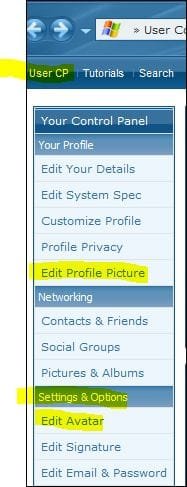
User CP than
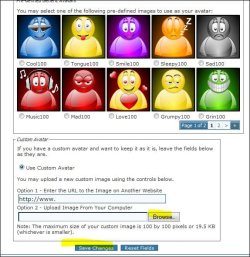
Edit Avatar ,select Use Custom Avatar,click on Browse button and select picture from your hard drive.
Windows 10 Pro x64 Intel Core i5 4440 @Stock 4 x 4GB HyperX Fury DDR3 Gigabyte GTX 1050Ti O4G PC/Desktop Custom Build Windows 10 Pro x64 Intel Core i5 4440 @Stock Gigabyte Z97 D3H 4 x 4GB HyperX Fury DDR3 Gigabyte GTX 1050Ti O4G Integrated Dell P2417H 1920 x 1080 Samsung EVO 850 120GB / Toshiba DT01ACA050 1TB 7200prm 32MB Riotoro Onyx 750W NZXT H500 Black-Red Stock CPU + NZXT 120mm + 2x120mm red fans Modecom Volcano Lanparty Asus ROG Gladius / DeepCool E-Pad Plus DOCSIS 50/3 Mbit Google Chrome Asus K55VJ(i5 3210M, GT635M / 2GB, 8GB DDR3, 500GB HDD)
----------------------
VIP
SF Team
Not sure why you would post this question here in Crashes and Debugging?
Go to your User CP - Settings and Options- Edit Avatar.
If you want to change your profile pic (the one on your profile page) then it's there under User CP - Your Profile - Edit Profile Pic
Windows 7 Ultimate x64 SP1 Core i7 920 (D0) @ 4Ghz, *26c idle *65c full ... 12GB DDR3 Corsair Dominator -CMD12GX3M6A1600C... Zotac Geforce GTX 770 PC/Desktop Airbot 2.0 Windows 7 Ultimate x64 SP1 Core i7 920 (D0) @ 4Ghz, *26c idle *65c full load on air Asus P6X58D Premium - Sata 6Gb/s - USB 3.0 12GB DDR3 Corsair Dominator -CMD12GX3M6A1600C8 at 1600MHz Zotac Geforce GTX 770 ASUS Xonar D2X 1 LG 24" Flatron W2453V-PF 1 Samsung 24" P2450H both 2ms RT 1920x1080@60hz 1 Samsung 250GB 840 Evo SSD Corsair HX1000W Cooler Master HAF 932 Case Fans *3 230mm, *1 140mm/CPU - *Tuniq Tower 120 Extreme Logitech Wireless MK700 Logitech Wireless MK700 DL 15 Mbps UL 0.98 Mbps None Firefox Nightly Processor-7.7 *RAM- 7.9 *Graphics-7.9 *Gaming Graphics- 7.9 *SSD- 7.8 W.E.I final score= 7.7
New member
Thread Starter
LMAO...Sorry guys. I wasn't even paying attention. My bad for posting it on a wrong forum.
----------------------
VIP
SF Team
Did the above solve your question?
Windows 7 Ultimate x64 SP1 Core i7 920 (D0) @ 4Ghz, *26c idle *65c full ... 12GB DDR3 Corsair Dominator -CMD12GX3M6A1600C... Zotac Geforce GTX 770 PC/Desktop Airbot 2.0 Windows 7 Ultimate x64 SP1 Core i7 920 (D0) @ 4Ghz, *26c idle *65c full load on air Asus P6X58D Premium - Sata 6Gb/s - USB 3.0 12GB DDR3 Corsair Dominator -CMD12GX3M6A1600C8 at 1600MHz Zotac Geforce GTX 770 ASUS Xonar D2X 1 LG 24" Flatron W2453V-PF 1 Samsung 24" P2450H both 2ms RT 1920x1080@60hz 1 Samsung 250GB 840 Evo SSD Corsair HX1000W Cooler Master HAF 932 Case Fans *3 230mm, *1 140mm/CPU - *Tuniq Tower 120 Extreme Logitech Wireless MK700 Logitech Wireless MK700 DL 15 Mbps UL 0.98 Mbps None Firefox Nightly Processor-7.7 *RAM- 7.9 *Graphics-7.9 *Gaming Graphics- 7.9 *SSD- 7.8 W.E.I final score= 7.7
New member
Guru
Gold Member
VIP
Hope next time will be on the right place. Glad that you have changed your avatar.
StalkeR
Windows 10 Pro x64 Intel Core i5 4440 @Stock 4 x 4GB HyperX Fury DDR3 Gigabyte GTX 1050Ti O4G PC/Desktop Custom Build Windows 10 Pro x64 Intel Core i5 4440 @Stock Gigabyte Z97 D3H 4 x 4GB HyperX Fury DDR3 Gigabyte GTX 1050Ti O4G Integrated Dell P2417H 1920 x 1080 Samsung EVO 850 120GB / Toshiba DT01ACA050 1TB 7200prm 32MB Riotoro Onyx 750W NZXT H500 Black-Red Stock CPU + NZXT 120mm + 2x120mm red fans Modecom Volcano Lanparty Asus ROG Gladius / DeepCool E-Pad Plus DOCSIS 50/3 Mbit Google Chrome Asus K55VJ(i5 3210M, GT635M / 2GB, 8GB DDR3, 500GB HDD)
New member
Thread Starter
Above problem SOLVED...Thanks you guys!
New member
Guru
Gold Member
VIP
Windows 10 Pro x64 Intel Core i5 4440 @Stock 4 x 4GB HyperX Fury DDR3 Gigabyte GTX 1050Ti O4G PC/Desktop Custom Build Windows 10 Pro x64 Intel Core i5 4440 @Stock Gigabyte Z97 D3H 4 x 4GB HyperX Fury DDR3 Gigabyte GTX 1050Ti O4G Integrated Dell P2417H 1920 x 1080 Samsung EVO 850 120GB / Toshiba DT01ACA050 1TB 7200prm 32MB Riotoro Onyx 750W NZXT H500 Black-Red Stock CPU + NZXT 120mm + 2x120mm red fans Modecom Volcano Lanparty Asus ROG Gladius / DeepCool E-Pad Plus DOCSIS 50/3 Mbit Google Chrome Asus K55VJ(i5 3210M, GT635M / 2GB, 8GB DDR3, 500GB HDD)