| Windows 7: Display scaling issue (not just in Windows) |
30 Jun 2009
|
#1 | | Windows 7 Home Premium x64 Liberty University |
Display scaling issue (not just in Windows) Hey,
I recently bought a Sony VAIO All-in-One Desktop/HDTV (this is NOT the computer that I put in for my system specs on this site). It has a 24" display that runs at 1920x1200 natively.
Whenever it displays the Windows 7 loading screen or the BIOS (both around 800x600), the actual display's resolution does not change from 1200p. Same problem occurs if I lower Windows' display resolution The result is that rather than stretching the picture to fit the screen, the picture is instead displayed in a small area in the middle of the screen, with a black letterbox on all sides.
Every other computer I've ever worked with will stretch lower resolutions to fit the display. How do I get this computer to do that instead of just making the on-screen picture smaller?
Thanks for any help you can offer,
- Phil
P.S. I posted this in the "Chillout Room" because it doesn't seem to have anything to do with Windows 7. If there's a better place to put it, please let me know. | My System Specs |
| System Manufacturer/Model Number Alienware X51 OS Windows 7 Home Premium x64 CPU Intel Core i7-2600 @3.40GHz Memory 8.00GB DDR3 Graphics Card NVIDIA GeForce GTX 555 w/1.0GB RAM Monitor(s) Displays BenQ XL2420TX Screen Resolution 1920x1080@120Hz Keyboard Logitech Wireless Illuminated Keyboard K800 Mouse Razer Orochi PSU 330-watt Hard Drives 1TB Internet Speed Campus Internet |
01 Jul 2009
|
#2 | | |
Look for a Aspect ratio/1:1/Fill setting in either your cards control panel or on the TV itself. It sounds like it's defaulting to 1:1 ratio which will give you borders etc. | My System Specs | | Computer type PC/Desktop System Manufacturer/Model Number SmartEyeball Custom Systems OS 8 Pro x64 CPU i7 3770K 4.6GHz Motherboard ASUS P8Z77 WS (great board good slot placement) Memory 16GB G.Skill Trident X 2400mhz Graphics Card 2x Gigabyte GTX 670 OC WindForce SLI Sound Card X-FI Forte 7.1 + ATH-AD900 Headphones Monitor(s) Displays x3 Dell U2410 / 58" Samsung / "40 Sony Screen Resolution 1920*1200 / 1920*1080 Keyboard Topre Realforce // Ducky Shine MX Black // Filco Ninja TKL Mouse Razer Imperator + Thermaltake Theron PSU Corsair AX1200W Case Thermaltake Level 10 GT Snow Edition Cooling Noctua NH-D14 Hard Drives 2x Intel 520 240GB (RAID 0) * 2x WD Caviar Blacks 2TB (RAID 0) * 2TB WD Caviar Black Antivirus MSE Browser Opera, Chrome, FF Other Info GT Extreme V2 Sim Racing Cockpit + 40" LCD and K/B Mouse stand ▼
Fanatec CSR Elite Wheel + Clubsport Pedals + CSR shifter/7GS ▼
Buttkicker v2 Seat Rumbler with Dedicated 5.1 and Sub Woofer attached to frame ▼
=
Bloody Big Grin |
01 Jul 2009
|
#3 | | Windows 7 Home Premium x64 Liberty University |

Quote: Originally Posted by smarteyeball Look for a Aspect ratio/1:1/Fill setting in either your cards control panel or on the TV itself. It sounds like it's defaulting to 1:1 ratio which will give you borders etc. The Intel GMA control panel has a place to choose aspect ratio settings, but the only one listed is the one I'm already on: "Center". I checked all over the unit itself, but I couldn't find any buttons, switches, or even OSD menu options relating to aspect ratio. I can't figure out why the Intel control panel isn't giving me any other options ... even if it did, would this fix the incorrect display outside of Windows? | My System Specs | | System Manufacturer/Model Number Alienware X51 OS Windows 7 Home Premium x64 CPU Intel Core i7-2600 @3.40GHz Memory 8.00GB DDR3 Graphics Card NVIDIA GeForce GTX 555 w/1.0GB RAM Monitor(s) Displays BenQ XL2420TX Screen Resolution 1920x1080@120Hz Keyboard Logitech Wireless Illuminated Keyboard K800 Mouse Razer Orochi PSU 330-watt Hard Drives 1TB Internet Speed Campus Internet |
04 Jul 2009
|
#4 | | |
Sorry for the delay in replying mate.
I'm not familiar with the Intel control panel, so I couldn't really tell you why it's only giving you the center option.
However, since it's occurring outside windows and therefore not controlled by a driver, it does sound like a setting on the display device itself. In the OSD menu, it could be hiding under a different name like AR, Wide Mode etc | My System Specs | | Computer type PC/Desktop System Manufacturer/Model Number SmartEyeball Custom Systems OS 8 Pro x64 CPU i7 3770K 4.6GHz Motherboard ASUS P8Z77 WS (great board good slot placement) Memory 16GB G.Skill Trident X 2400mhz Graphics Card 2x Gigabyte GTX 670 OC WindForce SLI Sound Card X-FI Forte 7.1 + ATH-AD900 Headphones Monitor(s) Displays x3 Dell U2410 / 58" Samsung / "40 Sony Screen Resolution 1920*1200 / 1920*1080 Keyboard Topre Realforce // Ducky Shine MX Black // Filco Ninja TKL Mouse Razer Imperator + Thermaltake Theron PSU Corsair AX1200W Case Thermaltake Level 10 GT Snow Edition Cooling Noctua NH-D14 Hard Drives 2x Intel 520 240GB (RAID 0) * 2x WD Caviar Blacks 2TB (RAID 0) * 2TB WD Caviar Black Antivirus MSE Browser Opera, Chrome, FF Other Info GT Extreme V2 Sim Racing Cockpit + 40" LCD and K/B Mouse stand ▼
Fanatec CSR Elite Wheel + Clubsport Pedals + CSR shifter/7GS ▼
Buttkicker v2 Seat Rumbler with Dedicated 5.1 and Sub Woofer attached to frame ▼
=
Bloody Big Grin |
05 Jul 2009
|
#5 | | Windows 7 Home Premium x64 Liberty University |
Well, I've pored over the physical buttons on the display, the OSD menu, and the remote, and I can't find anything that looks even remotely like an option to change aspect ratio. I guess the next step is to contact Sony support and ask them where they hid this setting. | My System Specs | | System Manufacturer/Model Number Alienware X51 OS Windows 7 Home Premium x64 CPU Intel Core i7-2600 @3.40GHz Memory 8.00GB DDR3 Graphics Card NVIDIA GeForce GTX 555 w/1.0GB RAM Monitor(s) Displays BenQ XL2420TX Screen Resolution 1920x1080@120Hz Keyboard Logitech Wireless Illuminated Keyboard K800 Mouse Razer Orochi PSU 330-watt Hard Drives 1TB Internet Speed Campus Internet |
05 Jul 2009
|
#6 | | Windows 7 Ultimate x64 Milton Keynes, United Kingdom |
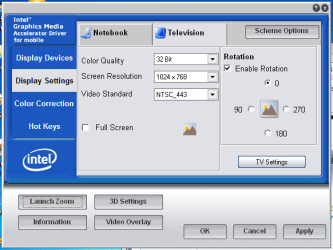
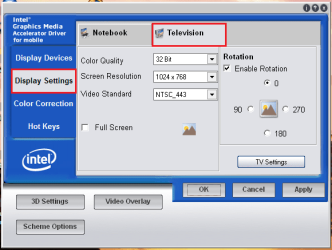
I have the exact same issue when connecting to my 43" plasma TV via S-Video. I have to set the following in order to view in full screen.
Main Control Panel
TV H/V Zoom Settings
Hope this helps
Jeff | My System Specs | | System Manufacturer/Model Number Compaq Desktop OS Windows 7 Ultimate x64 CPU AMD Sempron Dual Core Memory 3GB Graphics Card NVIDIA GeForce 6150SE nForce 430 Screen Resolution 1024x768 Hard Drives 150GB Sata |
09 Jul 2009
|
#7 | | Windows 7 Home Premium x64 Liberty University |
Orbital Shark, where you have that button that says "TV Settings" I have "Power Settings". I think this computer recognizes itself as a laptop display, so that could be why.
Well, I contacted Sony Support and they were no help at all. They just couldn't figure out what it was that I wanted to do. I finally gave up on that, and so I'm going to stay open to more suggestions from you guys, if anyone has any. I'm also going to try taking pictures of what this display is doing, compared to what I want it to do, just so I can confirm with you that I'm using the right terminology to describe all of this. | My System Specs | | System Manufacturer/Model Number Alienware X51 OS Windows 7 Home Premium x64 CPU Intel Core i7-2600 @3.40GHz Memory 8.00GB DDR3 Graphics Card NVIDIA GeForce GTX 555 w/1.0GB RAM Monitor(s) Displays BenQ XL2420TX Screen Resolution 1920x1080@120Hz Keyboard Logitech Wireless Illuminated Keyboard K800 Mouse Razer Orochi PSU 330-watt Hard Drives 1TB Internet Speed Campus Internet |
09 Jul 2009
|
#8 | | Windows 7 Ultimate x64 Milton Keynes, United Kingdom |
| My System Specs | | System Manufacturer/Model Number Compaq Desktop OS Windows 7 Ultimate x64 CPU AMD Sempron Dual Core Memory 3GB Graphics Card NVIDIA GeForce 6150SE nForce 430 Screen Resolution 1024x768 Hard Drives 150GB Sata |
09 Jul 2009
|
#9 | | Windows 7 Home Premium x64 Liberty University |

Quote: Originally Posted by Orbital Shark Actually, that has been there for a while. That is what I installed on this computer during my attempts to solve the problem. Unfortunately, no go. | My System Specs | | System Manufacturer/Model Number Alienware X51 OS Windows 7 Home Premium x64 CPU Intel Core i7-2600 @3.40GHz Memory 8.00GB DDR3 Graphics Card NVIDIA GeForce GTX 555 w/1.0GB RAM Monitor(s) Displays BenQ XL2420TX Screen Resolution 1920x1080@120Hz Keyboard Logitech Wireless Illuminated Keyboard K800 Mouse Razer Orochi PSU 330-watt Hard Drives 1TB Internet Speed Campus Internet |
09 Jul 2009
|
#10 | | Windows 7 Ultimate x64 Milton Keynes, United Kingdom |
If you right-click the desktop do you get 'Graphics Properties' showing in the list? | My System Specs | | System Manufacturer/Model Number Compaq Desktop OS Windows 7 Ultimate x64 CPU AMD Sempron Dual Core Memory 3GB Graphics Card NVIDIA GeForce 6150SE nForce 430 Screen Resolution 1024x768 Hard Drives 150GB Sata Display scaling issue (not just in Windows) problems? All times are GMT -5. The time now is 03:02 AM. | |