| Windows 7: New Laptop Owner |
24 Mar 2011
|
#1 | | Windows 7 Home Premium 32-Bit - Build 7600 SP1 Houston, Texas |
New Laptop Owner I am the proud owner of a new Dell Laptop, well not new, refurbished. It is in route to me so I have not gotten it yet. I have not owned a laptop before and have read a few things about them. I read where you should not use them on a bed because you might block an air vent and a few other things. If any of you could give me a few things that makes them different from PC's, I would appreciate it.
Thanks, | My System Specs |
| System Manufacturer/Model Number Custom Build OS Windows 7 Home Premium 32-Bit - Build 7600 SP1 CPU Intel Core i3-2120 3.30Ghz Motherboard Asus P8Z68-V LX Intel Z68 Socket H2 ATX Memory Kingston 4 GB DDR3 1333 mhz Graphics Card Zotac GeForce 9400 GT 512MB Sound Card Sound Blaster Audigy SE 24-Bit Monitor(s) Displays Samsung Sync Master 940 = 19 inch Screen Resolution 1440 X 900 Keyboard Microsoft Natural 4000 Mouse Microsoft Custom Optical 3000 PSU 500 watt Case NZXT Apollo - Silver with Clear Side Panel Cooling Three 120 mm Fans Hard Drives OCZ Vertex 3 120 GB Sata 3 SSD ==
Western Digital 160 GB Caviar Blue 7200 RPM ==
Western Digital 500 GB Caviar Green 7200 RPM == Internet Speed AT&T Fiber Optic Wireless Network Other Info 120 mm Blue LED Fan -- Three Blue LED Lazer Light Sticks |
24 Mar 2011
|
#2 | | Windows Home Premium 64bit St. Thomas, Ontario |
Hi Bigmck. Congratulations on your new (refurbished system).
"give me a few things that makes them different from PC's, I would appreciate it."
Um - lets see. A. They are smaller than your desktop.
B. They are easier to carry than your desktop.
C. Way more expensive it fix.
D. They don't bounce very well when you drop them.
E. You don't need a 400ft extension cord to power them.
Just kidding in most cases of course. You will have a ball with the new freedom
they bring to the table. Running wirelessly is a hugh convience but of course you
need a wireless router to so. Have you got one already?
Important: Most Notebooks nowdays ship with no cd/dvs. The good news is that there
is software on board to create a complete set of recovery dvd's. Do this
first thing and put them in a safe spot. Some Manufacturers allow you to make
only one set - HP I think. My Toshiba allows making as many sets as you want,
so being paranoid, of course I made two set. lol
Also first thing - I would make a system image of the whole HD for safe keeping
as well. Most use Macrium Reflect for this job. Very easy to use.
I really think you will enjoy your new acquisition. The very best of luck with it.
Best regards
JohnnyA | My System Specs | | System Manufacturer/Model Number Toshiba C650 OS Windows Home Premium 64bit CPU T61-- 2.0ghz Motherboard Toshiba Memory 4 GB Graphics Card On board Sound Card On board Monitor(s) Displays 15.6" Hard Drives 500 GB |
24 Mar 2011
|
#3 | | Windows 7 Home Premium x64 / SP1 Chesapeake, Virginia. |

Quote: Originally Posted by johnnya Hi Bigmck. Congratulations on your new (refurbished system).
Important: Most Notebooks nowdays ship with no cd/dvs. The good news is that there is software on board to create a complete set of recovery dvd's. Do this
first thing and put them in a safe spot. Some Manufacturers allow you to make
only one set - HP I think. My Toshiba allows making as many sets as you want,
so being paranoid, of course I made two set. lol
JohnnyA Looks like I'm not the only one that's paranoid. I just got my first laptop (Toshiba) a few days ago and made 2 sets also. One on DVD and another on USB Flash Drive.
I didn't know some companys only allow you to make one set. | My System Specs | | System Manufacturer/Model Number Toshiba Satellite L675-S7108 OS Windows 7 Home Premium x64 / SP1 CPU Intel(R) Core(TM)i3 CPU 2.53 GHz M 380 @ 2.53 GHz Memory 4 GB Screen Resolution 1600 x 900 Mouse Microsoft Wireless Mobile Mouse 4000 Other Info WSA Complete 2013. / MBAM Pro. / WOT.
Windows XP. / Windows 7. / Sandboxie ~ Paid. |
24 Mar 2011
|
#4 | | Vista, Windows7, Mint Mate, Zorin, Windows 8 Florida in winter, Black Forest/Germany |
Well, congratulations to your new pet. Depending on the screensize of your desktop, you will have to get used to the small screen. Next is the trackpad. I recommend to buy a mouse because the trackpads are a pain (at least for me - my wife loves it). I use a mouse with a trackball - really nice.
And the heat problem is always there. Make sure it is always well vented - especially a problem if it is vented to the bottom and not to the side. If it runs too hot (like one of my HP's did), use a coolpad with own power (not USB powered). That lowers the temp by 5-10 degrees F. I ended up to remove the HDD an put an SSD in. That fixed the problem. | My System Specs | | System Manufacturer/Model Number HP, Dell, Gateway, Toshiba - 4 laptops and 2 desktops OS Vista, Windows7, Mint Mate, Zorin, Windows 8 CPU from 1.6GHz Duo to i7 Monitor(s) Displays 2x HP w2207 Keyboard with trackball - no mices Mouse Trackball mice Hard Drives 5x HDD, 7x SSD, 12x Externals Internet Speed DSL 6000 |
24 Mar 2011
|
#5 | | |
Hi bigmck, congrats on your first laptop!
I thought I'd share some tips I've picked up over the years with you that may come in handy. - As Johnnya suggested, make your recovery CD/DVD for your system. If you have any kind of imaging software (Ghost, Acronis, HDClone,etc...), it can never hurt to make an image of your entire hard drive as well. You may never need it, but if the day comes that you do, you'll be very happy

- As suggested by whs, if you can afford it, get yourself an ssd rather than the standard platter drive. It will help with performance as well as temperature. His suggestion of a cooling pad is also a good idea. It will help keeping things cool and happy.
- As you suggested, don't put your laptop flat on the bed. This also includes a couch, carpeted floor, your lap/pants, etc... Anything that will restrict the air flow of the intakes on the bottom of the laptop is no good. This will eventually lead to overheating.
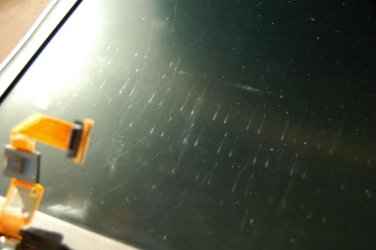
- Most laptops come with a fabric-like "separator" between the keyboard and the lcd. It's technically considered packing material and is usually discarded. Keep this! when you put your laptop in your bag for storage, put it back between the keys and the lcd. What happens is, over time your keyboard collects dust and dirt. When the laptop is in your bag/case and being shuffled around, these particles will start to wear on the lcd. Eventually you will start to see the pattern of your keys/keyboard engrained into the lcd.
 - If you know you will be using the laptop in a static position for an extended period of time(on your desk at work all day), remove your battery and run on the power supply. Laptop batteries develop a memory just like other batteries for example cell phones. There is no reason to keep a fully charged battery on power for extended periods of time if you don't need to. Over time it will degrade and you'll end up with a battery that lasts you 20 mins when it should last you much longer. It is also good practice to run your battery down very low before charging when possible, again to avoid it developing a memory.
- When you open the laptop lid, always open it with either 2 hands, one on each side, or with one hand in the middle where the latch is. Over time, opening the lid with one hand from a corner will tweak the frame and you'll end up with the lid having one corner raised up even when latched shut. Close your lid with the same method you opened it with.
- Always be sure your laptop is fully shut down/asleep before putting it in your bag. Sounds obvious but in a hurry it's easy to throw it in the case and go. If the laptop gets hung or installs updates, it is now running inside your bag and you can fill in the blanks from there. Not good

- Be ginger with your DC jack. These are usually the first thing that will wear out on a laptop. The repair itself is rather easy but it is costly to have someone do this as it takes a few hours to fully tear out the board, solder the new jack in, and put it back together. Plug it in straight, if you're moving your laptop w/ the power plugged in, be sure not to put stress on it thus tweaking the cable inside the jack.
- Get a nice, padded case. I can't tell you how many broken lcd screens I've seen because the user swung their bag into the corner of a desk or table. It's something that can easily happen and is surely an accident, getting a nice case will omit this from happening to you.
- Turn off the wireless and/or bluetooth if you don't need it. Save yourself some battery consumption.
- Get yourself an external mouse, it will save some frustration of using that touchpad for everything.
That's all that's coming to mind right now, I may have some more stored up there somewhere. If I can think of anything else I'll surely update/edit this post.
Most importantly, enjoy your new toy!!
~ TCG | My System Specs | | |
24 Mar 2011
|
#6 | | Win 7 Pro 64-bit South Central Texas |
Congrats on the new addition to the family, Jim. If you're going to use the touchpad most of the time I'd suggest familiarizing yourself with the settings in control panel > mouse. You may want to adjust sensitivity, scroll speed, tapping speed, double-click speed, etc to suit your own typing style.
I'd also consider the purchase of a laptop cooling pad to increase air circulation under and around the machine. You're absolutely correct about not blocking the air vents and a cooling pad could decrease temps by another 5 - 10 degrees.
It's just about impossible to make any changes to the hardware except for the RAM so don't expect to be swapping out the mobo, cpu, gpu, etc. The biggest gripe I have about laptops is the CMOS battery. It's only been recently that Dell has placed the battery under an access cover at the bottom of the machine. I have a Vostro 1520 only 15 months old and I'd have to remove the screen, keyboard, optical drive, memory, fan, etc in order to get to the battery.
I think you'll really enjoy the portability but a smaller screen may take some getting used to. Enjoy!
EDIT: I see that my slow typing allowed others to cover pretty much what I've said. Sorry. | My System Specs | | Computer type Laptop System Manufacturer/Model Number Sony Vaio VPCEB47GM Laptop OS Win 7 Pro 64-bit CPU Intel i5 2.4 Ghz Memory 8GB DDR3 Graphics Card Intel HD 3000 Sound Card IDT High Definition Monitor(s) Displays 15.6 WGXA Anti-Glare LED Screen Resolution 1280x800 Hard Drives 640Gb 7200rpm Antivirus MSE Browser Opera (primary) with IE9 backup |
24 Mar 2011
|
#7 | | |

Quote: Originally Posted by marsmimar EDIT: I see that my slow typing allowed others to cover pretty much what I've said. Sorry. It's ok, you are forgiven lol. | My System Specs | | |
24 Mar 2011
|
#8 | | Windows 7 Home Premium 32-Bit - Build 7600 SP1 Houston, Texas |
Well, my little short question, got a lot of response and I thank you all for it. Are the cooling pads sold according to the size of the laptop. Mine is a 14 inch screen, would I have to take that into consideration or is it one size fits all? Do they snap on the bottom or is it something that you just sit the laptop on? == My hard drive is small 30 GB. I should have upgraded before purchase, but I didn't. I have replaced a HD in a PC. Is it much harder in a laptop? Thanks, | My System Specs | | System Manufacturer/Model Number Custom Build OS Windows 7 Home Premium 32-Bit - Build 7600 SP1 CPU Intel Core i3-2120 3.30Ghz Motherboard Asus P8Z68-V LX Intel Z68 Socket H2 ATX Memory Kingston 4 GB DDR3 1333 mhz Graphics Card Zotac GeForce 9400 GT 512MB Sound Card Sound Blaster Audigy SE 24-Bit Monitor(s) Displays Samsung Sync Master 940 = 19 inch Screen Resolution 1440 X 900 Keyboard Microsoft Natural 4000 Mouse Microsoft Custom Optical 3000 PSU 500 watt Case NZXT Apollo - Silver with Clear Side Panel Cooling Three 120 mm Fans Hard Drives OCZ Vertex 3 120 GB Sata 3 SSD ==
Western Digital 160 GB Caviar Blue 7200 RPM ==
Western Digital 500 GB Caviar Green 7200 RPM == Internet Speed AT&T Fiber Optic Wireless Network Other Info 120 mm Blue LED Fan -- Three Blue LED Lazer Light Sticks |
24 Mar 2011
|
#9 | | Vista, Windows7, Mint Mate, Zorin, Windows 8 Florida in winter, Black Forest/Germany |
Coolpads are a bit different in size depending on make, but not really specific to 14, 15 or 17" laptops. You just sit the lappy on top. Examples: http://www.bestbuy.com/site/olspage....egories&ks=960
Changing the HDD is real easy. Just a few screws. Then you pull on the little latch backwards and it comes out. There are videos on the web on how to do it. Took me about 10 minutes every time (I replaced all HDDs with SSDs).
BTW: I would use a SSD in lieu of a HDD. It is a bit more money, but the performance improvement is phenominal. If not, buy at least a 7400 RPM HDD. | My System Specs | | System Manufacturer/Model Number HP, Dell, Gateway, Toshiba - 4 laptops and 2 desktops OS Vista, Windows7, Mint Mate, Zorin, Windows 8 CPU from 1.6GHz Duo to i7 Monitor(s) Displays 2x HP w2207 Keyboard with trackball - no mices Mouse Trackball mice Hard Drives 5x HDD, 7x SSD, 12x Externals Internet Speed DSL 6000 |
24 Mar 2011
|
#10 | | |

Quote: Originally Posted by TCG - If you know you will be using the laptop in a static position for an extended period of time(on your desk at work all day), remove your battery and run on the power supply.
Definitely this.
And in the interim of obtaining a coolpad, simply make sure the exhaust vent isn't blocked. 
Quote: Originally Posted by whs
BTW: I would use a SSD in lieu of a HDD. It is a bit more money, but the performance improvement is phenominal. If not, buy at least a 7400 RPM HDD. + another for a SSD
I myself was a little hesitant and dubious about SSD's before I had one - but the benefits really do outweigh the extra cost.
Going from a 30GB (most likely a 5400 rpm drive) to a SSD would certainly make it feel a heck of a lot more 'snappier' to use.
And as mentioned, replacing a laptop HDD is a doddle. It's arguably easier than replacing one in a desktop.
Oh, and unlike my sister - Do not use your laptop as drink coaster | My System Specs | | Computer type PC/Desktop System Manufacturer/Model Number SmartEyeball Custom Systems OS 8 Pro x64 CPU i7 3770K 4.6GHz Motherboard ASUS P8Z77 WS (great board good slot placement) Memory 16GB G.Skill Trident X 2400mhz Graphics Card 2x Gigabyte GTX 670 OC WindForce SLI Sound Card X-FI Forte 7.1 + ATH-AD900 Headphones Monitor(s) Displays x3 Dell U2410 / 58" Samsung / "40 Sony Screen Resolution 1920*1200 / 1920*1080 Keyboard Topre Realforce // Ducky Shine MX Black // Filco Ninja TKL Mouse Razer Imperator + Thermaltake Theron PSU Corsair AX1200W Case Thermaltake Level 10 GT Snow Edition Cooling Noctua NH-D14 Hard Drives 2x Intel 520 240GB (RAID 0) * 2x WD Caviar Blacks 2TB (RAID 0) * 2TB WD Caviar Black Antivirus MSE Browser Opera, Chrome, FF Other Info GT Extreme V2 Sim Racing Cockpit + 40" LCD and K/B Mouse stand ▼
Fanatec CSR Elite Wheel + Clubsport Pedals + CSR shifter/7GS ▼
Buttkicker v2 Seat Rumbler with Dedicated 5.1 and Sub Woofer attached to frame ▼
=
Bloody Big Grin New Laptop Owner problems? All times are GMT -5. The time now is 06:18 AM. | |