|  | | |
29 Dec 2011
|
#1 | | Windows 7 Home Premium 64-bit |
How many of you combine taskbar buttons on Windows 7? For some reasons, I feel it's much easier to see the names of the windows that are open on the taskbar rather than small icons that are tabbed. I think it's much faster and convenient. So why do most people always combine taskbar on Windows 7? | My System Specs |
| System Manufacturer/Model Number HP Elite PC OS Windows 7 Home Premium 64-bit CPU Intel Core2 Quad 8300 @ 2.5GHz Memory 8GB Graphics Card ATI Radeon 4800 Series Monitor(s) Displays Dell 23" Widescreen Screen Resolution 1920x1080 Keyboard HP Keyboard Mouse Microsoft optical mouse Case HP Elite Hard Drives 685GB SATA3G Internet Speed 1MBps download / 60kbps upload |
29 Dec 2011
|
#2 | | 64-bit Windows 7 Ultimate SP1 & Windows 8 Enterprise Texas |
It really depends on how you use Windows 7 for which option may work best for you.
Like me, I usually have so many things opened at once, it's not even funny. For example, 10 tabs in IE9, a few virtual machines, and a few other programs. There just wouldn't be enough room on the taskbar for all of them without them being grouped. "Always combined" is just more convenient for me. | My System Specs | | Computer type PC/Desktop System Manufacturer/Model Number Self built custom OS 64-bit Windows 7 Ultimate SP1 & Windows 8 Enterprise CPU Intel i7-3930K 3.2 Ghz (O/C 4 Ghz) Motherboard ASRock X79 Extreme11 Memory 32 GB (8GBx4) G.SKILL DDR3 Quad PC3-19200 2400MHz Graphics Card Sapphire HD5870 Eyefinity 6 2GB Sound Card SB Recon 3Di Integrated Chip Monitor(s) Displays 3x 27" Asus VE278Q Screen Resolution 1920x1080 Keyboard Logitech Cordless Desktop MX 5500 Revolution Mouse Logitech Cordless Desktop MX 5500 Revolution PSU OCZ Series Gold OCZZ1000M 1000W Case Thermaltake Level 10 GT Snow Edition Cooling Corsair Hydro H100 Hard Drives 256GB OCZ Vector
160GB OCZ RevoDrive X2
2 x 1TB Samsung HDD HD154UI SATA Internet Speed 50 Mb/s Download and 2 Mb/s Upload Other Info Microsoft LifeCam Cinema
Lite-On iHBS212 12x BD Writer
Samsung CLX-3175FW Printer
Netgear WNDR3800 Router
Motorola SBG6580 Cable Modem
2x APC Back-UPS XS 1500 |
29 Dec 2011
|
#3 | | |
Agree with Brink, I only *un group on a netbook with Windows Classic
Last edited by Infinite; 30 Dec 2011 at 03:26 AM..
Reason: Typo
| My System Specs | | OS Windows 7 Ultimate x64 CPU Intel Core i5 2500k at 3.3 GhZ Memory 2x4GB DDR3 1333Hz Graphics Card Ati Radeon 6770 Sound Card Speakers Monitor(s) Displays 1x 15" HD 572 Screen Resolution 1024x768 Keyboard Wired Keyboard Mouse Wired Mouse PSU 500W Cooling 3x Fans Hard Drives 2x500GB Internet Speed 10MB/s Other Info Netbook: Dell Inspiron Mini |
30 Dec 2011
|
#4 | | Windows 7 Home Premium x64 SP1 Bay Area Peninsula |
Always combine. Only way to get my taskbar separated like my theme is designed for.
A Guy | My System Specs | | OS Windows 7 Home Premium x64 SP1 CPU INTEL Core i5-750 Quad-Core 3.37GHz Motherboard ASUS P7P55D Memory KINGSTON 4GB (2 x 2GB) HyperX PC3-12800 DDR3 1600MHz CL8 Graphics Card MSI N240GT-MD1G/D5 GeForce GT 240 1GB 128-bit GDDR5 Monitor(s) Displays Samsung SyncMaster B2430H 24" Screen Resolution 1920 x 1080 PSU ANTEC TruePower New TP-550, 80 PLUS, 550W Case ANTEC Three Hundred Illusion Cooling COOLER MASTER Hyper 212 Plus, 4 x 120mm 1 x 140mm Noctua's Hard Drives Intel X25M Gen2 80GB, SEAGATE 500GB Barracudaź 7200.12, SATA 3 Gb/s, 7200 RPM, 16MB cache Internet Speed 20 + Mbps Antivirus Avast Browser Opera |
30 Dec 2011
|
#5 | | |
I only combine when full.
Have also enabled QuickLaunch, gotten rid of the pinned icons and set the taskbar to use small icons as I like the lower-profile look of the older taskbars. | My System Specs | | |
30 Dec 2011
|
#6 | | Windows 7 Ultimate x64 NM - Way South |
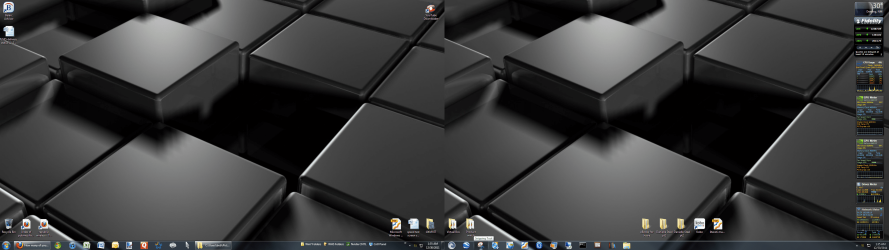
I have been a combiner although since upgrading to multiple monitors and making my taskbar span multiple 24" monitors I find that I have way more real-estate than I am currently using, so not so much crowding any more. | My System Specs | | System Manufacturer/Model Number Systemax N2000 Gaming PC OS Windows 7 Ultimate x64 CPU Q6600 @2.4ghz (G0 stepping) Motherboard XFX nforce 680i LT Memory 8 gb OCZ vista essential sli PC-6400 Graphics Card Dual 9800gt in SLI mode Sound Card Integrated 8.1 High Definition Audio Monitor(s) Displays Dual Sceptre x246w 24 inch monitors Screen Resolution 1920 x 1200 each monitor Keyboard MS Intelitype 6000 v2.0 Mouse MS Intelipoint 6000 PSU Cooler Master Real Power Pro 1250W Case N2000 server tower Cooling Thermaltake Bigwater 760 is Hard Drives 500 GB SATA II / 7500 rpm Internet Speed Wi-power 1.5GB up / 512k down Other Info Windows 7 Ultimate x64, Windows 7 Pro x64, Windows Home Premium X86, Windows XP pro, Windows Home Server x86, Ubuntu 10.4 x86 and x64, Ubuntu server 10.4, SQL Server 2005, MySQL 5.0 |
30 Dec 2011
|
#7 | | Windows 7 x64 Ultimate A Finnish immigrant in Leipzig, Germany |

Quote: Originally Posted by Brink It really depends on how you use Windows 7 for which option may work best for you.
Like me, I usually have so many things opened at once, it's not even funny. For example, 10 tabs in IE9, a few virtual machines, and a few other programs. There just wouldn't be enough room on the taskbar for all of them without them being grouped. "Always combined" is just more convenient for me.  I have a vertical taskbar on the left, set to combine only when taskbar is full with small icons.
It works for me, showing for instance only one IE regardless how many tabs I have open. To see and select a tab, I just need to hover the pointer on top of IE:
I like it this way. It is very clear and easy to use.
Kari | My System Specs | | Computer type Laptop System Manufacturer/Model Number HP ENVY 17-1150eg OS Windows 7 x64 Ultimate CPU 1.6 GHz Intel Core i7-720QM Processor Memory 6 GB Graphics Card ATI Mobility Radeon HD 5850 Graphics Sound Card Beats sound system with integrated subwoofer Monitor(s) Displays 17" laptop display, 22" LCD and 32" Full HD TV through HDMI Screen Resolution 1600*900, 1680*1050 and 1920*1080 Keyboard Logitech diNovo Media Desktop Laser (bluetooth) Mouse Logitech MX1000 Laser (Bluetooth) Hard Drives Internal: 2 x 500 GB SATA Hard Disk Drive 7200 rpm
External: 2TB for backups, 3TB USB3 network drive for media Internet Speed 50/10 Mbps VDSL Antivirus MSE, Windows Defender Browser Maxthon 3.5.2. Other Info Windows 7 Ultimate Retail Full in English, additional Guest-user accounts in Finnish, German and Swedish (Working languages English & Swedish, Family language German, my own language, mother tongue, Finnish. I really need Ultimate to get to use Language Packs!) |
30 Dec 2011
|
#8 | | Windows 7 Ultimate SP1 64-Bit Peterborough, England |
I prefer a clean desktop so I use shortcuts pinned to the Start menu, but the programs I use the most are pinned to the Taskbar as well. | My System Specs | | System Manufacturer/Model Number HP Pavilion Elite 495UK OS Windows 7 Ultimate SP1 64-Bit CPU Intel Core i7 870 @ 2.93GHz Motherboard MSI 2A9C (CPU1) Memory 8Gb Dual-Channel DDR3 @ 664MHz Graphics Card nVidia GeForce GTX 460 1024MB dedicated RAM Sound Card Realtek HD Audio Monitor(s) Displays HP2310i Screen Resolution 1920 x 1080 Keyboard Logitech K750 solar-powered keyboard Mouse Logitech Wireless M180 mouse PSU 460W Case HP Elite Cooling Air cooled Hard Drives 1x1954GB Hitachi HDS22020ALA 330 (RAID), 1x1954GB Hitachi External for backup and storage Internet Speed 2Mb Other Info Pure Avanti Flow Internet Radio with iPod Dock, 64Gb iPod, HP USB Speakers, Sony MDR-V500 Headphones, Sony Vaio F-Series Laptop |
30 Dec 2011
|
#9 | | Windows 7 Home Premium x64 SP1 England |
Always combine for me with icons central in the taskbar. IMO looks cleaner.
Danny | My System Specs | | System Manufacturer/Model Number acer aspire 5935g OS Windows 7 Home Premium x64 SP1 CPU intel(R)core(TM)2 duo CPU T6600 @ 2.20GHz Motherboard intel gm45/gm47 revision 07 Memory 3 gb ddr3 Graphics Card ati radeon hd4570/512mb Monitor(s) Displays lop156wh2-tle1 15.3 flat Screen Resolution 1366x768 Mouse Optical Hard Drives OCZ-Agility3 60gig ssd
320gig external hdd
500gig external hdd Internet Speed 30Mbps Down/30Mbps Up |
30 Dec 2011
|
#10 | | Windows 7 Ultimate SP1 32 bit/Windows 8 64bit Pembrokeshire, South Wales, UK |
I hadn't even given it much thought, I don't have many open at once programs anyway so there isn't a lot on my taskbar. I have a few pinned, the ones I want to get at quick but apart from that I don't take much notice, I think they would probably combine if the taskbar got full though, I can't see that happening much though. | My System Specs | | Computer type PC/Desktop System Manufacturer/Model Number Zoostorm Desktop/ Asus K55A Notebook PC OS Windows 7 Ultimate SP1 32 bit/Windows 8 64bit CPU Intel Core 2 Duo E4600 @ 2400 MHz/Intel B820,1.7GHz Motherboard Foxconn 45CMX/45GMX/45CMX-K/Asus Memory 2048 MB (2 x 1024 DDR2-SDRAM)/8GB 2 x 4GB DDR3 Graphics Card Intel Corp 82945G Integrated Graphics Controller/Intel Sound Card Onboard Realtek/Onboard Monitor(s) Displays Hanns.G HH221 22" inches Widescreen/Asus 15.6 Screen Resolution 1920 x 1080/1366 x 768 Keyboard Microsoft Natural Ergonomic Keyboard 4000 (UK)/Inbuilt Mouse Microsoft Optical Wheel Mouse/Touchpad Hard Drives ExcelStor (250GB)/Asus Internet Speed Just under 4MB download it's ADSL. Antivirus MSE/MSE Browser IE10/IE10 Other Info Epson Stylus SX415 All-in-one Printer,
Seagate Expansion 500GB External Desktop Drive
USB2 HDD Enclosure How many of you combine taskbar buttons on Windows 7? problems? All times are GMT -5. The time now is 10:03 AM. | |