Windows 7 Forums Search
Welcome to Windows 7 Forums. Our forum is dedicated to helping you find solutions with any problems, errors or issues you are experiencing with Windows 7. The Windows 7 forum also covers news and updates and has an extensive Windows 7 tutorial section that covers a wide range of tips and tricks.


Windows 7 - How do I check on my own thread?


01-23-2012   #1


Windows 7 Home Premium 32bit


How do I check on my own thread?

Hi guys and girls

I cannot figure out how to find the link to my own thread.
Is there a QuickLink somewhere?
I have found the "check statistics" option, but that does not seem to take me to my thread.

This is the first forum I've signed up to and I do not know how to find my own threads I have only been on for 32 minutes and have found some really interesting and helpful threads.
BIG thanks to all the volunteers that make this site possible


Thanks for your help.

My System SpecsSystem Spec
01-23-2012   #2
whs


Vista and Windows7, sometimes Ubuntu and Fedora


click on 'User CP' on the top. If there are answers, it will show up.

You can also click on where it says 'Welcome Draco' on the top left. Click on your name and then on 'Statistics' button.
My System SpecsSystem Spec
01-23-2012   #3


Windows 7 Ultimate x64 SP1


Hello Draco, and welcome to Seven Forums.

Yes. There's also a Quick Links link at the top of all webpages that you can click on for that option in it.
My System SpecsSystem Spec
.


01-23-2012   #4


Windows 7 Pro x64 -- PCLinuxOS KDE4 FullMonty 2011


Click on the search button. Type in your user name in the appropriate box. Click search.

That will get you here: Windows 7 Forums - Search Results
My System SpecsSystem Spec
01-23-2012   #5


Microsoft Windows 7 Home Premium 64-bit 7600


as brink said, quick links/my active threads or threads i posted in ,also click on the post total under your avatar it will go to a page with all your posts,
My System SpecsSystem Spec
01-24-2012   #6


Also, you can go to any thread you've posted on, find your own post and do either of these two things:

1. Either click on the number of posts listed under your username, and you will be directed to a list of all of your posts (and you can find the specific post you're looking for from there), or

2. Click on your username link. Then click on the link that says "Find more posts by Draco241"
My System SpecsSystem Spec
01-24-2012   #7


Windows 7 Enterprise x64 SP1


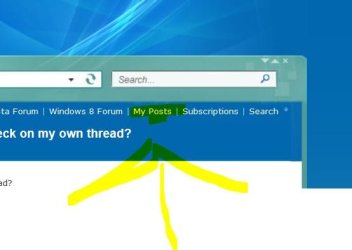
Also if you're using the default site skin the you can click the "My Posts" in the nav bar at the top of every page.

How do I check on my own thread?-myposts.jpg
My System SpecsSystem Spec
01-25-2012   #8


Windows 7 Home Premium 32bit


Thanks so much everybody. Now I have at least 4 different ways to find my posts!
My System SpecsSystem Spec
Reply


Thread Tools


Similar Threads for: How do I check on my own thread?
Thread Forum
Another SSD Thread Hardware & Devices


All times are GMT -5. The time now is 08:43 AM.


Windows 7 Forums is an independent web site and has not been authorized,
sponsored, or otherwise approved by Microsoft Corporation.
"Windows 7" and related materials are trademarks of Microsoft Corp.
© Designer Media Ltd
  

1 2 3 4 5 6 7 8 9 10 11 12 13 14 15 16 17 18 19 20 21 22 23 24 25 26 27 28 29 30