Windows 7 Forums


Windows 7: Northern Lights - Today on Bing - Tues. Jan. 31st

31 Jan 2012   #1

Vista 64 bit and 32 bit (SP2)
Los Angeles, California + Milwaukee, Wis
 
 
Northern Lights - Today on Bing - Tues. Jan. 31st

Bing has a pic with GORGEOUS moving images of the Northern Lights on its desktop today.

And if you click their link Aurora borealis - Bing Images
there are about 100 additional amazing Aurora borealis pics!

My System SpecsSystem Spec

31 Jan 2012   #2

Windows 7 Ultimate SP1 32 bit/Windows 8 64bit
Pembrokeshire, South Wales, UK


Yes I saw that this morning, it's great managed to get a few of the wallpapers to add to my collection. The only thing I have against the Bing page is that blooming search bar I wish they'd put it outside the photo instead of spoiling the view.
My System SpecsSystem Spec
04 Feb 2012   #3

Vista 64 bit and 32 bit (SP2)
Los Angeles, California + Milwaukee, Wis


Quote   Quote: Originally Posted by Joan Archer View Post
Yes I saw that this morning, it's great managed to get a few of the wallpapers to add to my collection. The only thing I have against the Bing page is that blooming search bar I wish they'd put it outside the photo instead of spoiling the view.
Actually Joan, problem solved. All you have to do is right-click and select "Save background as" and you'll get the photo without the Search Bar).

Now, if only I could figure out how to save the "moving" images, like the Northern Lights. Are these files .gif, or what are they? Anyone know how to save them?
My System SpecsSystem Spec
.


04 Feb 2012   #4

Windows 7 Ultimate SP1 32 bit/Windows 8 64bit
Pembrokeshire, South Wales, UK


Ah thanks for that Sue I'll try that when I go to the page tomorrow, shutting down for the night now, goodnight all.
My System SpecsSystem Spec
05 Feb 2012   #5

Windows 7 Ultimate SP1 32 bit/Windows 8 64bit
Pembrokeshire, South Wales, UK


Hi Sue, I think you mis-understood, that right click is if you want to save the photo of the day that's showing, which is not what I meant. It's the way they have made the page so that every photo has the search bar taking up space on the photo that is showing, like todays one.

Northern Lights - Today on Bing - Tues. Jan. 31st-bing.jpg
My System SpecsSystem Spec
05 Feb 2012   #6

Windows 7 Home Premium 32 bit
In a house with a cat trying to kill me


Nice pix. The Auroras were caused by the recent solar storm that hit us on Tues I believe.

Here's another link for some nice deep space desktops

Desktop Wallpaper: Deep space nebula | TechRepublic
My System SpecsSystem Spec
05 Feb 2012   #7

Win 7 Home Premium 64bit Ver 6.1.7600 Build 7601 - SP1
Central Pa.


Quote   Quote: Originally Posted by Joan Archer View Post
Hi Sue, I think you mis-understood, that right click is if you want to save the photo of the day that's showing, which is not what I meant. It's the way they have made the page so that every photo has the search bar taking up space on the photo that is showing, like todays one.

Attachment 196862
Hi Joan, the only way that I know of to save or set any image that has unwanted elements is to follow Sue's method, but it will need to have an extra step preformed in order to set it as a background.
You would have to follow one of Brink's tutorials that I will place at the end of each set of instructions.

I will start with IE as Sue's instruction calls for "Save background as..."

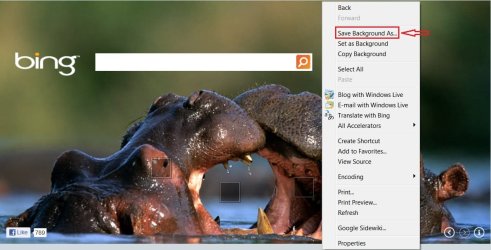
To save the image of the day without the Search Bar in IE8:
  • Right click on image, select Save Background As...
  • A Save As...Box opens, and you could then save the image where ever you liked.
Northern Lights - Today on Bing - Tues. Jan. 31st-hippoie.jpg

Then follow: Desktop Background - Change

Our FireFox acted differently:
  • Right click on image.
  • Left click on image scroll down, and select View Background Image.
  • Depending on your Browser settings; it may or may not open in a new Tab/Window, ours did.
  • Left click on image, select Save Image As... From here you can save it where ever you like.
Northern Lights - Today on Bing - Tues. Jan. 31st-hippoff.jpg

Then follow: Desktop Background - Change

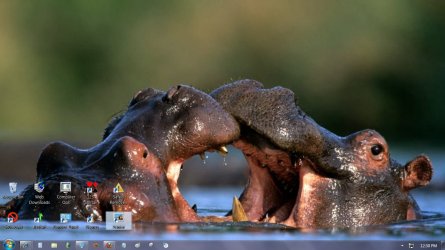
Result of either Browser method using Brink's tutorial:
Northern Lights - Today on Bing - Tues. Jan. 31st-hippodsktp.jpg

Joan, that Hippo on the right has her/his eye on us!

~~~ ~~~ ~~~

For Sue
. You would need to use a video downloader program or an add-on for your browser.

Suggestions:
http://download.cnet.com/windows/video-players

Add-ons for IE as you might imagine are a little hard to find, here is one:
Ant Video Downloader for Internet Explorer - Ant.com

Add-ons for FF:
Search Results for "Save Videos" | FireFox | platform=windows
This one seems popular for FF: Video DownloadHelper 4.9.8

Last edited by Anak; 06 Feb 2012 at 07:41 AM.. Reason: Had to reset IE, and FF Attachments. Not sure if I did it or?? :S
My System SpecsSystem Spec
05 Feb 2012   #8

Windows 7 Ultimate SP1 32 bit/Windows 8 64bit
Pembrokeshire, South Wales, UK


Those were very good instructions Steve but I think everyone is missing the point.

I don't want to save the photo's or have them as backgrounds I was merely stating that I don't like the way that they have put the search bar obstructing some of the photo, I'd rather see all of the photo without having part of it obscured with the word Bing and the long empty search box.

Hope that helps with what I wanted.
My System SpecsSystem Spec
06 Feb 2012   #9

Win 7 Home Premium 64bit Ver 6.1.7600 Build 7601 - SP1
Central Pa.


I understand now Joan, it is a matter of aesthetics.

It's okay it still gave me an opportunity to practice!
My System SpecsSystem Spec
06 Feb 2012   #10

Windows 7 Ultimate SP1 32 bit/Windows 8 64bit
Pembrokeshire, South Wales, UK


Glad it gave you an excuse to practise Steve, your instructions may help someone though who does want to keep the photo's.
My System SpecsSystem Spec
Reply

 Northern Lights - Today on Bing - Tues. Jan. 31st problems?


Thread Tools


Similar help and support threads for: Northern Lights - Today on Bing - Tues. Jan. 31st
Thread Forum
Updates Tues. Mar. 13 Win7 released. Windows Updates & Activation
Today, Bing UK is showing a swimming whale (?) in icy waters Browsers & Mail
Take a look at Bing's theme today 16 nov 2011 Chillout Room
New Bing Bar available for download today News
December 31st, 1969 Chillout Room


All times are GMT -5. The time now is 10:35 PM.


Seven Forums Android App Seven Forums IOS App Follow us on Facebook

Windows 7 Forums is an independent web site and has not been authorized,
sponsored, or otherwise approved by Microsoft Corporation.
"Windows 7" and related materials are trademarks of Microsoft Corp.
© Designer Media Ltd
  

1 2 3 4 5 6 7 8 9 10 11 12 13 14 15 16 17 18 19 20 21 22 23 24 25 26 27 28 29 30 31 32