Windows 7 Forums


Windows 7: Computer turns back on after pressing and holding the power button

06 Mar 2012   #1

Windows 7 Home Premium 64bit
 
 
Computer turns back on after pressing and holding the power button

Hello I been fighting with a computer for about a month. Here the problem. When the computer is on and most of the times I always shut it down by pressing the power button. But after about a minute it turns it self back on. I've replaced the power supply. changed hard drives out. Also changed the settings in Windows XP to shutdown when pressing the power button. So what do I need to do to fix this little problem?

My System SpecsSystem Spec

06 Mar 2012   #2

Windows 7 Ultimate 64bit (Build 7600)
Wales


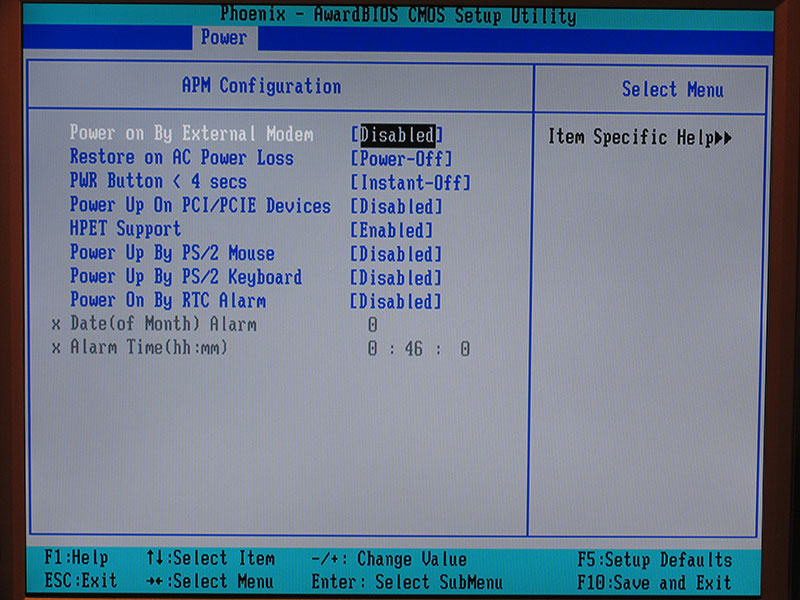
Have a looky in your Bios and make sure that there is no "power on" after AC power loss or something to this effect (it differs from pc to pc)

My System SpecsSystem Spec
06 Mar 2012   #3

Windows 7 Ultimate AMD64
Sydney, Nova Scotia


Your thread title says "pressing and holding the power button". So are you just momentarily pressing it or pressing and holding it down? You should only need a quick press and release for Windows to do a graceful shutdown. Assuming the BIOS is set correctly and windows is setup correctly. Most BIOS can be set to "instant off" or "4 second delay" for shut down when the power button is pressed. You want it set to 4 second delay. Otherwise the power supply will instantly shut down when you press the power button and Windows won't get a chance to shut down normally. If Windows locks up and won't shut down, then you hold the button in for 4 seconds and the power supply will turn off anyway.
My System SpecsSystem Spec
.


07 Mar 2012   #4

Windows 7 Home Premium 64bit


Quote   Quote: Originally Posted by PooMan UK View Post
Have a looky in your Bios and make sure that there is no "power on" after AC power loss or something to this effect (it differs from pc to pc)

Yes I have changed that and it still dose it.
My System SpecsSystem Spec
07 Mar 2012   #5

Windows 7 Ultimate x64 Service Pack 1
Doncaster, UK


Is the power button actually connected to the correct pins of the front panel connector on the motherboard? The symptom you are describing is pretty much what I would expect if the reset button was pressed instead.
My System SpecsSystem Spec
07 Mar 2012   #6

Windows 7 Home Premium 64bit


Quote   Quote: Originally Posted by Dwarf View Post
Is the power button actually connected to the correct pins of the front panel connector on the motherboard? The symptom you are describing is pretty much what I would expect if the reset button was pressed instead.
Okay I'll take a look into that and see. I think the motherboard been replaced in it so maybe I put it in the wrong place.
My System SpecsSystem Spec
07 Mar 2012   #7

Windows 7 Home Premium 64bit


Also today I found out that the computer will restart when you click shutdown in windows.
My System SpecsSystem Spec
07 Mar 2012   #8

Windows 7 Ultimate 64bit (Build 7600)
Wales


Have a looky over here pal winXP shutdown problems
My System SpecsSystem Spec
08 Mar 2012   #9

Windows 7 Home Premium 64bit


The problem was the motherboard. I replaced it with the same kind of motherboard and it seems to work just find now. So I guess it was the motherboard going out.
My System SpecsSystem Spec
Reply

 Computer turns back on after pressing and holding the power button problems?


Thread Tools


Similar help and support threads for: Computer turns back on after pressing and holding the power button
Thread Forum
After monitor turns off, computer won't turn back on. Graphic Cards
Grab the scroll bar by holding down the right mouse button Software
Solved Shut down computer, remove all power sources, hold down power button Hardware & Devices
Whats Holding Me Back? Gaming
Computer turns itself off and power light stays on General Discussion


All times are GMT -5. The time now is 11:26 PM.


Seven Forums Android App Seven Forums IOS App Follow us on Facebook

Windows 7 Forums is an independent web site and has not been authorized,
sponsored, or otherwise approved by Microsoft Corporation.
"Windows 7" and related materials are trademarks of Microsoft Corp.
© Designer Media Ltd
  

1 2 3 4 5 6 7 8 9 10 11 12 13 14 15 16 17 18 19 20 21 22 23 24 25 26 27 28 29 30 31 32