Windows 7 Forums


Windows 7: A Samsung TV

29 Dec 2009   #1

Window 7 Home Premium 64-Bit
England
 
 
A Samsung TV

I have just bought the Samsung LE32B350F1W television.

I know there is the Audio Output (Red & White/ Left & Right) but i was wondering if the was just a normal headphone socket as I can't seem to locate one on the TV it self.
The reason I ask is because i have wireless headphones and when I plug them into the Audio Output mentioned above nothing seems to work. I know the headphones work as I have tried them in various appliances around my house.

Any help would be very thankfull.

(Is there a headphone socket on the Samsung LE32B350F1W)
How can I fix the problem of not hearing anything if there is no headphone socket

Thanks so much guys

My System SpecsSystem Spec

29 Dec 2009   #2

Windows 7 Ultimate x64
Utah


I think you can buy an adapter for the Audio Output.
My System SpecsSystem Spec
31 Dec 2009   #3

Windows 7 Home Premium 32-Bit - Build 7600 SP1
Houston, Texas


Quote   Quote: Originally Posted by mjwilson94 View Post
I have just bought the Samsung LE32B350F1W television.

I know there is the Audio Output (Red & White/ Left & Right) but i was wondering if the was just a normal headphone socket as I can't seem to locate one on the TV it self.
The reason I ask is because i have wireless headphones and when I plug them into the Audio Output mentioned above nothing seems to work. I know the headphones work as I have tried them in various appliances around my house.

Any help would be very thankfull.

(Is there a headphone socket on the Samsung LE32B350F1W)
How can I fix the problem of not hearing anything if there is no headphone socket

Thanks so much guys
I feel sure it is not for headphones. They don't have a red/white plug. My guess would be an output for a surround-sound system. I have a pretty expensive TV and it does not have a headphone jack. Not all of them do.
My System SpecsSystem Spec
.


09 Jan 2010   #4

Windows 7 Ultimate x64 Service Pack 1
Doncaster, UK


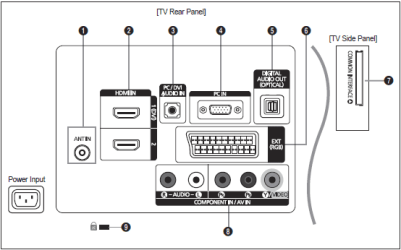
There are two audio outputs on this TV. The first is the digital optical (5) and the second is obtainable from the SCART socket (6).
A Samsung TV-capture.png
To get audio output from the SCART socket (note that only TV or DTV output is available) you will need a suitable adapter. Have a look at this: SCART adaptor, 3.5mm socket audio out: Amazon.co.uk: Electronics & Photo
You might also need 6.35 1/4" stereo socket to 3.5 Stereo jack adaptor: Amazon.co.uk: Electronics & Photo if the plug on your headphones is 6.3mm and not 3.5mm.
My System SpecsSystem Spec
09 Jan 2010   #5

W7 X-64 RTM,SUSE 11.1, XP PRO SP3 as a VM, VMware ESXi
Hafnarfjörður IS


Hi there
Just an 'Elf 'n safety warning -- but this one makes sense.

SCART output is usally at LINE Output level - this will be at too high a level and could damage your EARS (as well as your phones) so don't test by plugging the phones into this source directly.

If you can plug the audio into your Wireless device and then use the phones you should be fine as you will be able to adjust the volume presumably.

Cheers
jimbo
My System SpecsSystem Spec
Reply

 A Samsung TV problems?


Thread Tools


Similar help and support threads for: A Samsung TV
Thread Forum
Samsung 840 Pro SSD! Hardware & Devices
Please help me with my samsung General Discussion
Samsung Chillout Room
samsung nc 10 Hardware & Devices
Samsung SM 2333SW vs Samsung P2250N Hardware & Devices


All times are GMT -5. The time now is 06:02 AM.


Seven Forums Android App Seven Forums IOS App Follow us on Facebook

Windows 7 Forums is an independent web site and has not been authorized,
sponsored, or otherwise approved by Microsoft Corporation.
"Windows 7" and related materials are trademarks of Microsoft Corp.
© Designer Media Ltd
  

1 2 3 4 5 6 7 8 9 10 11 12 13 14 15 16 17 18 19 20 21 22 23 24 25 26 27 28 29 30 31 32