| Windows 7: adding downloaded icons to windows 7 |
10 Aug 2010
|
#1 | | |
adding downloaded icons to windows 7 hello, i,ve downloaded some icons from the rockers team website which are brilliant i must add,but i have no idea how to to install them to replace my windows 7 ultimate icons,i have seached the forum but cant find a tutorial to install them,maybe i,ve been looking in the wrong place... so any help would much appreciated | My System Specs |
| System Manufacturer/Model Number custom OS windows 7 ultimate CPU Intel(R) Core(TM) i3 CPU 530 @ 2.93GHz Motherboard Gigabyte Technology Co., Ltd. H55-USB3 x.x Memory 4.0 DDR3 Graphics Card NVIDIA GeForce 8800 GT Keyboard logitech G15 |
10 Aug 2010
|
#2 | | |
hello and welcome..
what icon do you means? icon on the folder or on the start button or the other icons. | My System Specs | | System Manufacturer/Model Number built up OS windows 7 CPU Phenom II AMD Dragon 3.5Ghz Memory DDR3 4GB Graphics Card ATI Radeon 512Mb Monitor(s) Displays HP L1506 Screen Resolution 1152 x 864 Keyboard HP wireless keyboard Mouse HP Optic Hard Drives WDC 1 TB SATA-II Green Power Internet Speed 1GB |
10 Aug 2010
|
#3 | | Windows 7 Home Premium 64 Bit SP 1 |

Quote: Originally Posted by harryo1 hello, i,ve downloaded some icons from the rockers team website which are brilliant i must add,but i have no idea how to to install them to replace my windows 7 ultimate icons,i have seached the forum but cant find a tutorial to install them,maybe i,ve been looking in the wrong place... so any help would much appreciated  Hi Harry 
Which are those icons ? If those are general system icons, but not iconpacks, you cannot install them, you are to replace system icons with the downloaded icons. A tutorial link to how to do it is available below my sig | My System Specs | | Computer type PC/Desktop System Manufacturer/Model Number Self Assembled OS Windows 7 Home Premium 64 Bit SP 1 CPU Intel Core i3 2120 @ 3.30GHz Motherboard Gigabyte Technology Co., Ltd. H61M-DS2 DVI Memory Corsair 2GB x2 (Single-Channel DDR3 @ 665MHz) Graphics Card 2047MB GeForce GTS 450 (ZOTAC International) Sound Card Onboard (Realtek High Definition Audio) Monitor(s) Displays LG Flatron E2040T Screen Resolution 1600x900 Keyboard Logitech MK220 Mouse Logitech MK220 PSU uMAX 750 watt. Case iBall Cooling Air/ Fans Hard Drives Western Digital 1 TB
Seagate 500 GB Internet Speed BSNL Broadband Antivirus Microsoft Security Essentials Browser Waterfox Other Info Dell Studio 15" Laptop |
11 Aug 2010
|
#4 | | |

Quote: Originally Posted by Arc 
Quote: Originally Posted by harryo1 hello, i,ve downloaded some icons from the rockers team website which are brilliant i must add,but i have no idea how to to install them to replace my windows 7 ultimate icons,i have seached the forum but cant find a tutorial to install them,maybe i,ve been looking in the wrong place... so any help would much appreciated  Hi Harry 
Which are those icons ? If those are general system icons, but not iconpacks, you cannot install them, you are to replace system icons with the downloaded icons. A tutorial link to how to do it is available below my sig  G,day arc
Thanks for your time,i,m thinking they are the system icons, the pack is named full glass blue and here is the link so you can have look for yourself and tell me what you think.I,m not to computer savvy but i like to have a go at things to learn more about the ins and outs of a computer. - Icons | My System Specs | | System Manufacturer/Model Number custom OS windows 7 ultimate CPU Intel(R) Core(TM) i3 CPU 530 @ 2.93GHz Motherboard Gigabyte Technology Co., Ltd. H55-USB3 x.x Memory 4.0 DDR3 Graphics Card NVIDIA GeForce 8800 GT Keyboard logitech G15 |
11 Aug 2010
|
#5 | | Windows 7 x64 Ma Shiptons Cave |
To replace a lot of those you are going to have to swap a lot of your system file icons out | My System Specs | | |
11 Aug 2010
|
#6 | | Windows 7 Home Premium 64 Bit SP 1 |

Quote: Originally Posted by harryo1 G,day arc
Thanks for your time,i,m thinking they are the system icons, the pack is named full glass blue and here is the link so you can have look for yourself and tell me what you think.I,m not to computer savvy but i like to have a go at things to learn more about the ins and outs of a computer. - Icons Nice choice. Those are my favorite ! You know, those are created by Mark , Mr Grim !!
But at the download you linked, contains all png images, you cannot make them use as icons (without converting). Better you search in "Customized icons" section of Virtual Customs • Home • Customize Your Virtual World! . It must be there . Or you can contact Mark for better suggestions, but he is not such active nowadays | My System Specs | | Computer type PC/Desktop System Manufacturer/Model Number Self Assembled OS Windows 7 Home Premium 64 Bit SP 1 CPU Intel Core i3 2120 @ 3.30GHz Motherboard Gigabyte Technology Co., Ltd. H61M-DS2 DVI Memory Corsair 2GB x2 (Single-Channel DDR3 @ 665MHz) Graphics Card 2047MB GeForce GTS 450 (ZOTAC International) Sound Card Onboard (Realtek High Definition Audio) Monitor(s) Displays LG Flatron E2040T Screen Resolution 1600x900 Keyboard Logitech MK220 Mouse Logitech MK220 PSU uMAX 750 watt. Case iBall Cooling Air/ Fans Hard Drives Western Digital 1 TB
Seagate 500 GB Internet Speed BSNL Broadband Antivirus Microsoft Security Essentials Browser Waterfox Other Info Dell Studio 15" Laptop |
11 Aug 2010
|
#8 | | |
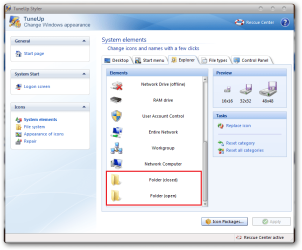
windows 7 icons thanks for all the help,i have tune up utilities that have options to change icons and install icon packages whether that would help | My System Specs | | System Manufacturer/Model Number custom OS windows 7 ultimate CPU Intel(R) Core(TM) i3 CPU 530 @ 2.93GHz Motherboard Gigabyte Technology Co., Ltd. H55-USB3 x.x Memory 4.0 DDR3 Graphics Card NVIDIA GeForce 8800 GT Keyboard logitech G15 |
11 Aug 2010
|
#9 | | Windows 7 x64 Ma Shiptons Cave |
Yeah, change all the icons you want / can and then save it as your own icon package. | My System Specs | | |
11 Aug 2010
|
#10 | | Windows 7 Home Premium 64 Bit SP 1 |

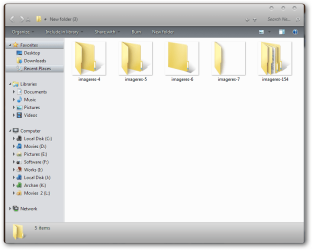
Quote: Originally Posted by harryo1 thanks for all the help,i have tune up utilities that have options to change icons and install icon packages whether that would help  What stuff you downloaded ? If toy got the iconpackager with the installer, tuneup utilities will not needed at all . Actually the installer is not capable to be used with tuneup. If you have download the icon pack without installer, you may apply tuneup to change icons . Though the lovely glassy folder icon will not be made by tuneup at all  Coz tuneup doesnot support live folders.
BTW, if you are planning to apply the iconpack installer, please backup your imageres.dll, shell32.dll and imagesp1.dll in a partition other than c manually, and have a bootable os disk in hand , like Puppy Linux 5.0 . Otherwise the installer may/might cause trouble. | My System Specs | | Computer type PC/Desktop System Manufacturer/Model Number Self Assembled OS Windows 7 Home Premium 64 Bit SP 1 CPU Intel Core i3 2120 @ 3.30GHz Motherboard Gigabyte Technology Co., Ltd. H61M-DS2 DVI Memory Corsair 2GB x2 (Single-Channel DDR3 @ 665MHz) Graphics Card 2047MB GeForce GTS 450 (ZOTAC International) Sound Card Onboard (Realtek High Definition Audio) Monitor(s) Displays LG Flatron E2040T Screen Resolution 1600x900 Keyboard Logitech MK220 Mouse Logitech MK220 PSU uMAX 750 watt. Case iBall Cooling Air/ Fans Hard Drives Western Digital 1 TB
Seagate 500 GB Internet Speed BSNL Broadband Antivirus Microsoft Security Essentials Browser Waterfox Other Info Dell Studio 15" Laptop adding downloaded icons to windows 7 problems? All times are GMT -5. The time now is 04:20 PM. | |