Windows 7 Forums


Windows 7: Windows 7127: Full transparent window frame again possi

18 May 2009   #1

Windows XP and 7
 
 
Windows 7127: Full transparent window frame again possi

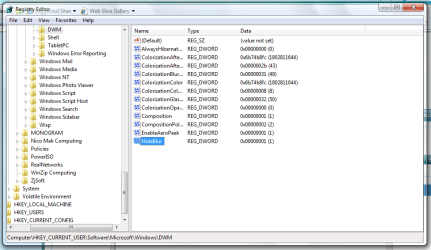
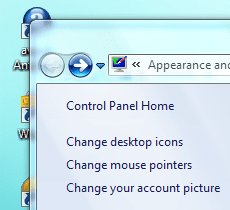
In Windows 7 (build 7127) again it is possible to switch the window frame from "frosted glass" effect ("blur") into fully transparent

Attached Thumbnails
Windows 7127: Full transparent window frame again possi-windows-7127-hideblur.png  

Last edited by Brink; 16 Jun 2009 at 02:19 PM..
My System SpecsSystem Spec

18 May 2009   #2

windows seven


will give it a gogo
My System SpecsSystem Spec
18 May 2009   #3

Windows 7 Ultimate x64 SP1
Somewhere on the 3rd rock from the sun.


That sounds intriguing....

Thanks for the info.
My System SpecsSystem Spec
.


18 May 2009   #4

Windows7 Pro x64


Cool, now how about the task bar ?
My System SpecsSystem Spec
19 May 2009   #5

Windows XP and 7


This effect was also in the builds 6956, 7022, 7048 and 7068 possible.
In the builds 7000, 7077 and 7100 it doesn't work.

You also can use this function in the build 7100 (RC), when you copy the two files "DWM.exe" and "uDWM.dll" from folder c:\windows\system32\ of Build 7127 into the Build 7100.

Whereby the file "DWM.exe" is responsible for the evaluation of the registry key ("HideBlur=1") and the file "uDWM.dll" for full transparency.

In order to overwrite these files at all, you first must acquire the full access rights at these files. Then "stop the service": "Desktop Windows Manager Session Manager" for a short time and copy the files from build 7127 into 7100. After that "restart the service": "Desktop Windows Manager Session Manager" again.

My System SpecsSystem Spec
19 May 2009   #6

windows seven


tanks mate works well ty
My System SpecsSystem Spec
22 May 2009   #7

Windows 7 Professional x64


Sorry to dig this up, but if there is someone with 7127 64 bit can you please upload dwm.exe and uDWM.dll files for me (and possibly others?).

Or does same files work for 64 bit?
My System SpecsSystem Spec
24 May 2009   #8

Windows 7 Ultimate x64
Milton Keynes, United Kingdom


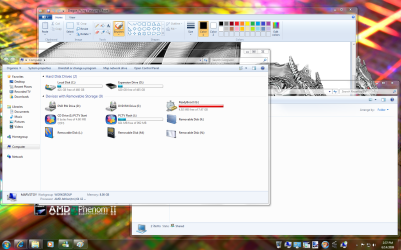
Cool, cheers man. Works great on 7127 x86. You need to add a DWORD (XXbit) value (where XX is 32 or 64, based on your system) in HKEY_CURRENT_USER\Software\Microsoft\Windows\DWM
Windows 7127: Full transparent window frame again possi-capture.png
Before
Name:  before hack.PNG
Views: 3131
Size:  42.4 KB
After
Name:  after hack.PNG
Views: 3136
Size:  44.8 KB
My System SpecsSystem Spec
04 Jun 2009   #9

Windows 7 Professional 64-bit


when you say 64-bit dword, do you mean q-word key?
My System SpecsSystem Spec
04 Jun 2009   #10

Windows 7 Ultimate x64 SP1


Quote   Quote: Originally Posted by swarfega View Post
when you say 64-bit dword, do you mean q-word key?

Hi swarfeggy,

you could just make a 32 bit dword value like the rest of the entries there, but it appears that it doesn't work anymore in 7201, at least for me now. I had it in 7137.
My System SpecsSystem Spec
Closed Thread

 Windows 7127: Full transparent window frame again possi problems?


Thread Tools


Similar help and support threads for: Windows 7127: Full transparent window frame again possi
Thread Forum
make window explorer transparent like gadget window. Themes and Styles
Full Frame vs Standard Music, Pictures & Video
Solved Windows 7 Window Frame. General Discussion
how to have Full window transparent, not just border? Customization
Full Transparent Windows Customization


All times are GMT -5. The time now is 12:40 AM.


Seven Forums Android App Seven Forums IOS App Follow us on Facebook

Windows 7 Forums is an independent web site and has not been authorized,
sponsored, or otherwise approved by Microsoft Corporation.
"Windows 7" and related materials are trademarks of Microsoft Corp.
© Designer Media Ltd
  

1 2 3 4 5 6 7 8 9 10 11 12 13 14 15 16 17 18 19 20 21 22 23 24 25 26 27 28 29 30 31 32