Solved Changing order of columns in detail view

Odd Bob

New member
Local time
2:26 PM
Messages
1
Hi! A few weeks ago I bought a new Acer netbook with Windows 7 Starter on it, after six years of using, and getting very comfortable with, XP. Some things I like, some things I don't, but I figure I should get used to the coming thing, since XP won't be around forever.

There is one thing (at the moment) that I can't figure out in Win 7 though. In XP all my windows that are opened in detail view first have the file name, then the file size right next to it. In Win 7, all the detail windows default to having the file size column over on the far right, where it's hard to see and does me no good at all. I can drag the file size column over to where I want it, of course, but I have hundreds of folders and would not like to have to do this for all of them manually. I also would prefer to have all new folders default to having the file size right next to the file name.

Is there any way I can get Starter to change the column order for all the folders at once, as well as make it the default for new ones I create?

Thank you.

-- Bob
 

My Computer My Computer

At a glance

Wun XP, Win 7 starter
OS
Wun XP, Win 7 starter
I am also interested in this please can someone help witha solution.
 

My Computer My Computer

At a glance

windows 7 ultimate 64-bitIntel i7 950 3.06ghz6GB Corsair DominatorEVGA nVidia GTX460 superclocked 1024MB
Computer Manufacturer/Model Number
custom
OS
windows 7 ultimate 64-bit
CPU
Intel i7 950 3.06ghz
Motherboard
EVGA X58 SLI3
Memory
6GB Corsair Dominator
Graphics Card(s)
EVGA nVidia GTX460 superclocked 1024MB
Hard Drives
1tb westurn digital sata 3
PSU
Corsair 750watt
Case
Coolermaster CM-690 II advanced with sidepanel
Cooling
Default intel cpu cooler and 5 zalman 120mm case fans.
hi Odd Bob and thermalzombie, welcome to sevenforums, both of you,

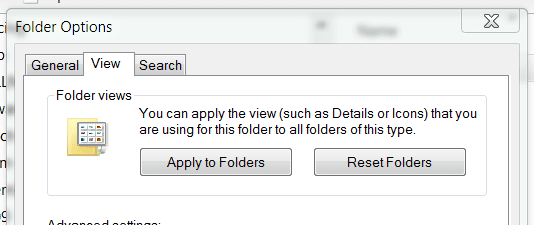
ok - set up your view just how you want it, then in windows explorer press alt-t to get the tools menu >> folder options >> view tab

at the top, you'll see 'apply to all folders' button.

apply.PNG
 

My Computer My Computer

At a glance

ultimate 64 sp1i5 2500K [email protected]8 gigs GSkill Ripjaws 1600amd hd6950
Computer Manufacturer/Model Number
mickey megabyte 1234
OS
ultimate 64 sp1
CPU
i5 2500K [email protected]
Motherboard
MSI P67A-GD53
Memory
8 gigs GSkill Ripjaws 1600
Graphics Card(s)
amd hd6950
Sound Card
creative x-fi gamer
Monitor(s) Displays
samsung 24"
Screen Resolution
1920x1080
Hard Drives
ocz vertex 2e 60 gig, samsung f3 1tb, buffalo 2tb ext
PSU
antec 550
Case
antec three hundred
Cooling
i'm a cooling fan
Keyboard
saitek eclipse ii
Mouse
logitech g3
Internet Speed
about 4 Mbps
Other Info
i love win7
Thankyou very easy to do this was driving me crazy.

Thanks again.
 

My Computer My Computer

At a glance

windows 7 ultimate 64-bitIntel i7 950 3.06ghz6GB Corsair DominatorEVGA nVidia GTX460 superclocked 1024MB
Computer Manufacturer/Model Number
custom
OS
windows 7 ultimate 64-bit
CPU
Intel i7 950 3.06ghz
Motherboard
EVGA X58 SLI3
Memory
6GB Corsair Dominator
Graphics Card(s)
EVGA nVidia GTX460 superclocked 1024MB
Hard Drives
1tb westurn digital sata 3
PSU
Corsair 750watt
Case
Coolermaster CM-690 II advanced with sidepanel
Cooling
Default intel cpu cooler and 5 zalman 120mm case fans.
my pleasure :)
 

My Computer My Computer

At a glance

ultimate 64 sp1i5 2500K [email protected]8 gigs GSkill Ripjaws 1600amd hd6950
Computer Manufacturer/Model Number
mickey megabyte 1234
OS
ultimate 64 sp1
CPU
i5 2500K [email protected]
Motherboard
MSI P67A-GD53
Memory
8 gigs GSkill Ripjaws 1600
Graphics Card(s)
amd hd6950
Sound Card
creative x-fi gamer
Monitor(s) Displays
samsung 24"
Screen Resolution
1920x1080
Hard Drives
ocz vertex 2e 60 gig, samsung f3 1tb, buffalo 2tb ext
PSU
antec 550
Case
antec three hundred
Cooling
i'm a cooling fan
Keyboard
saitek eclipse ii
Mouse
logitech g3
Internet Speed
about 4 Mbps
Other Info
i love win7
Back
Top