Windows 7 Forums


Windows 7: Show Desktop Icon in Taskbar? I want it.

19 May 2009   #1

W7 Build 7100 X64
 
 
Show Desktop Icon in Taskbar? I want it.

I searched but didn't find the answer.

How can I put the Show Desktop icon in the taskbar? I just want the one small icon like we have in XP. Thanks.

My System SpecsSystem Spec

19 May 2009   #2

Windows 7 Ultimate 64 BITS
Brasil


I dont know how to do that...but you can always use shortcuts
like

WINDOWS KEY + D = minimize all aplications and show the desktop
WINDOWS KEY + M = minimize all open windows

its faster and you dont have to click anything xD
My System SpecsSystem Spec
19 May 2009   #3

W7 Build 7100 X64


Thanks, Ajulian. I knew about those Windows Key shortcuts; I was looking for the Taskbar Button.

However, looking at the "related threads" at the bottom of the screen I saw this thread, which sort of answers my question.

Show desktop?

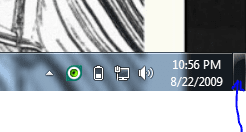
Why'd they go and do a dumb thing like that? I didn't even KNOW that thing was a button! It works, but it's far from the optimal location. I tried clicking and dragging it; doesn't work. Anyone know how to MOVE that "button that doesn't look like a button?"
My System SpecsSystem Spec
.


19 May 2009   #4

Vista X64 ultimate/ 7 X64 Ultimate (7264)
UK


My System SpecsSystem Spec
19 May 2009   #5

W7 Build 7100 X64


Thanks, Sevsman! Greatly appreciated.
My System SpecsSystem Spec
19 May 2009   #6

7264x64/7260x86


The reason it's put in the corner is for fast access to it. It has a zero pixel placement like the start menu. You don't have to aim for the button, just move the cursor all the way to the corner.
My System SpecsSystem Spec
19 May 2009   #7

W7 Build 7100 X64


Hmm. Now that you put it that way, Copernicus, it seems to make sense. I'll get used to it, I'm sure. Right now it's just so new that it's not natural for me to roll the mouse "that way" to aim for the button.
My System SpecsSystem Spec
19 May 2009   #8

Windows 7 Ultimate x64 SP1
Somewhere on the 3rd rock from the sun.


Well, bottom left is the start button...

Top right is the close button for most maximized apps...

Top left is the default application context menu...

That leaves bottom right - else there would have been a much larger paradigm shift as we all got used to having windows rewritten from those other three defaults above.
My System SpecsSystem Spec
19 May 2009   #9

new


thankyou.....
osama Al Bash
My System SpecsSystem Spec
20 May 2009   #10

7600 x86
budapest


i'm fond of the corner button, but i do wish it could be configured to be more like WIN-M than WIN-D, as the latter makes 3rd party gadgets like rainlendar and samurize disappear, while the former keeps them intact. the only reason i'd want to 'peek' at the desktop is to check my calendar or meters, but the way it's set up now, 'peeking' makes them disappear!
My System SpecsSystem Spec
Reply

 Show Desktop Icon in Taskbar? I want it. problems?


Thread Tools


Similar help and support threads for: Show Desktop Icon in Taskbar? I want it.
Thread Forum
Explorer icon in taskbar doesn't show recent items General Discussion
Check Box -> Show icon in taskbar notification area when connected is Network & Sharing
How do I get USB thumb drives to show a taskbar icon when inserted? General Discussion
*Need help on taskbar (Show desktop) General Discussion
show desktop icon Customization


All times are GMT -5. The time now is 05:16 PM.


Seven Forums Android App Seven Forums IOS App Follow us on Facebook

Windows 7 Forums is an independent web site and has not been authorized,
sponsored, or otherwise approved by Microsoft Corporation.
"Windows 7" and related materials are trademarks of Microsoft Corp.
© Designer Media Ltd
  

1 2 3 4 5 6 7 8 9 10 11 12 13 14 15 16 17 18 19 20 21 22 23 24 25 26 27 28 29 30 31 32