|
Welcome to Windows 7 Forums. Our forum is dedicated to helping you find solutions with any problems, errors or issues you are experiencing with Windows 7. The Windows 7 forum also covers news and updates and has an extensive Windows 7 tutorial section that covers a wide range of tips and tricks.
Windows 7 - Completely disable Jump List trigger |
08-30-2010
|
#1 | | Windows 7 Home Premium 64-bit |
Completely disable Jump List trigger I have a tendency to accidentally move my mouse cursor upwards as I click on taskbar application icons, which triggers the jump list. Is there a way to prevent this?
I know of a 3rd party app called "7 Taskbar Tweaker" that can change the right-click context menu of these taskbar items to the classic options (equivalent to Shift + right click), but that doesn't cover the above annoyance.
| My System Specs | | System Manufacturer/Model Number ASUS K52F-A1 OS Windows 7 Home Premium 64-bit CPU Intel Core i3-350M @ 2.27GHz Motherboard ? Memory 4GB DDR3 Graphics Card Intel GMA HD Sound Card Conexant SmartAudio HD Monitor(s) Displays Built-in notebook display (disabled) and Acer 22" (active) Screen Resolution 1680 x 1050 Keyboard Logitech K120 Mouse Dell Laser MOCZUL PSU none? Case ? Cooling none Hard Drives 320 GB Internet Speed 4.33Mbps / 640Kbps Other Info not yet revealed |
08-30-2010
|
#2 | | MS Windows 7 Ultimate SP1 64-bit |
Not the answer you are looking for but a solution to the problem is to use a trackball. You will find that clicking will result in no mouse movement, unless you are clumsy and put your hand on the trackball at the same time as clicking.
I always recommend trackballs to senior citizens with slow reflexes. | My System Specs | | System Manufacturer/Model Number Toshiba Satellite L305D laptop OS MS Windows 7 Ultimate SP1 64-bit CPU AMD Athlon X2 Dual-Core QL-64, 2100 Mhz, 2 Cores Motherboard TOSHIBA Portable PC (Socket M2/S1G1) Memory 4.0GB (2x2GB) DDR2 @ 333MHz 5-5-5-15 Graphics Card ATI Radeon 3100 Graphics (Toshiba) Sound Card Realtek High Definition Audio Monitor(s) Displays Generic PnP Monitor @ 1280x800 Screen Resolution 1280 x 800 Keyboard standard PS/2 Keyboard Mouse HP Wireless Optical Mobile Mouse Model FHA-3410 Hard Drives 125.03GB Corsair CSSD-V128GB2 ATA Device (IDE)
Depending upon testing, organized as 1,2, or 3 partitions with/without a 100mb system partition at the front. Internet Speed What the local pub, local coffee shop offers. Other Info Optical Drives HL-DT-ST DVDRAM GSA-T50N ATA Device
Synaptics PS/2 Port TouchPad
Speakers (Realtek High Definition Audio)
Atheros AR5007EG Wireless Network Adapter
Also have an Asus ha1002xp netbook with Win 7 Ultimate installed. |
08-30-2010
|
#3 | | Windows 7 Home Premium 64bit |
Karl,
I am a Senior Citizen and use the MS Wireless Intelli Mouse and have had no problem using it.
My reflexes aren't as good as they used to be but what the hell nothing works good like it used too!
You will find this out soon enough.  | My System Specs | | System Manufacturer/Model Number HP M9077c OS Windows 7 Home Premium 64bit CPU Intel(R)Core(TM)2 quad Q6600@2.4GHz 2.39GHz Motherboard ASUSeK Memory 6GB DDR2 6400 Graphics Card GeForce 8500/512MB Sound Card Realtek High Def Audio Monitor(s) Displays HP w2408 LCD 24" widescreen Screen Resolution 1920x1200 Keyboard MS wireless Inteli Mouse MS wireless Inteli Cooling 6 pack of Bud |
08-30-2010
|
#4 | | MS Windows 7 Ultimate SP1 64-bit |
I'm fortunate and with my 72 years still get by also using a MS laser mouse.
My father and mother, when they were about that age, benefited greatly from a trackball. Personally I have, since my days at Collins Radio, always preferred trackballs. | My System Specs | | System Manufacturer/Model Number Toshiba Satellite L305D laptop OS MS Windows 7 Ultimate SP1 64-bit CPU AMD Athlon X2 Dual-Core QL-64, 2100 Mhz, 2 Cores Motherboard TOSHIBA Portable PC (Socket M2/S1G1) Memory 4.0GB (2x2GB) DDR2 @ 333MHz 5-5-5-15 Graphics Card ATI Radeon 3100 Graphics (Toshiba) Sound Card Realtek High Definition Audio Monitor(s) Displays Generic PnP Monitor @ 1280x800 Screen Resolution 1280 x 800 Keyboard standard PS/2 Keyboard Mouse HP Wireless Optical Mobile Mouse Model FHA-3410 Hard Drives 125.03GB Corsair CSSD-V128GB2 ATA Device (IDE)
Depending upon testing, organized as 1,2, or 3 partitions with/without a 100mb system partition at the front. Internet Speed What the local pub, local coffee shop offers. Other Info Optical Drives HL-DT-ST DVDRAM GSA-T50N ATA Device
Synaptics PS/2 Port TouchPad
Speakers (Realtek High Definition Audio)
Atheros AR5007EG Wireless Network Adapter
Also have an Asus ha1002xp netbook with Win 7 Ultimate installed. |
08-31-2010
|
#5 | | Windows 7 Home Premium 64-bit |
Thanks for the responses. I'm not exactly a senior, so what does that exactly make me lol  .
But now that you mentioned it, it seems to happen more frequently ever since I switched from optical to laser mouse @ 1600 DPI last week. I already lowered the speed significantly so that it's not as sensitive. I also enabled the 'Enhanced pointer precision' option, which was fine on my old mouse and in XP.
Maybe that option and laser mice don't get along? I'll start monitoring with it off and hope that should take care of this problem. | My System Specs | | System Manufacturer/Model Number ASUS K52F-A1 OS Windows 7 Home Premium 64-bit CPU Intel Core i3-350M @ 2.27GHz Motherboard ? Memory 4GB DDR3 Graphics Card Intel GMA HD Sound Card Conexant SmartAudio HD Monitor(s) Displays Built-in notebook display (disabled) and Acer 22" (active) Screen Resolution 1680 x 1050 Keyboard Logitech K120 Mouse Dell Laser MOCZUL PSU none? Case ? Cooling none Hard Drives 320 GB Internet Speed 4.33Mbps / 640Kbps Other Info not yet revealed |
08-31-2010
|
#6 | | windows 7 Home Premium 64 Bit SP 1 |
You can disable jumplist . I think it is associated with the recent places concept . If you right click on the taskbar and select properties in the context menu , You will get the taskbar and startmenu properties window . Select the start menu tab there, and uncheck the box shown in the attached pic . I hope it will work for you.
It will make the recent place link in explorer void forever, too . If you want to restore the previous back, just check the box again . Recent Items - Turn On or Off
Last edited by Brink; 08-31-2010 at 10:16 AM..
Reason: added link
| My System Specs | | System Manufacturer/Model Number Self Assembled OS windows 7 Home Premium 64 Bit SP 1 CPU Intel Core i3 Motherboard Intel DH55TC Media Series Memory Corsair 2GB x2 Graphics Card Onboard Sound Card Onboard Monitor(s) Displays LG Flatron E2040T Screen Resolution 1600x900 Keyboard iBall Mouse Logitech Case iBall Hard Drives Western Digital 1 TB
Seagate 500 GB Internet Speed BSNL Broadband Other Info Dell Studio 15" Laptop |
08-31-2010
|
#7 | | Windows 7 Home Premium 64-bit |
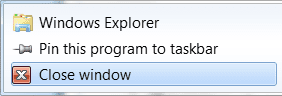
I've disabled both those options a while ago. Last night as I was googling, I found out that people who have suggested that defined the Jump List as the recent list, but my definition also encompasses the three basic menu options:
the application name
--------------------
Pin this program to taskbar
-------------------
Close window
It looks like this is one of those features that is so integrated in the shell viewer that it wouldn't be possible to disable without hacking | My System Specs | | System Manufacturer/Model Number ASUS K52F-A1 OS Windows 7 Home Premium 64-bit CPU Intel Core i3-350M @ 2.27GHz Motherboard ? Memory 4GB DDR3 Graphics Card Intel GMA HD Sound Card Conexant SmartAudio HD Monitor(s) Displays Built-in notebook display (disabled) and Acer 22" (active) Screen Resolution 1680 x 1050 Keyboard Logitech K120 Mouse Dell Laser MOCZUL PSU none? Case ? Cooling none Hard Drives 320 GB Internet Speed 4.33Mbps / 640Kbps Other Info not yet revealed |
08-31-2010
|
#8 | | windows 7 Home Premium 64 Bit SP 1 |

Quote: Originally Posted by Soyabeaner I've disabled both those options a while ago. Last night as I was googling, I found out that people who have suggested that defined the Jump List as the recent list, but my definition also encompasses the three basic menu options:
the application name
--------------------
Pin this program to taskbar
-------------------
Close window
It looks like this is one of those features that is so integrated in the shell viewer that it wouldn't be possible to disable without hacking  Then you ate right clicking on the taskbar icon . A right click on the taskbar icon shows that list , and sorry I dont know any way to disable the right click action
EDIT : Left click on the taskbar icon maximizes a minimized window , and minimizes a maximized window . Is it happens to you ? | My System Specs | | System Manufacturer/Model Number Self Assembled OS windows 7 Home Premium 64 Bit SP 1 CPU Intel Core i3 Motherboard Intel DH55TC Media Series Memory Corsair 2GB x2 Graphics Card Onboard Sound Card Onboard Monitor(s) Displays LG Flatron E2040T Screen Resolution 1600x900 Keyboard iBall Mouse Logitech Case iBall Hard Drives Western Digital 1 TB
Seagate 500 GB Internet Speed BSNL Broadband Other Info Dell Studio 15" Laptop |
08-31-2010
|
#9 | | MS Windows 7 Ultimate SP1 64-bit |
Soyabeaner,
I can give you some relief, but not total relief IF
your version has the group policy editor. WIN | type GPEDIT.MSC | ENTER
where WIN is the key with the wavy flag.
If you have the group policy editor, then let me know and I'll show how to get some relief.
I have the Ultimate version which has all of the goodies and don't remember whether you have the group policy editor on Home Premium. | My System Specs | | System Manufacturer/Model Number Toshiba Satellite L305D laptop OS MS Windows 7 Ultimate SP1 64-bit CPU AMD Athlon X2 Dual-Core QL-64, 2100 Mhz, 2 Cores Motherboard TOSHIBA Portable PC (Socket M2/S1G1) Memory 4.0GB (2x2GB) DDR2 @ 333MHz 5-5-5-15 Graphics Card ATI Radeon 3100 Graphics (Toshiba) Sound Card Realtek High Definition Audio Monitor(s) Displays Generic PnP Monitor @ 1280x800 Screen Resolution 1280 x 800 Keyboard standard PS/2 Keyboard Mouse HP Wireless Optical Mobile Mouse Model FHA-3410 Hard Drives 125.03GB Corsair CSSD-V128GB2 ATA Device (IDE)
Depending upon testing, organized as 1,2, or 3 partitions with/without a 100mb system partition at the front. Internet Speed What the local pub, local coffee shop offers. Other Info Optical Drives HL-DT-ST DVDRAM GSA-T50N ATA Device
Synaptics PS/2 Port TouchPad
Speakers (Realtek High Definition Audio)
Atheros AR5007EG Wireless Network Adapter
Also have an Asus ha1002xp netbook with Win 7 Ultimate installed. |
08-31-2010
|
#10 | | Windows 7 Home Premium 64-bit |

Quote: Originally Posted by Arc Then you ate right clicking on the taskbar icon . A right click on the taskbar icon shows that list , and sorry I dont know any way to disable the right click action
EDIT : Left click on the taskbar icon maximizes a minimized window , and minimizes a maximized window . Is it happens to you ? You can also active the jump list with the left click if you click on it and then with the button held down, move the mouse cursor up. That's where it's happening to me. The max & min window you mention only applies to the classic menu and older Windows versions.
Read here for more info: Slide Open Windows 7 Jump Lists » My Digital Life
@karlsnooks - I have Home Premium, so no gpedit for me.
The good news is I haven't encountered this "accident" yet ever since disabling the enhanced pointer precision option. I guess that was it  . | My System Specs | | System Manufacturer/Model Number ASUS K52F-A1 OS Windows 7 Home Premium 64-bit CPU Intel Core i3-350M @ 2.27GHz Motherboard ? Memory 4GB DDR3 Graphics Card Intel GMA HD Sound Card Conexant SmartAudio HD Monitor(s) Displays Built-in notebook display (disabled) and Acer 22" (active) Screen Resolution 1680 x 1050 Keyboard Logitech K120 Mouse Dell Laser MOCZUL PSU none? Case ? Cooling none Hard Drives 320 GB Internet Speed 4.33Mbps / 640Kbps Other Info not yet revealed Completely disable Jump List trigger problems? All times are GMT -5. The time now is 04:35 AM. |  |