Windows 7 Forums Search
Welcome to Windows 7 Forums. Our forum is dedicated to helping you find solutions with any problems, errors or issues you are experiencing with Windows 7. The Windows 7 forum also covers news and updates and has an extensive Windows 7 tutorial section that covers a wide range of tips and tricks.


Windows 7 - open & shut D: with a single shortcut

 
10-04-2010   #1


Windows 7 - Home Premium - 64bit - v6.1 - 7600


open & shut D: with a single shortcut

As title says... Can this be done?? Have googled without any luck

Hopefully there's a way ^^

PS - As welcome thread was closed...

Hi I'm King_Rat a.k.a targnik (King_Rat was taken as username {How dare they :lol:})

Have just got new tower with Windows 7 & am keen & eager to learn how to customize/utilize my new toy :woot:

T.I.A

My System SpecsSystem Spec
10-04-2010   #2


Windows 7 Ultimate x64 SP1


Welcome thread isn't closed.

Welcome to Seven Forums [3]
My System SpecsSystem Spec
10-04-2010   #3


Windows 7 - Home Premium - 64bit - v6.1 - 7600


Quote   Quote: Originally Posted by Airbot View Post
Welcome thread isn't closed.

Welcome to Seven Forums [3]
tnx 4 hedz up ^^

any idea re, shortcut??
My System SpecsSystem Spec
.


10-04-2010   #4


Windows 7 Ultimate x64 SP1


Try explaining the situation and what you want a little better.

"open & shut D: with a single shortcut" doesn't say much.
My System SpecsSystem Spec
10-04-2010   #5


Windows 7 - Home Premium - 64bit - v6.1 - 7600


Quote   Quote: Originally Posted by Airbot View Post
Try explaining the situation and what you want a little better.

"open & shut D: with a single shortcut" doesn't say much.
Translation:

I'd like to have a single shortcut that can open & close the D: cdrom drive

at the moment I have two shortcuts in my taskbar... seems like a waste of space which could be helped with just 1 shortcut to do both tasks ^^

T.I.A
My System SpecsSystem Spec
10-04-2010   #6


Windows 7 Ultimate x64 SP1


Could you this little script made by one of our long time members - MilesAhead

Down near the bottom of the page.

Tray
-

Faves Downloads

Does open a little window you have to use to open and close, but it's all from the one launcher. Worked OK for me when I pinned it to the taskbar. Closest I could find.
My System SpecsSystem Spec
10-04-2010   #7


Windows 7 - Home Premium - 64bit - v6.1 - 7600


Muchas Gracias Airbot
My System SpecsSystem Spec
10-04-2010   #8


Windows 7 Ultimate x64 SP1


You're welcome.
My System SpecsSystem Spec
11-14-2010   #9


Windows 7 - Home Premium - 64bit - v6.1 - 7600


Just an update for others ^^

Have uninstalled Tray.exe bit buggy & my AV said it was Gemini virus (maybe FP??)

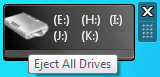
Have installed a desktop Gadget -=CLICKY=-

It's a bit ugly looking just increase transperancy & hide it in corner of desktop...

No bugs (as of yet)

:chuurz:

Last edited by targnik; 11-19-2010 at 06:56 PM..
My System SpecsSystem Spec
11-14-2010   #10


Windows 7 Ultimate x64 SP1


You could talk to the the developer about it, maybe he could help with the bugs. Pretty sure it's a safe program, he's been a long time member here and at our sister site Vistax64.com.
My System SpecsSystem Spec
Reply

 open & shut D: with a single shortcut problems?


Thread Tools


Similar Threads for: open & shut D: with a single shortcut
Thread Forum
Shut Down Computer Shortcut - Create Tutorials
Shut Down Windows Shortcut Tutorials
Disable Single Stroke Shortcut Key Performance & Maintenance
Opera Users: Open Single Tab When Clicking Outside Link Browsers & Mail


All times are GMT -5. The time now is 04:55 AM.


Windows 7 Forums is an independent web site and has not been authorized,
sponsored, or otherwise approved by Microsoft Corporation.
"Windows 7" and related materials are trademarks of Microsoft Corp.
© Designer Media Ltd
  

1 2 3 4 5 6 7 8 9 10 11 12 13 14 15 16 17 18 19 20 21 22 23 24 25 26 27 28 29 30