Windows 7 Forums


Windows 7: Power options - is there a keyboard shortcut ?

05 Oct 2010   #1

Windows 7 64-bit
 
 
Power options - is there a keyboard shortcut ?

I frequently have to change the power setting in my Windows 7 system from Power Saver to Always On and back to Power Saver (e.g. for installation of programs).


Is there a way to do this in one fell swoop with a keyboard shortcut rather than having to click through the Power Options windows ?
My System SpecsSystem Spec

05 Oct 2010   #2

Windows 7 x86/x64, Server 2008r2, Web Server 2008


I do not know of any but im sure some creative scripting and setting custom keyboard shortcuts could solve your problem
My System SpecsSystem Spec
05 Oct 2010   #3

Microsoft Windows 7 Home Premium 64-bit 7600
cornwall UK


not sure but i use godmode to accsses all my needs, create a new folder on desktop and name it this

GodMode.{ED7BA470-8E54-465E-825C-99712043E01C}

...copy and paste it from here its easier.

OR

Control Panel All Tasks List Shortcut

Last edited by Brink; 06 Oct 2010 at 11:46 PM.. Reason: added link
My System SpecsSystem Spec
.


05 Oct 2010   #4

Windows 7
UK
 
 
powercfg

You might get some ideas from this: Powercfg Command-Line Options
My System SpecsSystem Spec
05 Oct 2010   #5

Windows 7 Ultimate x64 SP1


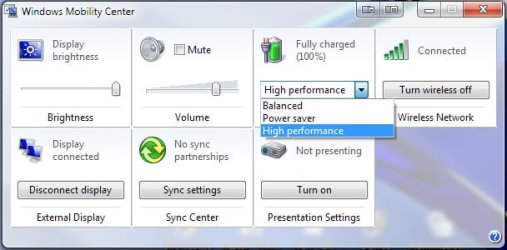
You could try using Win+X to go to this panel and select from there as shown here:

Power options - is there a keyboard shortcut ?-screenshot00003.jpg
My System SpecsSystem Spec
06 Oct 2010   #6

Windows 7 64-bit


Thanks very much, everybody, for these ideas. Looks like I need to use the God function and translate it into hotkeys. I'm working on it.
My System SpecsSystem Spec
06 Oct 2010   #7

Windows 7 Ultimate x64
Brisbane, Queensland, Australia


why dont you just left click on the power icon in the system tray, and change it there?
My System SpecsSystem Spec
06 Oct 2010   #8

64-bit Windows 7 Ultimate SP1 & Windows 8 Enterprise
Texas


Quote   Quote: Originally Posted by pacman10 View Post
I frequently have to change the power setting in my Windows 7 system from Power Saver to Always On and back to Power Saver (e.g. for installation of programs).

Is there a way to do this in one fell swoop with a keyboard shortcut rather than having to click through the Power Options windows ?
Hello Pacman,

In addition,

You could set two power plans to have each one set with a different setting you described. Afterwards, you can use the tutorial below to create a shortcut for each of these power plans to switch to using that power plan automatically. This way you can pin the power plan shortcuts to the taskbar (or where you like) to make toggling between them easier.

Power Plan - Create Shortcut to Change Power Plan

Hope this helps,
Shawn
My System SpecsSystem Spec
Reply

 Power options - is there a keyboard shortcut ? problems?


Thread Tools


Similar help and support threads for: Power options - is there a keyboard shortcut ?
Thread Forum
Power Options Shortcut - Create Tutorials
Keyboard shortcut for Context Menu->New Shortcut General Discussion
How to set Advanced options in Power Options (64 bit Ultimate) Performance & Maintenance
Advanced Power Options Shortcut - Create Tutorials
Power Options/Power plan settings? Performance & Maintenance


All times are GMT -5. The time now is 03:58 PM.


Seven Forums Android App Seven Forums IOS App Follow us on Facebook

Windows 7 Forums is an independent web site and has not been authorized,
sponsored, or otherwise approved by Microsoft Corporation.
"Windows 7" and related materials are trademarks of Microsoft Corp.
© Designer Media Ltd
  

1 2 3 4 5 6 7 8 9 10 11 12 13 14 15 16 17 18 19 20 21 22 23 24 25 26 27 28 29 30 31 32