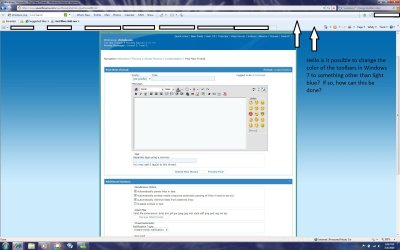
Is it possible to change the color of the toolbars in Windows 7 explorer & other programs to something other than light blue? I would like to continue to use the Aero Glass theme but I do not like the light blue color of all the toolbars. Thanks
Is it possible to change the color of the toolbars in Windows 7 explorer & other programs to something other than light blue? I would like to continue to use the Aero Glass theme but I do not like the light blue color of all the toolbars. Thanks
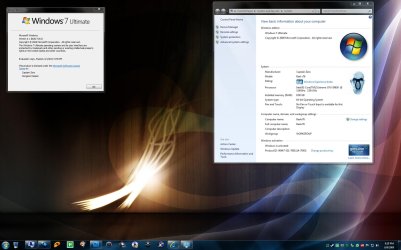
It is, although not by conventional means. Not recommended for those who aren't comfortable with HEX. In my case, I like the darker 'steel' appearance of the title bars but much prefer the blue for the task bar.
Attachments
Desk.jpg
200 KB
· Views: 4,269
My Computer
At a glance
Windows 7 Home Premium x64Intel QX9650 Extreme 4.0 GHz8GB (4x2) Corsair Dominator DDR32x Radeon R390X [8GB]
Computer type
PC/Desktop
Computer Manufacturer/Model Number
Custom Build/Mod
OS
Windows 7 Home Premium x64
CPU
Intel QX9650 Extreme 4.0 GHz
Motherboard
ASUS Rampage Extreme Rev2
Memory
8GB (4x2) Corsair Dominator DDR3
Graphics Card(s)
2x Radeon R390X [8GB]
Sound Card
SupremeFX X-Fi
Monitor(s) Displays
Dell 2408WFP 26" Panel
Screen Resolution
1920x1200
Hard Drives
4x WD 2TB (8TB+ Total)
2x Crucial SSD 128GB (RAID-0)
1x LG Blu-ray read/write
1x Phillips LightScribe DVD read/write
It is, although not by conventional means. Not recommended for those who aren't comfortable with HEX. In my case, I like the darker 'steel' appearance of the title bars but much prefer the blue for the task bar.
Yeah I see that, I was simply making the point that it could be done but that it wouldn't be advisable for the novice.
My example is just to illustrate that (like I said, "In my case"). So yes, it could be done by modifying the corresponding resource. I just haven't tackled that one yet.
My Computer
At a glance
Windows 7 Home Premium x64Intel QX9650 Extreme 4.0 GHz8GB (4x2) Corsair Dominator DDR32x Radeon R390X [8GB]
Computer type
PC/Desktop
Computer Manufacturer/Model Number
Custom Build/Mod
OS
Windows 7 Home Premium x64
CPU
Intel QX9650 Extreme 4.0 GHz
Motherboard
ASUS Rampage Extreme Rev2
Memory
8GB (4x2) Corsair Dominator DDR3
Graphics Card(s)
2x Radeon R390X [8GB]
Sound Card
SupremeFX X-Fi
Monitor(s) Displays
Dell 2408WFP 26" Panel
Screen Resolution
1920x1200
Hard Drives
4x WD 2TB (8TB+ Total)
2x Crucial SSD 128GB (RAID-0)
1x LG Blu-ray read/write
1x Phillips LightScribe DVD read/write
How did you go about doing that please Captain Zero ? Did you do it using res hacker or something similar . I'm curious as id love to get into making custom s-styles for w7.