Hello,
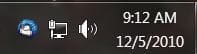
I have and add-on for Thunderbird called Minimize to Tray Plus. Anyhow, it puts a Thunderbird icon in my system tray that, to put it mildly, looks like crap. Can someone tell me if it is possible to customize this icon to one of my choosing? In fact, most of the 3rd party icons that run in the system tray could use a serious makeover. Any help would be greatly appreciated.
I have and add-on for Thunderbird called Minimize to Tray Plus. Anyhow, it puts a Thunderbird icon in my system tray that, to put it mildly, looks like crap. Can someone tell me if it is possible to customize this icon to one of my choosing? In fact, most of the 3rd party icons that run in the system tray could use a serious makeover. Any help would be greatly appreciated.
My Computer
At a glance
Windows 7 X64 ProfessionalIntel® Pentium D Dual Core 3.6GHZ4GB DDR2 PC2-5300GeForce GT 440 (Fermi) 2GB 128-bit DDR3 PCI E...
- Computer Manufacturer/Model Number
- Dell XPS 400
- OS
- Windows 7 X64 Professional
- CPU
- Intel® Pentium D Dual Core 3.6GHZ
- Motherboard
- DELL Dimension 9150 MotherBoard DXP051 XPS400 FJ030
- Memory
- 4GB DDR2 PC2-5300
- Graphics Card(s)
- GeForce GT 440 (Fermi) 2GB 128-bit DDR3 PCI Express 2.0 x16
- Sound Card
- ASUS XONAR DG 5.1 Channels PCI Interface Xonar DG
- Monitor(s) Displays
- 2 X 23" Apple Cinema Display
- Screen Resolution
- 1920 X 1200p
- Hard Drives
- 250GB Intel® 510 Series SSD SATA 6G (w/TRIM) [500MB/s Reads]
1.0TB Western Digital Caviar Black SATA 6G 7200rpm 64MB Cache
- PSU
- 375 Watt Dell
- Case
- Dell XPS 400 BTX Case
- Cooling
- Dell XPS 400 Air Cooling
- Keyboard
- Logitech Illuminated Keyboard
- Mouse
- Logitech M705 Marathon
- Internet Speed
- +/- 9929 Kbps
- Other Info
- This machine was given to me when my dad bought a new computer. I keep throwing upgrades at it and it keeps on ticking. Think I've done everything to it that can be done outside a PSU upgrade so I can run an even BETTER GPU.