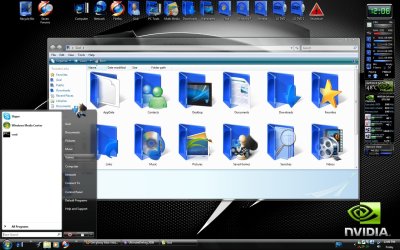
I was surprised to see that the folder icons in the User folder in Windows 7 have gone back to manilla-coloured folders.
Does anyone know how/where I can get the glossy blu user folders from Windows Vista? I am running Win 7 as my only OS, so I can't switch in to Vista to find the files any more, and the blue glossy folders don't seem to come with Windows 7.
System Manufacturer/Model Number Home Brew OS Windows 7 Ultimate Vista Ultimate x64 CPU Core 2 Duo E8500 3.16Ghz @ 3.8Ghz Motherboard eVGA 750i FTW Memory 2x2Gigs Patriot PC2-6400 LL Graphics Card Inno3D GeForce GTX260 216 SP Monitor(s) Displays ASUS VW222U 22" 2ms Response time Screen Resolution 1680x1050
Keyboard Logitech G15 Gaming Keyboard Mouse Logitech G9 Gaming Mouse PSU HYTEC 600W & Thermaltake 650W Toughpower Power Exp Case Thermaltake Armor LCS (Liquid Cooling System) Cooling Liquid Cooling System Hard Drives SATA 150GB
SATA II 250GB
USB IDE 750GB Ext.
I was surprised to see that the folder icons in the User folder in Windows 7 have gone back to manilla-coloured folders.
Does anyone know how/where I can get the glossy blu user folders from Windows Vista? I am running Win 7 as my only OS, so I can't switch in to Vista to find the files any more, and the blue glossy folders don't seem to come with Windows 7.
System Manufacturer/Model Number Home Brew OS Windows 7 Ultimate Vista Ultimate x64 CPU Core 2 Duo E8500 3.16Ghz @ 3.8Ghz Motherboard eVGA 750i FTW Memory 2x2Gigs Patriot PC2-6400 LL Graphics Card Inno3D GeForce GTX260 216 SP Monitor(s) Displays ASUS VW222U 22" 2ms Response time Screen Resolution 1680x1050
Keyboard Logitech G15 Gaming Keyboard Mouse Logitech G9 Gaming Mouse PSU HYTEC 600W & Thermaltake 650W Toughpower Power Exp Case Thermaltake Armor LCS (Liquid Cooling System) Cooling Liquid Cooling System Hard Drives SATA 150GB
SATA II 250GB
USB IDE 750GB Ext.
System Manufacturer/Model Number Home Brew OS Windows 7 Ultimate Vista Ultimate x64 CPU Core 2 Duo E8500 3.16Ghz @ 3.8Ghz Motherboard eVGA 750i FTW Memory 2x2Gigs Patriot PC2-6400 LL Graphics Card Inno3D GeForce GTX260 216 SP Monitor(s) Displays ASUS VW222U 22" 2ms Response time Screen Resolution 1680x1050
Keyboard Logitech G15 Gaming Keyboard Mouse Logitech G9 Gaming Mouse PSU HYTEC 600W & Thermaltake 650W Toughpower Power Exp Case Thermaltake Armor LCS (Liquid Cooling System) Cooling Liquid Cooling System Hard Drives SATA 150GB
SATA II 250GB
USB IDE 750GB Ext.
You can use icon packager but it is not fully compatible with windows 7 yet and some icons get mucked up. If you decide to use icon packager make sure you make a restore point first.
Restorator is pretty easy to use because it shows a preview of the icon you are going to change and you just drag and drop your custom icon onto the corresponding icon.
when your done you just hit save, providing you have taken ownership first and it's best if you have a dual boot and boot into the other OS to make any changes, that way you will ensure that none of the files are in use.
damm i dont have another os Windows 7 only now
was going to try iconpackager but wont now if it not 100% Windows 7
System Manufacturer/Model Number Acer aspire 8930G OS win 7 64bit(SP1) CPU Intel Core2 Extreme M X9100(OC 3.6ghz) Motherboard acer Memory 6 gig DDR3 Graphics Card Nvidia 9600m 1gig Sound Card realtek 5.1 high def Monitor(s) Displays 18.4in full HD 1080p Screen Resolution 1920x1080
Keyboard Acer Case Acer Cooling zalmon laptop cooler Hard Drives 64gig SSD
500gig sata
2gig intel turbo memory pci-e Internet Speed 10mb Other Info 4 speaker and sub in the laptop case
usb 3 expresscard