Ok, I think I know what could help...
1. Open
regedit and go to following keys one by one:
HKEY_CURRENT_USER\Software\Microsoft\Windows\CurrentVersion\Explorer\Shell Folders
HKEY_CURRENT_USER\Software\Microsoft\Windows\CurrentVersion\Explorer\User Shell Folders
2. Now you'll need to change the value of
Favorites string value in right-side pane to:
C:\ProgramData\Microsoft\Windows\Start Menu\Programs
Change
C: to your system drive, where windows is installed in your system.
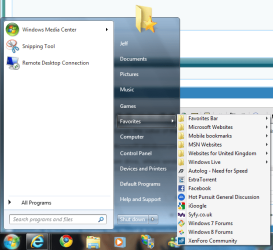
3. That's it. Log off or restart your system and now "Favorites" link in start menu will change to "
Programs" and will show all program shortcuts installed in your system just like XP start menu does.
NOTE: If you can't see the new menu in startmenu, you'll need to enable "Favorites Menu" from Taskbar Properties -> Start Menu -> Customize.
4. You can also disable the All Programs button in start menu. Open regedit and goto:
HKEY_CURRENT_USER\Software\Microsoft\Windows\CurrentVersion\Policies\Explorer
In right-side pane, create a new DWORD value
NoStartMenuMorePrograms and set its value to
1
Now log off or restart your system and the final output will look as following:
Not 100% what you're after but works as a good alternative wgile I look into it in more detail


