Windows 7 Forums


Windows 7: removing start button and notification area icon shadow

09 Apr 2011   #1

Windows 7 Professional 64bit.
 
 
removing start button and notification area icon shadow

Hi everyone. This is my first time creating a thread in this forum, though I've gotten plenty of good information from it already since I picked up Windows 7. I'm hoping you all can help me with one thing I haven't been able to find the answer to.

On the taskbar there is a shadow behind the start button and the notification area icons. In the image I've attached I have made all the icons visible to show that the shadow stretches to fit behind all of the visible icons. I would like to remove the shadow. Does anyone know how?

Thanks for reading and for your help.

Attached Thumbnails
removing start button and notification area icon shadow-dirty-taskbar.png  
My System SpecsSystem Spec

09 Apr 2011   #2

Several, including Windows 7 x64 Ultimate


If you just want to remove the start button, use this;

Tordex - Start Killer

The "shadow" is part of the theme I believe, and you would have to modify the theme to remove it.

Regards....Mike Connor
My System SpecsSystem Spec
09 Apr 2011   #3

Windows 7 Professional 64bit.


Thanks for commenting, Mike. Do you know how I would make that modification?
My System SpecsSystem Spec
.


09 Apr 2011   #4

Several, including Windows 7 x64 Ultimate


Quote   Quote: Originally Posted by oneillseanm View Post
Thanks for commenting, Mike. Do you know how I would make that modification?
Sorry, no I don't. I don't bother much with themes and such, only insofar as I need to for certain customisations I use, and don't really know much about modifying them. Somebody on here will know though, and doubtless chime in with a solution.

Regards....Mike Connor
My System SpecsSystem Spec
09 Apr 2011   #5

Windows 7 Professional 64bit.


Ok, cool. Thanks again for your help. I appreciate it.
My System SpecsSystem Spec
09 Apr 2011   #6

Several, including Windows 7 x64 Ultimate


My pleasure. Sorry I couldn't help you any more comprehensively.

Regards....Mike Connor
My System SpecsSystem Spec
09 Apr 2011   #7

Win 7 Pro x64
Council Bluffs, Iowa


Quote   Quote: Originally Posted by oneillseanm View Post
Hi everyone. This is my first time creating a thread in this forum, though I've gotten plenty of good information from it already since I picked up Windows 7. I'm hoping you all can help me with one thing I haven't been able to find the answer to.

On the taskbar there is a shadow behind the start button and the notification area icons. In the image I've attached I have made all the icons visible to show that the shadow stretches to fit behind all of the visible icons. I would like to remove the shadow. Does anyone know how?

Thanks for reading and for your help.
Welcome to the Seven Forums
Are you using Windows 7 Basic theme or default Aero?
How did you make the icons visible to show that the shadow stretches so I can try to do it. Then I may be able help.
Jerry
My System SpecsSystem Spec
09 Apr 2011   #8

Windows 7 Professional 64bit.


Hey Jerry. Thanks for the help.

I'm using default aero with modifications. I've turned transparency off and I've used regedit to remove the diagonal glassy gradients in the taskbar and window frames.

To make the icons visible I did a right click on the taskbar > properties > notification area customize button > clicked the checkbox for always show all icons.
My System SpecsSystem Spec
09 Apr 2011   #9

Win 7 Pro x64
Council Bluffs, Iowa


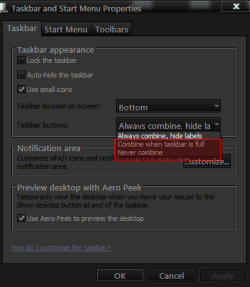
If you change the Taskbar Properties to Combine when taskbar is full or Never combine it will all be the color of the ends.
removing start button and notification area icon shadow-sp.png
If you are using the default aero theme I can change that for you by editing the aero.msstyle. I can make it & post it in a zip. Here you can see the ends are the same they have to be it's 1 image
removing start button and notification area icon shadow-tbc.png
&
You will need to do 1 of these 2 ways of Enabling custom themes for it to work.
Enabling Custom Themes - Windows 7
Or
Theme - How to Apply Custom Themes
Let me know
Jerry
My System SpecsSystem Spec
12 Aug 2011   #10

Windows 7 Ultimate 64bit


Hi, sorry to bump such an old thread, but I've been searching around google for an answer to this very question and have come out with nothing. I'm looking to modify those shadows behind both the clock area and the start button but I'm not certain what resource file within the msstyles are the shadows.

It would be GREAT if Bongo or anyone else could help me out, please.
My System SpecsSystem Spec
Reply

 removing start button and notification area icon shadow problems?


Thread Tools


Similar help and support threads for: removing start button and notification area icon shadow
Thread Forum
Solved Locking Down Notification Area and Start Button General Discussion
Solved Removing Items from Notification Area List? General Discussion
Add icon to notification area General Discussion
Show Icon in Notification Area Network & Sharing


All times are GMT -5. The time now is 05:21 PM.


Seven Forums Android App Seven Forums IOS App Follow us on Facebook

Windows 7 Forums is an independent web site and has not been authorized,
sponsored, or otherwise approved by Microsoft Corporation.
"Windows 7" and related materials are trademarks of Microsoft Corp.
© Designer Media Ltd
  

1 2 3 4 5 6 7 8 9 10 11 12 13 14 15 16 17 18 19 20 21 22 23 24 25 26 27 28 29 30 31 32