Windows 7 Forums Search
Welcome to Windows 7 Forums. Our forum is dedicated to helping you find solutions with any problems, errors or issues you are experiencing with Windows 7. The Windows 7 forum also covers news and updates and has an extensive Windows 7 tutorial section that covers a wide range of tips and tricks.


Windows 7 - How can i place folders on top of the lists in all start menu areas

 
04-13-2011   #1


7 Ultimate x64


How can i place folders on top of the lists in all start menu areas

have been trying to place the folders first and the application shortcuts on the end of the lists of start menu manually, but when i reboot, the order is bing reversed again. Its more than a year now that i am using 7 and i still haven't been able to get used to that order and i just want to be able to set the order like i could in XP, for some reason this order annoys, and i know other people feel the same. Is that somehow possible ? Do i need maybe to save the Theme everytime i make such changes ?

My System SpecsSystem Spec
04-16-2011   #2


Windows 7 x86 since December 2008


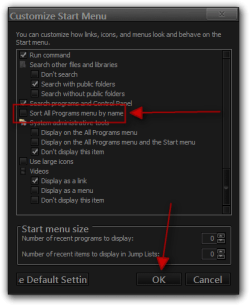
Have you tried Start Menu Properties - Start Menu tab - Customize - Uncheck "Sort All Programs menu by name"?
My System SpecsSystem Spec
08-18-2011   #3


Windows 7 Professional x64


I've looked and looked and looked and have not found a solution to getting manual sort order of "All Programs" to persist after a reboot. Upon each reboot, the programs are alphabetized again. Actually what I'm trying to do specifically is alphabetize the programs irregardless of whether it is a shortcut/file or folder as opposed to two separate alphabetized lists. Is there really no way to do this? Right now the only workaround I can think of is to put each shortcut/file into a folder or download some kind of software to fix this such as Classic Shell. Is there really no answer to this? Not famliar with themes but I'm guessing they don't encompass environment variables such as customized Start Menu options? What about Group Policy?
My System SpecsSystem Spec
.


08-18-2011   #4


Acer laptop W 7 Pro SP1 64 bit & Dell Desktop W 7 Pro SP1 32 bit


Quote   Quote: Originally Posted by HandsomeP View Post
I've looked and looked and looked and have not found a solution to getting manual sort order of "All Programs" to persist after a reboot. Upon each reboot, the programs are alphabetized again. Actually what I'm trying to do specifically is alphabetize the programs irregardless of whether it is a shortcut/file or folder as opposed to two separate alphabetized lists. Is there really no way to do this? Right now the only workaround I can think of is to put each shortcut/file into a folder or download some kind of software to fix this such as Classic Shell. Is there really no answer to this? Not famliar with themes but I'm guessing they don't encompass environment variables such as customized Start Menu options? What about Group Policy?
Welcome to the Seven Forums
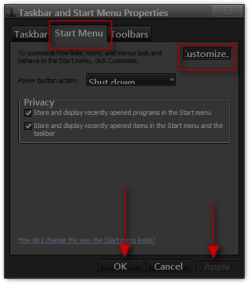
Right Click on your taskbar go to Properties
go to the Start Menu tab then click on the Customize button.
How can i place folders on top of the lists in all start menu areas-taskbar-start-menu-properties.png

Then uncheck Sort All Programs menu by name then click OK. Then click Apply and OK on the first Properties window.
How can i place folders on top of the lists in all start menu areas-customize-start-menu.png

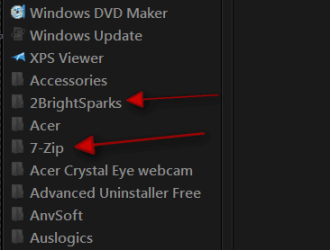
I just tried it restarted and it still in the position I put them give it a try.
How can i place folders on top of the lists in all start menu areas-region.png
Jerry
My System SpecsSystem Spec
08-18-2011   #5


Windows 7 Professional x64


Yes, THAT works, but try doing the same thing but this time try moving a shortcut (or program file) amongst the list of folders. Upon reboot you should see that Windows 7 has forced the shortcut (or program file) to be shown with the other shortcuts and program files before the list of folders. In Windows Explorer I can see the sense in forcing folders to be shown before files, but in the All Programs list, it would seem more logical to alphabetize the entire list irregardless of whether the item is a shortcut (or program file) or a folder. I assume you are able to replicate this issue?
My System SpecsSystem Spec
08-18-2011   #6


Windows 7 Ultimate x64


yes the situation is well and truely replicated!
My System SpecsSystem Spec
09-19-2011   #7


7 Ultimate x64


Someone maybe happen to know smth more about this ?
My System SpecsSystem Spec
02-11-2012   #8


7 Ultimate x64


Any developments / news on this ? its really annoying
My System SpecsSystem Spec
02-11-2012   #9


Acer laptop W 7 Pro SP1 64 bit & Dell Desktop W 7 Pro SP1 32 bit


You can go to
C:\Users\YOUR USER NAME\AppData\Roaming\Microsoft\Windows\Start Menu\Programs

C:\ProgramData\Microsoft\Windows\Start Menu\Programs
and make a folder and put in folders that would move them.
Jerry
My System SpecsSystem Spec
Reply

 How can i place folders on top of the lists in all start menu areas problems?


Thread Tools


Similar Threads for: How can i place folders on top of the lists in all start menu areas
Thread Forum
menu view of personal folders pinned to start menu Customization
How to exclude files and folders from "Recent" lists and jump lists Customization
All Programs in Start menu - place it on top? Customization
alphabetical folders in start menu General Discussion
Some start menu folders questions. Customization


All times are GMT -5. The time now is 06:17 AM.


Windows 7 Forums is an independent web site and has not been authorized,
sponsored, or otherwise approved by Microsoft Corporation.
"Windows 7" and related materials are trademarks of Microsoft Corp.
© Designer Media Ltd
  

1 2 3 4 5 6 7 8 9 10 11 12 13 14 15 16 17 18 19 20 21 22 23 24 25 26 27 28 29 30