Windows 7 Forums Search
Welcome to Windows 7 Forums. Our forum is dedicated to helping you find solutions with any problems, errors or issues you are experiencing with Windows 7. The Windows 7 forum also covers news and updates and has an extensive Windows 7 tutorial section that covers a wide range of tips and tricks.


Windows 7 - Icon Size Registry Tweak


07-08-2009   #1


Windows 7 Pro & Vista Home Premium


Icon Size Registry Tweak

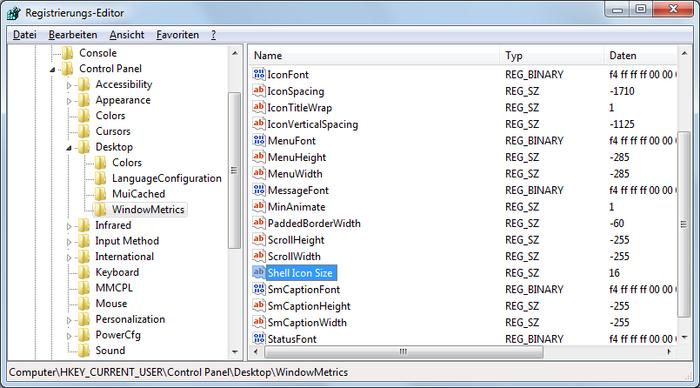
To change the size of the on icons on the desktop, you can use this tweak to make them larger, The default setting is 32

If you change this to 36, your icons will be slightly larger, the higher the number, the larger the icons will appear.

First you want to go to Start > Run, and type Regedit. navigate to HKEY_CURRENT_USER > Control panel > Desktop > WindowsMetrics. Click on the WindowsMetrics key and choose File > Export from Regedit's menu. Save the .reg file as windowMetricsoriiginal.reg. In case you don't like the changes, you can double-click on this file to restore the settings to their default value.


Quote:
Windows Registry Editor Version 5.00

[HKEY_CURRENT_USER\Control Panel\Desktop\WindowMetrics]
"Shell Icon Size"="36"


Last edited by reghakr; 02-10-2010 at 10:07 AM..
My System SpecsSystem Spec
07-08-2009   #2


Windows 7 Ultimate RC1 / XP Black 2009


Hi

This works in Windows 7 RC1 build 7100 > Click an empty space on your desktop > Press Ctrl on your keyboard > roll your mouse wheel and all desktop icons change size (and stay at the size you desire)
My System SpecsSystem Spec
07-08-2009   #3


Windows 7 Pro & Vista Home Premium


Excellent!

Can't try that one as my cheap $399.00 E-Machibne has no wheel
My System SpecsSystem Spec
.


07-08-2009   #4


Win 7


Quote   Quote: Originally Posted by Cindy View Post
Hi

This works in Windows 7 RC1 build 7100 > Click an empty space on your desktop > Press Ctrl on your keyboard > roll your mouse wheel and all desktop icons change size (and stay at the size you desire)
It has been like that since vista, i have no idea why anyone would want to alter the registry for this.

Quote   Quote: Originally Posted by reghakr View Post
Excellent!

Can't try that one as my cheap $399.00 E-Machibne has no wheel
Then right click desktop > view
My System SpecsSystem Spec
02-10-2010   #5


Windows 7


Quote:
[HKEY_CURRENT_USER\Control Panel\Desktop\WindowMetrics]
"Shell Icon Size"="36"
This doesn't work for me.

I'd like to have small instead of medium icon on the desktop.
My System SpecsSystem Spec
02-10-2010   #6


Windows 7 Pro & Vista Home Premium


Quote   Quote: Originally Posted by mrquickly View Post
Quote:
[HKEY_CURRENT_USER\Control Panel\Desktop\WindowMetrics]
"Shell Icon Size"="36"
This doesn't work for me.

I'd like to have small instead of medium icon on the desktop.
Then change the number to 16
My System SpecsSystem Spec
02-15-2010   #7


Windows 7


I set the icon size of the desktop icons to medium. Then i set the value to 16 and restarted the machine, but nothing changed. The icons are still in medium size.
My System SpecsSystem Spec
02-15-2010   #8


Windows 7 Pro & Vista Home Premium


Open regedit to this key:
HKEY_CURRENT_USER\Control Panel\Desktop\WindowMetrics

See what the value is for icon size.

If it's something other than 16, modify the Shell Icon Size value

NOTE: Make sure to export the key before making any changes.
My System SpecsSystem Spec
02-15-2010   #9


Windows 7


If tried this. This key isn't changed when I switch between big, middle oder small icons.
My System SpecsSystem Spec
02-15-2010   #10


Windows 7 Pro & Vista Home Premium


Quote:
This key isn't changed when I switch between big, middle oder small icons
Where are you changing this information?
My System SpecsSystem Spec
Reply

Icon Size Registry Tweak problems?


Thread Tools


Similar Threads for: Icon Size Registry Tweak
Thread Forum
Registry/GPO tweak Performance & Maintenance
Change icon size using a registry key change? Customization
Tweak to remember folder view and window size Performance & Maintenance
Tweak size of Virtual XP logical disk? Virtualization
Enable Transparent Icons registry tweak Customization


All times are GMT -5. The time now is 11:33 PM.


Windows 7 Forums is an independent web site and has not been authorized,
sponsored, or otherwise approved by Microsoft Corporation.
"Windows 7" and related materials are trademarks of Microsoft Corp.
© Designer Media Ltd
  

1 2 3 4 5 6 7 8 9 10 11 12 13 14 15 16 17 18 19 20 21 22 23 24 25 26 27 28 29 30